Settings Reference
Everything the app remembers lives in a single settings.json, created next to the executable
(see Installation for exact locations per OS). You normally never need to edit
this by hand — everything here is set through the UI — but it's documented for anyone scripting
around it, debugging, or just curious.
Opened via the gear icon in the main window.
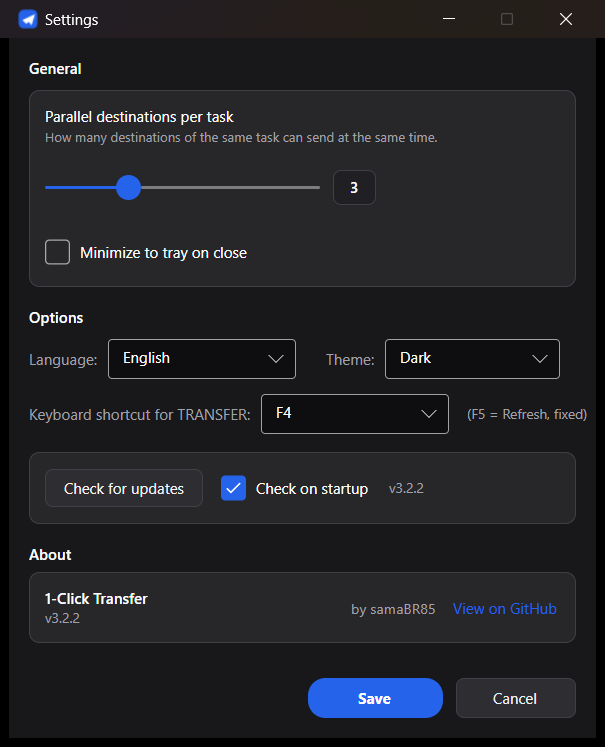
| Field | Values | Notes |
|---|---|---|
| Theme | Dark / Light | |
| Language | Portuguese / English | Switches the whole UI immediately. |
| Transfer shortcut | None, or F2–F12 (except F5) | Fires the same as clicking TRANSFER. F5 is reserved — always refreshes the source/destination browsers, can't be reassigned. |
| Max parallel destinations | 1–8 | How many destinations can upload at the same time during one transfer. |
| Minimize to tray on close | on/off | See Watch Mode and Tray. |
| Check for updates on start | on/off | Auto-update check against GitHub Releases. |
| Key | Type | Meaning |
|---|---|---|
theme |
"dark" | "light"
|
UI theme. |
language |
"en" | "pt"
|
UI language. |
shortcut |
string | Transfer shortcut key name (e.g. "F4"), or "None". |
splitRatio |
number (0–1) | Width ratio of the source card vs. destination card. |
tasksHeight |
number (px) | Height of the TASKS panel. |
queueHeight |
number (px) | Height of the Transfer Queue panel. |
windowWidth, windowHeight, windowLeft, windowTop
|
number | Remembered window bounds. |
windowMaximized |
bool | Whether the window was maximized last time it closed. |
autoUpdateCheck |
bool | Check GitHub Releases on startup. |
lastTransferAt |
ISO date or null
|
Timestamp of the last successful transfer, shown in the footer. |
maxParallelDestinations |
number (1–8) | See above. |
minimizeToTrayOnClose |
bool | See Watch Mode and Tray. |
jobs |
array of Task | Every task you've created (see below). |
selectedJob |
number | Index of the currently-selected task in the UI. |
profiles |
array of Profile (name, source, destinations) |
Saved source+destination presets. |
activeProfile |
string | Name of the last-loaded preset (bookkeeping only). |
destGroups |
array of DestGroup (name, destinations) |
Saved destination groups. |
savedServers |
array of SavedServer | Reusable FTP/SFTP connection details. |
| Key | Type | Meaning |
|---|---|---|
name |
string | Task name shown in the TASKS list. |
enabled |
bool | Included in "send all enabled" / TRANSFER. |
watch |
bool | Auto-send when the source changes — see Watch Mode and Tray. |
source |
Source | See below. |
destinations |
array of Destination | See below. |
overwrite |
"always" | "ifNewer" | "never"
|
See Overwrite Modes. |
| Key | Type | Meaning |
|---|---|---|
kind |
"file" | "folder"
|
Individual files, or a whole folder — see Folder Sources. |
path |
string | For folder kind: the chosen folder. For file kind: legacy/first-file field. |
files |
array of string | Explicit file list, when kind is "file". |
pattern |
string | Glob pattern for folder mode (currently always "*" — every file). |
recursive |
bool | Always true for folder mode; kept for backward compatibility. |
excludePatterns |
array of string |
.gitignore-style patterns ("name/" for a folder, "name" or "*.ext" for files) — built for you by the exclude checklist, see Folder Sources. |
keepRootFolderName |
bool | Keep the chosen folder itself as a container at the destination — see Folder Sources. |
| Key | Type | Meaning |
|---|---|---|
type |
"local" | "ftp" | "sftp"
|
Destination kind. |
folder |
string | Local path, or remote path on the server. |
host |
string | FTP/SFTP only. |
port |
number |
21 (FTP default), 22 (SFTP default), or a custom port. |
username, password
|
string |
password is encrypted (DPAPI on Windows, obfuscated AES elsewhere) — never plaintext. |
useTls |
bool | FTP only — enables FTPS (explicit TLS). |
enabled |
bool | Whether this destination currently receives transfers for its task. |
Passwords are encrypted per machine (Windows: per Windows user account via DPAPI; other OSes:
a local AES key stored alongside the file). Copying settings.json to another computer (or even
another user account on the same Windows PC) carries over garbled/undecryptable passwords for any
FTP/SFTP destinations — you'll need to re-enter them there. Everything else (tasks, local
destinations, UI preferences) copies over fine.