MODBUS scan
When a connection between the proxy and your TSUN device is established but no telemetry data or metrics are found, the root cause is often an unknown register mapping.
The proxy identifies register mappings using a specific sensor-list-id. After establishing a connection, the proxy automatically tests all sensor lists it knows. Each test is initiated with a log entry like this:
2026-07-21 05:30:55 INFO | root | Testing sensor-list: 0x**** by reading Modbus registers at 0x****
If a sensor list is not supported by your specific TSUN device, the proxy usually encounters a timeout or receives an error message, such as:
CRC error: 0005 != ffff for msg: 0500
The proxy will then automatically proceed to test the next available sensor list. Currently, the following lists are natively supported by the proxy:
-
0x2b0– Modbus registers at0x3000 -
0x1097– Modbus registers at0x1000 -
0x3026– Modbus registers at0x00
If the proxy successfully detects a matching mapping, it will log a confirmation message:
2026-07-21 05:30:55 INFO | root | Use sensor-list: 0x2b0 for 'y***************'
A Modbus scan becomes necessary if your proxy goes through all known sensor lists without finding a match, leaving your device connected but data-less.
Check your application logs. If you do not see the successful Use sensor-list: 0x... entry, and instead only see CRC errors or timeouts for all tested lists, the register mapping of your TSUN device is currently unsupported. In this case, you should perform a Modbus scan to determine which registers your device actually responds to.
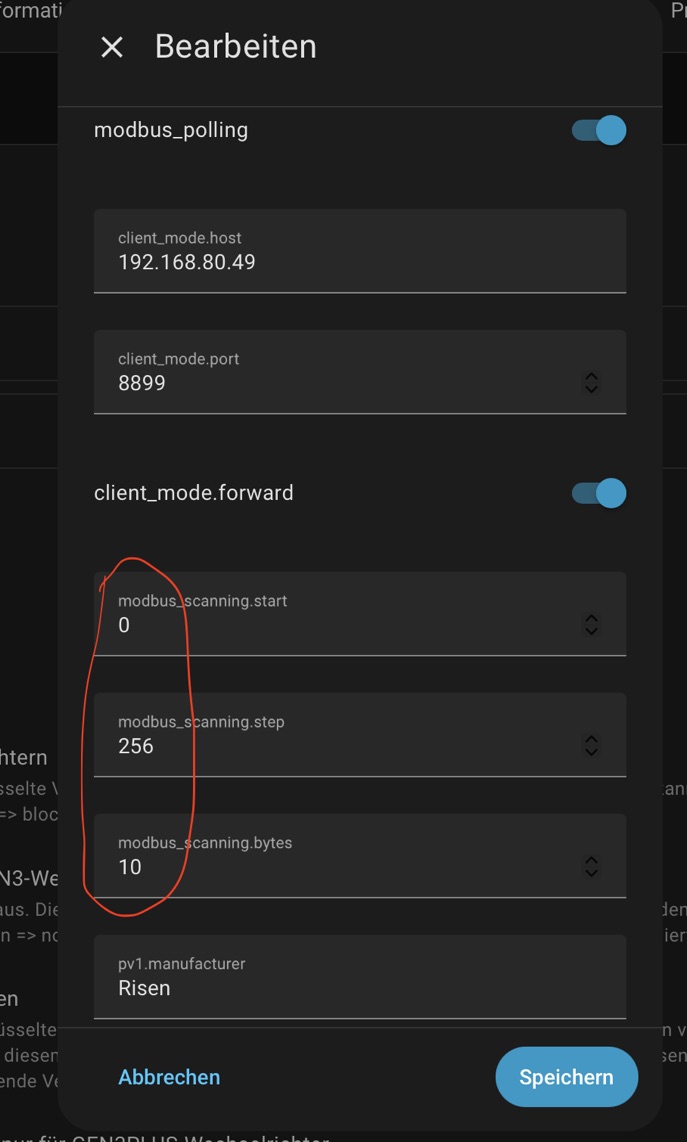
The proxy includes a built-in Modbus scanner. You can configure it using the following settings:
| Keyword | Type | Mandatory/Optional | Description |
|---|---|---|---|
modbus_scanning.start |
int | Optional | Modbus scanner: start address |
modbus_scanning.step |
int | Optional | Modbus scanner: step width Default: 0x400
|
modbus_scanning.bytes |
int | Optional | Modbus scanner: number of bytes to read. Default: 0x10
|
-
Activate the Scan: Set the
modbus_scanning.startconfiguration parameter to a valid integer value (e.g., your desired starting address). Good values for a first run are: start: 0, step: 256, bytes: 10 - Run the Proxy: Restart the proxy application. The scanner will now systematically probe the device registers based on your configured steps and byte lengths.
- Analyze the Logs: Check the log output. Successfully discovered registers and their responses will be clearly displayed there.
-
Deactivate the Scan: Once you have gathered the data, disable the scanner by setting
modbus_scanning.startto an empty string ("").
To check if your new register mapping can be integrated into the proxy, please contact the project maintainer.
Instead, please:
- Open a brief issue on the GitHub repository to state that you have performed a scan.
- Send the actual log files containing your scan results (e.g. trace.log file) via email directly to the maintainer: DataType76@allius.de.
Example: