Pose screen
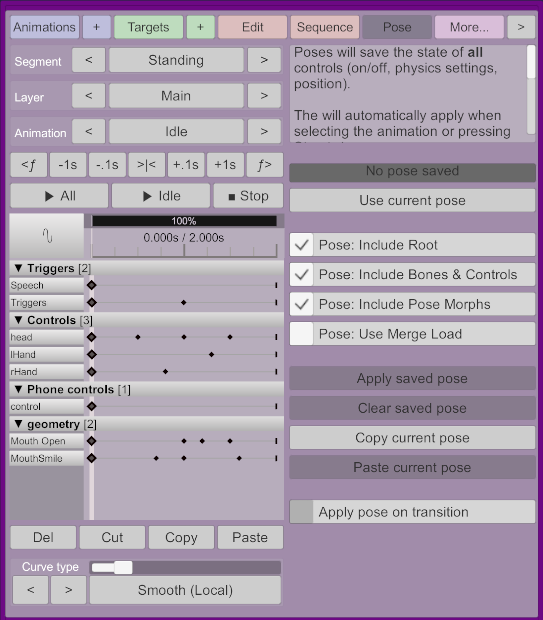
This screen allows you to record a pose, including pose morphs and bone positions, in an animation.
This will show whether there is currently a pose in the current animation, or on another layer.
Saves the current pose of the person atom
-
Pose: Include Root: Whether to include thecontrol(root) of the atom in the pose. -
Pose: Include Bones & Controls: Whether to include the control state, including mode (on, off, etc), physics settings, and bones information so the model can be snapped into place instantly. -
Pose: Include Pose Morphs: Whether to include morphs marked as "pose morphs". -
Pose: Use Merge Load: Affects whether existing pose morphs will be left alone or not.
-
Apply saved posewill apply whatever is currently in the saved pose. -
Clear saved posewill delete the current pose from the animation. -
Copy current posewill copy the current pose to be pasted in another animation. -
Paste current posewill paste whatever was copied using the previous button.
Whether to apply this pose when the animation is being played by a sequence. This will force the blend duration to zero.