debug logging
Muximux includes a debug logging system for both the frontend (browser console) and the backend (server logs). These are designed to help you diagnose issues without needing to modify code or restart the server.
Add ?debug=true to your Muximux URL:
https://muximux.example.com/?debug=true
This writes a flag to your browser's localStorage, so debug logging persists across page reloads and navigation. You only need to add the query parameter once.
Navigate to:
https://muximux.example.com/?debug=false
Or manually remove the flag:
localStorage.removeItem('muximux_debug');Important: Simply removing
?debug=truefrom the URL does not turn off debug logging - it persists in localStorage until you explicitly disable it with?debug=false.
All debug messages appear in the browser console under console.debug(). In most browsers, you need to enable the "Verbose" log level in DevTools to see them.
Messages are prefixed with [muximux:category] for easy filtering:
| Category | What's Logged |
|---|---|
config |
Config loaded (app count, auth method, health interval), config updates via WebSocket |
ws |
WebSocket connect, connected, reconnect attempts, gave up, event types received |
auth |
Auth status check results, login success/failure |
theme |
Theme applied, custom CSS load failures |
health |
Health polling started, health data updates |
icon |
Image load failures for app icons |
keys |
Keyboard shortcut actions dispatched |
In Chrome/Firefox DevTools, use the Console filter box to show only specific categories:
- Type
[muximux:ws]to see only WebSocket messages - Type
[muximux:to see all Muximux debug messages - Type
-[muximux:health]to hide health polling noise
When debug logging is disabled (the default), each debug() call is a single boolean check that returns immediately. There is no string formatting, no object serialization, and no console output. The performance impact is effectively zero.
In Settings > General, change the Log Level to debug. This takes effect immediately without a restart.
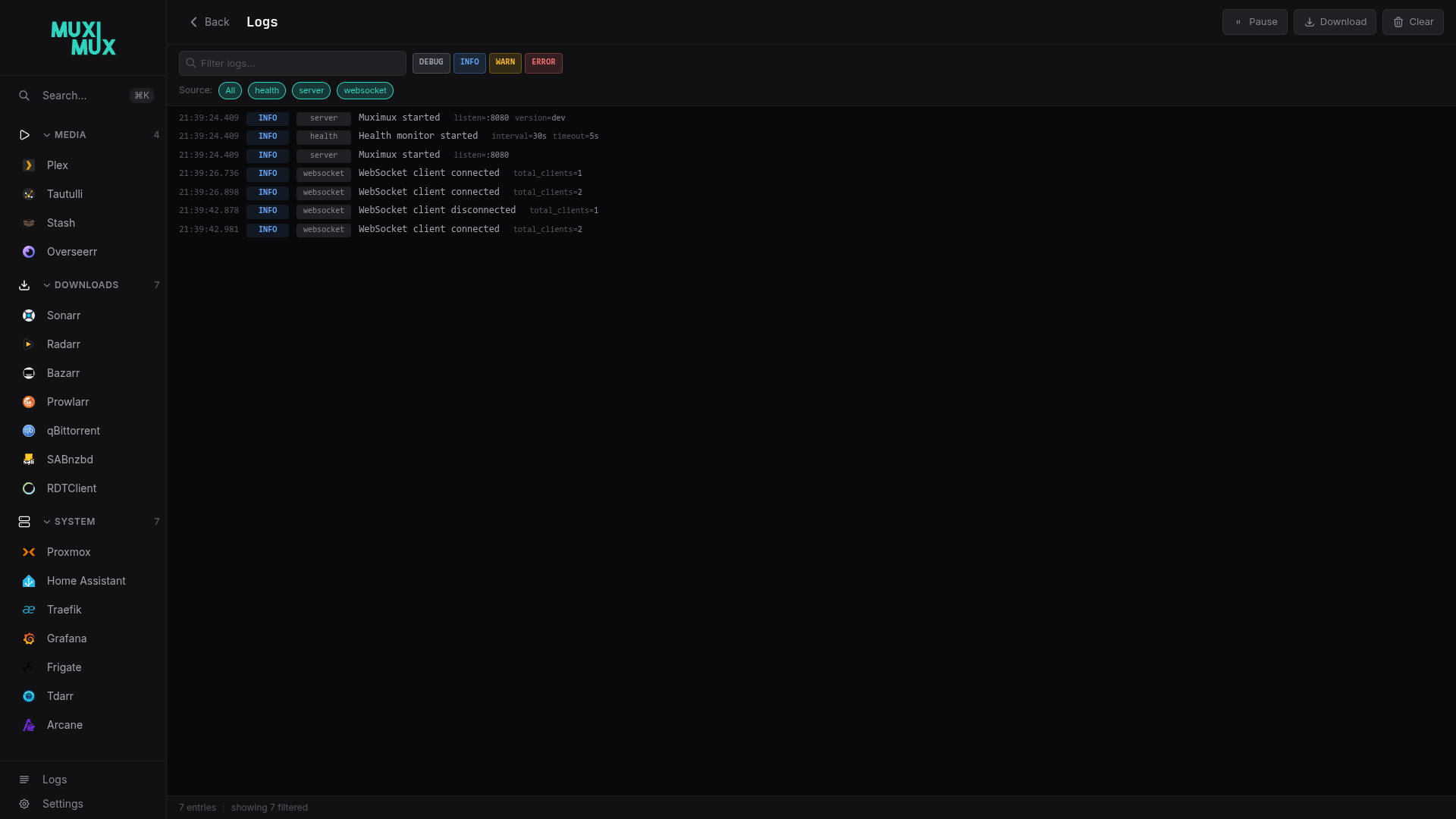
Or set it in config.yaml:
server:
  log_level: debug
Or override with an environment variable (takes precedence over config file):
MUXIMUX_LOG_LEVEL=debug muximuxSome log sources are active at the default INFO level; others only appear when you switch to DEBUG.
Always active (INFO and above):
| Source | What's Logged |
|---|---|
http |
API and page requests: method, path, status, latency, bytes written, remote IP, user agent |
audit |
Security events: login, logout, password changes, user management, config changes |
server |
Panic recovery with stack traces (logged at ERROR) |
Debug level only (set log level to debug to see these):
| Source | What's Logged |
|---|---|
http |
Static asset requests (/assets/*, .js, .css, images, fonts) -- suppressed at INFO to avoid noise |
auth |
Every request showing whether it was authenticated, bypassed, or rejected, including the matched user and request path |
health |
Individual health check results per app with response times |
proxy |
Route rebuilds when config changes |
websocket |
Client connect/disconnect events |
Tip: At the default
infolevel, you'll see one log line per API call -- not per CSS/JS/image load. Setlog_level: warnto suppress request logs entirely and see only warnings and errors.
Every HTTP request is assigned a unique request_id that appears in all log entries for that request. This makes it easy to trace a single request across auth, handler, and proxy logs.
- If an upstream proxy (Nginx, Traefik, Caddy) sends an
X-Request-IDheader, Muximux reuses it - Otherwise, a random 16-character hex ID is generated
- The
X-Request-IDresponse header is always set, so you can match browser requests to server logs
Filter logs by request ID in the log viewer to see the full lifecycle of a single request.
When debug logging is enabled, you'll see Auth bypassed messages for certain paths. This is expected behavior - these are static assets and endpoints that must be accessible without authentication:
| Path Pattern | Why It's Bypassed |
|---|---|
/assets/* |
SPA JavaScript and CSS bundles (needed to render the login page) |
/manifest.json |
PWA manifest |
/api/auth/status |
Checks if the user is logged in (must work before login) |
/themes/*.css |
Theme stylesheets (needed to style the login page) |
/favicon.ico, /apple-touch-icon.png
|
Browser-requested icons |
All API endpoints that return user data (/api/config, /api/apps/*, etc.) require authentication and show Authenticated request with the username.
| Problem | What to Enable | What to Look For |
|---|---|---|
| App not loading in iframe | Frontend (?debug=true) |
[muximux:config] for app list, browser Network tab for 404s |
| WebSocket disconnections | Frontend |
[muximux:ws] for reconnect attempts and "gave up" messages |
| Theme not applying | Frontend |
[muximux:theme] for CSS load failures |
| Health status wrong | Backend (debug level) |
health source for individual check results and response times |
| Auth issues | Backend (debug level) |
auth source for bypass/reject/authenticate details per request |
When reporting an issue:
- Enable frontend debug logging (
?debug=true) - Set backend log level to
debug - Reproduce the problem
- Copy the relevant console output and server logs
- Include them in your bug report
Frontend logs can be copied from the browser's DevTools Console tab. Backend logs appear in the server's standard output and in muximux.log inside the data directory.
The muximux.log file (in the data directory) is automatically rotated to prevent unbounded disk growth:
- When the log file reaches 10 MB, it is rotated
- Up to 3 rotated copies are kept (
muximux.log.1,muximux.log.2,muximux.log.3) - Older rotated files are automatically deleted
No external log rotation tool (e.g., logrotate) is needed.
On restart, the most recent log entries are reloaded into the in-memory buffer so the /logs page shows history from before the restart.
- Frontend debug logs are written only to your browser's console. They are not sent to any server.
- The
localStorageflag (muximux_debug) contains only the value"1"- no personal data. - Backend debug logs may include usernames and request paths. Be mindful of this when sharing logs publicly.