Your peers are an asset. You have never been able to tell which ones are valuable.
If you have never touched this, your node has ten outbound connections that Bitcoin Core picked at random, and no manual ones. If it is listening, add whatever dialled in — you did not choose those either.
One peer out of that whole set delivers most of your blocks. The rest are along
for the ride. You have no means of telling them apart: getpeerinfo gives you an
address, a user agent and a ping, and none of it correlates with who delivers.
Core will drop that peer whenever it suits, for reasons that have nothing to do with it being the one that mattered. It is not doing anything wrong — it selects for the health of the network, which is its job, not for your latency. So the best peer you have is on loan, and you will not notice when it goes.
Not that one peer, kept forever. Blocks are not made in one place: a peer sitting next to one large miner is no help when the next block is found on the other side of the world. What you want is a set where many peers deliver, from different directions.
That is the real measure of how well connected a node is. One peer in ten delivering only means the other nine are worse. A dozen delivering is a node that is close to the front whoever finds the next block.
Bitcoin Lab makes that difference visible — and you do not have to act on it yourself: switch the rotation on and it does the finding, testing and swapping for you.
For the first hours the numbers mean nothing. A peer is not judged until it has been connected through 50 blocks, so expect an empty ranking, and an idle rotation if you turned it on.
After a few days the difference is noticeable. Then it flattens: the eight slots fill with the best peers seen so far, and every further gain has to beat one of them — which gets rarer the better they are.
A non-listening node typically has one to three peers that ever deliver. Curated, all eight manual slots do.
If you solo mine against your own node, your pool cannot hand out work on a new block until your node knows the block exists. Every millisecond before that, your miner is hashing something that is already solved.
So the number that matters is how fast a block reaches you, and the only part of that path you can choose is which peers carry it.
I more than halved that delay on my own node, from about 1.2 seconds behind to under 0.5, in under a week with the rotation running. Nothing but this loop did it: measure the outbound peers Core hands you, keep the ones that deliver, drop the ones that do not.
You will notice fewer stale shares on your miner: less work handed out on a block that had already been found.
A bitcoind restart wipes the outbound set completely: the addnode list Core
builds at runtime lives only in its memory, and Core re-reads only bitcoin.conf
on the way back up — which this app never touches. Core starts over with ten
fresh peers out of its address database, and whatever the old ones were worth
goes with them.
Bitcoin Lab keeps its own copy of your eight proven manual peers and puts them back, so a restart costs you nothing you had earned.
A new block is detected only over Core's ZMQ pubhashblock topic and
timestamped before anything else happens, so no RPC call sits on the timing path.
One getpeerinfo snapshot follows. Every peer connected at that moment counts as
Eligible; the one that actually delivered the block counts as First.
The rank comes from the last 500 blocks — about three and a half days. Within
that window it is First / Eligible, taken as a Wilson lower bound, so four
blocks out of fifty cannot outrank sixty out of nine hundred. A peer that has
not been connected for all 500 yet is judged on its whole record for the part
of the window it missed. Nothing is discarded: the lifetime figures stay in the
table and on the page, they just no longer decide the order.
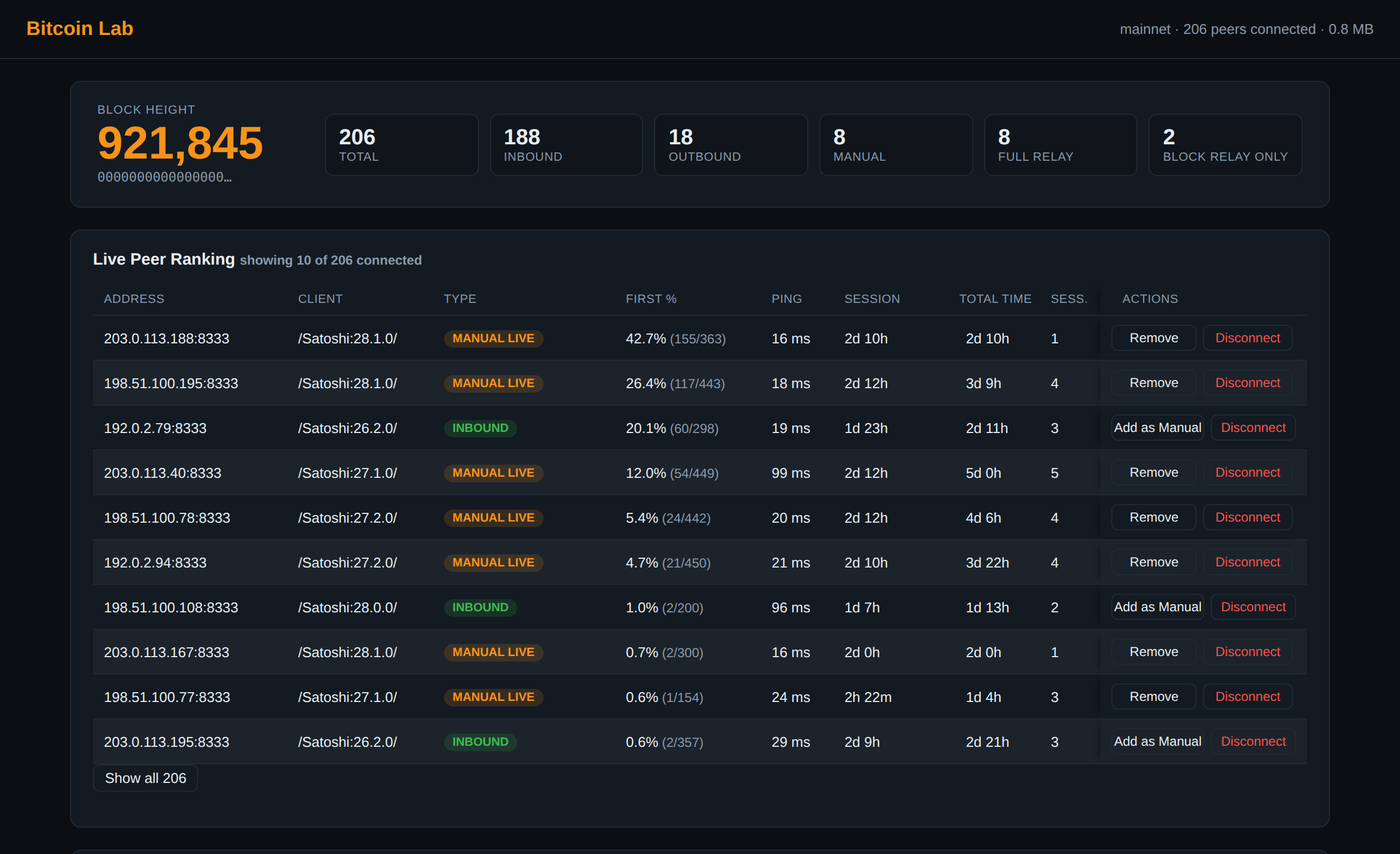
My eight manual slots after a week of this. My node listens, so these eight compete with everything that dials in:
                First %      blocks     ping
peer 1           37.6 %     355/945    16 ms
peer 2           21.2 %    217/1023    14 ms
peer 3           17.6 %      15/85     33 ms
peer 4           17.3 %    177/1026    17 ms
peer 5            6.0 %     62/1031    99 ms
peer 6            5.0 %      12/240    19 ms
peer 7            4.5 %     46/1031    17 ms
peer 8            0.5 %       3/573    21 ms
886 of the 1,032 blocks recorded — six in seven — reached me through one of these eight, with 208 peers connected. Core connected me to all of them. A week of measuring decided which eight stayed.
Peers 3 and 4 look tied at 17.6% and 17.3%. They are not: one has 85 blocks behind it, the other 1,026. As a Wilson lower bound they separate cleanly, 11.0 against 15.1, and the ranking sorts them that way round. The table shows what each peer has done; the ranking shows how much of it can be relied on.
The ping is not what counts. Where a peer sits relative to where blocks are made is — and a peer that sits close today will probably still sit close tomorrow.
Every number here comes from one node: a first-gen Lenovo ThinkCentre with an
i7, running Umbrel, listening on IPv4 and IPv6 with Tor and I2P enabled and
maxconnections=200. Worth knowing, and it cuts the other way than you might
expect: with two hundred connections competing to deliver each block, the eight
manual ones still delivered six in seven. A node with ten outbound peers has
less to choose from, not more.
Two moves. You can make them yourself on the dashboard, or switch the rotation on and let it make them for you.
The eight is Core's own limit, not this app's. And on almost every node all
eight sit empty, because Core never uses addnode by itself — these are not
places to take from someone, they are connections you already have and are not
using.
- Keep a good peer. It is registered via
addnode, so Core holds on to it instead of letting it rotate away — up to 8 such connections (MAX_ADDNODE_CONNECTIONS). With all eight filled you have 18 outbound connections and you chose eight of them. - Drop a peer that never delivers. Core replaces a dropped outbound connection with a fresh random one, which then gets ranked the same way.
- Protect a peer from the rotation. Anything you add by hand comes in protected — that is the star in the peer list — and the rotation leaves it alone: it is neither displaced by a better peer nor parked when it goes offline. Click the star to release it. It is still measured and still ranked, it is only exempt from being swapped. With all eight starred the rotation has nothing left to promote.
Inbound peers are ranked too, and can be promoted — by you, or by the rotation,
which tests them the same way it tests anyone else. Their getpeerinfo address
carries a temporary source port rather than the port they listen on — if they
listen at all — so Bitcoin Lab re-derives the real one with a TCP handshake
(8333, then 9333) before touching anything. A promoted peer joins under that
listening port, which counts as a new address here, so its record starts again
from zero.
Set Bitcoin Core's outgoing connections to clearnet only. On Umbrel: Bitcoin Node → Settings → Outgoing Peer Connections. Three toggles — Clearnet, Tor, I2P — and all three are on by default. Leave only Clearnet on.
An I2P peer is in practice never first. Measured here: 335 I2P peers were connected for 2,659 blocks and delivered none of them. Tor is the same argument with none of the evidence — slower than clearnet for the same reasons, but this node has not measured it, so treat that as an expectation rather than a number.
Either way, an outbound slot Core fills over Tor or I2P is one this app cannot promote: it dials out over plain TCP, with no Tor proxy, no I2P bridge and no CJDNS interface, so there is no address to call back on.
Inbound connections over Tor or I2P are fine — those peers connected to you, and they rank normally.
The effect is biggest on a node that does not accept inbound connections at all. Its 18 outbound are the entire peer set, and you chose eight of them.
A listening node is usually the better connected of the two, though: more peers means a better chance that several of them sit somewhere useful. That advantage is real — it is just unmanaged and temporary. You did not choose those peers, and they leave on their own schedule.
Which is the part this app changes. An inbound peer that turns out to be good can be tried: if it answers on its listening port, it becomes one of your eight. If it does not, the advantage lasts exactly as long as that peer feels like staying.
A toggle on the dashboard automates the loop. Every ~10 minutes it:
- Kicks dead weight — disconnects any live outbound peer that has been eligible for at least 50 blocks (about eight hours) and never once delivered a block. Never a manual or inbound peer.
- Parks a manual peer that has been offline too long — the slot is freed, its record kept.
- Puts a parked peer back when it answers again.
- Promotes the best candidate — the highest-ranked peer with a real track record that is not already manual, into a free slot, or in place of the weakest manual peer if it beats it by more than 0.2 points. Most of the time that will be an outbound peer: an inbound peer has to answer on its own listening port, and few do.
A peer that has just taken a slot cannot be displaced for its first 50 blocks.
Every action is written to a rotation log shown under the toggle, with the parked peers listed beside it. The last thirty actions are kept.
A manual peer that goes dark loses its slot, but not its record: it is parked, re-probed on every pass, and put back the moment it answers. A weak peer keeps its slot about an hour and is remembered for four days; a strong one keeps it a day and is remembered for five months.
The Outbound Peers card carries four numbers over the whole history, counted by IP so a host that reconnected or was kept under a second address counts once: how many outbound peers Core has handed this node, how many stayed connected long enough to be judged, how many ever delivered a block first, and how many were kept.
On my node the middle pair is the whole argument: of 74 random outbound peers that lasted 50 blocks, 12 ever delivered one. Five in six are along for the ride, measured rather than asserted.
The dashboard header shows what this app's data occupies on disk, and a panel at the bottom of the page breaks it into the two things that grow: peer measurements and pool history.
Each can be cleared on its own. Your manual peers are never part of either — they survive a reset with their record starting again from zero, which is the point: by then, finding them has taken months.
The other half of the app: it times how quickly each mining pool turns a new block into fresh work, your own local pool included.
Each pool gets its own TCP connection and is timed on when its mining.notify
carrying a new prevhash arrives — hrtime on the socket's data event, before
any parsing. The first pool to report a given prevhash sets 0 ms and every other
pool is measured against it. No pool is special-cased, including your own. A pool
that does not report inside the timeout window is scored a miss.
Your own pool goes in with one button: templates for GoBrrr, Bassin and Public Pool fill in the container name and the port the stratum server listens on inside that container — often not the port your miner connects to.
Per pool: wins, win %, average / median / P90 latency, races seen, misses. The public pools are the baseline your own is measured against.
What it answers: whether your own pool keeps up with the public ones, and by how much. Curating your peers is what closes that gap.
Four processes from one image, sharing one SQLite file (WAL mode, 10s busy timeout), each restarted independently by Docker:
| Process | Job |
|---|---|
dashboard |
HTTP API, static frontend, and the SSE block stream |
peer-profiler |
Session bookkeeping, manual/addnode sync, peer rotation |
relay-profiler |
The ZMQ block-timing path and First/Eligible recording |
stratum-race |
One persistent TCP connection per pool, mining.notify timing |
The relay profiler does nothing but sit on its ZMQ socket, so a slow dashboard
request or a stalled pool connection can never delay the one timestamp that has
to be exact. Each worker writes a heartbeat into the shared meta table every 30
seconds; GET /api/health reports all four.
Everything reaches Bitcoin Core through its RPC and ZMQ interfaces. Pull this app off the machine and the node is exactly as it was.
Between them the four processes hold about 80 MB of memory on a live node — a Node runtime each and almost nothing on top, because everything that grows lives in SQLite. CPU is idle between blocks. Umbrel adds its own proxy container in front, which costs about as much again.
Bitcoin Lab ships as an Umbrel Community App — see bitcoin-lab-community-store for the store URL and the installation steps. It also runs as a plain Docker Compose stack outside Umbrel; see Running locally.
It needs Umbrel's Bitcoin Node app, and reaches it only over RPC and ZMQ. It never touches bitcoin.conf, host configuration, or any state Core depends on.
A normal multi-container Docker Compose stack; the Umbrel-specific wiring lives only in the packaging repo.
docker compose -f docker-compose.dev.yml up --build
bash test/regtest-generate.sh   # mine a regtest block
docker compose -f docker-compose.dev.yml logs -f relay-profiler
Dashboard: http://localhost:8788
npm install
npm testAll configuration is environment variables (see src/lib/config.js) — no config
files to hand-edit.
Worth knowing before you install: Stratum Race opens one persistent TCP
connection to each enabled pool, and eight public pools are enabled by default,
so a fresh install starts talking to eight external mining pools straight away.
It subscribes and authorizes but never submits a share; the address it
authorizes with is a well-known burn address, configurable below. Disable or
delete any of them on the dashboard. On Umbrel these are supplied automatically
via the bitcoin app dependency contract (APP_BITCOIN_*); for local use set
the plain BITCOIN_* equivalents (docker-compose.dev.yml is a working
example).
| Variable | Purpose | Default |
|---|---|---|
BITCOIN_RPC_HOST / APP_BITCOIN_NODE_IP |
Bitcoin Core RPC + ZMQ host | 127.0.0.1 |
BITCOIN_RPC_PORT / APP_BITCOIN_RPC_PORT |
RPC port | 8332 |
BITCOIN_RPC_USER / APP_BITCOIN_RPC_USER |
RPC username | - |
BITCOIN_RPC_PASS / APP_BITCOIN_RPC_PASS |
RPC password | - |
BITCOIN_ZMQ_HASHBLOCK_PORT / APP_BITCOIN_ZMQ_HASHBLOCK_PORT |
ZMQ pubhashblock port |
28334 |
DATA_DIR |
SQLite storage root | /data |
DASHBOARD_PORT |
Dashboard HTTP port | 8788 |
STRATUM_RACE_TIMEOUT_MS |
Window a pool has to report before it is scored a miss | 8000 |
PEER_POLL_INTERVAL_MS |
Peer Profiler session poll interval | 15000 |
STRATUM_HISTORY_RETENTION_DAYS |
How long stratum race history is kept | 365 |
FEELER_PEER_RETENTION_DAYS |
How long sessions of peers with no relay history are kept | 14 |
MAX_MANUAL_PEERS |
Manual peers addnode'd at once — mirrors Core's MAX_ADDNODE_CONNECTIONS |
8 |
MIN_ELIGIBLE_FOR_JUDGEMENT |
Blocks a peer must have been eligible for before its First % is acted on | 50 |
NEW_MANUAL_PEER_GRACE_BLOCKS |
Blocks a newly added manual peer cannot be displaced for | 50 |
MIN_SWAP_MARGIN_PCT |
How much better a challenger must be, in points of First %, to take a slot | 0.2 |
RECENT_SCORE_WINDOW_BLOCKS |
Blocks the ranking judges a peer on, once it has been around for all of them | 500 |
ROTATION_LOG_ENTRIES |
Rotation-log entries kept, and shown behind "Show all" | 30 |
OFFLINE_GRACE_MIN_HOURS |
Shortest an offline manual peer keeps its slot, whatever its record | 1 |
OFFLINE_GRACE_MAX_HOURS |
Longest, however good its record | 24 |
OFFLINE_GRACE_HOURS_PER_PCT |
Hours of grace bought per point of First % | 1 |
PARKED_PEER_PROBES_PER_TICK |
Retired peers re-tested per rotation pass | 3 |
PARKED_PEER_MAX_PROBE_INTERVAL_HOURS |
Longest gap between tests for a peer at or above full-speed % | 12 |
PARKED_PEER_SLOW_PROBE_INTERVAL_HOURS |
Longest gap for a peer with no record worth chasing | 48 |
PARKED_PEER_FULL_SPEED_PCT |
First % from which a parked peer is chased at full speed | 20 |
PARKED_PEER_RETENTION_DAYS_PER_PCT |
Days a parked peer is remembered, per point of First % | 5 |
PARKED_PEER_MIN_RETENTION_DAYS / _MAX_ |
Floor and ceiling on that | 2 / 180 |
BITCOIN_ZMQ_HOST / APP_BITCOIN_NODE_IP |
ZMQ host, when it differs from the RPC host | RPC host |
BITCOIN_ZMQ_HASHBLOCK_URL |
Full ZMQ URL, overriding host and port together | - |
BITCOIN_NETWORK / APP_BITCOIN_NETWORK |
Network label shown in the header | mainnet |
SQLITE_PATH |
Full path to the database file, overriding DATA_DIR |
$DATA_DIR/sqlite/bitcoinlab.db |
STRATUM_AUTHORIZE_ADDRESS |
Address sent in mining.authorize when racing a pool - never receives anything, so it is a burn address by default |
1BitcoinEater…f59kuE |
STRATUM_IDLE_TIMEOUT_MS |
Silence after which a pool connection is considered dead and reopened | 21600000 (6h) |
PARKED_PEER_MIN_PROBE_INTERVAL_MINUTES |
Shortest gap between two tests of the same parked peer | 30 |
PARKED_PEER_MAX_RETENTION_DAYS |
Ceiling on how long a parked peer is remembered | 180 |
DOCKER_PROXY_MASKED_HOST |
The gateway address Docker substitutes for relayed inbound IPv6 peers | 10.21.0.1 |
UMBREL_INTERNAL_NETWORK_CIDR |
Range treated as "another app on this Umbrel" rather than a peer | 10.21.0.0/16 |
LOG_LEVEL |
error / warn / info / debug |
info |
- Inbound IPv6 peers show no address. Docker can only hand an inbound IPv6 connection to an IPv4-only container by relaying it through docker-proxy, which re-originates the connection from the Docker bridge gateway. Core never learns the peer's real address, so there is nothing for this app to recover or act on — those rows are labelled honestly instead of showing a meaningless local IP.
- Relay observations are never pruned. They are the ranking, so they are kept regardless of age — about four megabytes a day on a node with a couple of hundred peers, one and a half gigabytes a year. The Storage panel shows what it currently costs, and lets you delete it if you want the space back.
- Core has to share this app's clock. Point it at a node on a different machine and the two clocks have to agree to within about two seconds — otherwise no peer is ever credited, First % stays at 0, and nothing in the log says why.
MIT — see LICENSE.