Discover Moraya, the epitome of elegant simplicity in an open-source Markdown/Typst AI agent that bridges cutting-edge AI power with unwavering user sovereignty—empowering you to create, collaborate, and innovate in total privacy.
Moraya is now in your browser: web.moraya.app — no install, open a tab and start writing.
Moraya Web carries the same elegant WYSIWYG Markdown/Typst editing experience to the web, and extends it into an AI-native knowledge workspace:
- Same editor core — instant WYSIWYG, three editing modes, outline, find & replace, powered by the shared
@moraya/coreengine for pixel-perfect rendering parity with the desktop app. - Your creation, your keys, your AI — Bring Your Own Cloud (BYOC) storage (Aliyun OSS, AWS S3, Cloudflare R2, Tencent COS, Backblaze B2) and end-to-end encryption with client-side keys; your content stays yours.
- AI everywhere — multi-provider AI chat, AI agents over your documents, and voice-first capture with real-time transcription and AI structuring.
- Works offline — installable as a PWA with autosave and an offline buffer, so your writing never waits for the network.
Prefer a fully local, ~10MB native app? The desktop version below remains free and open-source — same Moraya, your choice of where it runs.
Moraya is a free, open-source, ultra-lightweight (~10MB) editor crafted with Rust and Tauri v2 — WYSIWYG for Markdown, source + live preview for Typst — with local AI and MCP built in as a privacy-first "Personal Assistant" that never leaves your device. Derived from "mora" (Latin, "a moment") and "ya" (Chinese, "elegance").
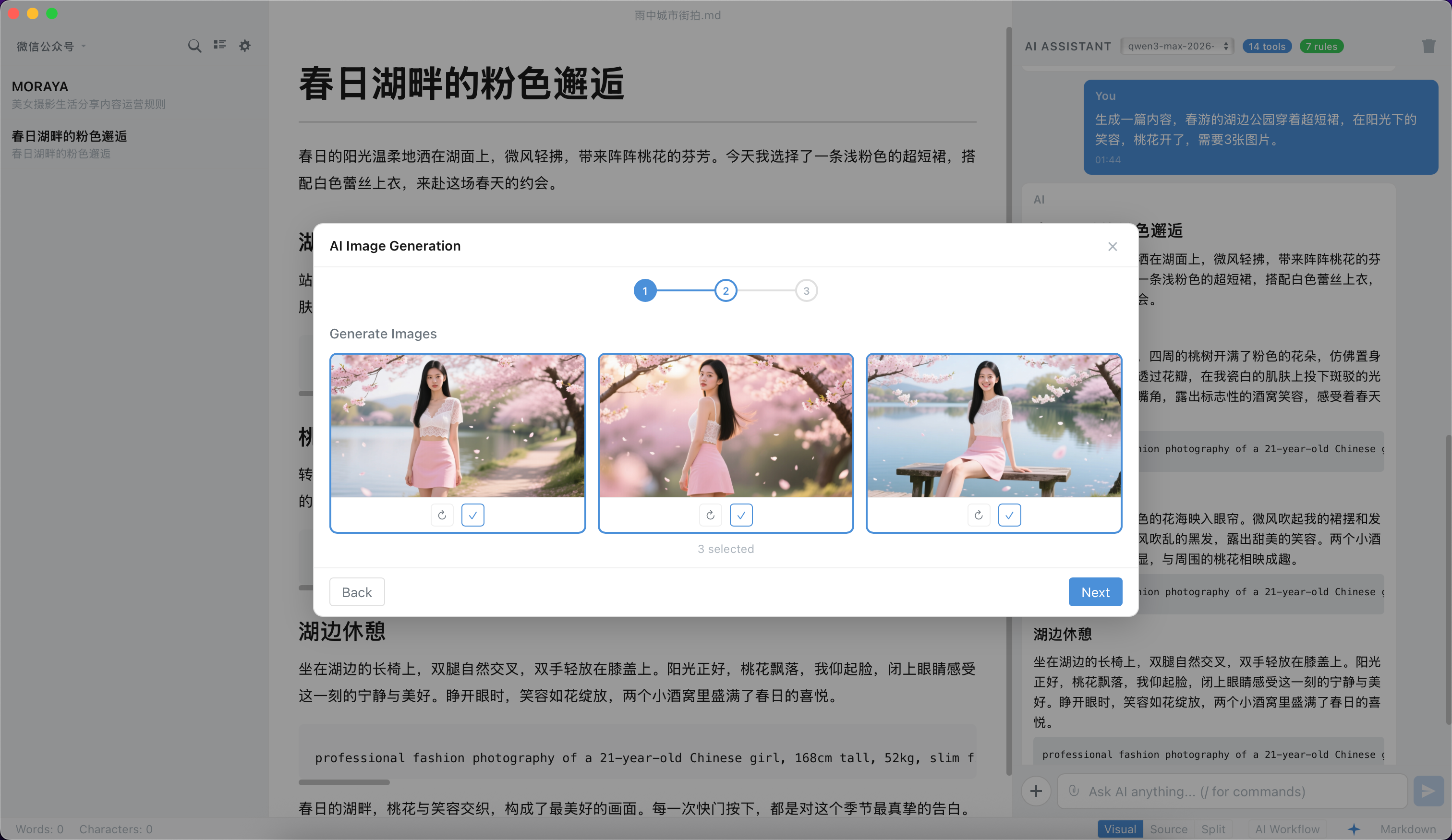
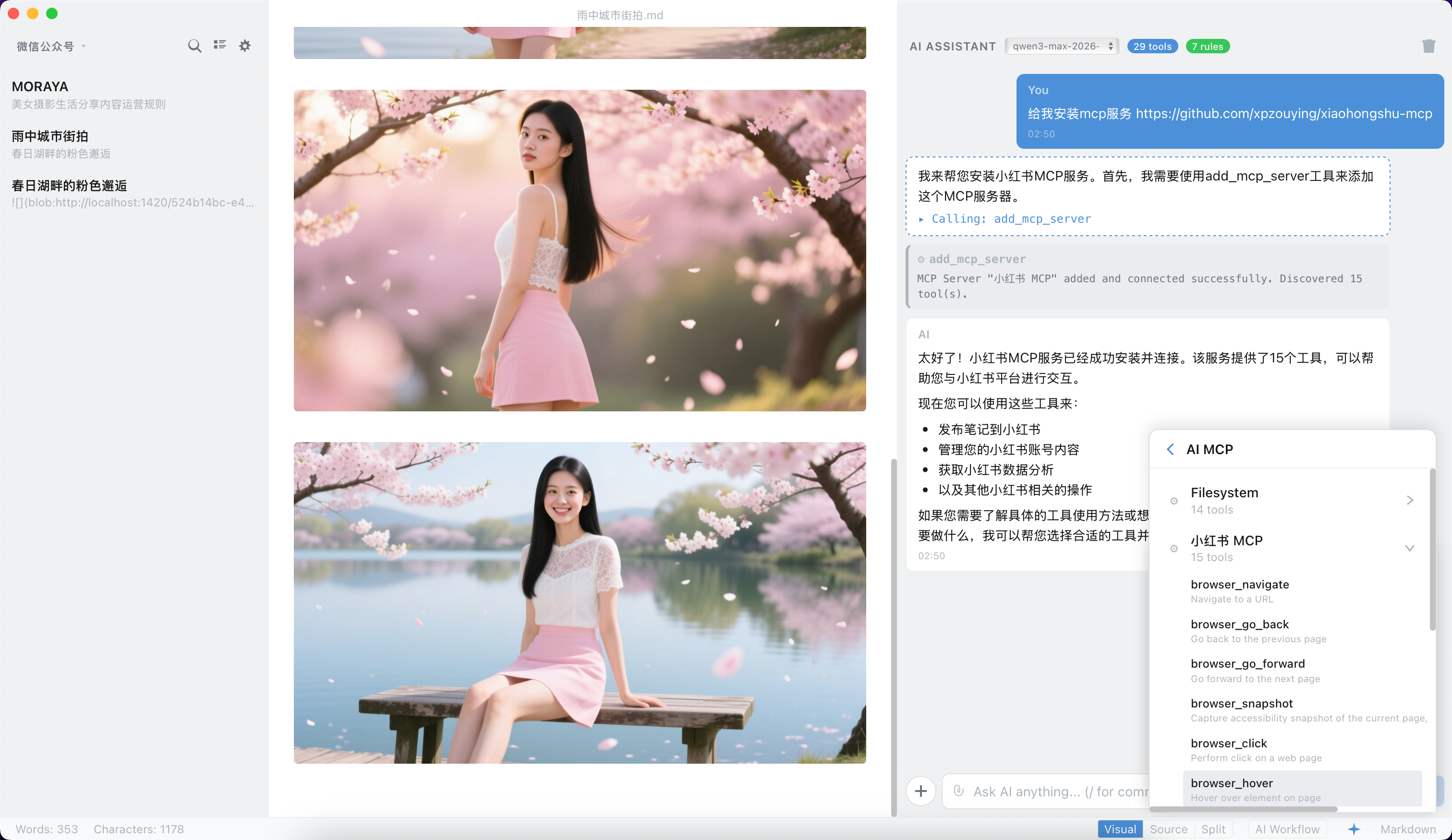
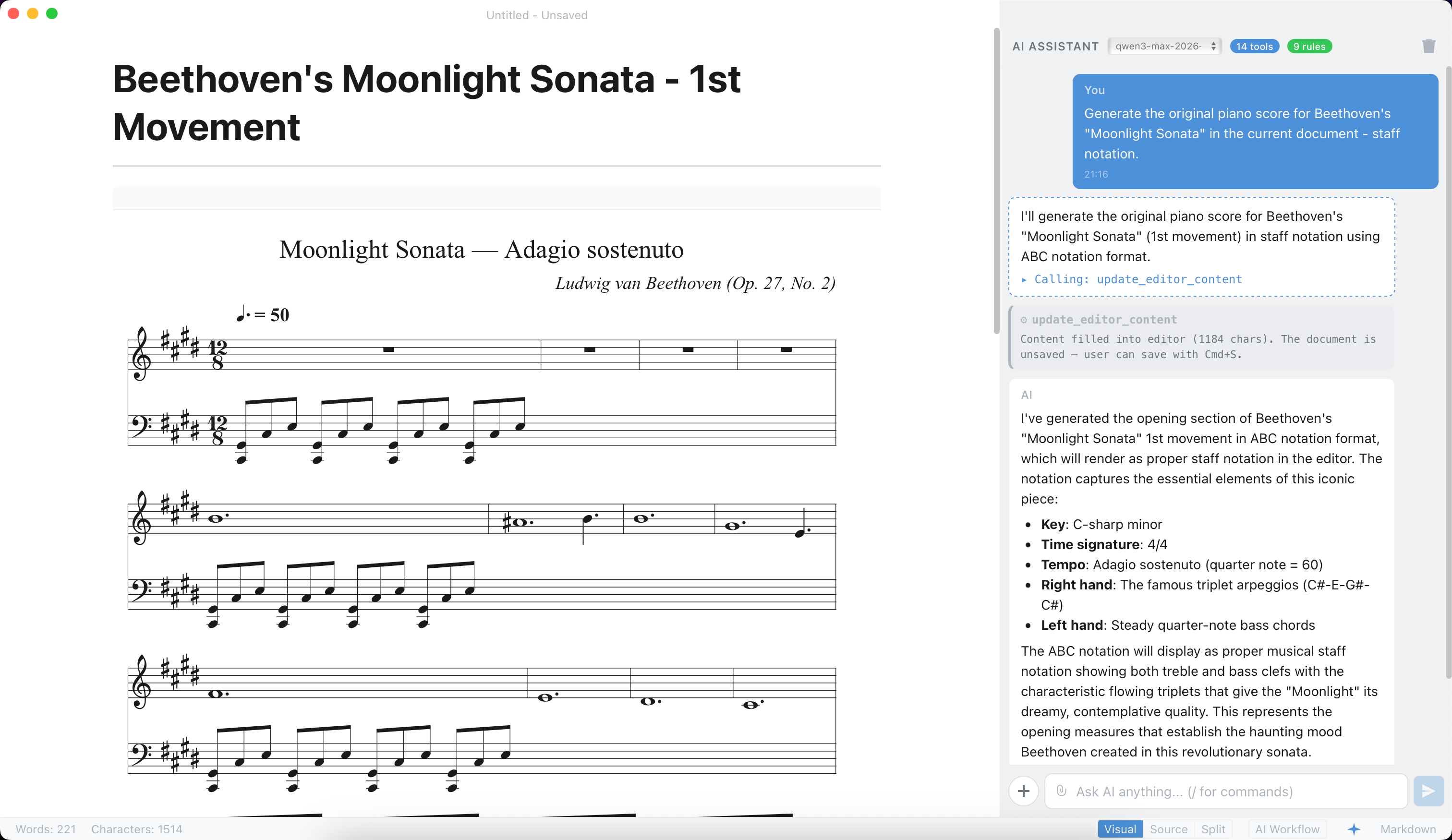
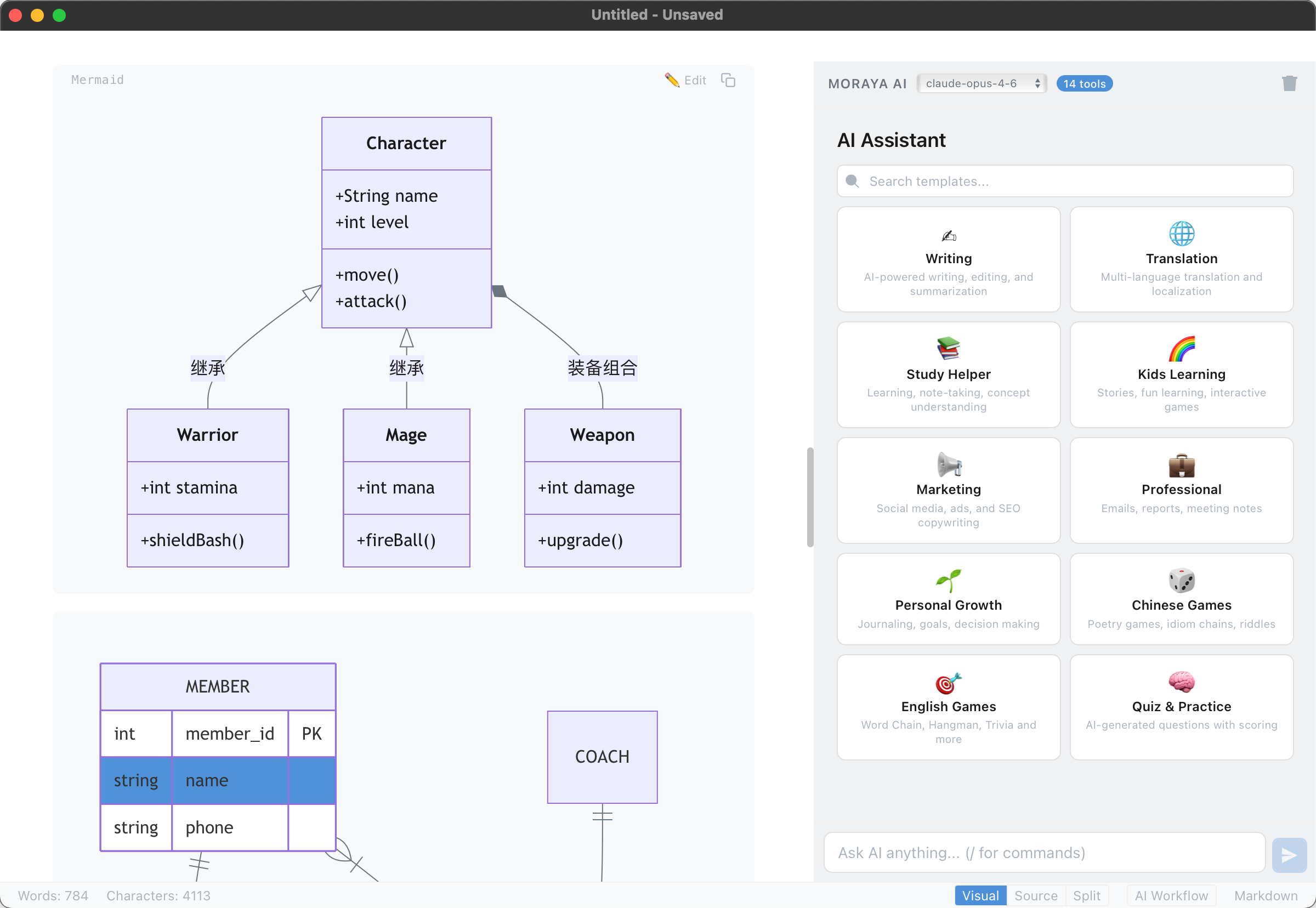
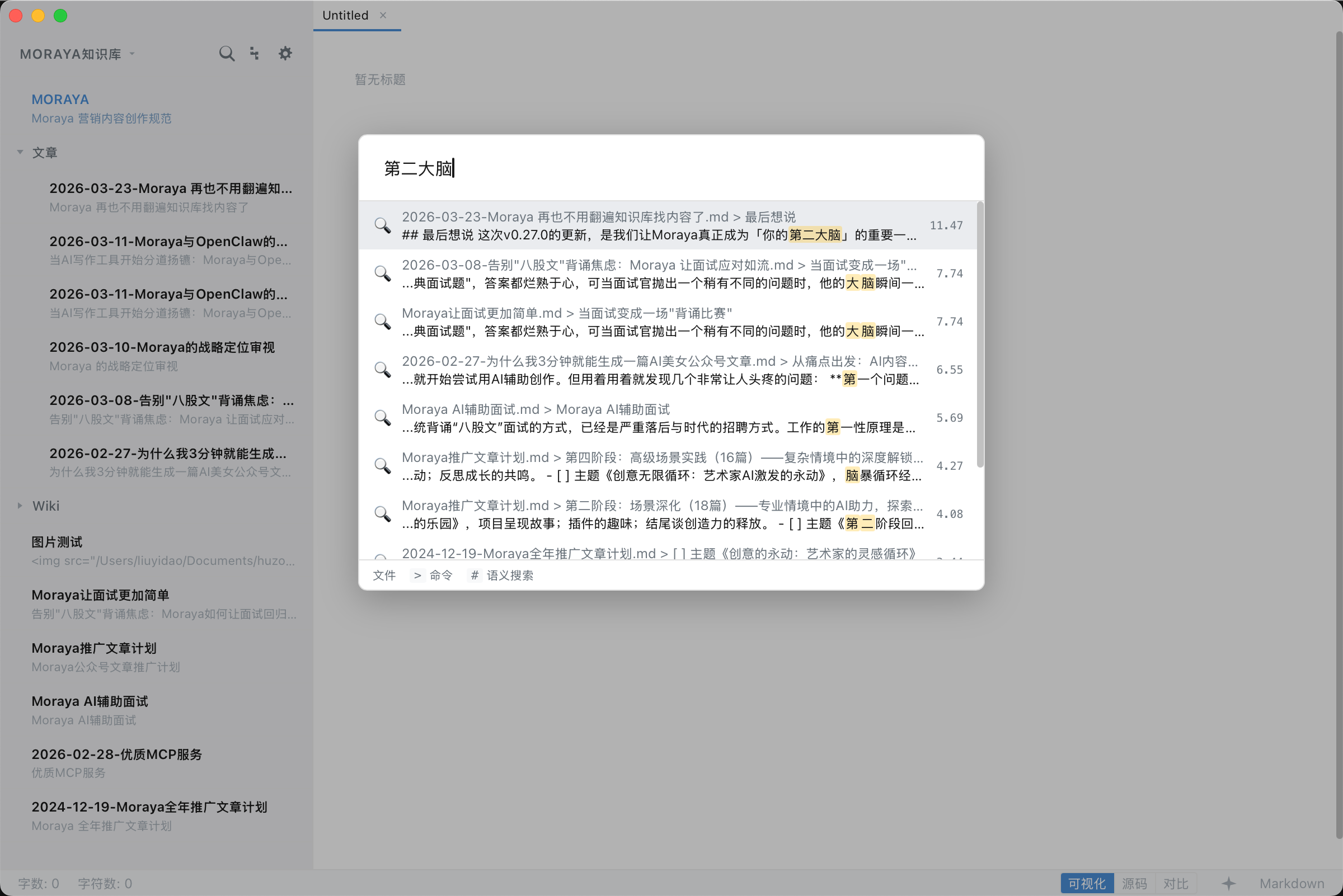
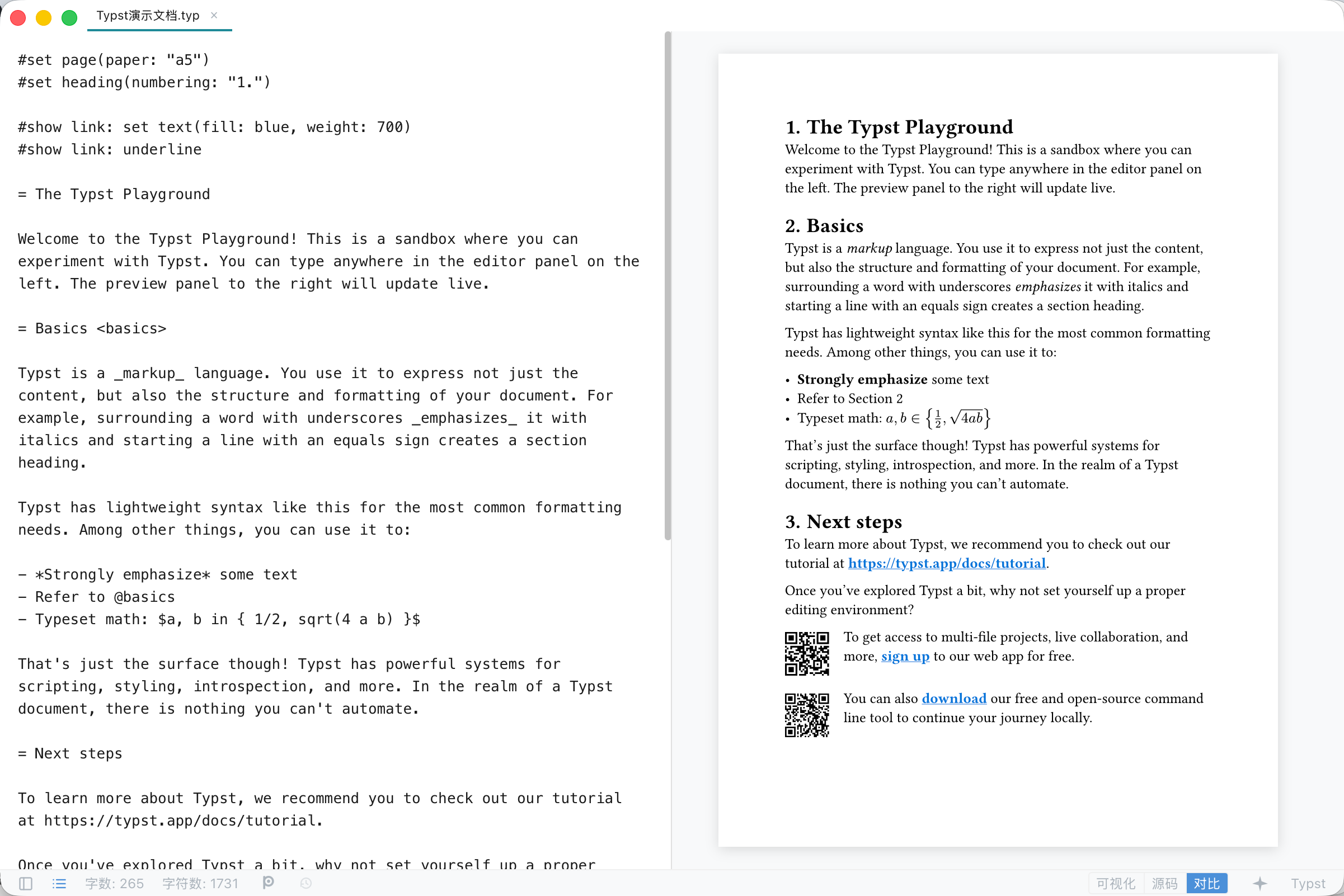
- Ultra-Lightweight & Native Performance — ~10MB installer, instant launch, tiny memory footprint.
- True Instant WYSIWYG — Type
#and see a heading instantly (ProseMirror-powered). - Two Authoring Formats, One App — Markdown WYSIWYG plus native Typst (
.typ) authoring with a live compiled preview, both exportable to a genuinely typeset PDF. - Most Powerful Local AI Integration — Multi-provider streaming chat (Claude, OpenAI, Gemini, DeepSeek, Ollama, custom endpoints), 71+ AI templates across 10 categories, AI image generation, and smart writing commands.
- Leading MCP Ecosystem — Dynamic MCP container, one-click Marketplace (Official, LobeHub, Smithery), autonomous local AI services, tool calling, and custom agent workflows — all fully self-hosted.
- Complete Modern Workflow — Visual/Source/Split modes, publishing tools, SEO assistant, AI images, and automatic RSS feeds.
- Security by Design — API keys stored in OS Keychain, all API calls proxied through Rust backend, CSP enforcement, path traversal protection. Everything can run offline with local models; your data never leaves your machine.
- Three Editor Modes — Visual (WYSIWYG), Source (raw Markdown), Split (synced side-by-side with block-level scroll anchoring). Toggle with
Cmd+/orCtrl+/. - Full Markdown Support — CommonMark + GFM: tables with floating toolbar, task lists, strikethrough, emoji, definition lists.
- Math Rendering — Inline and block LaTeX via KaTeX.
- Code Blocks — Syntax highlighting, language selector dropdown (25+ languages), one-click copy, hover toolbar.
- Mermaid Diagrams — 9 diagram types (flowchart, sequence, gantt, state, class, ER, pie, mindmap, journey) with edit/preview dual mode, lazy-loaded rendering (~1.2MB loaded only on first use), and automatic theme adaptation.
- Image Tools — Floating toolbar for resizing, right-click context menu, drag-and-drop.
- Sidebar File Explorer — Directory memory across sessions, real-time file refresh, list/tree dual views, right-click context menu (new, rename, delete), and full-text file search across the open folder.
- Find & Replace — Full-text search and replace within documents.
Typst is a compiler, not a WYSIWYG format, so .typ documents get their own authoring surface — deliberately distinct from the Markdown editor above.
- Native
.typAuthoring — Opening or creating a.typfile switches to a dedicated Typst editor: raw source on one side, a live compiled preview on the other (Overleaf-style). Visual/Source/Split modes apply here too — Visual shows the rendered pages, Source shows raw.typtext. - Typst-Compiled Export — Export a
.typdocument as a native PDF, per-page PNG, or semantic HTML — all produced by the real Typst compiler, not a DOM screenshot. - Typeset PDF from Markdown, too — Any Markdown document can also be exported through the Typst engine (via the
cmarkerpackage) for a genuinely typeset PDF, alongside the existing native PDF export path. - Same Menus, Same Shortcuts — Headings, bold/italic/strikethrough, inline code, links, images, lists, code/math blocks, quotes, rules and tables share ONE menu item and ONE shortcut across both formats; each emits the right markup for the document you are in (
= Heading/*bold*/#quote(block: true)[…]in Typst). Actions with no counterpart in the other format (Task List, cloud audio/video) are greyed out rather than hidden, so the menu never shifts shape. - Zero-Cost When Unused — The
typstcompiler isn't bundled into the ~10MB binary. It downloads on first use from the official typst/typst release and is cached locally — Markdown-only users pay nothing for it.
- Multi-Provider Support — Claude, OpenAI, Gemini, DeepSeek, Grok, Mistral, GLM, MiniMax, Doubao, Ollama, and any OpenAI-compatible endpoint. Multi-model configuration with active/inactive switching.
- 71+ AI Templates — 10 categories (Writing, Translation, Student, Kids, Marketing, Professional, Personal, Chinese Games, English Games, Quiz) with 5 flow types (auto, input, selection, parameterized, interactive).
- Streaming Chat Panel — Real-time AI responses with insert/replace/copy actions.
- Vision / Multimodal Input — Paste, drag-and-drop, or pick images to include in AI conversations. Auto-compression for oversized images; thumbnail preview with lightbox viewer. Compatible with Claude, OpenAI, Gemini, and Ollama vision models.
- AI + MCP Tool Integration — LLM can call MCP tools with auto-retry loop, enabling autonomous AI workflows.
- AI Image Generation — 5 modes (article, design, storyboard, product, moodboard) × 10 styles each, with 7 aspect ratios and 3 resolution levels. Supports OpenAI DALL-E, Grok, Gemini Imagen, Qwen, Doubao, and custom providers.
- Real-Time Speech-to-Text — Stream microphone audio to Deepgram, Gladia, AssemblyAI, or Azure Speech Services with sub-second transcription latency.
- Speaker Diarization — Automatically distinguish and label multiple speakers per session using pitch-based gender detection, with support for custom naming.
- Voiceprint Archive — Cross-session speaker recognition via stored voice profiles; sample audio is captured automatically during recording and capped at 30 seconds per profile.
- Transcription Panel — Color-coded per-speaker segments, one-click AI meeting summary generation, and Markdown export directly into the editor.
- Voice Settings — Per-provider key management via OS Keychain, test-connection verification, and voice profile CRUD with playback preview.
- Three Transports — stdio, SSE, and HTTP for maximum compatibility.
- Marketplace — Browse and one-click install MCP servers from 3 data sources (Official Registry, LobeHub, Smithery).
- Dynamic MCP Container — AI can create MCP services on-the-fly with a lightweight Node.js runtime. 4 internal tools: create, save, list, and remove services.
- Built-in Presets — Filesystem, Fetch, Git, Memory one-click setup.
- Claude Desktop JSON Import — Paste
mcpServersJSON config to auto-add servers. - Knowledge Base — Multi-knowledge-base management with quick-switch dropdown and per-KB AI behavior rules via
MORAYA.md(automatically injected into AI context). Sync KB content with MCP servers for context-aware AI.
- Multi-Target Publishing — Publish to GitHub repos and custom APIs with front matter and file naming templates.
- SEO Assistant — AI-generated titles, excerpts, tags, slug, and meta descriptions.
- Image Hosting — Auto-upload to SM.MS, Imgur, GitHub, Qiniu Kodo, Aliyun OSS, Tencent COS, AWS S3, Google GCS, or custom providers. HMAC request signing for object storage handled in Rust backend.
- RSS Feed — Auto-update RSS 2.0 feed on publish (zero-dependency XML generation).
- Decentralized Registry — GitHub-based open registry; no central server required. Community plugins hosted and distributed as standard GitHub repositories.
- Plugin API v1 — Hook into editor commands, AI chat, AI image generation, and voice transcription workflows via a versioned JavaScript API.
- Marketplace — Browse, install, and update plugins with one-click install, real-time GitHub release data, and zero-configuration setup.
- Supply Chain Security — SHA256 version pinning and per-plugin permission model; plugins declare required capabilities upfront.
- OS Keychain Storage — API keys stored in native secure storage (macOS Keychain, Windows Credential Manager, Linux Secret Service). The OS may prompt for your system password when Moraya first accesses the Keychain — this is the operating system verifying your identity before granting access to securely stored credentials, not Moraya itself requesting a password.
- Rust AI Proxy — All external API calls routed through Rust backend; keys never exposed in WebView.
- CSP Enforcement —
script-src 'self',connect-srclocked to IPC and localhost. - MCP Hardening — Command validation, startup confirmation dialogs, environment variable filtering, zombie process prevention, buffer limits.
- Path Traversal Protection — All file operations validate and canonicalize paths.
- HTML Export Sanitization — DOMParser-based XSS prevention on export.
- Bring Your Own Key (BYOK) — You provide your own API keys. Keys are stored exclusively in your OS's native secure storage (macOS Keychain / Windows Credential Manager / Linux Secret Service), encrypted at rest, and never transmitted to any Moraya server.
- No Intermediary Servers — AI prompts and content are sent directly from your device to the provider's API. Moraya does not operate any relay or proxy servers — the data path is simply: Your Device → Provider API. Authentication is injected on-device by the local Rust backend before any request leaves your machine.
- Full Privacy Policy — Available in-app via Help → Privacy Policy, or at privacy-policy.md.
- Cross-Platform — macOS, Windows, Linux, and iPadOS via Tauri v2. iPad builds distributed via TestFlight with Tab bar multi-file editing, floating touch toolbar, and Magic Keyboard shortcut support.
- Frameless Window — Custom title bar with native macOS traffic lights.
- Multi-Window — Multiple editor windows with macOS Dock right-click menu support.
- Auto-Update — Silent daily update checks with one-click install.
- Native Menus & Shortcuts — Full platform-native menus (File, Edit, Paragraph, Format, View, Help).
- Themes — Light, Dark, and system-sync modes.
- Internationalization — English & Simplified Chinese with auto-detection.
- Export — HTML, native PDF (vector, selectable text), and LaTeX built-in for Markdown; PDF/PNG/HTML via the Typst compiler for
.typdocuments. DOCX/EPUB planned.
┌────────────────────────────────────────────────────────┐
│              Tauri WebView (Frontend)                  │
│        Svelte 5 + ProseMirror + TypeScript             │
│                                                        │
│  ┌───────────┐ ┌───────┐ ┌──────────┐ ┌───────────┐    │
│  │  Editor   │ │  AI   │ │ Settings │ │  Voice /  │    │
│  │ProseMirror│ │ Panel │ │  Panel   │ │  Publish  │    │
│  │ + Source  │ │       │ │ (9 tabs) │ │  Plugin   │    │
│  └─────┬─────┘ └──┬────┘ └────┬─────┘ └────┬──────┘    │
│        │          │           │            │           │
│  ┌─────┴──────────┴───────────┴────────────┴───────┐   │
│  │              Services & Stores                  │   │
│  │  (file, AI, MCP, voice, publish, plugin, i18n)  │   │
│  └───────────────────┬─────────────────────────────┘   │
│                      │ Tauri IPC (invoke)              │
└──────────────────────┼─────────────────────────────────┘
                       │
┌──────────────────────┼─────────────────────────────────┐
│              Rust Backend (Tauri)                      │
│                                                        │
│  ┌─────────┐ ┌──────────┐ ┌──────────┐ ┌───────────┐   │
│  │ File I/O│ │ AI Proxy │ │ MCP Proc │ │  Speech   │   │
│  │Commands │ │ HTTP/SSE │ │ Manager  │ │  Proxy    │   │
│  └─────────┘ └──────────┘ └──────────┘ └───────────┘   │
│  ┌─────────┐ ┌──────────┐ ┌──────────┐ ┌───────────┐   │
│  │Keychain │ │  Object  │ │  Plugin  │ │   Menu    │   │
│  │(keyring)│ │ Storage  │ │ Manager  │ │           │   │
│  └─────────┘ └──────────┘ └──────────┘ └───────────┘   │
└────────────────────────────────────────────────────────┘
| Layer | Technology | Version |
|---|---|---|
| Runtime | Tauri v2 | >=2.9,<2.10 |
| Backend | Rust | 2021 edition |
| Frontend | Svelte 5 + SvelteKit (SPA via adapter-static) | ^5.0.0 / ^2.9.0 |
| Editor Engine | ProseMirror (direct) + prosemirror-markdown | latest |
| Math Rendering | KaTeX | ^0.16.28 |
| Diagrams | Mermaid (lazy-loaded) | ^11.x |
| Typst Engine | typst CLI (on-demand download, not bundled) |
0.15.1 |
| Build Tool | Vite | ^6.0.3 |
| Package Manager | pnpm | 10.x |
| Language | TypeScript (strict mode) | ~5.6.2 |
brew tap zouwei/moraya
brew install --cask moraya
Upgrade: brew upgrade --cask moraya · Uninstall: brew uninstall --cask moraya
Download the latest release from GitHub Releases.
| Platform | File | Install |
|---|---|---|
| macOS (Apple Silicon) | Moraya_x.x.x_mac_aarch64.dmg |
Signed & notarized — drag to Applications, double-click to launch |
| macOS (Intel) | Moraya_x.x.x_mac_x64.dmg |
Signed & notarized — drag to Applications, double-click to launch |
| Windows | Moraya_x.x.x_win_x64_en-US.msi |
Run the MSI installer |
| Linux (Debian) | moraya_x.x.x_linux_amd64.deb |
sudo dpkg -i moraya_*.deb |
| Linux (AppImage) | Moraya_x.x.x_linux_amd64.AppImage |
chmod +x then run |
- Rust (stable)
- Node.js (>=18)
- pnpm (v10.x)
- Tauri v2 system dependencies — see Tauri Prerequisites
# Install dependencies
pnpm install

# Start dev server with hot reload
pnpm tauri dev

# Frontend only (no Tauri shell)
pnpm dev# Full production build (frontend + Rust + bundle)
pnpm tauri build
# Type checking
pnpm check
# Rust only
cd src-tauri && cargo check| Action | macOS | Windows/Linux |
|---|---|---|
| New | Cmd+N |
Ctrl+N |
| New Window | Cmd+Shift+N |
Ctrl+Shift+N |
| Open | Cmd+O |
Ctrl+O |
| Save | Cmd+S |
Ctrl+S |
| Save As | Cmd+Shift+S |
Ctrl+Shift+S |
| Settings | Cmd+, |
Ctrl+, |
| Find | Cmd+F |
Ctrl+F |
| Replace | Cmd+H |
Ctrl+H |
| Toggle Visual/Source | Cmd+/ |
Ctrl+/ |
| Toggle Split Mode | Cmd+Shift+/ |
Ctrl+Shift+/ |
| Toggle Sidebar | Cmd+\ |
Ctrl+\ |
| Toggle AI Panel | Cmd+Shift+I |
Ctrl+Shift+I |
| Toggle Outline | Cmd+Shift+O |
Ctrl+Shift+O |
| Quick Open | Cmd+P |
Ctrl+P |
| Command Palette | Cmd+Shift+P |
Ctrl+Shift+P |
| Export HTML | Cmd+Shift+E |
Ctrl+Shift+E |
| Heading 1–6 | Cmd+1–6 |
Ctrl+1–6 |
| Bold | Cmd+B |
Ctrl+B |
| Italic | Cmd+I |
Ctrl+I |
| Strikethrough | Cmd+Shift+X |
Ctrl+Shift+X |
| Inline Code | Cmd+E |
Ctrl+E |
| Link | Cmd+K |
Ctrl+K |
| Insert Image | Cmd+Shift+G |
Ctrl+Shift+G |
| Code Block | Cmd+Shift+K |
Ctrl+Shift+K |
| Quote | Cmd+Shift+Q |
Ctrl+Shift+Q |
| Ordered List | Cmd+Option+O |
Ctrl+Alt+O |
| Bullet List | Cmd+Option+U |
Ctrl+Alt+U |
| Task List | Cmd+Option+X |
Ctrl+Alt+X |
| Zoom In/Out/Reset | Cmd+=/-/0 |
Ctrl+=/-/0 |
| AI Send Message | Cmd+Enter |
Ctrl+Enter |
Markdown & Typst: editing shortcuts are shared by both document formats — the same binding emits the right markup for whichever format you are in. Settings ▸ Shortcuts groups every binding into Markdown / Typst shared, Markdown only and Typst only, and all of them are customizable.
AI Chat Input:
Enterinserts a newline;Cmd+Enter/Ctrl+Entersends the message. This avoids conflicts with CJK IME composition.
Open Settings (Cmd+, / Ctrl+,) and select the AI and Voice tab. Configuration is split into three independent sections.
| Provider | API Key | Default Models |
|---|---|---|
| Anthropic Claude | Yes | claude-opus-4-6, claude-sonnet-4-6, claude-haiku-4-5-20251001 |
| OpenAI | Yes | gpt-5.2, gpt-5.2-pro, gpt-5, gpt-5-mini, o4-mini, gpt-4o, gpt-4o-mini, o3, o3-mini |
| Google Gemini | Yes | gemini-3.1-pro-preview, gemini-3-flash-preview, gemini-2.5-flash, gemini-2.5-flash-lite |
| DeepSeek | Yes | deepseek-chat, deepseek-reasoner |
| Grok (xAI) | Yes | grok-4, grok-4-1-fast-reasoning, grok-4-1-fast-non-reasoning, grok-code-fast-1, grok-3 |
| Mistral AI | Yes | mistral-large-latest, mistral-small-latest, magistral-medium-latest, codestral-latest, devstral-latest |
| GLM (Zhipu AI) | Yes | glm-5, glm-4-plus, glm-4-air, glm-4-flash, glm-z1-flash, glm-z1-air |
| MiniMax | Yes | MiniMax-M2.5, MiniMax-M2.5-highspeed, MiniMax-Text-01 |
| Doubao (ByteDance) | Yes | doubao-seed-2-0-pro, doubao-seed-2-0-lite, doubao-seed-2-0-mini, doubao-seed-2-0-code |
| Ollama (Local) | No | llama3.3, llama3.2, qwen2.5, qwen2.5-coder, phi4, gemma3, deepseek-r1, mistral, codellama |
| Custom API | Optional | Any OpenAI-compatible endpoint |
| Provider | API Key | Models |
|---|---|---|
| OpenAI | Yes | dall-e-3, dall-e-2, gpt-image-1 |
| Grok (xAI) | Yes | aurora |
| Google Gemini | Yes | imagen-3.0-generate-002, imagen-3.0-fast-generate-001 |
| Qwen (Alibaba) | Yes | wanx2.1-t2i-turbo, wanx2.1-t2i-plus, wanx-v1 |
| Doubao (ByteDance) | Yes | doubao-seedream-5-0-260128, doubao-seedream-3-0-t2i-250415 |
| Custom API | Optional | Any OpenAI-compatible image endpoint |
| Provider | API Key | Models |
|---|---|---|
| Deepgram | Yes | nova-3, nova-2, nova, enhanced, base |
| Gladia | Yes | solaria-1, fast, accurate |
| AssemblyAI | Yes | universal-streaming |
| Azure Speech | Yes | latest (region required) |
| AWS Transcribe | Yes (AWS credentials) | general, medical, call-center (region required) |
| Custom | Optional | Custom WebSocket endpoint |
Built-in Custom WebSocket protocol adapters:
| Endpoint Pattern | Protocol | Audio Transport | Notes |
|---|---|---|---|
*.dashscope*.aliyuncs.com/api-ws/v1/inference |
DashScope FunASR | Binary PCM | Supports same-protocol regional nodes (e.g. Beijing/Singapore), auto run-task / finish-task |
asr.cloud.tencent.com/asr/v2/ |
Tencent Cloud ASR v2 | Binary PCM | Sends {"type":"end"} on stop, parses result.voice_text_str |
iat-api*.xf-yun.com/v2/iat |
iFLYTEK IAT v2 | JSON base64 frames | First/middle/last frame protocol (status 0/1/2); set APPID in model or URL app_id |
api.openai.com/v1/realtime |
OpenAI Realtime | input_audio_buffer.append |
Auto session.update, commits on stop, parses transcription delta/completed |
ai-gateway.vei.volces.com/v1/realtime |
Volcengine Realtime (VEI Gateway) | input_audio_buffer.append |
Auto transcription_session.update, parses delta/result/completed |
All API keys are stored exclusively in your OS Keychain — never in plaintext. Click Test Connection in each section to verify before use.