



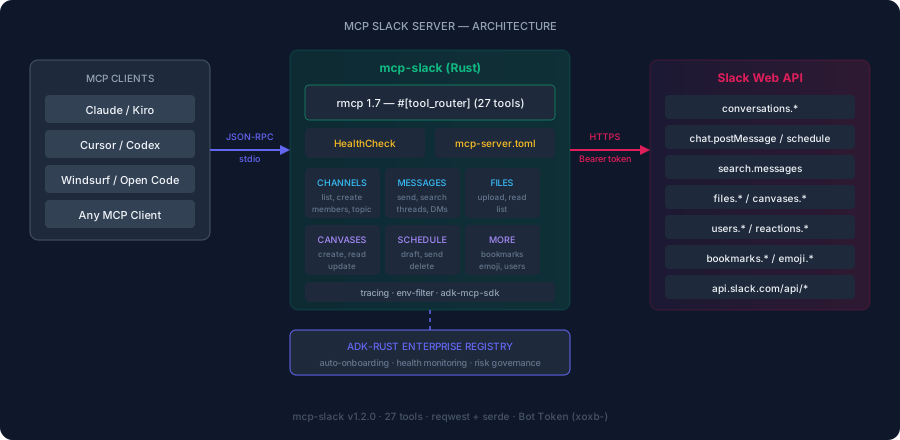
Give your AI agents full Slack access — messages, threads, DMs, channels, canvases, reactions, and search. 27 tools over the Slack Web API with enterprise governance and audit-ready risk classification.
| Tool | Purpose | Risk Class |
|---|---|---|
list_channels |
List public and private channels | Read-only |
list_channels_paginated |
List channels with cursor pagination | Read-only |
get_channel_history |
Get recent messages from a channel | Read-only |
get_history_paginated |
Get history with cursor pagination | Read-only |
get_thread |
Get thread replies for a message | Read-only |
search_messages |
Search messages across all channels | Read-only |
list_users |
List workspace users | Read-only |
get_user |
Get user profile info by ID | Read-only |
list_members |
List members of a channel | Read-only |
list_dms |
List direct message conversations | Read-only |
list_emoji |
List custom emoji in the workspace | Read-only |
list_files |
List files shared in a channel | Read-only |
get_file |
Get file metadata and download URL | Read-only |
read_canvas |
Read/export a canvas as markdown | Read-only |
list_bookmarks |
List bookmarks in a channel | Read-only |
list_scheduled_messages |
List scheduled (draft) messages | Read-only |
send_message |
Send a message to a channel or thread | External write |
open_dm |
Open a DM conversation with users | External write |
add_reaction |
Add an emoji reaction to a message | External write |
set_channel_topic |
Set a channel's topic | External write |
upload_file |
Upload a text file to a channel | External write |
create_channel |
Create a new public or private channel | External write |
create_canvas |
Create a rich document in a channel | External write |
update_canvas |
Update canvas content (markdown) | External write |
add_bookmark |
Add a bookmark link to a channel | External write |
schedule_message |
Schedule a message for future delivery | External write |
delete_scheduled_message |
Cancel a scheduled message | External write |
| Feature | Slack Official | korotovsky/slack-mcp | Ours |
|---|---|---|---|
| Thread replies (read) | ✅ | ✅ | ✅ |
| DMs / Group DMs | ✅ | ✅ | ✅ |
| Canvases (create/read/update) | ✅ | ❌ | ✅ |
| Create channel | ✅ | ✅ | ✅ |
| List channel members | ✅ | ✅ | ✅ |
| Custom emoji list | ✅ | ❌ | ✅ |
| Send messages + threads | ✅ | ✅ | ✅ |
| Reactions | ✅ | ✅ | ✅ |
| Search | ✅ | ✅ | ✅ |
| File upload + reading | ✅ | ❌ | ✅ |
| Draft/scheduled messages | ✅ | ❌ | ✅ |
| Bookmarks | ❌ | ✅ | ✅ |
| Pagination (cursor) | ✅ | ✅ | ✅ |
| OAuth/user tokens | ✅ | ✅ (cookie) | Bot token |
| Registry governance | ❌ | ❌ | ✅ |
| Risk classification | ❌ | ❌ | ✅ |
| HealthCheck trait | ❌ | ❌ | ✅ |
| Rust / single binary | ❌ (Node) | ❌ (Node) | ✅ |
git clone https://github.com/zavora-ai/mcp-slack
cd mcp-slack
cargo build --releasecargo install mcp-slack| Variable | Required | Description |
|---|---|---|
SLACK_BOT_TOKEN |
✅ | Bot User OAuth Token (xoxb-...) |
SLACK_TOKEN |
Alternative | Alias for SLACK_BOT_TOKEN |
RUST_LOG |
❌ | Log level (default: info) |
channels:read        — list channels
channels:history     — read messages
channels:manage      — set topic
groups:read          — private channels
groups:history       — private channel messages
chat:write           — send messages
reactions:write      — add reactions
search:read          — search messages
users:read           — list/get users
files:write          — upload files
channels:join        — self-join channels (optional)
display_information:
  name: MCP Slack Bot
  description: AI agent access to Slack via MCP protocol
features:
  bot_user:
    display_name: MCP Bot
    always_online: true
oauth_config:
  scopes:
    bot:
      - channels:read
      - channels:history
      - channels:manage
      - groups:read
      - groups:history
      - chat:write
      - reactions:write
      - search:read
      - users:read
      - files:write
settings:
  org_deploy_enabled: false
  socket_mode_enabled: false
token_rotation_enabled: false{
"mcpServers": {
"slack": {
"command": "mcp-slack",
"args": [],
"env": {
"SLACK_BOT_TOKEN": "xoxb-your-token"
}
}
}
}Add to .kiro/settings/mcp.json:
{
  "mcpServers": {
    "slack": {
      "command": "mcp-slack",
      "args": [],
      "env": {
        "SLACK_BOT_TOKEN": "xoxb-your-token"
      }
    }
  }
}Add to .cursor/mcp.json:
{
  "mcpServers": {
    "slack": {
      "command": "mcp-slack",
      "args": [],
      "env": {
        "SLACK_BOT_TOKEN": "xoxb-your-token"
      }
    }
  }
}{
"mcpServers": {
"slack": {
"command": "mcp-slack"
}
}
}Add to ~/.codeium/windsurf/mcp_config.json:
{
  "mcpServers": {
    "slack": {
      "command": "mcp-slack",
      "args": [],
      "env": {
        "SLACK_BOT_TOKEN": "xoxb-your-token"
      }
    }
  }
}# Set token
export SLACK_BOT_TOKEN="xoxb-your-token"
# Verify token works
curl -s -H "Authorization: Bearer $SLACK_BOT_TOKEN" https://slack.com/api/auth.test
# Run server
mcp-slacknpx @modelcontextprotocol/inspector mcp-slack"List my Slack channels"
→ calls list_channels
"What did the team say in the thread about the deployment?"
→ calls search_messages → get_thread
"Post in #engineering: the release is ready for QA"
→ calls send_message with channel + text
"Reply to that message saying I'll review it"
→ calls send_message with thread_ts
"Send a DM to James asking about the PR"
→ calls open_dm → send_message
"Create a private channel called project-alpha"
→ calls create_channel with is_private=true
server_id = "mcp_slack"
display_name = "Slack"
version = "1.3.0"
domain = "collaboration"
risk_level = "medium"
writes_allowed = "gated"
transports = ["stdio"]
credentials = ["vault://slack-bot-token"]# Build
cargo build
# Run tests
cargo test
# Integration test (requires SLACK_BOT_TOKEN)
echo '{"jsonrpc":"2.0","id":1,"method":"initialize","params":{"protocolVersion":"2024-11-05","capabilities":{},"clientInfo":{"name":"test","version":"1.0"}}}
{"jsonrpc":"2.0","id":2,"method":"tools/call","params":{"name":"list_channels","arguments":{"limit":5}}}' | cargo run- OAuth user token support (for user-level access beyond bot)
- Workflow triggers (
workflows.triggers.create) - Pin messages (
pins.add,pins.list) - User presence/status (
users.setPresence,users.profile.set)
This server implements the ADK MCP SDK contract:
- HealthCheck — async health probe for registry monitoring
- mcp-server.toml — manifest declaring tools, risk classes, and credentials
- Structured tracing —
RUST_LOGenv-filter for observability
 James Karanja Maina |
|---|
Apache-2.0 — see LICENSE for details.
Part of the ADK-Rust Enterprise MCP server ecosystem.
Built with ❤️ by Zavora AI
This server is built with rmcp 3.1.2 and requires Rust 1.94.1 or newer. The rmcp 3 rollout retains legacy MCP initialization compatibility and targets MCP protocol revisions 2025-11-25 and 2026-07-28.
This server uses rmcp 3.1.2 and adk-mcp-sdk 0.2 with a minimum supported
Rust version of 1.94.1. It accepts stateless MCP 2026 requests with
per-request protocol, client identity, and capability metadata while retaining
the legacy MCP 2025-11-25 initialize flow for ordinary tools.
- Tasks:
upload_file - MRTR approvals:
send_message,upload_file - Discovery and routing: rmcp serves on-demand discovery and validates the
per-request protocol envelope; HTTP deployments can route with
Mcp-MethodandMcp-Name. The packaged binary currently uses stdio. - Caching:
tools/listreturns a publicttlMsof 60,000 for MCP 2026; rmcp omits the cache fields for legacy clients. - Deprecated extensions: this server does not add new Roots, Sampling, or dynamic client-registration dependencies.
Protected tools require MCP_REQUEST_STATE_KEY with at least 32 high-entropy
bytes. All replicas must share that key so sealed approval state can resume on
another instance. Approval state is bound to the client identity, tool, and
arguments and expires after two minutes. Missing identity, invalid state,
rejection, or legacy protocol use fails closed. Task records are process-local
for the current stdio runtime; use a durable task store before deploying the
server behind scale-to-zero HTTP infrastructure.