A Svelte component that adds an animated cat that chases your mouse cursor around the screen. This is a Svelte 5 port of the popular oneko.js library.
- Interactive cat that follows your mouse cursor
- Smooth animations with sprite-based movement
- Idle animations when the cat reaches the cursor
- Wall-scratching animations when near screen edges
- Respects
prefers-reduced-motionaccessibility settings - Compatible with Svelte 5
pnpm install @yuna0x0/svelte-neko<script>
import { Neko } from '@yuna0x0/svelte-neko';
</script>
<Neko nekoImage="/path/to/oneko.gif" />| Prop | Type | Default | Description |
|---|---|---|---|
nekoImage |
string |
Required | Path to the neko sprite image (typically oneko.gif) |
tracking |
boolean |
true |
Whether the neko should track/follow the mouse cursor |
toggleTrackingOnClick |
boolean |
false |
Whether clicking the neko should toggle tracking on/off |
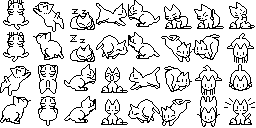
You'll need a neko sprite sheet image. You can:
- Download from the demo site
- Download from the original oneko.js repository
- Create your own sprite sheet following the 32x32 pixel format
<script>
	import { Neko } from '@yuna0x0/svelte-neko';
</script>

<Neko nekoImage="/oneko.gif" toggleTrackingOnClick={true} /><script>
import { Neko } from '@yuna0x0/svelte-neko';
</script>
<Neko nekoImage="/oneko.gif" tracking={false} /><script>
import { Neko } from '@yuna0x0/svelte-neko';
let isTracking = true;
function toggleTracking() {
isTracking = !isTracking;
}
</script>
<Neko nekoImage="/oneko.gif" tracking={isTracking} />
<button on:click={toggleTracking}>
{isTracking ? 'Disable' : 'Enable'} Neko
</button>This component automatically respects the user's prefers-reduced-motion setting. When reduced motion is preferred, the neko will not be rendered.
# Clone the repository
git clone https://github.com/yuna0x0/svelte-neko.git
cd svelte-neko

# Install dependencies
pnpm install

# Start development server
pnpm dev

# Run tests
pnpm test

# Build the library
pnpm package- Original oneko.js by @adryd325
- Forked from khromov/svelte-neko
MIT License - see LICENSE file for details.
Contributions are welcome! Please feel free to submit a Pull Request. Make sure to:
- Run
pnpm lintandpnpm checkbefore submitting - Add tests for new features
- Update documentation as needed