


This is the official implementation of the paper:
"Fast Online Adaptive Neural MPC via Meta-Learning"
by Yu Mei, Xinyu Zhou, Shuyang Yu, Vaibhav Srivastava, and Xiaobo Tan.
- Fast Online Adaptive Neural MPC via Meta-Learning
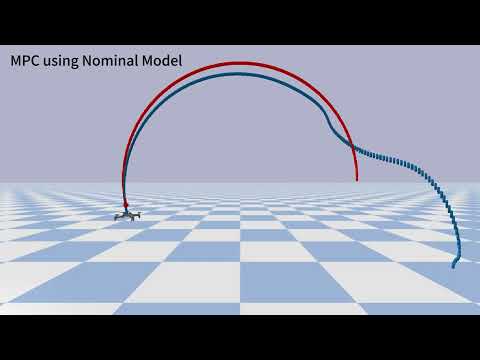
Watch our YouTube video showcasing the control performance on the CartPole and 2D Quadrotor environments using the proposed Fast Online Meta-MPC framework.
1. Clone the repository (common to both tracks)
git clone https://github.com/yu-mei/MetaResidual-MPC.git
cd MetaResidual-MPC
2. Pick the track that matches your GPU, then follow one of the two options below:
| Your GPU | Track |
|---|---|
| Pre-Blackwell cards — RTX 20/30/40 series, A-series (e.g., RTX A2000) | Option A |
Blackwell cards — RTX 50 series (e.g., RTX 5070), compute capability sm_120 |
Option B |
A1. Create a conda environment
conda env create -f environment.yml
conda activate l4control
A2. Install l4casadi
Install the latest version using pip with --no-build-isolation (GPU/CUDA supported):
pip install l4casadi --no-build-isolation🔗 Source: github.com/Tim-Salzmann/l4casadi
A3. Install acados and the acados Python interface
A3.1 Clone and build Acados
Follow the official Acados installation guide.
A3.2 Install the Acados Python interface
Follow the Python interface installation guide.
A4. Install safe-control-gym
Follow the official safe-control-gym installation guide.
A5. Override PyTorch installation
Due to version conflicts between l4casadi and safe-control-gym, it is necessary to override PyTorch:
conda install pytorch==2.5.1 torchvision==0.20.1 torchaudio==2.5.1 pytorch-cuda=12.4 -c pytorch -c nvidia
⚠️ This ensures compatibility with bothl4casadiandsafe-control-gym.
🔧 Make sure your CUDA drivers are compatible with CUDA 12.4.
A6. Fix installation issues (if any)
If you encounter any remaining errors, manually install the missing or incompatible packages.
Package versions may vary depending on your system environment.
⚠️ Why a separate track? Blackwell cards (RTX 50 series) have compute capabilitysm_120, which PyTorch only supports from 2.7+ with CUDA ≥ 12.8 builds. The Option A install (pytorch==2.5.1 + pytorch-cuda=12.4) imports fine but fails at the first GPU op withCUDA capability sm_120 is not compatible with the current PyTorch installation. In addition, the-c pytorchconda channel no longer publishes new versions, so PyTorch is installed via pip wheels here, andl4casadimoves to the last step so that it compiles against the final PyTorch.
💡 The
CUDA Version: 13.xshown bynvidia-smiis the driver's maximum supported runtime, not an installed toolkit. The pip wheels bundle their own CUDA runtime, so no system CUDA toolkit is required for PyTorch.
B1. Create a conda environment
conda env create -f environment.yml
conda activate l4control
B2. Install acados and the acados Python interface (same as A3 — unchanged)
The acados C library is CPU-only and unaffected by the GPU swap.
B2.1 Clone and build Acados
Follow the official Acados installation guide.
B2.2 Install the Acados Python interface
Follow the Python interface installation guide.
B3. Install safe-control-gym (same as A4)
Follow the official safe-control-gym installation guide.
💡 Whatever PyTorch version it pulls in will be replaced in the next step — ignore it for now.
B4. Install PyTorch (Blackwell build) (replaces A5 — do not run the old conda command)
pip uninstall -y torch torchvision torchaudio triton
pip install "torch==2.9.*" "torchvision==0.24.*" "torchaudio==2.9.*" \
    --index-url https://download.pytorch.org/whl/cu130 --no-cache-dir
💡 torch ≥ 2.7 is the hard minimum for
sm_120; the 2.9 series is the first with CUDA 13.0 wheels, still supports Python 3.10, and is a modest API jump from 2.5.1.
Conservative fallback if the code misbehaves under 2.9 (cu128 wheels remain hosted and run fine on 13.x drivers):
pip install torch==2.7.1 torchvision==0.22.1 torchaudio==2.7.1 \
    --index-url https://download.pytorch.org/whl/cu128 --no-cache-dir
🔗 Source: pytorch.org/get-started/locally · pinned versions: pytorch.org/get-started/previous-versions
B5. Install l4casadi — last, after PyTorch (moved from A2)
pip install l4casadi --no-build-isolation --no-cache-dir
⚠️ Order matters:--no-build-isolationmakesl4casadicompile and link against the currently installed PyTorch, so it must come after B4. If you ever change the torch version later, force a rebuild:pip install l4casadi --no-build-isolation --force-reinstall --no-cache-dir
🔧 Requires GCC ≥ 10. If the GPU build is not detected automatically and a system toolkit exists:CUDACXX=/usr/local/cuda/bin/nvcc pip install l4casadi --no-build-isolation.
🔗 Source: github.com/Tim-Salzmann/l4casadi
B6. Verify the GPU stack
import torch
print(torch.__version__, torch.version.cuda)   # e.g. 2.9.x  13.0
print(torch.cuda.get_device_name(0))           # NVIDIA GeForce RTX 5070
print(torch.cuda.get_device_capability(0))     # (12, 0)
x = torch.randn(1024, 1024, device="cuda")
print((x @ x).sum())                           # real kernel launch = the actual test
⚠️ torch.cuda.is_available()only checks the driver — always run the matmul line. If you seesm_120 is not compatibleorno kernel image is available, a pre-cu128 or CPU wheel sneaked in: redo B4 (uninstall first, keep--no-cache-dirand the explicit--index-url).
B7. Fix installation issues (if any)
If you encounter any remaining errors, manually install the missing or incompatible packages.
Package versions may vary depending on your system environment.
💡 If you reinstall
safe-control-gymlater, usepip install -e . --no-depsso it does not downgrade PyTorch.
💡 If your local copy ofenvironment.ymlpredates the repo cleanup and still listsnvidia-*-cu11ortriton==3.1.0underpip:, delete those lines (orpip uninstallthe packages) — they are leftovers from an old CUDA 11-era PyTorch and conflict with the Blackwell wheels.
We provide several scripts under VanderPol/ for running different versions of the Van der Pol system using Meta-MPC:
| Script | Description |
|---|---|
VanderPolSys_sim.py |
Simulates the nominal Van der Pol system. |
VanderPolSys_real.py |
Simulates the real system (with mismatched dynamics). |
VanderPolSys_naive.py |
Runs nominal MPC to predict the trajectories. |
VanderPolSys_naive_lightmlp.py |
Runs nominal MPC with a lightweight learned MLP model (learn from stratch) |
VanderPolSys_naive_meta.py |
Runs MPC using a meta-learned model. |
VanderPolSys_Collection_Meta.py |
Collects offline data for training the meta-learned model, and data file vdp_meta_nominal_residual.py is under dataset |
Comparsion.ipynb |
Jupyter notebook comparing performance across methods. |
MetaLearning/Offline_Train_Meta.py |
Training the Meta MLP offline using the data file vdp_meta_nominal_residual.py |
📌 Example: Run nominal MPC + Meta MLP
cd VanderPol
python VanderPolsys_naive_meta.py
After running the different methods and saving results in the results/ folder, open Comparsion.ipynb to visualize and compare the performance.

We provide several scripts under Cartpole/ to run different MPC controllers for the CartPole system using our Meta-MPC framework:
| Script | Description |
|---|---|
cartpole_Nominal.py |
Runs MPC with a nominal (physics-based) model. |
cartpole_LightMLP.py |
Runs MPC using a learned residual MLP trained from scratch. |
cartpole_MetaMLP.py |
Runs MPC using a meta-learned residual MLP with online adaptation. |
cartpole_Nominal_seeds.py |
Batch test across seeds using nominal model. |
cartpole_LightMLP_seeds.py |
Batch test using residual MLP (non-meta). |
cartpole_MetaMLP_seeds.py |
Batch test using meta-residual MLP model. |
MetaLearning/DataCollection_Meta.py |
Collects residual training data for meta-learning. The output is saved in meta_dataset_mpc/. |
MetaLearning/Offline_Train_Meta.py |
Trains the Meta-Residual MLP model using the collected CSV dataset. |
meta_dataset_mpc/cartpole_meta_residual_mpc.csv |
CSV dataset collected from DataCollection_Meta.py used for offline meta-learning. |
Comparsion.ipynb |
Jupyter notebook to visualize and compare results across all methods. |
📌 Example: Run Meta-MPC with Online Adaptation
cd Cartpole
python cartpole_MetaMLP.py
📌 Example: Collect Residual Data for Meta-Training
python MetaLearning/DataCollection_Meta.py📌 Example: Train Meta Residual MLP Offline
python MetaLearning/Offline_Train_Meta.pyAfter running all variants, results will be saved in the results/ folder.
Open Comparsion.ipynb to visualize metrics such as RMSE, trajectory tracking, and adaptation efficiency.


Left: Nominal MPC | Middle: Neural MPC + Residual MLP | Right: Neural MPC + Residual Meta-MLP
We provide two folders for 2D Quadrotor control tasks using our Meta-MPC framework:
Quadrotor_2D_Stabilization/: for stabilization tasksQuadrotor_2D_Tracking/: for reference trajectory tracking
Each folder contains scripts to run, which is similar as CartPole system:
📌 Example: Run Meta-MPC for Stabilization
cd Quadrotor_2D_Stabilization
python quadrotor2D_Meta.py
📌 Example: Run Meta-MPC for Tracking
cd Quadrotor_2D_Tracking
python quadrotor2D_Meta.py


Left: Nominal MPC | Middle: MPC + Residual MLP | Right: Neural MPC + Residual Meta-MLP


Left: Nominal MPC | Middle: MPC + Residual MLP | Right: Neural MPC + Residual Meta-MLP
MetaResidual-MPC/
├── assets/                      # Demo GIFs and figures used in README (e.g., CartPole_MetaMLP.gif, Quadrotor_*.gif)
├── Cartpole/                    # Code for CartPole experiments
├── Quadrotor_2D_Stabilization/  # Code for 2D Quadrotor stabilization tasks
├── Quadrotor_2D_Tracking/       # Code for 2D Quadrotor trajectory tracking tasks
├── VanderPol/                   # Code for Van der Pol oscillator experiments
├── environment.yml              # Conda environment file
└── README.md                    # Project documentation
If you find our work useful, please consider citing:
@article{mei2025fast,
  title={Fast Online Adaptive Neural MPC via Meta-Learning},
  author={Mei, Yu and Zhou, Xinyu and Yu, Shuyang and Srivastava, Vaibhav and Tan, Xiaobo},
  journal={IFAC-PapersOnLine},
  volume={59},
  number={30},
  pages={377--382},
  year={2025},
  publisher={Elsevier}
}