

Pomonote is a terminal-based TUI application for managing your tasks, combined with a Pomodoro-inspired 25-minute timer to help you focus. It's designed to be a lightweight, distraction-free tool for developers and anyone who loves working in the terminal.
The goal of Pomonote is to provide a simple yet effective way to manage your to-do list without leaving your terminal, keeping you in the zone.
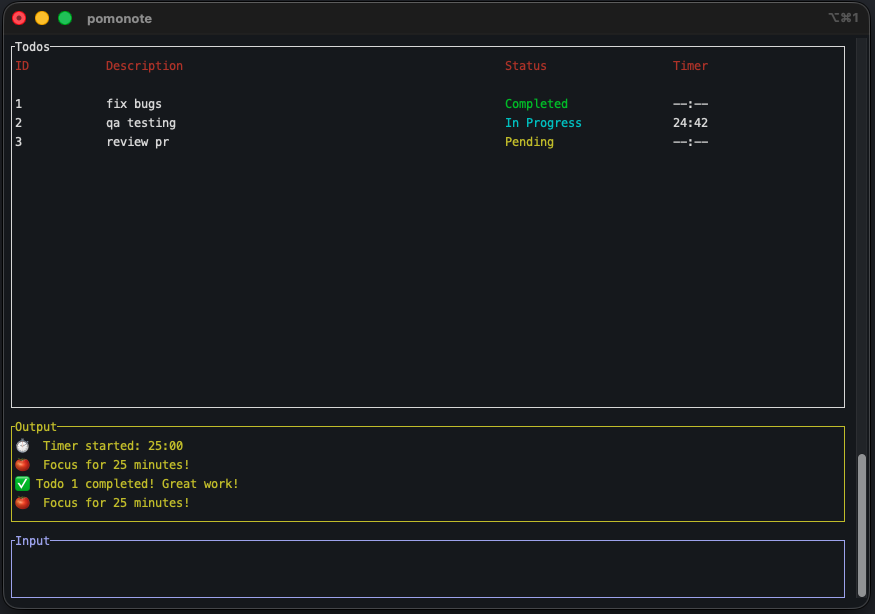 Pomonote
- Terminal-Based Interface: No need to switch contexts. Manage your tasks right where you code.
- Pomodoro Timer: A 25-minute timer to help you stay focused on your tasks.
- Simple Task Management: Add, remove, start, stop, and complete tasks with simple commands.
- Lightweight and Fast: Built with Rust for performance.
- Persistent Storage: Your tasks are saved in a lightweight JSON file, so you don't lose them.
You can install Pomonote using the provided Zsh script.
-
Clone the repository:
git clone https://github.com/willnjl/pomonote.git cd pomonote -
Run the installation script: This script will build the application and install it into
~/bin/pomonote../install.zsh
-
Ensure
~/binis in your PATH: Make sure~/binis in your shell'sPATHvariable. You can add it to your.zshrcor.bashrcfile:export PATH="$HOME/bin:$PATH"
To start Pomonote, simply run:
pomonoteThe application will launch in your terminal.
Pomonote uses a simple command-based interface for task management.
| Command | Aliases | Description | Example |
|---|---|---|---|
add |
Adds a new task. | add "Fix the main bug" |
|
remove |
rm |
Removes one or more tasks by their ID. | remove 1 3 |
start |
Starts the timer for one or more tasks. | start 2 |
|
stop |
Stops the timer for one or more tasks. | stop 2 |
|
complete |
done |
Marks one or more tasks as complete. | complete 1 |
toggle |
{id} |
Toggles the status of one or more tasks. | 1 2 |
quit |
exit, q |
Exits the application. | q |
To build and run the application for development:
cargo runTo watch for changes and automatically rebuild:
cargo watch -x "test" -x "run"This project is licensed under the MIT License. See the LICENSE file for details.