You signed in with another tab or window. Reload to refresh your session.You signed out in another tab or window. Reload to refresh your session.You switched accounts on another tab or window. Reload to refresh your session.Dismiss alert
Usage: ./migrate.py [OPTIONS]... [DESTINATION] [USER LIST FILE]
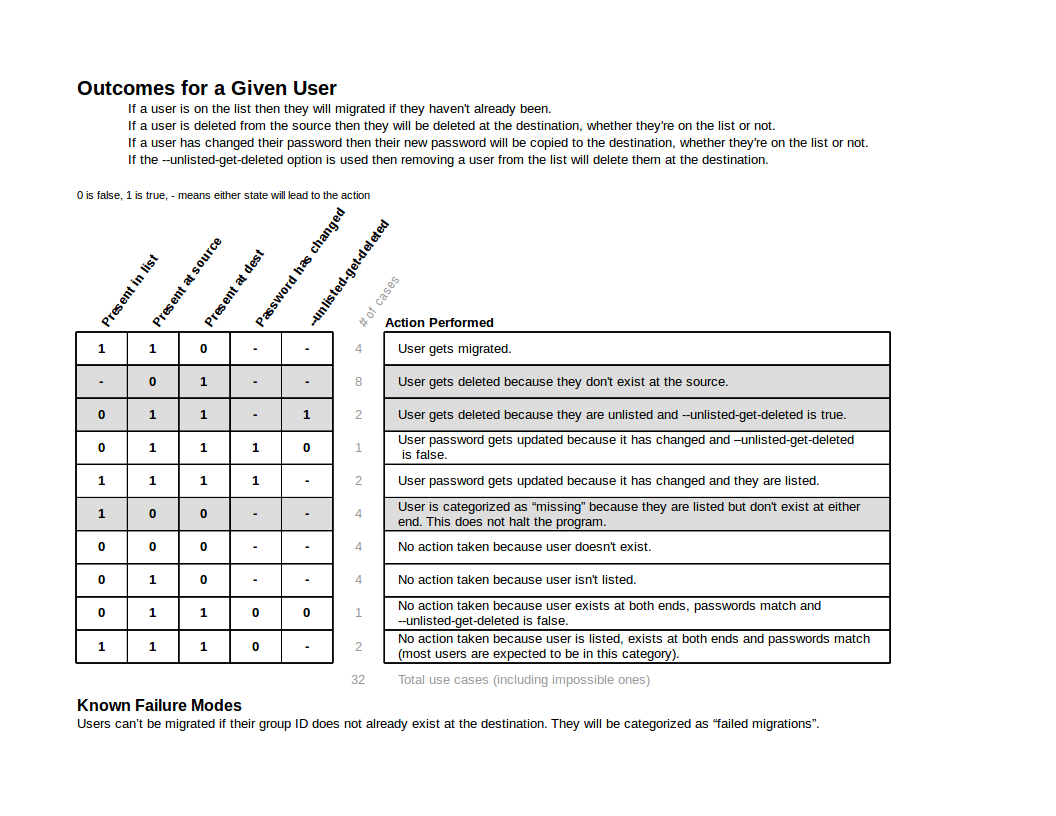
Transfer/update user accounts specified in USER LIST FILE to the DESTINATION computer and delete users at the destination that no longer exist locally. The USER LIST FILE must contain a new-line separated list of usernames. Changed passwords are the only attribute that will be propagated and this will occur regardless of whether that user is in the USER LIST FILE.
The user list must be a text file containing a newline-separated list of usernames. The network destination needs to be pre-authorized for ssh access which can be done with ssh-keygen.
Command-line Options
--help
display message explaining options and usage
-u, --unlisted-get-deleted
removing a user from USER LIST FILE will delete it at DESTINATION
-v, --verbose
provide more information about actions taken
-s, --simulate
simulate running the program, but perform no actions
- The program should not alter system accounts (1001 < uid < 60000).
- The program should not alter user accounts on the machine it is run from.
- The program should not alter the text file it is given (the one listing users to be migrated).
Program Requirements
- This program must be run as the superuser so it can access /etc/shadow and the execution lock file that prevents more than one instance from running.
- This program must be pre-authorized for ssh access on the remote machine using ssh-keygen.
- Pre-authorized access must be connecting to the root account on the remote machine so it can remotely alter user accounts.
- Problems with mismatched locales between the source and destination machines can cause Perl to start dumping warning about that. This can be solved by running "dpkg-reconfigure locales" at both ends and selecting the same locale.
- Users that are being transferred will retain their group ID. That group ID must already exist at the destination machine.