
SpeedyBench is a lightweight, self-hosted network speed test application. It provides an intuitive interface to accurately measure your network's ping, jitter, download, and upload speeds.
The backend is built with Go for maximum performance and minimal resource footprint, while the frontend is a modern, responsive single-page application built with TypeScript and Vite.


Animated Demo
- Accurate Metrics: Measures ping, jitter, download, and upload bandwidth.
- Interactive Visualizations: Includes real-time SVG charts and detailed statistical tables (accessible via the info icon) for in-depth analysis of download and upload phases, with quick one-click copying of measurements in TSV format.
- Lightweight: Distributed as a single, self-contained binary with embedded frontend assets.
- Built-in Self-Updater: Update the binary in-place on demand from GitHub Releases via
./speedybench updatewith SHA256 checksum verification. - Self-Hosted: Perfect for home labs, private networks, or public servers to test routing and connectivity.
- Cross-Platform: Runs seamlessly on Linux, macOS, and Windows.
- Secure by Default: Containerized environments run as non-root with read-only filesystems and dropped capabilities.
You can run SpeedyBench using a pre-compiled binary or via Docker.
- Download the latest binary for your operating system and architecture from the Releases page.
- Extract the archive. The binary is already executable, but we recommend restricting permissions for better security (Linux/macOS):
chmod 500 speedybench
- Run the application:
./speedybench
- Access the web interface at
http://127.0.0.1:8989.
SpeedyBench provides built-in CLI commands and options for maintenance:
update: Queries GitHub Releases on demand, verifies SHA256 checksums, and performs an atomic in-place binary upgrade:./speedybench update
help,-h,--help: Displays usage instructions, available commands, and environment variables:./speedybench helpversion: Prints the installed version of SpeedyBench:./speedybench version
--healthcheck: Executes a lightweight HTTP health check against the local server (exiting with code 0 if healthy, 1 if unhealthy). Specifically designed for Docker container and Compose health checks in minimalscratchenvironments:./speedybench --healthcheck
SpeedyBench can be configured using the following environment variables:
SPEEDYBENCH_HOST: If not provided, the server listens on localhost (127.0.0.1) by default for security reasons. If set toall(equivalent to0.0.0.0), it will listen on all available network interfaces. Alternatively, you can explicitly specify an IP address to bind to a specific interface.SPEEDYBENCH_PORT: The port for the web server to listen on (default:8989). For security reasons, the port must be strictly within the restricted range of1025to65535to prevent binding to privileged ports. (Note: When using Docker, you do not need to change this variable; simply map your desired host port to the container's default8989port, e.g.,-p 9090:8989).SPEEDYBENCH_MAX_CONNS: The maximum number of concurrent speed test connections allowed globally (default:100). This is a DoS protection feature to prevent server resource exhaustion. If provided, it must be an integer between5and65535.
View execution examples
1. Localhost and standard port:
# By default, the server binds to 127.0.0.1:8989
./speedybench

# Which is exactly equivalent to:
SPEEDYBENCH_HOST=127.0.0.1 SPEEDYBENCH_PORT=8989 ./speedybench
2. Local IP, non-standard port, and concurrent connection limit:
SPEEDYBENCH_MAX_CONNS=200 SPEEDYBENCH_HOST=192.168.1.100 SPEEDYBENCH_PORT=9090 ./speedybench3. Listening on all interfaces and standard port:
# Using 'all' is exactly equivalent to using '0.0.0.0'
SPEEDYBENCH_HOST=all ./speedybenchYou can easily deploy SpeedyBench using Docker Compose. A production-ready docker-compose.yaml is provided in the repository.
- Define your base directory and download the
docker-compose.yamlfile:export BASE_DIR="/opt/speedybench" mkdir -p "${BASE_DIR}" curl -sSL -o "${BASE_DIR}/docker-compose.yaml" https://raw.githubusercontent.com/underhax/speedybench/main/docker/docker-compose.yaml
- Start the container:
docker compose -f "${BASE_DIR}/docker-compose.yaml" up -d - Access the web interface at
http://127.0.0.1:8989.
To stop and remove the container, run:
docker compose -f "${BASE_DIR}/docker-compose.yaml" downAlternatively, you can run the image directly with docker run:
View manual docker run command
docker run -d \
  --name speedybench \
  --hostname speedybench \
  -p 127.0.0.1:8989:8989 \
  --restart always \
  --user 65534:65534 \
  --ulimit nofile=65535:65535 \
  --cpus 1.0 \
  --memory 128m \
  --memory-reservation 32m \
  --security-opt no-new-privileges:true \
  --cap-drop ALL \
  --read-only \
  --tmpfs /tmp:mode=1777,noexec,nosuid \
  --health-cmd "CMD /app/speedybench -healthcheck" \
  --health-interval 30s \
  --health-timeout 5s \
  --health-retries 3 \
  --health-start-period 10s \
ghcr.io/underhax/speedybench:latestView available Client-Side Settings
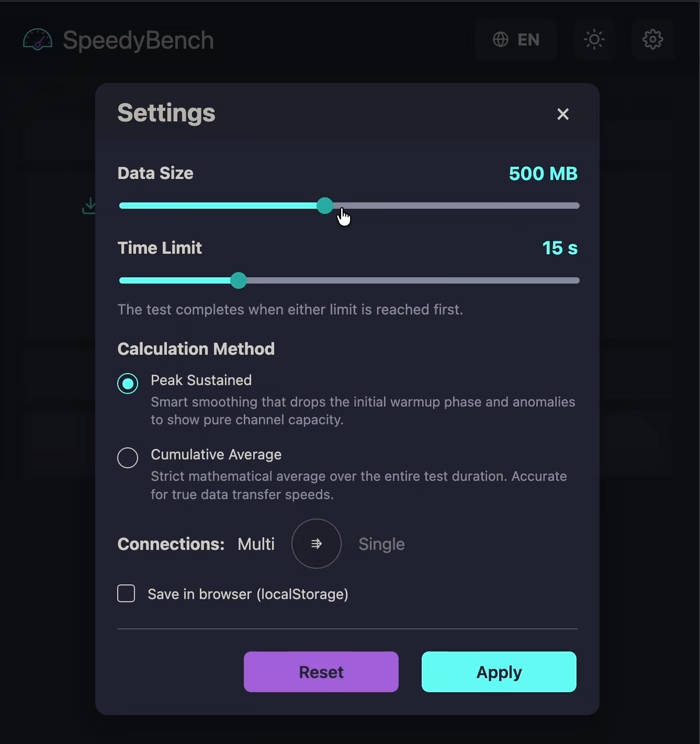
SpeedyBench offers several customizable parameters directly from the web interface to tailor the benchmark to your specific network environment:
- Data Size: The maximum volume of data (in megabytes) transferred during a single test phase (download or upload).
- Time Limit: The maximum duration (in seconds) allowed for each test phase.
Note: The active test phase completes automatically as soon as either the Data Size or the Time Limit is reached, whichever occurs first.
- Calculation Method: Toggles between Cumulative Average and Peak Sustained. Cumulative Average calculates the total data transferred over the total time elapsed. Peak Sustained filters out the most unstable portions of the test (dropping the bottom 30% and top 10% of samples) to provide a more accurate representation of your stable sustained bandwidth.
- Connections: Toggles between Single and Multi-stream modes. Multi-stream opens multiple concurrent HTTP connections to fully saturate available bandwidth, which is ideal for testing maximum throughput. Single-stream evaluates the throughput and stability of a single TCP connection.
Note: The exact number of concurrent threads in Multi-stream mode is automatically determined by the number of available CPU cores on the backend server (capped at
3threads for servers with 4 cores or fewer, and5threads for servers with more than 4 cores). - Save in browser: If enabled, your configuration preferences are persisted across browser sessions using
localStorage. If disabled, they are stored temporarily insessionStorageand reset when the tab is closed.
View Nginx Configuration Examples
If you are running SpeedyBench behind an Nginx reverse proxy, you can configure it based on your routing needs:
server {
    listen 443 ssl;
    server_name speedybench.example.com;

    # SSL configuration
    ssl_certificate /path/to/cert.pem;
    ssl_certificate_key /path/to/key.pem;

    # Security recommendations for TLS
    ssl_protocols TLSv1.2 TLSv1.3;
    ssl_prefer_server_ciphers on;
    ssl_ciphers ECDHE-ECDSA-AES128-GCM-SHA256:ECDHE-RSA-AES128-GCM-SHA256:ECDHE-ECDSA-AES256-GCM-SHA384:ECDHE-RSA-AES256-GCM-SHA384:ECDHE-ECDSA-CHACHA20-POLY1305:ECDHE-RSA-CHACHA20-POLY1305;
    ssl_session_cache shared:SSL:10m;
    ssl_session_timeout 10m;

    # Disable HTTP/2 for accurate speedybench results on high-speed links
    # (HTTP/2 multiplexing flow control can artificially limit single-stream throughput)
    http2 off;

    location / {
        proxy_pass http://127.0.0.1:8989;

        # SpeedyBench specific optimizations
        client_max_body_size 35m;
        proxy_request_buffering off;
        proxy_buffering off;
        proxy_max_temp_file_size 0;

        # Standard proxy headers
        proxy_redirect      off;
        proxy_set_header    X-Real-IP           $remote_addr;
        proxy_set_header    X-Forwarded-For     $proxy_add_x_forwarded_for;
        proxy_set_header    X-Forwarded-Proto   $scheme;
        proxy_set_header    Host                $http_host;
        proxy_set_header    X-NginX-Proxy       true;

        # Optimize keep-alive connections to the backend
        proxy_http_version  1.1;
        proxy_set_header    Connection          "";
    }
}If you want to host SpeedyBench under a specific path (e.g., https://example.com/speedybench/), you must use a trailing slash in the proxy_pass directive to strip the prefix before it reaches the backend.
    location /speedybench/ {
        proxy_pass http://127.0.0.1:8989/;

        client_max_body_size 35m;
        proxy_request_buffering off;
        proxy_buffering off;
        proxy_max_temp_file_size 0;

        proxy_redirect      off;
        proxy_set_header    X-Real-IP           $remote_addr;
        proxy_set_header    X-Forwarded-For     $proxy_add_x_forwarded_for;
        proxy_set_header    X-Forwarded-Proto   $scheme;
        proxy_set_header    Host                $http_host;
        proxy_set_header    X-NginX-Proxy       true;

        proxy_http_version  1.1;
        proxy_set_header    Connection          "";
    }

    location = /speedybench {
        return 301 /speedybench/;
}SpeedyBench already implements global connection limits at the application level via the SPEEDYBENCH_MAX_CONNS variable. However, if you wish to apply strict per-IP rate limiting at the reverse proxy level, you can configure Nginx to do so.
These rate limiting directives can be applied to either of the routing options described above (Root Path or Sub-directory Path).
Since a network speed test inherently generates rapid requests (especially during the latency phase) and opens multiple concurrent streams, any Nginx rate limits must be carefully tuned to avoid blocking legitimate tests.
Tuning Guide: The values provided below are strictly examples.
Note: To prevent accidental outages, the example configuration includes
limit_req_dry_run on;by default. This safe mode logs rate-limiting entries in your Nginxerror.logbut does not actually block the requests. You should monitor your logs during tests and adjust therate,burst, andlimit_connvalues depending on your expected load and whether your users share IP addresses (e.g., corporate NATs).Once you have tuned the limits to your satisfaction, remove or comment out
limit_req_dry_run on;to enforce the blocks.For a deep dive into Nginx rate limiting, please refer to the official Nginx documentation.
First, define the limit zones in your Nginx http block (typically in /etc/nginx/nginx.conf):
http {
    # ... other settings ...
    limit_conn_zone $binary_remote_addr zone=speedybench_conn:10m;
    limit_req_zone $binary_remote_addr zone=speedybench_req:10m rate=50r/s;
}
Then, apply these limits inside your location block:
    location / {
        # Example limit for concurrent connections per IP
        limit_conn speedybench_conn 50;

        # Example limit for request rate per IP (using burst to handle simultaneous test requests)
        limit_req zone=speedybench_req burst=100 nodelay;

        # Safe mode: logs rejected requests without actually blocking them.
        # Comment out or remove ONLY the line below AFTER you have finished tuning!
        limit_req_dry_run on;

        # --- Standard proxy configuration from the main example above ---
        proxy_pass http://127.0.0.1:8989;
        # ... rest of the proxy configuration ...
}For instructions on how to set up the development environment, build the project from source, or run the test suite, please refer to DEVELOPMENT.