Plain sailing in the distracting digital world
/Resources/images/icon-512.png?raw=true)
Source code for the Safari, Chrome, and Firefox extension Digital Habits: Focus, available for Mac, iOS, and other devices.
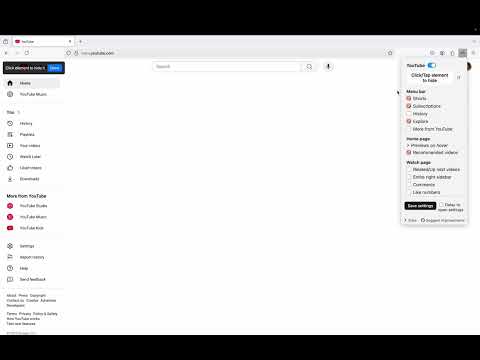
Hide distractions on any site (e.g., YouTube, Instagram, LinkedIn, Google Search, etc.). Works on any website in any browser, with pre-configured options for popular platforms.
Digital Habits: Focus is open source, developed by the Centre for Digital Habits, and backed by research.
- Works on any website, with built-in options for YouTube, Facebook, Twitter, Instagram, LinkedIn, Google Search, and WhatsApp Web
- Hide any distracting element with a single click
- Cross-browser support (Safari, Chrome, Firefox)
- Lightweight and privacy-friendly


On mobile Safari, you can create shortcuts to open distracting websites directly in the browser (bypassing their apps) and then delete the apps from your device. Example for iPhone:
- Open the Shortcuts app.
- Create a new shortcut (+ button).
- Search for the Open URL action and enter, e.g.,
https://www.instagram.com. - Tap the Share icon in the top-right and select Add to Home Screen.
To run this locally:
- Install Xcode
- Clone or download the repository
- Open the project in Xcode
- Click the Play button
See changelog-style.md for how to write release notes,
changelog.md for the notes themselves, and
docs/app-store-ci.md for GitHub Release + App Store
Connect / add-on store CI (Mac, iOS, Firefox, and optional Chrome/Edge).