
Feishu/Lark Docs、Sheet、Bitable → Markdown | AI Agent-friendly knowledge base exporter with OAuth 2.0, CLI, TUI & Claude Skills support



中文 | English
Let AI Agents read your Feishu/Lark knowledge base.
- 🤖 Built for AI — Works seamlessly with Claude/GPT Skills for document retrieval
- 📄 Full Coverage — Documents, Spreadsheets, Bitables, Wiki nodes
- 🔐 Authentication — One-time auth, automatic token refresh
- 🎨 Dual Interface — CLI + Beautiful TUI (Textual-based)
- 📦 Zero Config —
pip installand start exporting
# Install
pip install feishu-docx

# Configure credentials (one-time)
feishu-docx config set --app-id YOUR_APP_ID --app-secret YOUR_APP_SECRET

# Export! (auto-obtains tenant_access_token, no OAuth needed)
feishu-docx export "https://my.feishu.cn/wiki/KUIJwaBuGiwaSIkkKJ6cfVY8nSg"

# Optional: Use OAuth mode for user-level permissions
# feishu-docx config set --auth-mode oauth && feishu-docx authEnable Claude to access your Feishu knowledge base directly!
This project includes a Claude Skill at .skills/feishu-docx/SKILL.md.
Copy this Skill to your agent project, and Claude can:
- 📖 Read Feishu knowledge base as context
- 🔍 Search and reference internal documents
- 📝 (Planned) Write conversation content back to Feishu
| Feature | Description |
|---|---|
| 📄 Document Export | Docx → Markdown with formatting, images, tables |
| 📊 Spreadsheet Export | Sheet → Markdown tables |
| 📋 Bitable Export | Multidimensional tables → Markdown |
| 📚 Wiki Export | Auto-resolve wiki nodes |
| 🗂️ Wiki Batch Export | Recursively export entire wiki space with hierarchy |
| 🗄️ Database Schema | Export APaaS database structure to Markdown |
| 🖼️ Auto Image Download | Images saved locally with relative paths |
| 🔐 Auth | Auto tenant_access_token (recommended) or OAuth 2.0 |
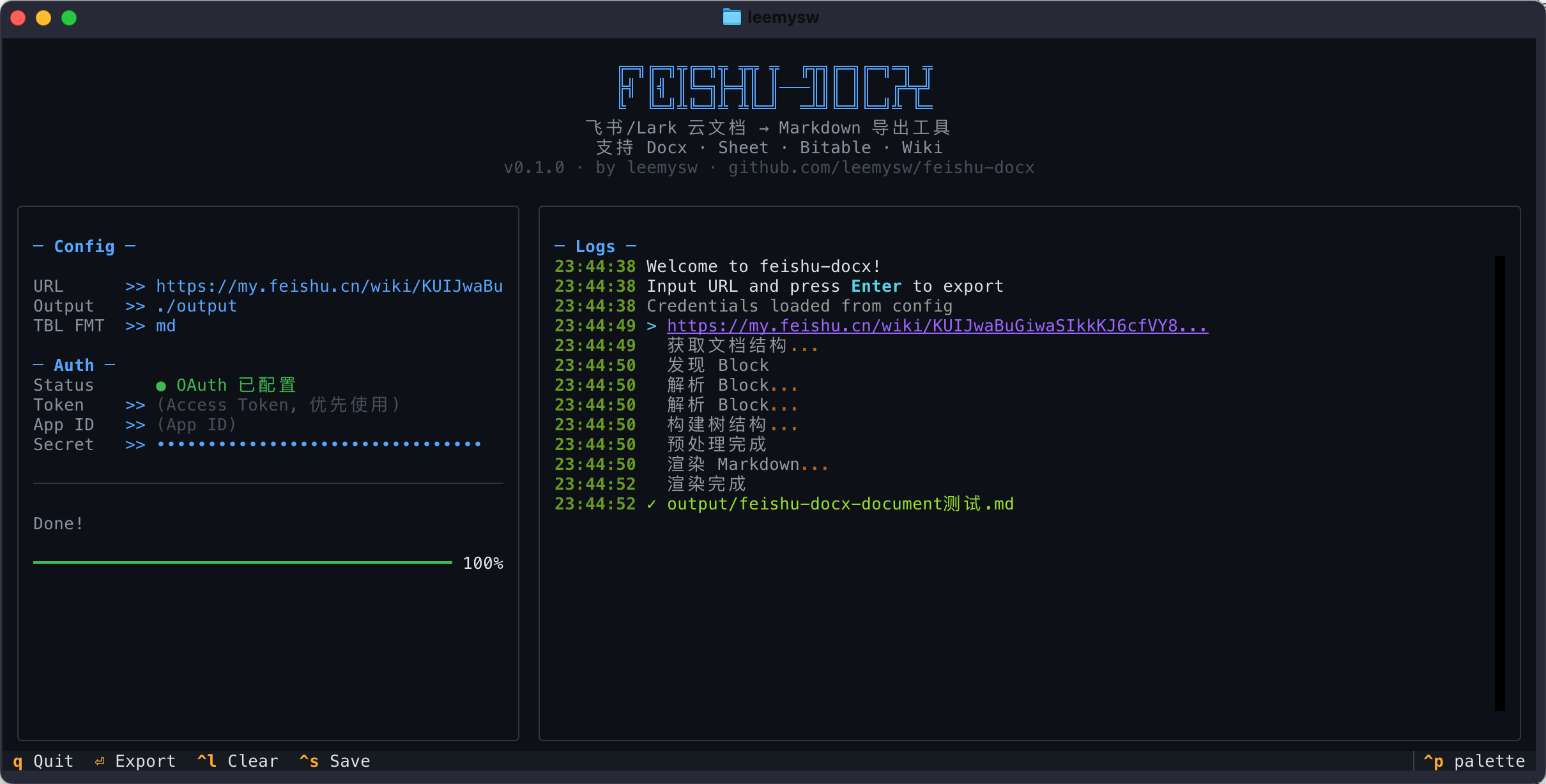
| 🎨 Beautiful TUI | Terminal UI powered by Textual |
This tool currently supports exporting the following Feishu/Lark document components:
| Category | Features | Status | Notes |
|---|---|---|---|
| Basic Text | Headings, Paragraphs, Lists, Tasks (Todo), Code Blocks, Quotes | ✅ | Fully Supported |
| Formatting | Bold, Italic, Strikethrough, Underline, Links, @Mentions | ✅ | Fully Supported |
| Layout | Columns, Callouts, Dividers | ✅ | Fully Supported |
| Tables | Native Tables | ✅ | Export to Markdown/HTML |
| Media | Images, Drawing Boards | ✅ | Drawing boards exported as images |
| Embedded | Spreadsheets (Sheets), Bitable | ✅ | Text content only |
| Special | Synced Blocks | Original blocks within the same doc only | |
| Files | Attachments | ✅ | File name + download link |
# Export single document to specific directory
feishu-docx export "https://xxx.feishu.cn/docx/xxx" -o ./docs

# Batch export entire wiki space (preserves hierarchy)
feishu-docx export-wiki-space <space_id_or_url> -o ./wiki_backup --max-depth 5

# Export APaaS database schema
feishu-docx export-workspace-schema <workspace_id> -o ./database_schema.md

# Use token directly
feishu-docx export "URL" -t your_access_token

# Launch TUI
feishu-docx tuifrom feishu_docx import FeishuExporter
# Initialize (uses tenant_access_token by default)
exporter = FeishuExporter(app_id="xxx", app_secret="xxx")
# Export single document
path = exporter.export("https://xxx.feishu.cn/wiki/xxx", "./output")
# Get content without saving
content = exporter.export_content("https://xxx.feishu.cn/docx/xxx")
# Batch export entire wiki space
result = exporter.export_wiki_space(
space_id="xxx",
output_dir="./wiki_backup",
max_depth=3,
)
print(f"Exported {result['exported']} docs to {result['space_dir']}")- Create app at Feishu Open Platform
- Add redirect URL:
http://127.0.0.1:9527/ - Request permissions:
"docx:document:readonly"  # 查看云文档
"wiki:wiki:readonly"  # 查看知识库
"drive:drive:readonly"  # 查看云空间文件(图片下载)
"sheets:spreadsheet:readonly"  # 查看电子表格
"bitable:app:readonly"  # 查看多维表格
"board:whiteboard:node:read"  # 查看白板
"contact:contact.base:readonly"  # 获取用户基本信息(@用户名称)
"offline_access" # 离线访问(获取 refresh_token)- Save credentials:
feishu-docx config set --app-id cli_xxx --app-secret xxx| Tenant Mode (Default) | OAuth Mode | |
|---|---|---|
| Token Type | tenant_access_token |
user_access_token |
| Setup | Configure permissions in Open Platform | Request permissions during OAuth flow |
| User Interaction | ✅ Automatic, no user action needed | ❌ Requires browser authorization |
| Access Scope | Documents the app has permission to | Documents the user has permission to |
| Best For | Server automation, AI Agents | Accessing user's private documents |
Tenant Mode (Recommended for most cases):
# One-time setup
feishu-docx config set --app-id xxx --app-secret xxx

# Export (auto-obtains tenant_access_token)
feishu-docx export "https://xxx.feishu.cn/docx/xxx"
⚠️ Tenant mode requires pre-configuring document permissions in Feishu Open Platform → App Permissions.
OAuth Mode (For user-level access):
# One-time setup
feishu-docx config set --app-id xxx --app-secret xxx --auth-mode oauth
feishu-docx auth  # Opens browser for authorization

# Export (uses cached user_access_token)
feishu-docx export "https://xxx.feishu.cn/docx/xxx"
💡 OAuth mode requests permissions during the authorization flow, no pre-configuration needed.
| Command | Description |
|---|---|
export <URL> |
Export single document to Markdown |
export-wiki-space <space_id> |
Batch export wiki space with hierarchy |
export-workspace-schema <id> |
Export APaaS database schema |
create <title> |
Create new Feishu document |
write <URL> |
Append Markdown content to document |
update <URL> |
Update specific block in document |
auth |
OAuth authorization |
tui |
Launch TUI interface |
config set |
Set credentials |
config show |
Show configuration |
config clear |
Clear cache |
- Literal
\nappears afterwrite -c
- Cause: shell escaping turns
\ninto plain text. - Recommendation: for multiline input, prefer
-f <markdown_file>or shell$'...'.
- CLI says success, but formatting is wrong
- Recommendation: always verify with export immediately after write.
- Recommended command:
feishu-docx export "<DOC_URL>" --stdout -b
updatereturnscode: 1770001/invalid param
- Observation: some block types/payloads fail validation.
- Hotfix: append a single-line plain-text record first to preserve data, then format later.
- Safer append flow
cat > /tmp/entry.md <<'MD'
## New Account (YYYY-MM-DD)
- URL: http://example.com
- Username: alice
- Password: secret
MD

feishu-docx write "<DOC_URL>" -f /tmp/entry.md
feishu-docx export "<DOC_URL>" --stdout -b | tail -n 80- Document/Sheet/Wiki export
- OAuth 2.0 + Token refresh
- TUI interface
- Claude Skills support
- Batch export entire wiki space
- MCP Server support
- Write to Feishu (create/update docs)
See CHANGELOG.md for version history.
MIT License - See LICENSE
⭐ Star this repo if you find it helpful!