This repository is a practical Playwright + Jira integration example using @testream/playwright-reporter. It shows how to upload Playwright test results and failure artifacts (screenshots and traces) from local runs and GitHub Actions into Jira via Testream.
If you are searching for "Playwright Jira reporter", "Playwright GitHub Actions Jira integration", or "send Playwright results to Jira", this repo is the implementation template.
- CI-ready: Includes a complete GitHub Actions workflow.
- Failure artifact capture: Screenshots are captured on failure and uploaded.
- Flexible upload control: Upload is enabled by
TESTREAM_API_KEYand can be toggled viaTESTREAM_UPLOAD_ENABLED. - Practical demo: Intentional failures show realistic triage in Jira.
Testream is an automated test management and reporting platform for Jira teams. It ingests test results from Playwright and other frameworks, then provides failure diagnostics, trends, and release visibility directly in Jira.
If this sample repository is not the framework you need, browse all native reporters in the Testream docs: https://docs.testream.app/.
Click to see how Testream turns raw CI test results into actionable Jira insights (failures, trends, and release visibility):
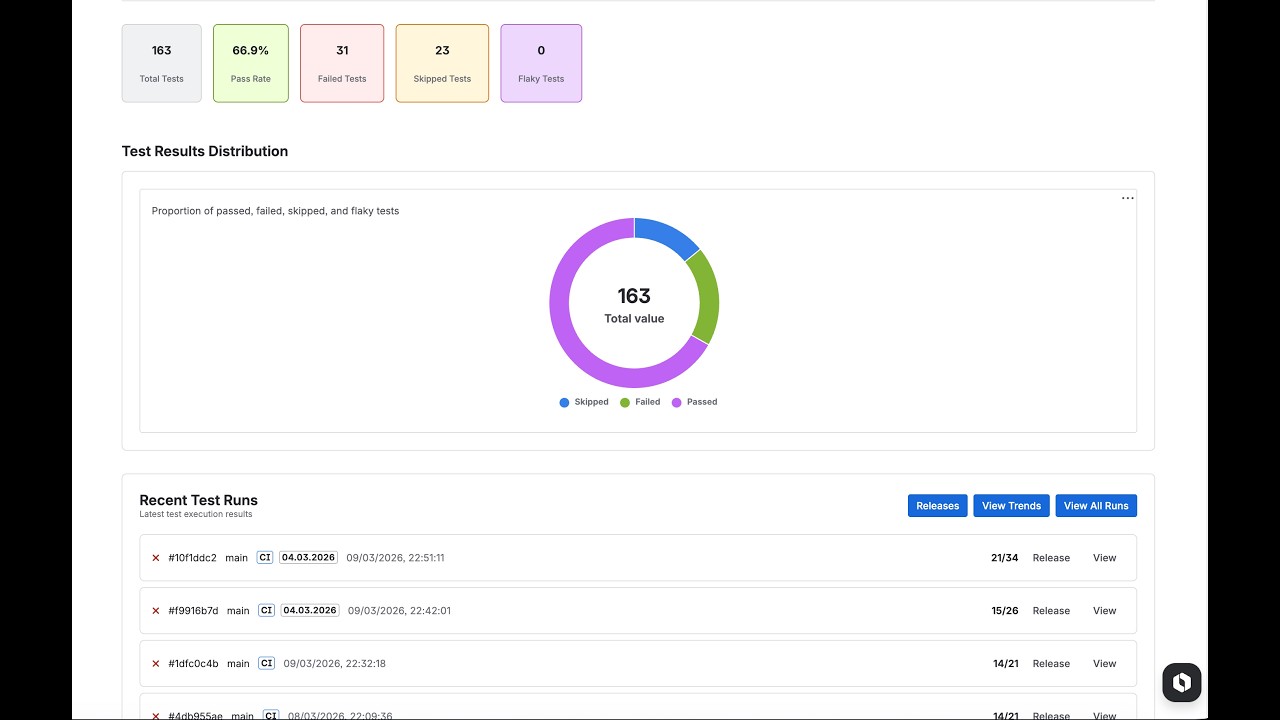
Install Testream Automated Test Management and Reporting for Jira in your Jira workspace to view uploaded runs.
tests/
  passing.spec.ts   - Smoke tests expected to pass
  failing.spec.ts   - Intentional failures to demonstrate artifact capture
playwright.config.ts
.github/workflows/playwright.yml
.env.example
failing.spec.ts is intentionally incorrect to show end-to-end failure diagnostics in Testream/Jira.
- Sign in at testream.app.
- Create a project.
- Copy your API key.
npm install
npx playwright install chromiumcp .env.example .envSet at least:
TESTREAM_API_KEY=<your key>npm testWith TESTREAM_API_KEY, results upload to Testream. Without it, tests still run and local reports are generated.
Key behavior in this example:
- Reporter is always declared, but upload is controlled by
uploadEnabled. uploadEnabledrequires API key and allows an explicit off switch viaTESTREAM_UPLOAD_ENABLED=false.failOnUploadErroris set tofalsein this example.buildNameusesGITHUB_WORKFLOW.- CI metadata (
branch,commitSha,repositoryUrl,buildNumber,buildUrl) is auto-resolved. use.screenshot = 'only-on-failure'supports artifact-rich triage.
Reporter docs: https://docs.testream.app/reporters/playwright
The workflow at .github/workflows/playwright.yml runs on push, pull request, and manual dispatch.
Add this repository secret:
Settings -> Secrets and variables -> Actions -> New repository secret
| Name | Value |
|---|---|
TESTREAM_API_KEY |
Your Testream API key |
Workflow env examples already set:
| Variable | Example |
|---|---|
TEST_ENV |
ci |
GITHUB_WORKFLOW |
Auto-injected by runner |
After connecting Testream to Jira, you get:
- Dashboard summaries for run health
- Failure diagnostics with stack traces, screenshots, and traces
- Trend analytics over time
- Jira issue creation directly from failed tests
- Confirm
TESTREAM_API_KEYis present. - Confirm
TESTREAM_UPLOAD_ENABLEDis not set tofalse.
- Verify Testream project connection to the correct Jira workspace.
- Verify Testream Automated Test Management and Reporting for Jira app installation.
- Confirm GitHub Actions secrets are available to the run context.
It is an example template with production-style CI and reporter wiring intended to be adapted.
To demonstrate artifact capture (screenshots/traces) and Jira-based failure triage.
Yes. Playwright runs normally without API key-based upload.
| Approach | Benefit | Tradeoff |
|---|---|---|
| Local Playwright HTML only | Simple local debugging | No Jira-native historical analytics |
| Custom upload scripts | Flexible | Higher maintenance overhead |
| Testream Playwright reporter (this repo) | Native integration + artifact-aware Jira workflow | Requires Testream setup |
- Testream app: https://testream.app
- Testream Automated Test Management and Reporting for Jira: https://marketplace.atlassian.com/apps/3048460704/testream-automated-test-management-and-reporting-for-jira
- Playwright reporter docs: https://docs.testream.app/reporters/playwright
- Playwright docs: https://playwright.dev