


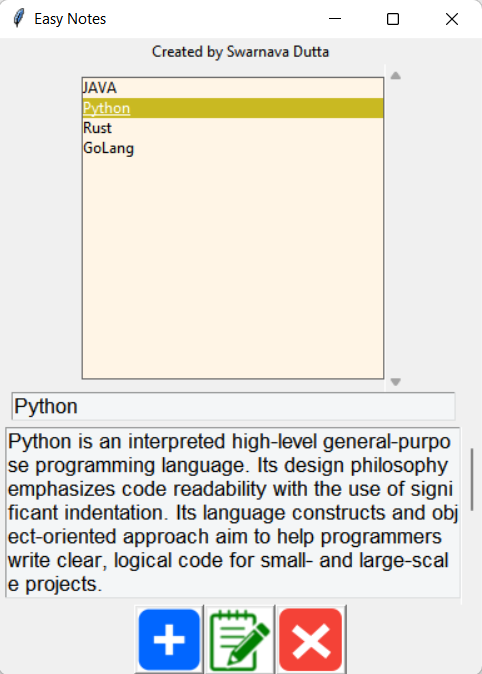
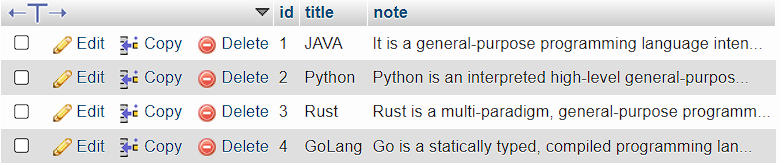
This is how the data gets saved into database
How to implement this:
- Install XAMPP from https://www.apachefriends.org/index.html
- Compile and run the code. Make sure your MySQL Admin is running on Port:
3306

Initialising the buttons
button_frame = tk.Frame(window)
photo_add = tk.PhotoImage(file="add.gif")
photo_edit = tk.PhotoImage(file="edit.gif")
photo_delete = tk.PhotoImage(file="delete.gif")
This is used to connect to database
conn = mysql.connector.connect(host="localhost", port=3306, user="root", passwd="")Creating the database
def db_create_db(conn):
    mycursor = conn.cursor()
    query = "CREATE DATABASE IF NOT EXISTS EasyNotes"
    mycursor.execute(query)
Creating a new table
def db_create_table(conn):
    db_create_db(conn)
    conn.database = "EasyNotes"
    mycursor = conn.cursor()
    query = "CREATE TABLE IF NOT EXISTS notes (" \
            "id INT AUTO_INCREMENT PRIMARY KEY, " \
            "title VARCHAR(255) NOT NULL, " \
            "note VARCHAR(10000) NOT NULL)"
    mycursor.execute(query)
Inserting a note in database
def db_insert_note(conn, title, note):
    conn.database = "EasyNotes"
    mycursor = conn.cursor()
    query = "INSERT INTO notes (title, note) VALUES (%s, %s)"
    val = (title, note)
    mycursor.execute(query, val)
    conn.commit()
    return mycursor.lastrowid
Showing all the notes from database
def db_select_all_notes(conn):
    conn.database = "EasyNotes"
    query = "SELECT * from notes"
    mycursor = conn.cursor()
    mycursor.execute(query)
    return mycursor.fetchall()
Selecting a specific note
def db_select_specific_note(conn, id):
    conn.database = "EasyNotes"
    mycursor = conn.cursor()
    mycursor.execute("SELECT title, note FROM notes WHERE id = " + str(id))
    return mycursor.fetchone()
Updating a note
def db_update_note(conn, title, note, id):
    conn.database = "EasyNotes"
    mycursor = conn.cursor()
    query = "UPDATE notes SET title = %s, note = %s WHERE id = %s"
    val = (title, note, id)
    mycursor.execute(query, val)
    conn.commit()
Deleting a note
def db_delete_note(conn, id):
    conn.database = "EasyNotes"
    mycursor = conn.cursor()
    query = "DELETE FROM notes WHERE id = %s"
    adr = (id,)
    mycursor.execute(query, adr)
    conn.commit()