
AI-Powered Vendor Risk & Compliance Screening Tool
Built for the Microsoft Agents League Hackathon 2026
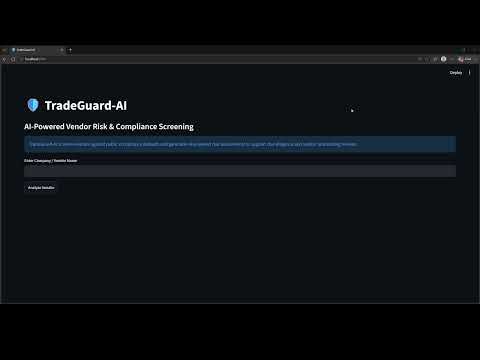
Every business needs to onboard vendors — suppliers, partners, service providers. Before signing a contract, compliance teams manually check regulatory databases. This takes hours, is error prone, and is often skipped entirely.
TradeGuard-AI automates this process in seconds using AI-powered reasoning.
TradeGuard-AI uses Microsoft Foundry IQ as the core reasoning engine — not just for text generation, but for multi-step agentic reasoning over real screening data.
Step 1 — Context Building After the Entity Analyzer screens the vendor against regulatory databases, the screening results (matched entities, dataset sources, match types) are structured and passed to Foundry IQ as context — not a simple question, but a compliance evidence package.
Step 2 — Multi-step Reasoning Foundry IQ reasons through multiple factors simultaneously:
- Is the matched entity the same legal entity as the vendor being screened?
- What sector and jurisdiction does this vendor operate in?
- What regulatory frameworks apply based on the findings?
- What is the overall risk level — Low, Medium, or High?
Step 3 — Grounded Output Unlike generic AI responses, Foundry IQ output is grounded in actual screening data:
- If OFAC returns no match, Foundry IQ does not mention OFAC in the report
- If SEBI returns a match, Foundry IQ explains what that match means specifically for that vendor
- Every report is different because the reasoning adapts to what was actually found
Step 4 — Structured Report Generation Foundry IQ generates a structured compliance report with six sections:
- Company Overview
- Screening Summary
- Vendor Risk Analysis
- Compliance Exposure
- Recommended Due Diligence Actions
- Important Notice
TradeGuard-AI helps businesses verify whether a vendor or company is safe to onboard before entering a business relationship. The platform automates vendor screening by cross-checking company information against public regulatory and compliance datasets and generating an AI-powered risk assessment in seconds.
By combining automated screening with Microsoft Foundry IQ-powered reasoning, TradeGuard-AI enables procurement and compliance teams to make faster, more informed onboarding decisions while reducing manual review effort and improving consistency across compliance workflows.
The final output is a comprehensive vendor risk report containing:
- Risk Level (Low / Medium / High)
- Company Overview
- Screening Summary
- Vendor Risk Analysis
- Compliance Exposure Assessment
- Recommended Due Diligence Actions
- OFAC SDN List (US Treasury) — Global sanctions screening
- SEBI Debarred Entities (NSE India) — Indian securities market debarments
- User enters a company or vendor name
- Entity Analyzer screens against regulatory databases
- Screening results passed to Microsoft Foundry IQ as structured context
- Foundry IQ reasons through entity identity, risk level and compliance exposure
- Structured risk report generated and presented for human review
- Frontend: Streamlit
- AI: Azure OpenAI (GPT) via Microsoft Foundry IQ
- Data: OFAC SDN List, SEBI Debarred Entities (NSE India)
- Language: Python
| Dataset | Source | License |
|---|---|---|
| OFAC SDN List | US Treasury Department | Public Domain |
| SEBI Debarred Entities | NSE India | Public Regulatory Data |
- Clone the repository
- Install dependencies:
pip install -r requirements.txt
- Create a
.envfile:
AZURE_OPENAI_ENDPOINT=your_endpoint
AZURE_OPENAI_API_KEY=your_key
AZURE_OPENAI_DEPLOYMENT=your_deployment
- Run the app:
streamlit run app.py
TradeGuard-AI presents screening findings only. It does not approve or reject vendors. All final vendor decisions must be made by a qualified compliance officer.
TradeGuard-AI is an educational project for demonstrating AI-powered vendor screening and risk assessment. Results are for informational purposes only and should not be used as the sole basis for compliance or business decisions. Data is sourced from public domain government datasets.