

You do not need to understand the whole codebase first. Follow the illuminated path in the graphic:
01 — Choose source code → 02 — Detect data elements → 03 — Trace data flows → 04 — Generate evidence → 05 — Fix risky paths
| What you are looking at | Plain-English meaning |
|---|---|
| Input | What the user or system supplies |
| Core | The repository’s main processing loop |
| Guardrails | Configuration, policy, filters, or approval boundaries |
| Output | The result the system returns or deploys |
| Proof | Tests, reports, previews, logs, or other visible evidence |
Status, stated plainly: This fork preserves HoundDog.ai’s upstream scanner documentation and licensing. The visual is a Sonoxo portfolio guide, not a claim of a new integration.
Accessibility and motion
The hero is a native SVG with descriptive text. Animation automatically stops when your device enables Reduce Motion. No JavaScript, tracking code, video autoplay, or external image host is required.
HoundDog.ai is an ultra-fast privacy scanner that detects sensitive data flows and leaks in your code.
It answers questions such as:
- What data is processed? (e.g., personal data, financial data, health data)
- Where is data stored? (e.g., logs, files, databases)
- Who is data shared with? (e.g., AWS, Stripe, internal microservices)
It is useful for:
- Early prevention of data leaks during development.
- Automated and evidence-based data mapping for privacy compliance (e.g., GDPR, HIPAA).
- Reducing engineering fatigue, stale data inventories, and regulatory fines.
HoundDog.ai in action:
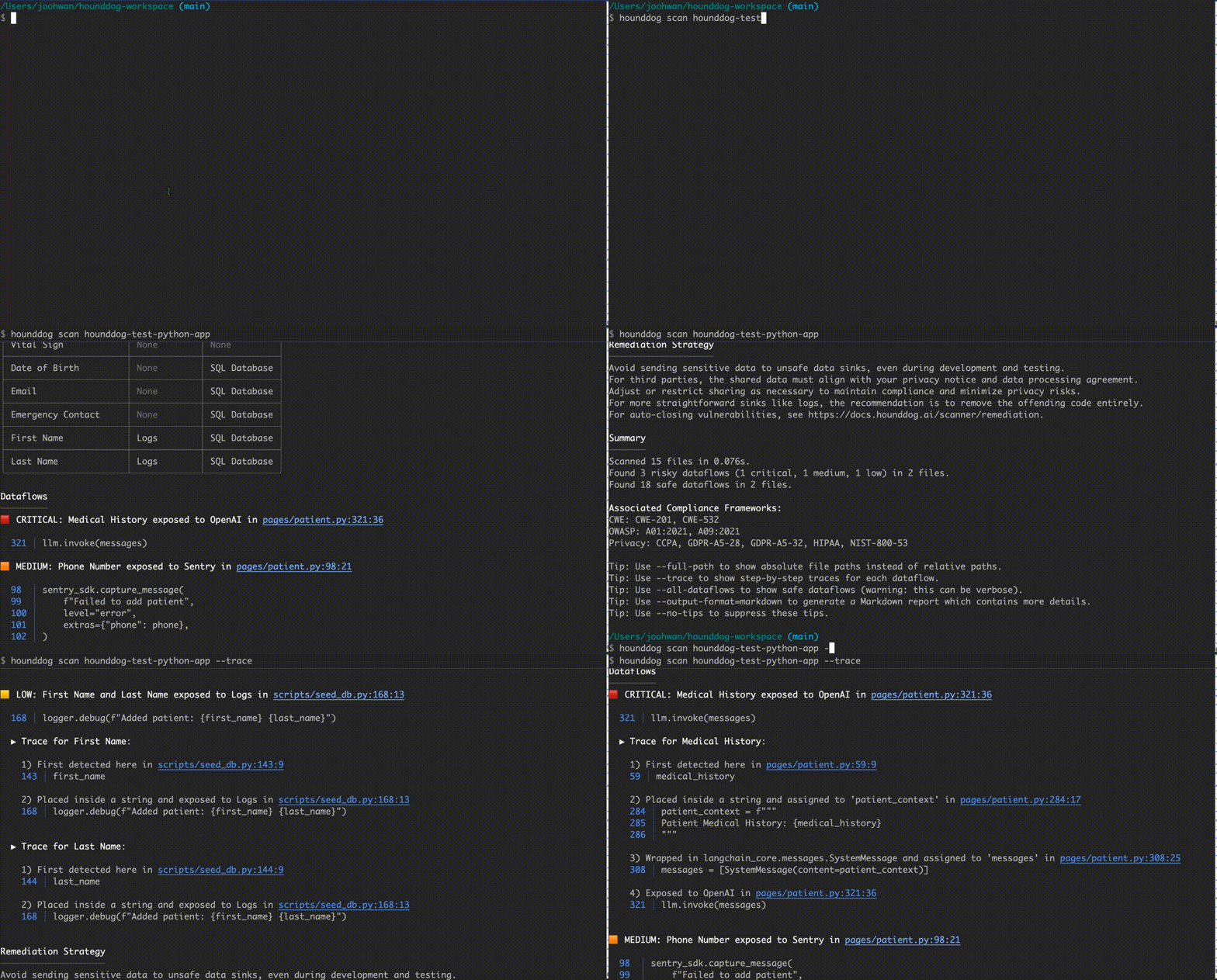
Its technical highlights:
- Runs as a standalone binary on your machine. Your code never leaves your environment by default.
- Fast and ready for large codebases. It can scan 1 million+ lines of code in seconds on modern laptops.
- Supports 100s of data elements and sinks out of the box.
Check out the sample Markdown report and FAQ for more information.
curl -fsSL https://raw.githubusercontent.com/hounddogai/hounddog/main/install.sh | shTo install a specific version:
curl -fsSL https://raw.githubusercontent.com/hounddogai/hounddog/main/install.sh | sh -s -- --version 1.2.3irm https://raw.githubusercontent.com/hounddogai/hounddog/main/install.ps1 | iexTo install a specific version:
$env:HOUNDDOG_VERSION = '1.2.3'; irm https://raw.githubusercontent.com/hounddogai/hounddog/main/install.ps1 | iexAlternatively, you can download the binary directly from the releases page.
# Linux and macOS
rm -rf ~/.hounddog

# Windows
Remove-Item -Recurse -Force "$env:LocalAppData\hounddog"hounddog scan [OPTIONS] [PATH]For a quick demonstration, you can scan our test repository:
# Clone the test repository
git clone https://github.com/hounddogai/hounddog-test-python-app

# Scan the test repository
hounddog scan hounddog-test-python-app
By default, only risky dataflows are shown to minimize noise. Use --all-dataflows to see everything:
hounddog scan hounddog-test-python-app --all-dataflowsUse --trace to see detailed dataflow traces (one of our coolest features and useful for debugging):
hounddog scan hounddog-test-python-app --traceUse --output-format=markdown to generate a Markdown report:
hounddog scan hounddog-test-python-app --output-format=markdown --output-file=report.mdWe recommend the Markdown Viewer Chrome extension for viewing it (see setup and sample report).
To see the up-to-date list of supported data elements in HTML format:
hounddog data-elementsTo see the up-to-date list of supported data sinks in HTML format:
hounddog data-sinksUse --help to see all subcommands and options:
hounddog [SUBCOMMAND] --help| Free | Enterprise | |
|---|---|---|
| Supported Languages | Python, JavaScript, TypeScript | Languages in Free + C#, Go, Java, SQL, GraphQL, OpenAPI |
| Usage Options | CLI, IDE | CLI, IDE, GitHub Integration (Automated Scans, PR Reviews) |
| IDE Plugins | VS Code, JetBrains, Cursor | VS Code, JetBrains, Cursor |
| Dataflow Detection | Limited Coverage | Full Coverage |
| Rule Customization | No | Custom Data Element and Data Sink Rules |
| Privacy Reports | No | RoPA, PIA, DPIA |
| Cloud Platform | No | Issue Tracking, Alerts, SSO, RBAC, Audit Logs |
| On-Prem Deployment | No | Included |
| Support | GitHub Issues + Email | Priority Support with SLA + Dedicated Slack Channel |
Visit our Trust Center to view our latest SOC2 report, penetration testing results, and SBOM details.
No. Scans run locally. Your code never leaves your machine.
AI is used to generate and update data detection rules for scaling coverage, but scans themselves run on a deterministic static analysis engine. This keeps scans fast, cheap, and free of hallucinations.
LLMs can discover issues that traditional SAST tools miss, but they are slow, expensive, and non-deterministic. SAST tools are faster, cheaper, and predictable, but require high-effort rule maintenance and suffer from high false positive rates.
HoundDog.ai’s vision is to combine the strengths of both approaches. Our scanning engine is fully rule-based and deterministic, with a rule specification expressive enough to model real-world code at compiler-level accuracy. AI is used selectively to scale coverage across thousands of code patterns without sacrificing performance, reliability, and trust.
Secrets scanning tools look for credentials that are hardcoded directly in code, such as API keys, passwords, or tokens. For example:
exposed_api_key = "sk-proj-1234567890-abcdefghijklmnopqrstuvwxyz"HoundDog.ai, on the other hand, focuses on how sensitive data actually flows through code. It tracks values across various code paths such as assignment statements and transformations. For example:
import logging
import os

logger = logging.getLogger(__name__)

# HoundDog.ai detects that `foo` is an authentication token.
foo = os.environ.get("MY_API_KEY")

# HoundDog.ai traces values through various code paths.
bar = {"message": f"api_key={foo}".strip()}

# HoundDog.ai detects that `bar` contains an authentication token (tainted) and is leaked to a log.
logger.info("data=%s", bar)DIY SAST tools like Semgrep and CodeQL are powerful and highly customizable, but their rules need significant upfront investment to learn and maintain.
HoundDog.ai is a turnkey solution that provides broad, high-quality coverage of data elements and sinks out of the box, greatly reducing the rule authoring burden. It is designed specifically for dataflow analysis, scaling efficiently to large codebases, and detecting complex data flows that general-purpose solutions miss.
Our rules are constantly evolving, and we are working hard on improving them. Please let us know any false positives or negatives, and we will be happy to address them.
View license information for HoundDog.ai's software.
If you have any questions or feedback, please create a GitHub issue or email us at support@hounddog.ai.