A powerful, user-friendly React component for building cron expressions with support for both Unix and Quartz formats





- 📖 Contributing Guidelines - Learn how to contribute
- 📜 Code of Conduct - Our community standards
- 🐛 Issue Tracker - Report bugs or request features
- 💬 Discussions - Ask questions and share ideas
- 🎯 Dual Format Support - Works with both Unix (5 fields) and Quartz (7 fields) cron formats
- 🔄 Automatic Conversion - Seamlessly convert between Unix and Quartz formats
- ✅ Built-in Validation - Comprehensive cron expression validation
- 🌍 Internationalization - Full i18n support with custom translation functions
- ♿ Accessible - WCAG compliant with keyboard navigation and screen reader support
- 📱 Responsive - Mobile-friendly design that works on all devices
- 🎨 Customizable - Easy to style and configure
- 🔒 Type Safe - Full TypeScript support with comprehensive type definitions
- ⚡ Performance Optimized - Memoized computations and efficient re-renders
- 🛡️ Error Boundaries - Graceful error handling built-in
npm install react-cron-generatoror
yarn add react-cron-generatorimport React, { useState } from 'react';
import Cron from 'react-cron-generator';
import 'react-cron-generator/build/cron-builder.css';
function App() {
const [value, setValue] = useState('0 0 00 1/1 * ? *');
return (
<Cron
onChange={(cronValue, humanReadable) => {
setValue(cronValue);
console.log('Cron:', cronValue);
console.log('Human:', humanReadable);
}}
value={value}
showResultText={true}
showResultCron={true}
/>
);
}import React, { useState } from 'react';
import Cron from 'react-cron-generator';
import 'react-cron-generator/build/cron-builder.css';
function App() {
const [value, setValue] = useState('*/5 * * * *');
return (
<Cron
onChange={(cronValue, humanReadable) => {
setValue(cronValue);
}}
value={value}
showResultText={true}
showResultCron={true}
isUnix={true} // Enable Unix format
/>
);
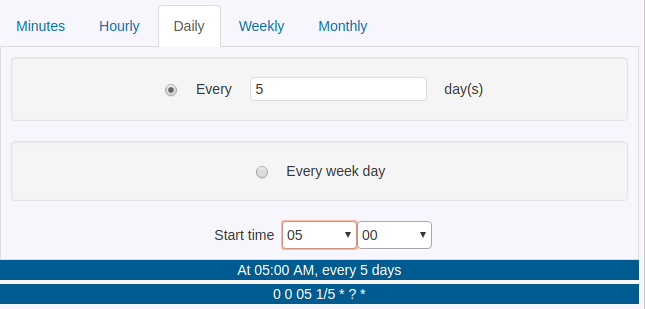
}
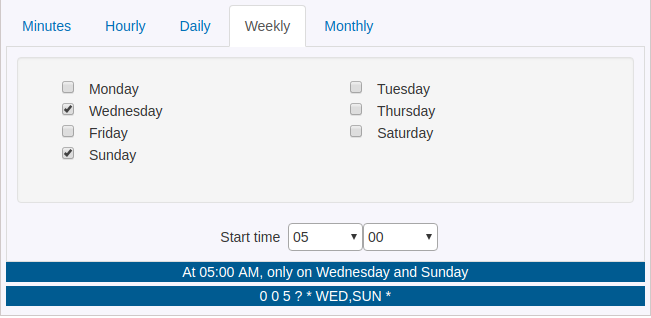
| Prop | Type | Default | Description |
|---|---|---|---|
value |
string |
undefined |
Initial cron expression (Unix: 5 fields, Quartz: 6 or 7 fields) |
onChange |
(value: string, text: string) => void |
Required | Callback fired when cron value changes. Receives cron expression and human-readable text |
onHeaderChange |
(header: string) => void |
undefined |
Callback fired when the selected tab/header changes. Receives header value ('Minutes', 'Hourly', 'Daily', 'Weekly', 'Monthly', 'Custom'). Called on initial mount and whenever tabs changes |
showResultText |
boolean |
false |
Display human-readable description below the builder |
showResultCron |
boolean |
false |
Display the cron expression below the builder |
isUnix |
boolean |
false |
Use Unix format (5 fields) instead of Quartz. Cannot be used with use6FieldQuartz |
use6FieldQuartz |
boolean |
false |
Use 6-field Quartz format instead of 7-field. Cannot be used with isUnix |
translateFn |
(key: string) => string |
undefined |
Custom translation function for i18n support |
locale |
string |
'en' |
Locale for cronstrue (human-readable text) |
options |
{ headers: HeaderType[] } |
All headers | Customize which tabs are available |
disabled |
boolean |
false |
Disable the entire component |
| Feature | Unix (5 fields) | Quartz (6 fields) | Quartz (7 fields) |
|---|---|---|---|
| Format | minute hour day month day-of-week |
second minute hour day month day-of-week |
second minute hour day month day-of-week year |
| Example | */5 * * * * |
0 */5 * * * ? |
0 0/5 * * * ? * |
| Day of Week | 0-6 (Sunday=0) | 1-7 (Sunday=1) or SUN-SAT | 1-7 (Sunday=1) or SUN-SAT |
| Special Chars | * , - / |
* , - / ? L W # |
* , - / ? L W # |
| Used By | Linux/Unix cron, most cron implementations | Quartz Scheduler (legacy) | Quartz Scheduler, Spring Framework, Java apps |
The component supports both 6-field and 7-field Quartz formats:
- 6-field format:
second minute hour day month day-of-week(e.g.,0 0 12 * * ?) - 7-field format:
second minute hour day month day-of-week year(e.g.,0 0 12 * * ? *)
Format Behavior:
The use6FieldQuartz prop controls the output format:
// Default: 7-field Quartz format
<Cron
  value="0 0 12 * * ?"  // 6-field input
  onChange={(value) => {
    console.log(value);  // "0 0 12 * * ? *" - converted to 7-field
  }}
  showResultText={true}
  showResultCron={true}
/>

// Explicitly use 6-field Quartz format
<Cron
  value="0 0 12 * * ? *"  // 7-field input
  onChange={(value) => {
    console.log(value);  // "0 0 12 * * ?" - converted to 6-field
  }}
  showResultText={true}
  showResultCron={true}
  use6FieldQuartz={true}  // Enable 6-field format
/>
Rules:
use6FieldQuartz={false}(default): Always outputs 7-field format, even if 6-field input is provideduse6FieldQuartz={true}: Always outputs 6-field format, even if 7-field input is provided- Cannot use both
isUnix={true}anduse6FieldQuartz={true}together - this will throw an error - Internally, the component always works with 7-field format for processing
import {
  unixToQuartz,
  quartzToUnix,
  detectCronFormat
} from 'react-cron-generator';

// Convert Unix to Quartz
const quartzCron = unixToQuartz('*/5 * * * *');
console.log(quartzCron); // '0 */5 * * * ? *'

// Convert Quartz to Unix
const unixCron = quartzToUnix('0 0/5 * * * ? *');
console.log(unixCron); // '*/5 * * * *'

// Auto-detect format
const format = detectCronFormat('*/5 * * * *');
console.log(format); // 'unix'import { validateCron } from 'react-cron-generator';
// Validate any format (auto-detects Unix or Quartz)
const result = validateCron('*/5 * * * *');
console.log(result);
// { isValid: true, format: 'unix' }
// Check validation result
if (result.isValid) {
console.log('Valid cron expression!');
} else {
console.error('Invalid:', result.error);
}import Cron, { HEADER } from 'react-cron-generator';
const options = {
headers: [
HEADER.MINUTES,
HEADER.HOURLY,
HEADER.DAILY,
HEADER.WEEKLY,
HEADER.MONTHLY,
HEADER.CUSTOM
]
};
<Cron options={options} {...otherProps} />import Cron from 'react-cron-generator';
const translations = {
'Every': 'Cada',
'minute(s)': 'minuto(s)',
// ... more translations
};
function translateFn(key) {
return translations[key] || key;
}
<Cron
translateFn={translateFn}
locale="es" // For cronstrue
{...otherProps}
/>The component comes with default styles. Import the CSS file:
import 'react-cron-generator/build/cron-builder.css';You can override styles by targeting the CSS classes:
.cron_builder {
  /* Your custom styles */
}

.cron_builder .nav-link {
  /* Customize tabs */
}

.cron_builder_bordering {
  /* Customize content area */
}Cron- Main cron builder component (default export)
unixToQuartz(cron: string): string- Convert Unix to Quartz formatquartzToUnix(cron: string): string- Convert Quartz to Unix formatdetectCronFormat(cron: string): 'unix' | 'quartz'- Detect cron formatvalidateCron(cron: string): ValidationResult- Validate any cron format (auto-detects Unix or Quartz)HEADER- Constants for tab headerscronstrue- Human-readable cron descriptions (from cronstrue/i18n)
CronProps- Props for Cron componentCronFormat- 'unix' | 'quartz'CronValidationResult- Validation result interfaceTranslateFn- Translation function type- And many more...
Unix: */5 * * * *
Quartz: 0 0/5 * * * ? *
Human: "Every 5 minutes"
Unix: 30 14 * * *
Quartz: 0 30 14 * * ? *
Human: "At 02:30 PM"
Unix: 0 9 * * 1
Quartz: 0 0 9 ? * MON *
Human: "At 09:00 AM, only on Monday"
Unix: 0 0 1 * *
Quartz: 0 0 0 1 * ? *
Human: "At 12:00 AM, on day 1 of the month"
- Chrome (latest)
- Firefox (latest)
- Safari (latest)
- Edge (latest)
- Mobile browsers
Contributions are welcome! We love your input and want to make contributing as easy and transparent as possible.
Please read our Contributing Guidelines and Code of Conduct before getting started.
- Fork the repository
- Create your feature branch (
git checkout -b feature/AmazingFeature) - Commit your changes (
git commit -m 'Add some AmazingFeature') - Push to the branch (
git push origin feature/AmazingFeature) - Open a Pull Request
For detailed information on:
- Setting up your development environment
- Running tests
- Code style guidelines
- Submitting pull requests
Please see our Contributing Guide.
This project is licensed under the ISC License - see the LICENSE file for details.
- cronstrue - For human-readable cron descriptions
- Viswanath Lekshmanan - Original inspiration
Sojin Antony
- GitHub: @sojinantony01
- Buy me a coffee:

Thanks to all the amazing people who have contributed to this project! 🎉
Want to see your name here? Check out our Contributing Guide!
Give a ⭐️ if this project helped you!



Made with ❤️ by Sojin Antony