


Smdn.Devices.Mcp2221A is a .NET library for the Microchip Technology MCP2221 and MCP2221A, a USB2.0 to I2C/UART Protocol Converter with GPIO. This library provides APIs that enable .NET applications to access the functions of the MCP2221/MCP2221A via the USB HID interface.
With this library, you can interface with I2C devices and control GPIO pins from any PC that has a USB port. It can be used without intermediate microcontrollers like Raspberry Pi or Arduino and does not require any special kernel drivers, offering an alternative for hardware control and prototyping.
This library also provides the MCP2221/MCP2221A adapter interface for System.Device.Gpio. This library enables you to use the many device bindings provided by Iot.Device.Bindings.
Note
This project and its NuGet package were previously published under the name Smdn.Devices.MCP2221. For detailed information regarding the renaming and migration, please refer to issue #18.
- Supports .NET, .NET Framework, and Mono via .NET Standard 2.0.
- Runs on Windows, Linux, macOS, and any platform supported by the underlying USB HID backend provider§.
- All GPIO pin functions for GP0–GP3:
- GPIO input/output
- 10-bit ADC input and ADC reference voltage
- 5-bit DAC output and DAC reference voltage
- Reference clock output (375 kHz–24 MHz)
- Interrupt detection on rising, falling, and both edges
- UART and I2C traffic indicator LEDs:
LED_URx,LED_UTx,LED_I2C - USB status output:
SSPND,USBCFG
- I2C functions:
- Standard mode (100 kbps), Fast mode (400 kbps), and custom speeds such as 50 kbps, 200 kbps, 1 Mbps, etc.
- ⚠Note: MCP2221A can be configured up to approximately 4 Mbps, but operation above 400 kbps is not guaranteed.
- 💭Planned: support for data transfers larger than 60 bytes is not yet fully implemented.
- Fetch and modify all SRAM settings (runtime configuration).
- Fetch Flash settings (default power-on configuration):
- USB descriptor strings: Manufacturer, Product, Serial Number, Chip Factory Serial Number
- ⚠Note: Chip Factory Serial Number currently always returns
01234567(issue #8). - 💭Planned: writing settings to Flash.
- Soft reset via command.
Note
Actual MCP2221 operation has not been tested, but compatibility is expected to be the same as MCP2221A.
- Request/response operations for MCP2221/MCP2221A use USB HID reports and support:
- both synchronous and asynchronous APIs
- cancellation via
CancellationToken - internal thread safety using synchronous primitives
- Provides adapters and integration for System.Device.Gpio, enabling Iot.Device.Bindings compatibility.
Mcp2221AController.GpioControllerexposes MCP2221A GPIO control via System.Device.Gpio.GpioController. (docs and examples)Mcp2221AController.I2cBusexposes I2C access via System.Device.I2c.I2cBus. (docs and examples)
- Supports logging with
ILoggerand Microsoft.Extensions.Logging. (example) - Can find and work with multiple MCP2221/MCP2221A devices using
Predicate<IUsbHidDevice>and/orPredicate<IMcp2221AInfo>. (example) - Supports MCP2221/MCP2221A devices with custom VID/PID values written in the chip settings. (example)
- Provides I2C bus scanning APIs. (example)
- Uses the USB HID abstraction layer (Smdn.IO.UsbHid.Abstractions) to support HIDSharp, LibUsbDotNet, and other backends. (docs and examples)
- Allows selecting the USB HID backend per device using dependency injection (
IServiceProvider) and service keys. (example)
Select USB HID backend provider §
This library communicates with the MCP2221/MCP2221A device using the USB HID interface. To do this, you must add a PackageReference for one of the following USB HID backend provider packages (Smdn.IO.UsbHid.Providers.*).
This design, integrated with standard .NET dependency injection, gives you the flexibility to choose a provider based on your specific requirements, such as licensing.
HidSharp (Apache License 2.0) 
To use HidSharp, add a PackageReference for Smdn.IO.UsbHid.Providers.HidSharp to your project file. Then, register the backend provider with the ServiceCollection using the AddHidSharpUsbHid() extension method.
var services = new ServiceCollection();

services.AddHidSharpUsbHid();
LibUsbDotNet version 3 (LGPL-3.0) 
Read More
Add a PackageReference for Smdn.IO.UsbHid.Providers.LibUsbDotNetV3, and then register the provider using the AddLibUsbDotNetV3UsbHid() method.
services.AddLibUsbDotNetV3UsbHid(
  configure: (builder, options) => {
    ...
  }
);
Tip
To use LibUsbDotNet, you need to either install libusb-1.0 on your system or manually copy it to the output directory of the executable. For more details, please refer to the LibUsbDotNet documentation.
LibUsbDotNet version 2 (LGPL-3.0) 
Read More
Add a PackageReference for Smdn.IO.UsbHid.Providers.LibUsbDotNet, and then register the provider using the AddLibUsbDotNetUsbHid() method.
If the libusb-1.0 library fails to load automatically, you can either explicitly specify its filename via the LibUsbLibraryPath option, or provide a custom library resolving callback to LibUsbDllImportResolver.
services.AddLibUsbDotNetUsbHid(
  configure: (builder, options) => {
    // Specify the filename of the libusb-1.0 library installed on your
    // system or placed in the output directory.
    options.LibUsbLibraryPath = "libusb-1.0.so.0";
    // options.LibUsbLibraryPath = "libusb-1.0.dll";
    // options.LibUsbLibraryPath = "libusb-1.0.dylib";
  }
);
Tip
On Windows, you may need to change drivers, so using LibUsbDotNet version 3 is recommended over version 2. For more details, please see issue #44.
For working examples that show how to add PackageReferences in a project file (*.csproj), register the backend providers with a ServiceCollection, and configure options for each provider, see UsbHidBackendSamples.md.
To use the MCP2221/MCP2221A with this library, two configuration steps may be required depending on your Linux distribution.
Device permissions (udev) §
Read More
To access the MCP2221/MCP2221A via this library, some system configuration may be required. Generally, a udev rule is necessary on most distributions to grant non-root users access to the device (see udev rule files for setup instructions).
Driver conflict (hid_mcp2221, Ubuntu 24.04 / Kernel 6.8+) §
Read More
On Ubuntu 24.04 (Kernel 6.8+) and newer systems, you may also encounter a driver conflict where the native hid_mcp2221 driver claims the device, preventing the /dev/hidraw* node from being created. In this case, you must blacklist the dedicated driver to force the system to use the generic usbhid driver. Detailed steps for this process can be found in modprobe blacklist file.
Add package Smdn.Devices.Mcp2221A to your project.
dotnet add package Smdn.Devices.Mcp2221A
Then write your codes. The simplest code, blinking the LEDs connected to the GP pins is like below.
using System.Device.Gpio;

using Microsoft.Extensions.DependencyInjection;

using Smdn.Devices.Mcp2221A;
using Smdn.IO.UsbHid.DependencyInjection;

var services = new ServiceCollection();

// Use HidSharp (Apache License 2.0)
// (Add `Smdn.IO.UsbHid.Providers.HidSharp` to PackageReference)
services.AddHidSharpUsbHid();

using var serviceProvider = services.BuildServiceProvider();

// Find and open the first MCP2221/MCP2221A device connected to the USB port.
using var device = Mcp2221AController.Create(serviceProvider);

// Configure the all GP pins (GP0-GP3) as GPIO output.
device.GpPins.ConfigureAllAsGpioOutput();

// Blink the configured GPIO pins.
foreach (var gp in device.GpPins) {
  Console.WriteLine($"Blinking {gp.PinName}");

  for (var n = 0; n < 10; n++) {
    // Set the pin output to Low (logic 0)
    gp.Write(false);
    Thread.Sleep(100);

    // Set the pin output to High (logic 1)
    gp.Write(true);
    Thread.Sleep(100);
  }
}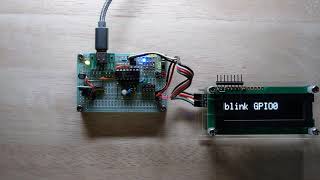
See the actual action in the video

For detailed instructions, including wiring of the devices and parts, see GettingStarted_CSharp page.
More sample codes can be found in examples directory.
If your application cannot detect the MCP2221/MCP2221A, follow these steps to diagnose driver conflicts or permission issues.
First, check if the system has created the character device file for HIDRAW:
ls -l /dev/hidraw*If no devices are listed, or if a device corresponding to the target MCP2221/MCP2221A is not listed, the kernel driver conflict is likely the cause. If the file exists but you cannot open it due to unprivileged access, check the permissions.
Next, inspect the kernel logs. Monitor the kernel logs while reconnecting the device to identify which driver is claiming it. Use dmesg -w or journalctl -k -f.
Expected Output: You should see hid-generic or usbhid associated with the device, followed by a hidraw assignment.
kernel: usb 3-1.1: New USB device found, idVendor=04d8, idProduct=00dd, bcdDevice= 1.00
kernel: usb 3-1.1: New USB device strings: Mfr=1, Product=2, SerialNumber=0
kernel: usb 3-1.1: Product: MCP2221 USB-I2C/UART Combo
kernel: usb 3-1.1: Manufacturer: Microchip Technology Inc.
kernel: hid-generic 0003:04D8:00DD.0008: hiddev0,hidraw0: USB HID v1.11 Device [Microchip Technology Inc. MCP2221 USB-I2C/UART Combo] on usb-0000:00:14.0-1.1/input2
In this example, /dev/hidraw0 is successfully assigned.
Conflict Indicator: If you see mcp2221 mentioned instead of hid-generic, or logs indicating the I2C/GPIO features are being initialized, the dedicated mcp2221 kernel driver is active and suppressing the HIDRAW interface.
kernel: mcp2221 0003:04D8:00DD.000A: USB HID v1.11 Device [Microchip Technology Inc. MCP2221 USB-I2C/UART Combo] on usb-0000:00:14.0-1.1/input2
If this occurs, you must blacklist the mcp2221 driver.
To verify which driver is currently controlling the interface, run:
lsusb -tLook for the MCP2221/MCP2221A interface (typically Class=Human Interface Device).
If the target interface is displayed as Driver=usbhid, it can be controlled as HIDRAW. However, if it is displayed as Driver=mcp2221, it is controlled by the kernel driver, and the HIDRAW node is suppressed.
If the /dev/hidrawX file exists but remains inaccessible, verify the ACL (Access Control List) permissions using the getfacl command and check that your user is part of the plugdev group or that the uaccess tag is correctly applied:
getfacl /dev/hidrawX # Replace X with your device number# file: dev/hidrawX
# owner: root
# group: plugdev
user::rw-
user:[your-username]:rw- # This line may be added by 'uaccess'
group::rw-
mask::rw-
other::---
If you do not have sufficient permissions, check if the udev properties were applied correctly:
udevadm info -n /dev/hidrawXConfirm that E: GROUP=plugdev and/or E: TAGS=:uaccess: are present in the output. If these properties are missing, ensure your udev rules are correctly installed and reloaded.
If uaccess does not apply as expected, manually add your user to the plugdev group:
sudo usermod -aG plugdev $USER # A re-login is required for group changes to take effectWhen using LibUsbDotNet, you need to unbind the devices that are bound to the usbhid driver.
If you got the exception like below, configure the MCP2221/MCP2221A to unbind, and reconnect it again. See udev rule file for detail.
Unhandled exception. Smdn.Devices.Mcp2221A.Mcp2221AUnavailableException: The requested MCP2221/MCP2221A is unavailable due to reasons such as unprivileged access, being disconnected, or being blocked by another driver. (device='3-1.2')
---> LibUsbDotNet.LibUsb.UsbException: Resource busyIf you got the exception like below, you need to run as the root user, the command like sudo dotnet run.
LibUsbDotNet:
Unhandled exception. Smdn.Devices.Mcp2221A.Mcp2221AUnavailableException: The requested MCP2221/MCP2221A is unavailable due to reasons such as unprivileged access, being disconnected, or being blocked by another driver. (device='3-1.2')
 ---> LibUsbDotNet.LibUsb.UsbException: Access denied (insufficient permissions)
HIDSharp:
Unhandled exception. Smdn.Devices.Mcp2221A.Mcp2221AUnavailableException: The requested MCP2221/MCP2221A is unavailable due to reasons such as unprivileged access, being disconnected, or being blocked by another driver. (device='/sys/devices/pci0000:00/0000:00:14.0/usb3/3-1/3-1.1/3-1.1:1.2/0003:04D8:00DD.001F/hidraw/hidraw0')
 ---> HidSharp.Exceptions.DeviceUnauthorizedAccessException: Not permitted to open HID class device at /dev/hidraw0.
If you want to give access privileges to a non-root user instead, you can use udev rule file. See udev rule files.
Contributions are appreciated!
If there's a feature you would like to add or a bug you would like to fix, please read Contribution guidelines and create an Issue or Pull Request.
IssueやPull Requestを送る際は、Contribution guidelinesをご覧頂ください。 可能なら英語が望ましいですが、日本語で構いません。
This project is licensed under the terms of the MIT License.
(An English translation for the reference follows the text written in Japanese.)
本プロジェクトは、MCP2221/MCP2221Aの製造元・供給元・販売元とは無関係の、非公式なものです。
This is an unofficial project that has no affiliation with the manufacturers/vendors/suppliers of MCP2221/MCP2221A.
This project uses the following components. See ThirdPartyNotices.md for detail.