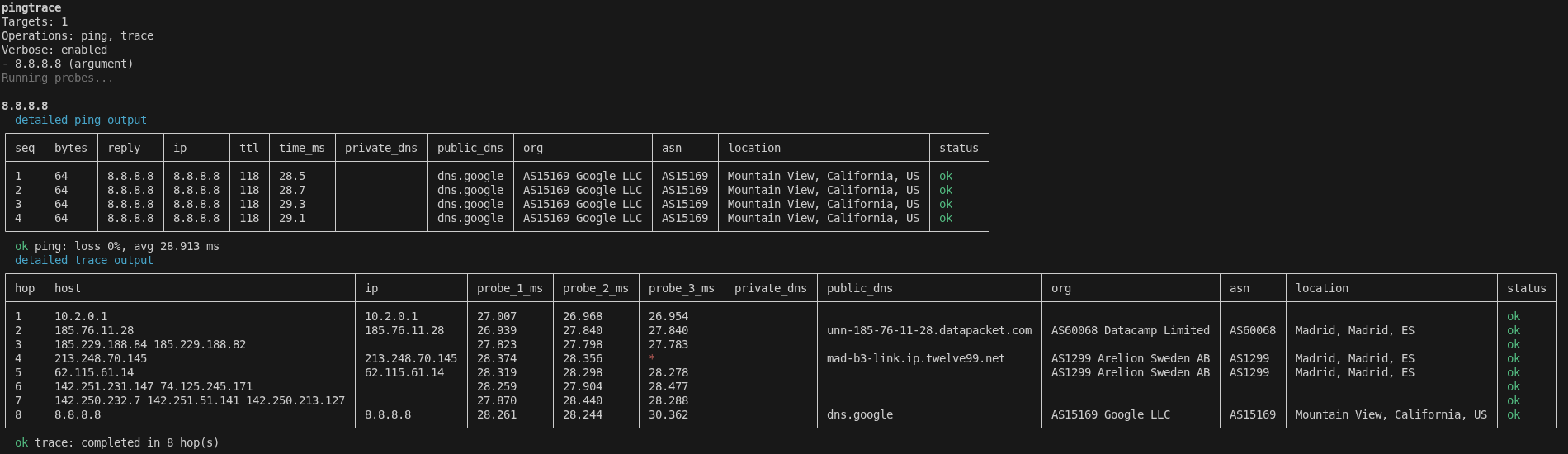




pingtrace runs ping and traceroute from a single command and enriches every reply and hop with DNS, organisation, ASN, geolocation, and PeeringDB data.
It accepts:
- Single target -
pingtrace 8.8.8.8 - Multi-target - comma-separated:
pingtrace 8.8.8.8,1.1.1.1,example.com - CSV file -
pingtrace --file targets.csv(first column is the target) - IPv4 CIDR -
pingtrace 10.0.0.0/30(auto-switches to bulk mode for /23 and larger)
Output is rendered as a responsive table that adapts to your terminal width, with optional CSV export for reporting.
| You want to | Without pingtrace | With pingtrace |
|---|---|---|
| Ping + traceroute one host | Two commands, two cli outputs | One command, two tables exportable in csv |
| Know the ASN/org behind each hop | Manual whois per IP |
Built-in via ipinfo.io |
| Spot a CDN vs a transit hop | Cross-reference PeeringDB by hand | net_type/policy columns |
| Check a whole /24 | Shell loop + manual CSV | pingtrace 10.0.0.0/24 -> CSV |
| Resolve hops against an internal DNS | dig @internal.dns ... per hop |
dns.privateServers config |
npm install -g pingtrace
pingtrace --help
Or run without installing:
npx pingtrace 8.8.8.8pingtrace 8.8.8.8 # single host
pingtrace 8.8.8.8,1.1.1.1,example.com # multiple hosts
pingtrace 10.0.0.0/30 # IPv4 CIDR
pingtrace --file ./targets.csv # from CSVCSV input format - one target per row, first column only:
| target |
|---|
| 8.8.8.8 |
| 1.1.1.1 |
| example.com |
pingtrace 8.8.8.8 --no-trace      # ping only
pingtrace 8.8.8.8 --no-ping # trace onlypingtrace auto-fits its tables to your terminal width. When space is tight, it drops the lowest-priority enrichment columns (policy, net_type, private_dns, location, asn, org, public_dns in that order) and truncates long values with an ellipsis. The essentials (seq/hop, ip, time/probe_*_ms, status) are always preserved.
pingtrace 8.8.8.8 --summary                          # one line per target
pingtrace 8.8.8.8 --wide                             # disable auto-fit, full width
pingtrace 8.8.8.8 --columns seq,ip,time_ms,status # render only these columnspingtrace 8.8.8.8 --export # CSV in current directory
pingtrace 8.8.8.8 --export ./reports # CSV in ./reportsWhen export is enabled, pingtrace writes one file per operation:
ping_UTCdate(YYYY-MM-DD-HH-MM-SS).csv- one row per packet, with all enrichment columnstrace_UTCdate(YYYY-MM-DD-HH-MM-SS).csv- one row per hop, with all enrichment columns
With --summary, the CSV falls back to one summary row per target instead of per-packet/per-hop detail.
Open the interactive editor:
pingtrace configList current values:
pingtrace config listSet a single value directly:
pingtrace config set ping.packetCount 3Examples for DNS server target lists:
pingtrace config set dns.publicServers 8.8.8.8
pingtrace config set dns.publicServers 8.8.8.8,1.1.1.1
pingtrace config set dns.privateServers 10.0.0.0/30
Supported config keys:
| Key | Default | Description |
|---|---|---|
dns.privateServers |
(empty) | Private/internal DNS servers for reverse lookups. Accepts IPs, comma-separated IPs, or CIDR. |
dns.publicServers |
8.8.8.8 |
Public DNS servers for reverse lookups. |
providers.ipinfoToken |
(empty) | ipinfo.io API token. Enables org, asn, and location columns for public IPs. |
providers.peeringdbEnabled |
false |
Enables PeeringDB enrichment. Adds net_type and policy columns for public IPs. Requires providers.ipinfoToken. |
ping.packetSize |
56 |
Ping packet size in bytes. |
ping.packetCount |
4 |
Number of ping packets per target. |
ping.timeoutSeconds |
5 |
Ping timeout in seconds. |
trace.maxHops |
16 |
Maximum traceroute hops. |
trace.timeoutSeconds |
2 |
Per-hop traceroute timeout in seconds. |
trace.numericOnly |
true |
Skip hostname resolution in traceroute. |
Output columns are shown conditionally - only when the corresponding provider is configured.
Reverse DNS lookups are performed for every hop and ping reply. Configure up to two resolvers:
pingtrace config set dns.privateServers 10.0.0.1   # internal resolver
pingtrace config set dns.publicServers 8.8.8.8      # public resolver
If a private DNS server is unreachable, pingtrace will warn and skip it after a 5-second timeout so probes continue without interruption.
Enriches public IPs with organisation, ASN, and geolocation. Get a free token at ipinfo.io.
pingtrace config set providers.ipinfoToken <your-token>Adds columns: org, asn, location.
Enriches public IPs with network type and peering policy sourced from the PeeringDB public API. Requires providers.ipinfoToken to resolve the ASN first. No additional credentials are needed for PeeringDB.
pingtrace config set providers.peeringdbEnabled trueAdds columns: net_type, policy.
net_type value |
Meaning |
|---|---|
NSP |
Network Service Provider - transit/backbone carrier |
Content |
Content delivery network (CDN) or hyperscaler |
IXP |
Internet Exchange Point |
Enterprise |
Enterprise or corporate network |
Educational |
University or research network |
Non-Profit |
Non-profit organisation |
Route Server |
Route server operator |
policy value |
Meaning |
|---|---|
Open |
Will peer with anyone |
Selective |
Peers on a case-by-case basis |
Restrictive |
Very limited peering |
No |
Does not peer |
When a target set exceeds 254 hosts (i.e., any CIDR larger than /24 such as /23, /22, /18), pingtrace automatically enables bulk mode:
- Streaming tables are disabled - output is one compact summary line per target
- Up to 10 probes run concurrently to reduce total execution time
- A CSV is auto-exported to the current directory without requiring
--export
pingtrace 10.0.0.0/22

pingtrace
Targets: 1022
Operations: ping, trace
Bulk mode: 1022 targets exceed /24 - running concurrently, streaming disabled.
CSV export: /current/dir
Running probes...

  10.0.0.1            ok ping: loss 0.0%, avg 4ms  |  ok trace: 7 hop(s)  [1/1022]
  10.0.0.2            fail ping: loss 100%          |  fail trace: no route  [2/1022]
  ...

Completed 980 probe(s).
Failed 42 probe(s).
Wrote ping CSV (4088 row(s)) to /current/dir/ping_2026-03-20-...csv
Wrote trace CSV (7154 row(s)) to /current/dir/trace_2026-03-20-...csv
To speed up large runs further, combine with --no-trace (ping only) or --no-ping (trace only).
# Targets
pingtrace <target>                                  # single
pingtrace <t1>,<t2>,<t3>                            # multi
pingtrace <cidr>                                    # /30 to /24 inline, /23+ bulk
pingtrace --file <path.csv>                         # from CSV (first column)

# Operations
pingtrace <target> --no-trace                       # ping only
pingtrace <target> --no-ping                        # trace only

# Output
pingtrace <target> --summary                        # one-line per target
pingtrace <target> --wide                           # full-width tables
pingtrace <target> --columns seq,ip,time_ms,status  # explicit columns

# Export
pingtrace <target> --export                         # CSV in cwd
pingtrace <target> --export <dir>                   # CSV in dir

# Help
pingtrace --help
pingtrace --version

# Configuration
pingtrace config                                    # interactive editor
pingtrace config list
pingtrace config get <key>
pingtrace config set <key> <value>
pingtrace config reset
pingtrace config --help # all subcommandspingtracedepends on systempingandtraceroutetooling being available onPATH.- On Windows,
tracertis used. - On Unix-like systems,
tracerouteis used, withtracepathas a fallback where available. --exportwithout a path writes operation-specific CSV files in the current working directory.- If
--exportpoints to a.csvfile path,pingtraceuses that file's directory and still writes separateping_...csvandtrace_...csvfiles. - Private DNS enrichment is automatically skipped if the configured server does not respond within 5 seconds.
- PeeringDB and ipinfo.io enrichment is skipped for private/RFC-1918 IP addresses.
If pingtrace saved you time in a troubleshooting session, it was worth building.

