Visit EssayInsightsAI to try the app online!
This section of the project contains my approach to the kaggle competition Feedback Prize - Evaluating Student Writing. The goal of this competition is to predict the feedback that a student would receive on their essay. The dataset contains argumentative essays written by U.S students in grades 6-12. The essays were annotated by expert raters for elements commonly found in argumentative writing. The task was to segment each essay into discrete rhetorical and argumentative elements (i.e., discourse elements) and then classify each element into one of the following categories: Claim, Evidence, Lead, Position, Counterclaim, Rebuttal, and Concluding Statement. Please check Feedback Prize - Evaluating Student Writing for more details about the competition.
Please read my competition report to know more details of my approach
This section of the project is a web application that allows users to interact with an AI-powered chatbot for essay analysis. EssayInsightAI is an intelligent web app that helps students and writers improve their essays by:
- Identifying key components like Claims, Evidence, Leads, and Positions in the essay
- Providing personalized feedback through an integrated AI chatbot
- Offering real-time insights to enhance writing clarity, structure, and coherence
Whether you're preparing for an exam or polishing an academic submission, EssayInsightAI guides you through each step of the writing process.
- Start a New Session: Click the "New Chat" button present in the side panel to begin a new analysis session.
- Select Your Model: Choose the appropriate model in the side panel for your essay analysis. The default is set to
gpt-4o, which is optimized for conversational tasks and essay analysis. - Enter Your OpenAI API Key: Input your OpenAI API key in the side panel to enable the AI functionalities. If you don't have one, you can sign up at OpenAI API.
- Give your Essay: You can either paste your essay text directly or upload a file.
- Segmentation: Click the "Segmentation" button to break down your essay into its following key components:
Claim: The main argument or thesis of your essay.Evidence: Supporting facts, data, or examples that back up your claim.Lead: The introduction or opening statement that sets the context for your essay.Position: The stance or viewpoint you are taking in your essay.Counterclaim: An opposing argument or viewpoint that you address in your essay.Rebuttal: Your response to the counterclaim, defending your original position.Concluding Statement: The final summary or closing argument that wraps up your essay.None: If the segment does not fit into any of the above categories, it will be labeled as "None".
- Chat with AI: Ask questions about your essay, request feedback, or seek clarification on specific points.
- Review Feedback: Read the AI's suggestions and apply them to improve your essay.
- Python 3.12 or higher
- Create a virtual environment (optional but recommended)
- Install the required packages using
pip install -r requirements.txt
- Download the dataset from Feedback Prize - Evaluating Student Writing and place it in the
datafolder. - A config file template
template.yamlis provided in theanalyzer\configsfolder. You can modify it according to your requirements. - To train the model, run the following command:
python analyzer/main.py -C <config file> -O <output folder> -T "Train"
- To do inference on the test set, run the following command:
python analyzer/main.py -C <config file> -O <output folder> -P <checkpoint path> -T "Inference"
- To do postporcessing on multiple checkpoints, run the following command:
python analyzer/main.py -C <config file> -O <output folder> -T "Postprocess"
- Obtain an OpenAI API key from OpenAI
- Run the Streamlit app using the following command:
streamlit run chatbot/frontend/app.py
-
- Both the
train_essays.csvandtrain_labels.csvare merged into a singletrain_essays_annotated.csvfile. - A
label2id.jsonfile is created to map the labels to their corresponding IDs. More instructions can be found on Hugging Face's documentation. - Test data is added into a single dataframe for inference and final submission
- Both the
-
- The EDA is done using the
analyzer\notebooks\data_analysis.ipynbnotebook. It includes visualizations of the distribution of labels, the length of essays, and other relevant statistics.
- The EDA is done using the
-
- The
analyzer\dataset.pyfile contains theFeedbackPrizeDatasetclass that handles the loading of the dataset. It uses thelabel2id.jsonfile to map the labels to their corresponding IDs. - A PyTorch Lightning Data Module (
FeedbackPrizeDataModule) is created to handle the data loading and batching. - Three data splitting strategies were implemented:
- K-Fold Cross Validation: The dataset is split into
kfolds for cross-validation. - Stratified K-Fold: The dataset is split into
kfolds while maintaining the distribution of labels in each fold. - Train Val: The dataset is split into training and validation sets randomly.
- K-Fold Cross Validation: The dataset is split into
- The
-
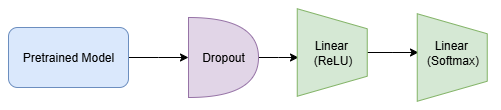
- The model architecutre is illustrated below:
- We used
google-bert\bert-large-uncasedfrom HuggingFace for all the experiments - Top encoder layers were frozen to reduce the training time and memory usage.
- Configs for the above models are provided in the
analyzer\configsfolder.
-
- Refer to report for detailed training strategies and hyperparameters used.
-
- Finetuned model results can be further improved by following postprocessing steps:
- Soft Voting: Multiple finetuned models softmax probabilities are averaged for all tokens.
- Hard Voting: Multiple fine-tuned models outputs are combined through majority voting of predicted class for each token.
- Span Average: Each prediction’s start and end positions can be averaged across multiple fine-tuned models
- Span Repair: If, for a given essay, there are multiple prediction spans with the same discourse type consecutively with less gap, all those spans are combined to give one prediction output.
- Finetuned model results can be further improved by following postprocessing steps:
-
- A
submission.csvis created with the final predictions for the test set by preprocessing inference predictions from finetuned model/postprocessing. - The submission file contains the
idof the essay and thepredictionstringas per the competition requirements. Thepredictionstringis a string of space-separated start and end token indices for each predicted discourse element in the essay.
- A
-
- The frontend is built using Streamlit, which provides a simple and interactive web interface for the chatbot. Specific components include:
- Sidebar: Contains the model selection dropdown, OpenAI API key input, and a button to start a new chat.
- Input Box: Allows users to enter their essay text or upload a file.
- Chat Interface: Displays the conversation between the user and the AI, including the user's essay text and the AI's responses.
- The frontend is built using Streamlit, which provides a simple and interactive web interface for the chatbot. Specific components include:
-
- The chatbot uses the
OpenAI APIto generate responses based on the user's input and the essay analysis. - The
LangChainframework is used to createPromptTemplatesfor specific tasks like Grammar Correction, Essay Analysis, and General conversation related to the essay. - Appropriate prompt is selected based on the user's input by detecting keywords and the prompt is being added as a system prompt to the OpenAI API call.
- The chatbot uses the
- Analyzer: PyTorch, PyTorch Lightning, Transformers
- Chatbot: Streamlit, OpenAI API, LangChain
I am Shanmukha Sainath, working as AI Engineer at KLA Corporation. I have done my Bachelors from Department of Electronics and Electrical Communication Engineering department with Minor in Computer Science Engineering and Micro in Artificial Intelligence and Applications from IIT Kharagpur.

- Feedback Prize - Evaluating Student Writing for the dataset and competition.
- PyTorch for the deep learning framework used in the analyzer.
- PyTorch Lightning for the lightweight wrapper around PyTorch to organize the code.
- OpenAI for the API used in the chatbot.
- Streamlit for the web app framework.
- LangChain for the framework to build applications powered by language models.
- Hugging Face Transformers for the pre-trained models and tokenizers used in the analyzer.
- Thanks to the Kaggle community for their open source contributions and discussions that helped shape this project.
- Thanks to online resources, tutorials, and documentation that provided valuable insights and guidance throughout the development process.

If you have any feedback, please reach out to me at venkatashanmukhasainathg@gmail.com