


Eiko is a GPU-accelerated Eikonal equation solver, enabling fast computation of the shortest time-of-flight through an arbitrary 2D or 3D medium.
Eiko takes a sound-speed map and initial time-of-flight values and returns the full time-of-flight map.
time_of_flight = eiko(initial_delays, slowness_map)
For example, if the initial delays describe a plane-wave:

To learn about how Eiko works, see THEORY.
A few reasons to use Eiko:
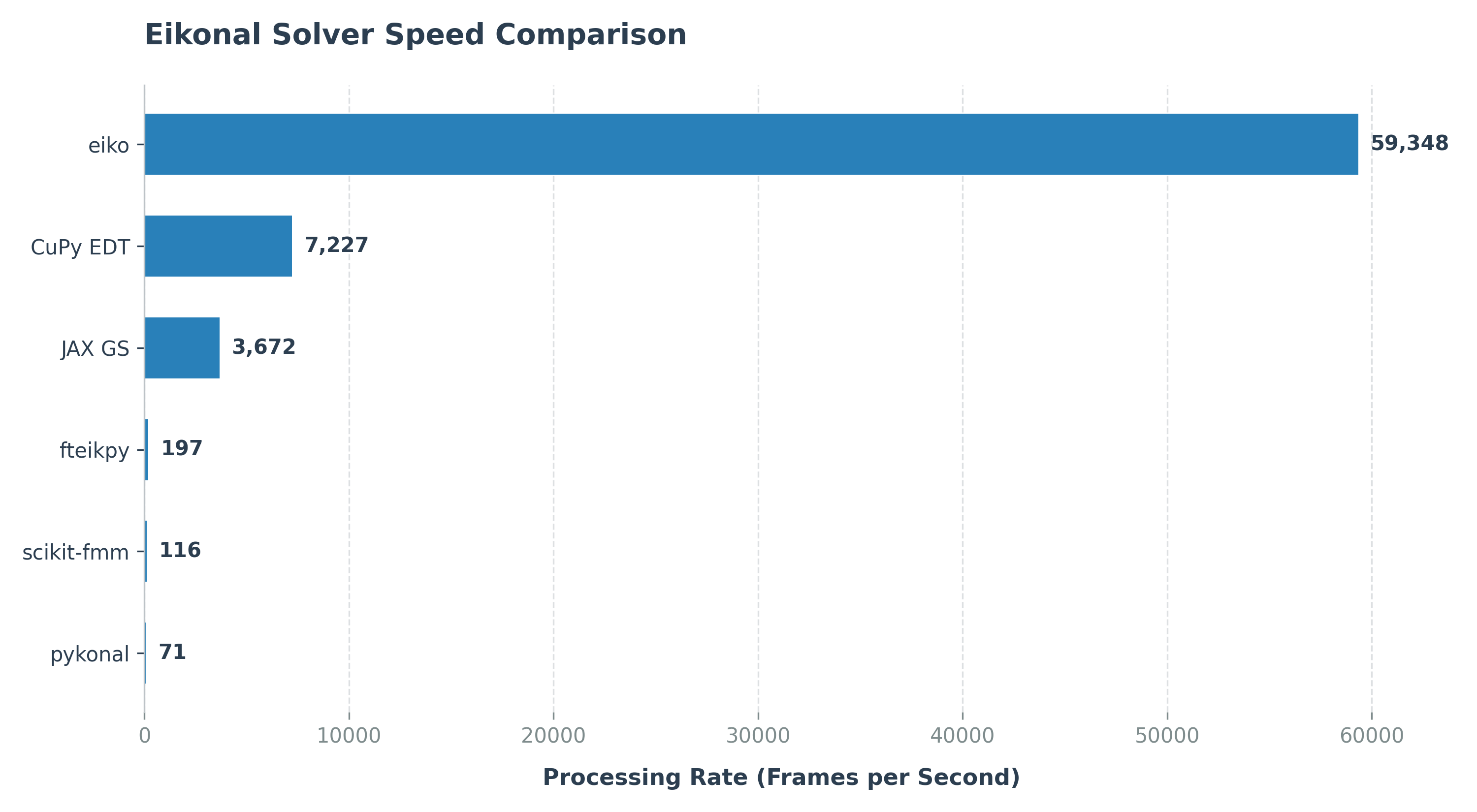
- Eiko is fast - up to 100x faster than comparable libraries.
- Eiko is differentiable, allowing it to be used with PyTorch or JAX.
- Eiko supports advection, allowing it to compute apodizations through a lens.
Download eiko_matlab.zip, extract the eiko folder, and add it to your MATLAB path:
addpath('/path/to/eiko')Requires MATLAB R2019b+ with the Parallel Computing Toolbox. See the MATLAB installation guide for more details.
We recommend using the automated installer script, which checks your GPU driver, installs C++ & CUDA compilers, and sets up a Python virtual environment with PyTorch and JAX. Alternatively, Eiko can be installed through pip:
pip install eikoRequires Python 3.8+ with PyTorch or JAX. See the Python installation guide for more details.
Your system must have the following:
- OS: Windows or Linux.
- Hardware: An NVIDIA GPU. A GeForce GTX 10-series, RTX-series, or newer is recommended.
If you don't have a GPU, you can instead run Eiko for Python from Google Colab here.
An example of how to use Eiko is shown below.
MATLAB Example (Click to expand)
% 1. Setup grid parameters.
N = 101;            % Number of grid points (NxN grid)
dx = 0.001;         % Grid spacing in meters (1 mm, for example)
c = 1540;           % Speed of sound in m/s (uniform medium)

% 2. Create the slowness map (1/velocity).
f = ones(N, N, 'single', 'gpuArray') / c;

% 3. Initialize the time-of-flight field.
u_init = inf(N, N, 'single', 'gpuArray'); % Unknown points set to infinity.

% Set a point source at the center of the grid to time = 0.
center_idx = ceil(N/2);
u_init(center_idx, center_idx) = 0;

% 4. Compute the numerical solution using eiko.
u = eiko(u_init, f, dx);

% 5. Visualize the result.
% Create physical coordinate axes in millimeters using dx
axis_mm = ((1:N) - center_idx) * dx * 1000;

% Set up plot.
figure;
imagesc(axis_mm, axis_mm, u * 1e6);
axis image;

% Format axes and text size.
title('Time-of-Flight', 'FontSize', 14, 'FontWeight', 'bold');
xlabel('x (mm)', 'FontSize', 12, 'FontWeight', 'bold');
ylabel('y (mm)', 'FontSize', 12, 'FontWeight', 'bold');

% Format colorbar.
cb = colorbar;
cb.Label.String = 'Time (\mus)';
cb.Label.FontSize = 12;
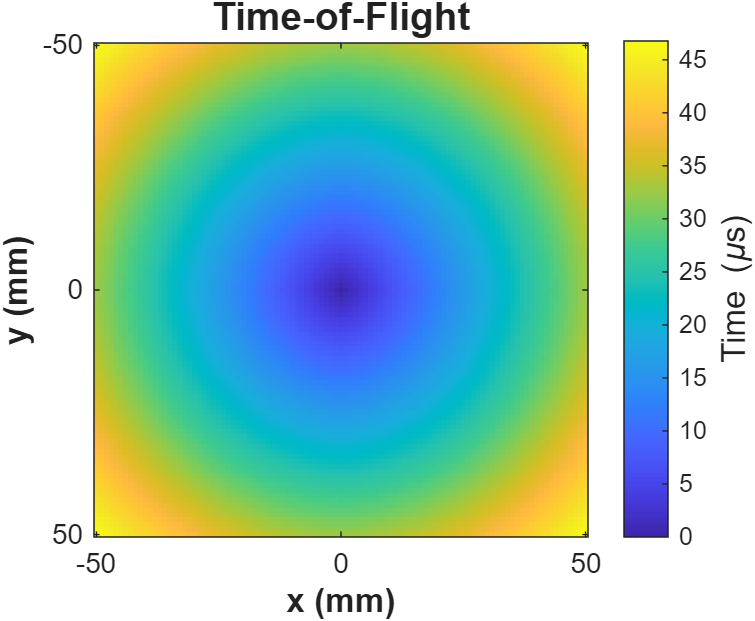
The result should look something like this:
For 3D inputs, use eiko3d.
Python Example (Click to expand)
import torch
import matplotlib.pyplot as plt
from eiko import eiko

# 1. Setup device and grid parameters.
device = torch.device("cuda")
N = 101
dx = 0.001  # Grid spacing in meters (1 mm)
c = 1540.0  # Speed of sound in m/s (uniform medium)

# 2. Create the slowness map (1/velocity) on the device.
f = torch.full((N, N), 1.0 / c, dtype=torch.float32, device=device)

# 3. Initialize the time-of-flight field.
# Unknown points are set to infinity
u_init = torch.full((N, N), float('inf'), dtype=torch.float32, device=device)

# Set a point source at the center of the grid to time = 0.
center_idx = N // 2
u_init[center_idx, center_idx] = 0.0

# 4. Compute the numerical solution.
u = eiko(u_init, f, dx=dx)

# 5. Visualize the result.

# Create physical coordinate axes in millimeters using dx
axis_mm = (torch.arange(N) - center_idx) * dx * 1000

# Set up plot (equivalent to 'figure')
plt.figure(figsize=(6, 6))

# 'imagesc' equivalent with physical extents.
# 'extent' maps the data coordinates to the axes.
extent = [axis_mm[0], axis_mm[-1], axis_mm[0], axis_mm[-1]]
plt.imshow(u.cpu() * 1e6, extent=extent, origin='lower', cmap='viridis')

# 'axis image' equivalent (forces equal pixel aspect ratio)
plt.gca().set_aspect('equal', adjustable='box')

# Format axes and text size
plt.title('Time-of-Flight', fontsize=14, fontweight='bold')
plt.xlabel('x (mm)', fontsize=12, fontweight='bold')
plt.ylabel('y (mm)', fontsize=12, fontweight='bold')

# Format colorbar
cb = plt.colorbar()
cb.set_label(r'Time ($\mu$s)', fontsize=12)

# Display the plot
plt.show()
The result should look something like this:
For 3D inputs, use from eiko import eiko3d.
See EXAMPLES for more code examples.
Feel free to contribute to the project (see PROJECT).
Bug reports and feature requests may be submitted on the Issues page.
You can cite Eiko as
@misc{eiko2026,
  author       = {Pr{\ae}sius, Sebastian Kazmarek},
  title        = {{Eiko}: the {GPU}-accelerated {E}ikonal equation solver},
  year         = {2026},
  publisher    = {GitHub},
  howpublished = {\url{https://github.com/sebftw/Eiko}},
  note         = {GitHub repository}
}
This project is an independent open-source software project and is not affiliated with, endorsed by, or sponsored by any of the companies mentioned.
- MATLAB is a registered trademark of The MathWorks, Inc.
- NVIDIA and CUDA are registered trademarks of NVIDIA Corporation.
- PyTorch is a trademark of the Linux Foundation.
- Ubuntu is a registered trademark of Canonical Ltd.
- Windows is a registered trademark of Microsoft Corporation.
All other trademarks, service marks, and company names are the property of their respective owners.