
This is the GIMP 3 version of BIMP, maintained at sandbranch/gimp-bimp (branch
gimp3) while the original project has no GIMP 3 release. The original, for GIMP 2.10, is alessandrofrancesconi/gimp-plugin-bimp.
Also worth a look for batch work in GIMP 3: Batcher by Kamil Burda (BSD-3), actively maintained, which batch-processes images and layers with a preview. BIMP's strength is its list of ready manipulations and saved sets; use whichever fits.
With BIMP you can apply a set of GIMP manipulations on groups of images: resize, crop, flip or rotate, color correction, sharpen or blur, watermarks (text or image), change format and compression, rename with a pattern, and any other GIMP procedure. Sets of manipulations can be saved and loaded again.
Documentation @ http://www.alessandrofrancesconi.it/projects/bimp
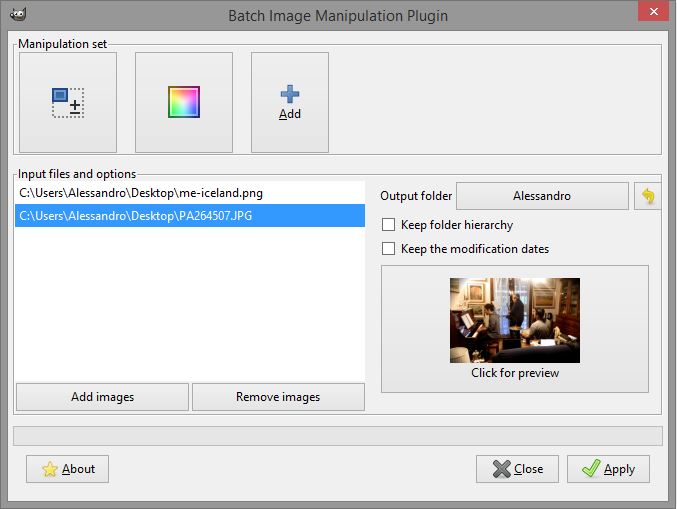
In GIMP 3: File > Batch Image Manipulation...
-
Runs in GIMP 3 (GTK 3, the GIMP 3 plug-in API).
-
Batch without a window: the procedure
plug-in-bimp-batchapplies a set saved from the BIMP window (.bimp) to a list of files, from scripts or the command line, e.g. in Python inside GIMP (the output folder is created if needed; it returns the number of files processed and of errors):proc = Gimp.get_pdb().lookup_procedure('plug-in-bimp-batch') config = proc.create_config() config.set_property('set-file', Gio.File.new_for_path('web.bimp')) config.set_property('files', ['/photos/a.jpg', '/photos/b.jpg']) config.set_property('output-folder', Gio.File.new_for_path('/photos/web')) config.set_property('overwrite', False) proc.run(config) -
Other GIMP procedure... edits the procedure's settings in GIMP's own dialog for it.
-
Formats are written with GIMP 3's exporters: BMP, GIF, ICO, JPEG, PNG, TGA, TIFF, HEIF, WebP, AVIF and OpenEXR.
-
.bimpfiles from BIMP 2 load, except the settings of "Other GIMP procedure...", which GIMP 3's procedures cannot take (the procedure is kept, with its defaults).
Needs meson, ninja, a C compiler, gettext and the GIMP 3 development files
(libgimp-3.0-dev on Debian and Ubuntu, gimp-devel on Fedora).
meson setup build -Dplugindir=$HOME/.config/GIMP/3.2/plug-ins
ninja -C build install
This installs bimp/bimp and its translations into the plug-in folder.
Without -Dplugindir it goes into GIMP's system folder (needs root).
For the Flatpak version of GIMP, build inside it with gimp-devtools:
gimp-build.sh . meson setup build -Dplugindir=\$GIMP_PLUGINDIR
gimp-build.sh . ninja -C build install
Restart GIMP after installing.
The Windows installer (nsis/) and the macOS build have not been updated
for GIMP 3 yet.
tests/run.sh builds BIMP into tests/output, runs the unit tests of the
.bimp format (meson test, no GIMP needed), and then runs a headless
GIMP (Flatpak) with a profile of its own in tests/output/profile
(GIMP3_DIRECTORY), so an installed BIMP and your GIMP settings are not
used or changed. It applies each set in tests/sets to test images with
plug-in-bimp-batch: one per manipulation and format, a chain, BIMP 2
files, and edge cases (broken and hand-written sets, files that do not
load, odd file names, gray, indexed, 16-bit, float and multi-layer images,
existing and read-only output folders, metadata, "Other GIMP procedure..."
with several kinds of settings, a locale with a decimal comma). It prints
PASS or FAIL per test and exits with 1 if any failed. It needs
gimp-devtools
next to this folder (or GIMP_DEVTOOLS=<folder>), Python 3 with numpy and
Pillow, and takes a minute longer the first time.
BIMP_SANITIZE=1 tests/run.sh does the same with BIMP built with
AddressSanitizer and UndefinedBehaviorSanitizer; the plug-in runs so
inside GIMP, and any report fails the run.
tests/gui/start.sh opens the window on a Broadway display to look at it
in a browser.
For the GIMP 3 version: https://github.com/sandbranch/gimp-bimp/issues
For the original: http://github.com/alessandrofrancesconi/gimp-plugin-bimp/issues