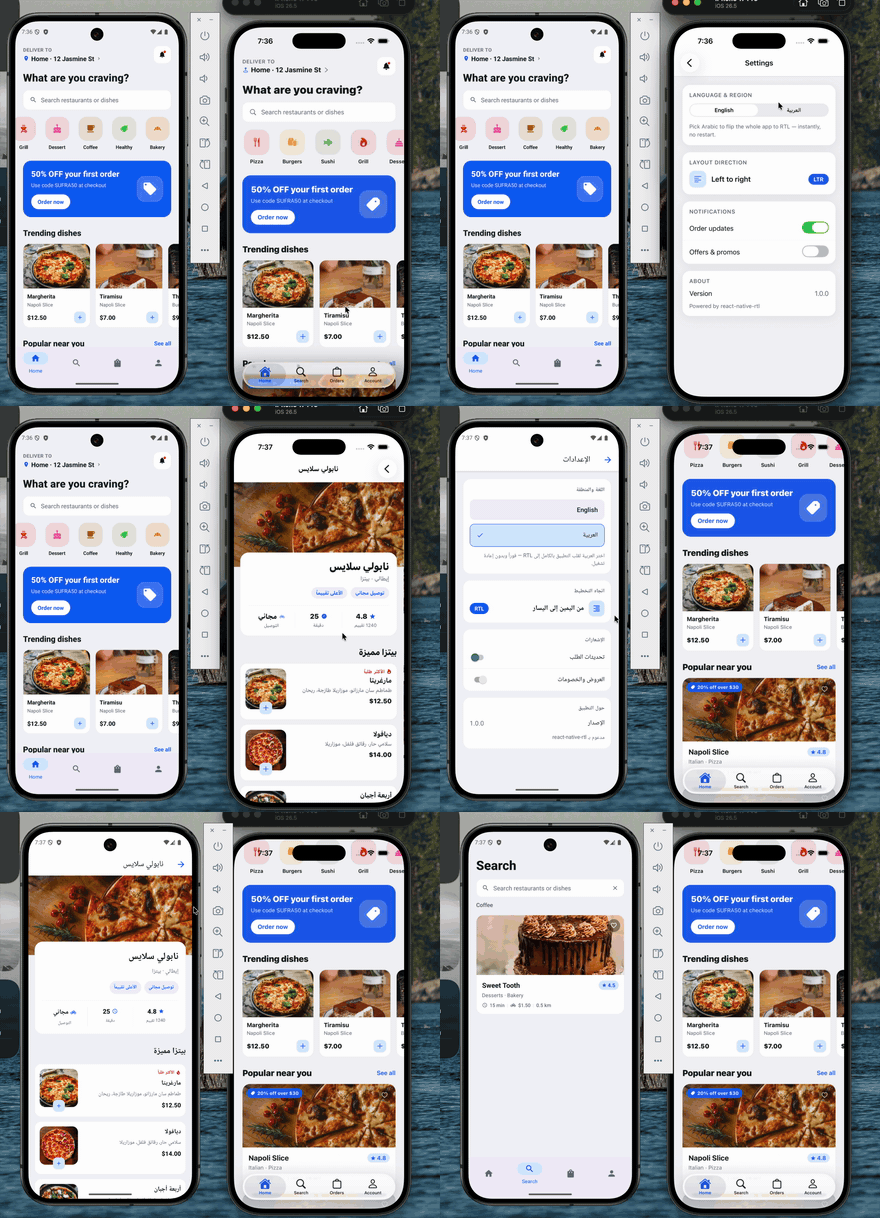
Flip your React Native app between LTR and RTL at runtime — no restart, no bundle reload, no remount. One call re-mirrors the whole UI and the native chrome (navigation header, native tab bar, and on iOS the edge swipe-back gesture), in place, keeping the user's navigation stack, scroll and form state intact.
The usual I18nManager.forceRTL(true) needs an app restart to take effect. This
package doesn't — it rides React Native's own re-layout paths (the ones a cold
start uses) to re-lay out every live Fabric surface, and mirrors the native
chrome alongside it. No node_modules patch, no navigator swap, no root-key
remount.
- Runtime flip — LTR ⇄ RTL without restarting.
- Native New Architecture (Fabric / bridgeless), iOS + Android.
- Autolinked — no
MainApplication/ Podfile edits. - Tiny API —
setRTL,applyLocaleDirection,isRTLLocale.
- React Native New Architecture (Fabric) — default on RN 0.76+ / Expo SDK 52+.
- A development build or bare app. This is native code, so it does not
run in Expo Go — use
expo prebuild+expo-dev-client. - iOS 13+ / Android with
android:supportsRtl="true"(the package's manifest merges this in for you; Expo sets it by default).
npm install react-native-rtl
# or: yarn add react-native-rtl
Rebuild the native app — the JS wrapper is a safe no-op until the native module is in the binary:
# bare React Native
cd ios && pod install && cd ..
npx react-native run-ios && npx react-native run-android

# Expo (development build)
npx expo prebuild
npx expo run:ios && npx expo run:android
Autolinks on both platforms — no manual native edits.
import { setRTL, applyLocaleDirection, isRTLLocale } from 'react-native-rtl';

await setRTL(true);   // flip to RTL, instantly
await setRTL(false);  // back to LTR

await applyLocaleDirection('ar'); // RTL (drive it from a locale)
await applyLocaleDirection('en'); // LTR

isRTLLocale('he-IL'); // true
setRTL also keeps JS-side I18nManager.isRTL in sync.
| Export | Signature | Description |
|---|---|---|
setRTL |
(isRTL: boolean) => Promise<boolean> |
Flip layout direction at runtime. Resolves to the applied direction. Safe no-op off-device / in Expo Go / tests. |
applyLocaleDirection |
(locale: string) => Promise<boolean> |
setRTL(isRTLLocale(locale)). |
isRTLLocale |
(locale: string) => boolean |
Whether a BCP-47 tag / language code is right-to-left. |
Three things to wire up: cold start, the language switch, and (for RTL that follows your text and navigation) a couple of small conventions.
Do it before the first screen paints, so a relaunch in the stored language is already correct:
// app root (before rendering your navigator)
const lang = await getStoredLanguage();
await setRTL(isRTLLocale(lang));   // native flip + JS I18nManager
await i18n.changeLanguage(lang);Call setRTL before i18n.changeLanguage. The tree must be RTL when the
new text re-measures; otherwise the new text bakes its alignment while the tree
is still LTR.
async function changeLanguage(locale: string) {
  await setRTL(isRTLLocale(locale)); // 1. flip direction (native, no restart)
  await i18n.changeLanguage(locale); // 2. then swap the strings
}React Native only mirrors a <Text> / <TextInput> when its style sets
textAlign. Plain unset text stays natural — left on an LTR device, even
under forced RTL. Use textAlign: 'left': it is start-relative, so RN keeps
it left in LTR and flips it to right under RTL.
const styles = StyleSheet.create({
  title: { fontSize: 20, textAlign: 'left' },   // ✅ flips with direction
  body:  { fontSize: 15 /* no textAlign */ },    // ❌ stays left under RTL
});
Rows built with flexDirection: 'row' reverse automatically under RTL — no
change needed.
If you use Expo Router (or React Navigation without an explicit direction),
the native-stack push/pop animation and the swipe-back gesture read their
direction from LocaleDirContext, which defaults to
I18nManager.getConstants().isRTL — the cached startup constant. It never
updates at runtime, so pushed screens keep the old direction until a restart.
Override it with a value that tracks your language state:
import { LocaleDirContext } from '@react-navigation/native';

function RootLayout() {
  const language = useLanguageStore((s) => s.language);
  const direction = isRTLLocale(language) ? 'rtl' : 'ltr';

  return (
    <LocaleDirContext.Provider value={direction}>
      <Stack /* … */ />
    </LocaleDirContext.Provider>
  );
}
(Plain React Navigation: pass direction to NavigationContainer and re-render
it on language change instead.)
setRTL(isRTL) first keeps JS coherent (I18nManager.allowRTL(true) +
forceRTL(isRTL)), then calls the native module, which runs on the main thread
in a single pass:
- iOS — flip
RCTI18nUtilflags → postUIContentSizeCategoryDidChangeNotificationso everyRCTFabricSurfacestores the newlayoutDirection→ bust Yoga's size-keyed layout cache by nudging each surface's size 1 pt and restoring it (forces a real re-layout in the new direction) → mirrorUINavigationBar/UITabBarsemanticContentAttributeand re-arm theinteractivePopGestureRecognizer. - Android — flip
I18nUtilflags →forceLayout()+requestLayout()on everyReactSurfaceView(re-runsonMeasure→updateLayoutSpecs→constraintLayout, re-readingisRTL) → set the decor viewlayoutDirection.
Full deep-dive with exact RN source paths:
RTL_RUNTIME_NATIVE.md.
| Symptom | Cause / fix |
|---|---|
| Nothing happens at all | Native module not in the binary — rebuild the app (pod install + run). It no-ops in Expo Go. |
| Only flips after a restart | You're on the New Architecture? Confirm newArchEnabled. Make sure you await setRTL(...) (it re-lays out live surfaces). |
| Text doesn't right-align | Add textAlign: 'left' to that text style (see step 3). Unset alignment never flips on an LTR device. |
| Text flips but shows old strings' alignment | Call setRTL before i18n.changeLanguage (step 2). |
| Push animation / swipe-back keep old direction | Override LocaleDirContext (step 4). |
A runnable Expo app lives in example/ — Sufra, a full
food-delivery UI (the screen in the GIF above). It shows the flip holding up
across a real app: native bottom tabs (expo-router NativeTabs), screens
pushed outside the tabs (restaurant detail, a cart modal, checkout, and
settings) with native headers, back buttons and the iOS edge swipe-back all
mirroring, a shared cart, a @expo/ui SwiftUI control, and English ⇄ Arabic
switching that re-mirrors every price, rating and layout in place. See
example/README.md.
cd example
npx expo prebuild --clean
npx expo run:ios # or: npx expo run:androidMIT © Saleh Ayman