On-device AI for Expo & React Native.
LLM · Speech · Vision · Embeddings, running on the phone. No API keys.




Documentation · npm · Changelog · llms.txt
 💬 streamMessage |
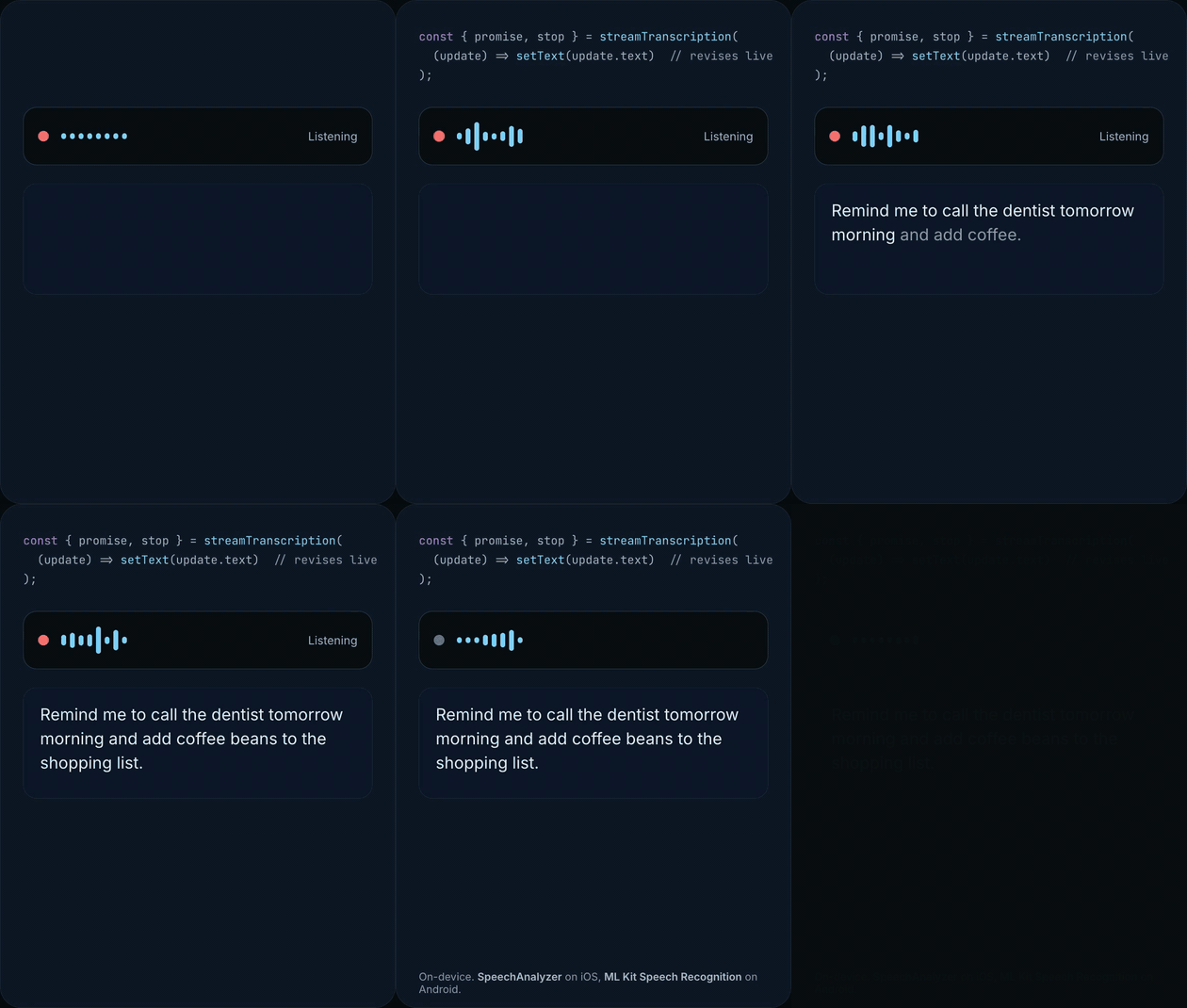 🎙️ streamTranscription |
 👁️ removeBackground · labelImage |
 🔎 embed · createVectorStore |
import {
  sendMessage, streamMessage, generateObject, generateText, // 💬 LLM: chat, typed JSON, tool calling
  transcribe, streamTranscription,                          // 🎙️ Speech
  removeBackground, labelImage, recognizeText,              // 👁️ Vision
  embed, chunkText, createVectorStore,                      // 🔎 Embeddings
} from 'expo-ai-kit';| What you want | Call | iOS | Android |
|---|---|---|---|
| 💬 Chat with a local model, stream tokens | sendMessage, streamMessage |
Apple Foundation Models | ML Kit Prompt API |
| 🧾 Get typed JSON back, validated against your schema | generateObject |
Apple Foundation Models | ML Kit Prompt API |
| 🛠️ Build an on-device agent: the model calls your functions | generateText({ tools }) |
Apple Foundation Models | ML Kit Prompt API |
| 🎙️ Speech to text, live or from a file | streamTranscription, transcribe |
SpeechAnalyzer | ML Kit Speech Recognition |
| ✂️ Cut the subject out of a photo | removeBackground |
Apple Vision | ML Kit Subject Segmentation |
| 🏷️ Label what is in a photo | labelImage |
Apple Vision | ML Kit Image Labeling |
| 🔤 Read the text in a photo | recognizeText |
Apple Vision | ML Kit Text Recognition |
| 🔎 Search by meaning | embed, createVectorStore |
NLContextualEmbedding | EmbeddingGemma |
| 🧠 Run a Gemma, Qwen, or Phi model you pick | downloadModel, setModel |
LiteRT-LM | LiteRT-LM |
Every capability follows the same three steps: check availability, prepare once, use. Only the
prepare step downloads anything, and failures throw a ModelError with a typed code.
- Everything runs on the device. Nothing is sent to a server.
- Uses the models the OS already ships (Apple Foundation Models, Apple Vision, SpeechAnalyzer, ML Kit), so most features need no bundled weights. Download a Gemma, Qwen, or Phi model when you want a specific one.
- Plain async functions. No hooks, no hidden state, no runtime dependencies.
expo-ai-kit/aiexposes the same engines as a Vercel AI SDK provider.- Typed errors, explicit lifecycles, and an llms.txt for coding agents.
npx expo install expo-ai-kitexpo-ai-kit contains native Swift and Kotlin code and is not available in Expo Go. Use a development build,
npx expo run:ios|android, or EAS Build. Bare React Native needs Expo modules installed,npx pod-installon iOS, andminSdkVersion 26on Android.
The LLM works with no configuration. Speech, Vision (Android), and Embeddings (Android) are opt-in build flags, so apps that don't use them pay nothing in size or permissions:
{
  "expo": {
    "plugins": [["expo-ai-kit", { "speech": true, "vision": true, "androidEmbeddings": true }]]
  }
}
Turning a flag on requires a new native build (dev client or EAS, not an OTA update). Without a
flag, the corresponding APIs throw a typed error (SPEECH_NOT_ENABLED, VISION_NOT_ENABLED,
EMBEDDINGS_NOT_ENABLED) instead of failing silently.
import { isAvailable, prepareBuiltInModel, sendMessage } from 'expo-ai-kit';

if (!(await isAvailable())) {
  throw new Error('On-device generation is not supported on this device.');
}

// No-op when ready. Android may prepare its OS-managed ML Kit model first.
await prepareBuiltInModel();

const { text } = await sendMessage([
  { role: 'user', content: 'Explain local-first AI in one sentence.' },
]);Chat with the OS model or a downloaded one, get typed JSON back with generateObject, or let the
model call your functions in an agent loop with generateText. messages is an array of
{ role: 'system' | 'user' | 'assistant'; content: string }. The message APIs are stateless, so
pass the complete history on every call.
import { streamMessage } from 'expo-ai-kit';

const { promise, stop } = streamMessage(
  [{ role: 'user', content: 'Write a very short story.' }],
  ({ token }) => console.log(token)
);

const { text } = await promise; // call stop() to cancel earlyDescribe the shape you want with a JSON Schema. expo-ai-kit prompts the model, extracts and validates the JSON, and repairs invalid output within a bounded retry loop (two attempts by default). Keep schemas small and shallow for compact on-device models.
import { generateObject } from 'expo-ai-kit';

type Recipe = { title: string; minutes: number; ingredients: string[] };

const { object } = await generateObject<Recipe>(
  [{ role: 'user', content: 'A quick weeknight pasta.' }],
  {
    type: 'object',
    properties: {
      title: { type: 'string' },
      minutes: { type: 'integer' },
      ingredients: { type: 'array', items: { type: 'string' } },
    },
    required: ['title', 'minutes', 'ingredients'],
  }
);generateText with tools is a small agent loop that runs entirely on the phone: the model picks
a tool, expo-ai-kit validates the arguments against your schema, runs your function, feeds the
result back, and repeats until it can answer. The loop is bounded by maxSteps (default 5). Omit
execute to get the proposed call back for human approval instead.
import { generateText } from 'expo-ai-kit';

const { text } = await generateText(
  [{ role: 'user', content: 'What should I wear in Paris today?' }],
  {
    tools: {
      getWeather: {
        description: 'Get the current weather for a city.',
        parameters: {
          type: 'object',
          properties: { city: { type: 'string' } },
          required: ['city'],
        },
        execute: async ({ city }: { city: string }) => fetchWeather(city),
      },
    },
  }
);Transcribe on-device, live from the microphone with revising and finalized updates, or from a
recorded file. Enable it with "speech": true (it adds microphone permissions).
import {
  getSpeechRecognitionAvailability,
  prepareSpeechRecognition,
  requestSpeechPermissionsAsync,
  streamTranscription,
  transcribe,
} from 'expo-ai-kit';

const availability = await getSpeechRecognitionAvailability({ locale: 'en-US' });
if (availability.status === 'downloadable') {
  await prepareSpeechRecognition({ locale: 'en-US' }); // OS-managed model download
}

// Live: updates carry the full transcript so far; isFinal marks committed segments.
await requestSpeechPermissionsAsync();
const { promise, stop } = streamTranscription((update) => setText(update.text));
// … when the user releases the button:
stop();
const { text } = await promise;

// Batch: transcribe a recording (WAV, M4A, MP3, …).
const result = await transcribe({ audio: { uri: recordingUri } });- iOS (26+): faster than real time, timestamped
segments, no permission needed for files. - Android (12+): text only, and the engine ingests files at real-time rate (a 60-second file takes about a minute). It requires the microphone permission even for file input. Right for voice notes and dictation; use a cloud service for podcast-length audio.
Background removal, image labels, and text recognition, all on-device. Enable the Android side with
"vision": true; iOS needs no configuration. Pass any local image as { uri } (a file:// URI
or path, for example from expo-image-picker).
import { labelImage, prepareVision, recognizeText, removeBackground } from 'expo-ai-kit';

// Android downloads its Google Play services models once; iOS resolves immediately.
await prepareVision({ features: ['background-removal', 'text-recognition'] });

// Background removal: a PNG cutout with a transparent background, in the app cache.
const cutout = await removeBackground({ uri: photo.uri });
// <Image source={{ uri: cutout.uri }} />  ·  cutout.bounds, cutout.foregroundCoverage, …
// Keep only the subject the user tapped, and get the mask too:
const one = await removeBackground({ uri: photo.uri }, { subject: { x: 0.3, y: 0.6 }, mask: true });
// one.uri (cutout), one.maskUri (grayscale mask PNG)

// Image labels, what is in the picture, highest confidence first.
const labels = await labelImage({ uri: photo.uri }, { maxResults: 5 });
// [{ label: 'Dog', confidence: 0.97 }, { label: 'Pet', confidence: 0.81 }, …]

// Text recognition (OCR), the text plus normalized bounds for every block and line.
const { text, blocks } = await recognizeText({ uri: photo.uri });| Function | iOS | Android |
|---|---|---|
removeBackground |
Vision subject lifting, iOS 17+ (physical device) | ML Kit Subject Segmentation (Play services model) |
labelImage |
Vision image classifier, ~1,300 labels (physical device) | ML Kit Image Labeling, ~400 labels, bundled with the app |
recognizeText |
Vision text recognition, auto-detects language | ML Kit Text Recognition v2: Latin, Chinese, Japanese, Korean, Devanagari |
Vision calls are independent of the LLM and speech guards, so they can run alongside a
generation or a transcription. getVisionAvailability() reports each feature separately, and
getSupportedTextRecognitionLanguages() lists what the device can read.
Turn text into vectors for semantic search, then feed the best matches to the model, with small,
dependency-free primitives. iOS uses Apple's zero-download NLContextualEmbedding (iOS 17+);
Android uses EmbeddingGemma 300M behind the androidEmbeddings flag (about 25 MB of APK plus a
184 MB one-time model download via prepareEmbeddingModel(); Gemma Terms of Use apply).
import { chunkText, createVectorStore, embed, sendMessage } from 'expo-ai-kit';

const chunks = chunkText(document);
const { embeddings } = await embed(chunks, { task: 'retrieval-document' });

const store = createVectorStore<{ text: string }>();
store.addMany(
  chunks.map((text, index) => ({ id: `chunk-${index}`, vector: embeddings[index], metadata: { text } }))
);

const { embeddings: [query] } = await embed([question], { task: 'retrieval-query' });
const context = store
  .search(query, { topK: 4 })
  .map((result) => result.metadata?.text)
  .join('\n\n');

const { text } = await sendMessage([
  { role: 'system', content: `Answer using only this context:\n${context}` },
  { role: 'user', content: question },
]);
Every result carries a model: { id, revision } identity; persisted vectors are only comparable
when that identity matches exactly. chunkText, cosineSimilarity, and createVectorStore are
pure JavaScript and work with any vectors.
A few patterns that combine capabilities:
Offline assistant. Speech feeds an agent.
const { text } = await transcribe({ audio: { uri: commandUri } });
const { text: reply } = await generateText([{ role: 'user', content: text }], {
  tools: {
    createReminder: {
      description: 'Create a reminder at a given time.',
      parameters: {
        type: 'object',
        properties: { title: { type: 'string' }, when: { type: 'string' } },
        required: ['title', 'when'],
      },
      execute: async ({ title, when }: { title: string; when: string }) => reminders.add(title, when),
    },
  },
});
Voice memo → structured summary. Speech feeds the LLM.
const { text } = await transcribe({ audio: { uri: memoUri } });
const { object } = await generateObject<{ title: string; actionItems: string[] }>(
  [{ role: 'user', content: `Summarize this voice memo:\n${text}` }],
  {
    type: 'object',
    properties: { title: { type: 'string' }, actionItems: { type: 'array', items: { type: 'string' } } },
    required: ['title', 'actionItems'],
  }
);
Receipt scanner. Vision feeds the LLM.
const { text } = await recognizeText({ uri: receipt.uri });
const { object } = await generateObject<{ merchant: string; total: number; date: string }>(
  [{ role: 'user', content: `Extract the merchant, total, and date from this receipt:\n${text}` }],
  {
    type: 'object',
    properties: { merchant: { type: 'string' }, total: { type: 'number' }, date: { type: 'string' } },
    required: ['merchant', 'total'],
  }
);
Photo search by meaning. Vision feeds Embeddings.
const labels = await labelImage({ uri: photo.uri });
const { embeddings: [vector] } = await embed([labels.map((l) => l.label).join(', ')], {
  task: 'retrieval-document',
});
photoIndex.add(photo.id, vector, { uri: photo.uri });
// later: embed the user's query with task 'retrieval-query' and photoIndex.search(queryVector)
Product cutout.
const cutout = await removeBackground({ uri: photo.uri }); // transparent PNG, subject-trimmedThe LLM and speech are single-flight; vision and embeddings are not. The pipelines above can run alongside each other.
The LLM defaults to the OS model. Switch to a downloadable model when the device has no built-in one or you need a specific model.
| Model id | Parameters | Download | License |
|---|---|---|---|
qwen3-0.6b |
0.6B | ~0.5 GB | Apache-2.0 |
qwen3-1.7b |
1.7B | ~2.1 GB | Apache-2.0 |
gemma-e2b |
2.3B | ~2.6 GB | Gemma |
qwen3-4b |
4B | ~2.7 GB | Apache-2.0 |
gemma-e4b |
4.5B | ~3.7 GB | Gemma |
phi-4-mini |
3.8B | ~3.9 GB | MIT |
import { downloadModel, getRecommendedModel, setModel } from 'expo-ai-kit';

const best = await getRecommendedModel(); // largest model this device can run, or null
if (best) {
  await downloadModel(best.id, { onProgress: console.log });
  await setModel(best.id, { generation: { temperature: 0.7 } });
}
Register your own LiteRT-LM model with registerModel({ id, downloadUrl, sha256, … }) and it
gets the same download, integrity, status, and activation flow. Check each model's license before
shipping it.
Android x86/x86_64: downloadable models are disabled because LiteRT-LM's x86 backend can crash natively. Use a physical device or an arm64 emulator image. Built-in ML Kit is unaffected.
The provider wraps the same on-device engines for the Vercel AI SDK (versions 6 and 7,
LanguageModelV3, EmbeddingModelV3, TranscriptionModelV3).
npm install aiimport { embed, generateText, streamText, transcribe } from 'ai';
import { expoAiKit } from 'expo-ai-kit/ai';
const { text } = await generateText({ model: expoAiKit(), prompt: 'Capital of France?' });
const result = streamText({ model: expoAiKit('gemma-e2b'), prompt: 'Write a short story.' });
for await (const chunk of result.textStream) console.log(chunk);
const { embedding } = await embed({
model: expoAiKit.embeddingModel(undefined, { task: 'retrieval-query' }),
value: 'sunny day at the beach',
});
const transcript = await transcribe({ model: expoAiKit.transcriptionModel(), audio });Tool calling and structured output reuse the core protocols. Vision has no AI SDK model type, so
use the core functions for it. Generation is single-flight (INFERENCE_BUSY), sampling is fixed
at model activation, on-device runtimes report no token usage, and image prompt parts are not
supported. React Native may need the AI SDK's
Expo polyfills.
Everything is exported from expo-ai-kit (the AI SDK provider from expo-ai-kit/ai).
| Capability | Do the work | Availability & preparation | Opt-in flag |
|---|---|---|---|
| 💬 LLM | sendMessage, streamMessage, generateObject, generateText, stripThinking |
isAvailable, prepareBuiltInModel |
none |
| 🎙️ Speech | transcribe, streamTranscription |
getSpeechRecognitionAvailability, prepareSpeechRecognition, getSupportedSpeechLocales, getSpeechPermissionsAsync, requestSpeechPermissionsAsync |
speech |
| 👁️ Vision | removeBackground, labelImage, recognizeText |
getVisionAvailability, prepareVision, getSupportedTextRecognitionLanguages |
vision (Android) |
| 🔎 Embeddings | embed, chunkText, cosineSimilarity, createVectorStore |
getEmbeddingModelStatus, prepareEmbeddingModel, cancelEmbeddingModelDownload, deleteEmbeddingModel, getSupportedEmbeddingLanguages |
androidEmbeddings (Android) |
| 🧠 Models | setModel, unloadModel, getActiveModel |
getBuiltInModels, getDownloadableModels, getDownloadedModels, getRecommendedModel, downloadModel, cancelDownload, deleteModel, registerModel, unregisterModel, getRegisteredModels, fetchModelMetadata |
none |
| 🔌 AI SDK | expoAiKit(), expoAiKit.embeddingModel(), expoAiKit.transcriptionModel(), createExpoAiKit |
Full TypeScript definitions ship with the package; the documentation has the complete reference, and llms.txt is the same information condensed for coding agents.
| Feature | iOS | Android |
|---|---|---|
| Minimum OS | iOS 15.1+ | API 26+ |
| LLM (built-in) | Apple Foundation Models, iOS 26+ on Apple Intelligence devices | ML Kit Prompt API on supported devices |
| LLM (downloadable) | Gemma, Qwen, Phi, custom LiteRT-LM | Gemma, Qwen, Phi, custom LiteRT-LM (arm64) |
| Speech | SpeechAnalyzer, iOS 26+ | ML Kit GenAI Speech Recognition, Android 12+ |
| Vision | Vision framework; background removal iOS 17+; cutouts and labels need a physical device, OCR also runs in the Simulator | ML Kit Vision with Google Play services (labels work without it) |
| Embeddings | NLContextualEmbedding, iOS 17+ |
EmbeddingGemma 300M, opt-in |
| Expo | SDK 54+, development or production build | SDK 54+, development or production build |
Support still depends on the device, OS configuration, memory, and model. Use the availability functions instead of assuming support.
Questions, bug reports, feature requests, and pull requests are welcome in GitHub Issues.
MIT © Said Kaban