

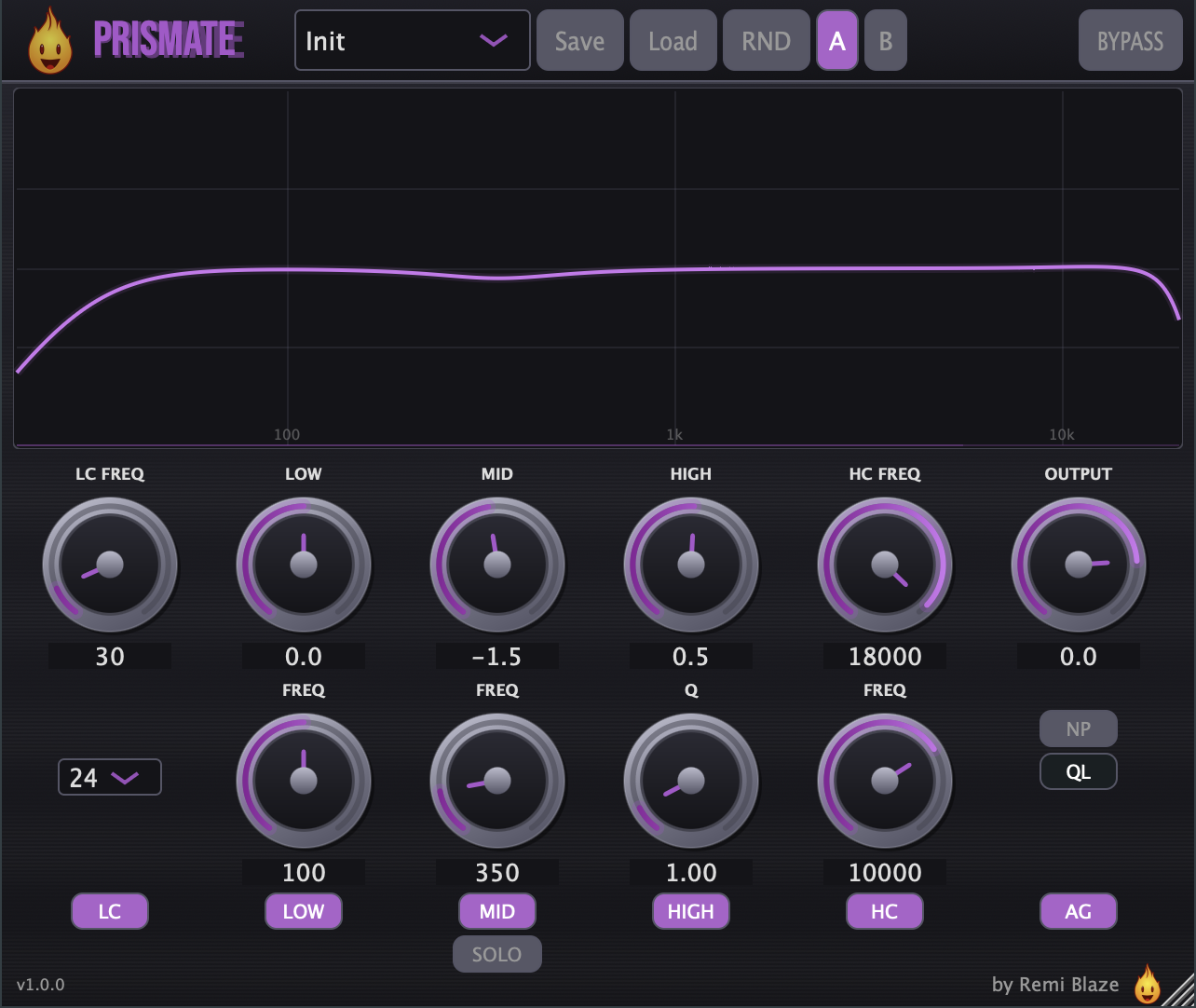
Sculpt clarity, air, and presence with a clean, visual three-band EQ.
Prismate is a mixing and enhancement EQ built around a low shelf, a parametric mid bell, and a high shelf, framed by musical low-cut and high-cut filters and a live spectrum analyzer. Push presence and air where a track needs it, then let Auto-Gain keep your levels honest for a fair A/B.
macOS (Apple Silicon and Intel): AU, VST3, CLAP, AAX, Standalone. Signed and notarized by Apple.
Windows 10 and 11, 64-bit: VST3, CLAP, Standalone. Authenticode signed.
AAX ships on macOS only.
Go to the latest release and pick your platform.
macOS
- Download
Prismate_Installer.pkg. - Double-click it and follow the installer. It is signed and notarized by Apple, so it installs cleanly with no security warnings.
- Restart your DAW and rescan plug-ins. Prismate appears under Remi Blaze.
Windows 10 and 11, 64-bit
- Download
Prismate_Installer.exe. - Run it and follow the installer. It is Authenticode signed.
- Restart your DAW and rescan plug-ins. Prismate appears under Remi Blaze.
No dongle and no extra account on either platform.
Full guide: remiblaze.com/support.
- Low Shelf: Gain (±24 dB) and frequency (20–500 Hz) for weight and warmth.
- Parametric Mid Bell: Gain (±24 dB), frequency (200 Hz–8 kHz), and Q (0.1–10) for surgical or broad midrange moves.
- High Shelf: Gain (±24 dB) and frequency (2–20 kHz) for presence and air.
- Low Cut: Sweepable high-pass (20 Hz–1 kHz) with an enable toggle and selectable slope: 12, 24, or 48 dB/oct.
- High Cut: Sweepable low-pass (1–20 kHz) with an enable toggle.
- Per-Band Bypass: Toggle the low, mid, and high bands independently.
- Band Solo: Isolate the Low, Mid, or High band to hear exactly what you're shaping.
- Q-Link: Automatically tightens the mid Q as you push its gain for a more musical bell.
- Natural Phase: Engages 2× oversampled processing for cleaner high-frequency behaviour.
- Output: Level trim from −24 dB to +6 dB.
- Auto-Gain: RMS-matched level compensation for honest before/after comparison.
- Bypass: Instant A/B of the whole plug-in in one click.
- A/B Slots: Store two settings and toggle between them.
- Real-Time Spectrum Analyzer: 2048-point FFT with a live EQ response curve, refreshing at 30 Hz.
- Randomize: One click to explore new EQ shapes.
- Tooltips: Hover any control for a description.
- Double-Click Reset: Double-click a knob to return it to its default.
- Resizable UI: Scales from 500×400 up to 900×750.
- Logarithmic frequency controls for natural, ear-matched sweeps.
- Parameter smoothing on every control to prevent zipper noise and clicks.
- 2× IIR oversampling engaged by Natural Phase, with latency reported to the host only when active.
- Anti-pop preset ducking that fades out, swaps at zero-crossing, and fades back in when recalling settings.
- 5 Hz DC blocker to keep the low end clean.
- tanh soft clipper near full scale as an output safety ceiling.
- Delay-compensated bypass so track alignment stays correct when the plug-in is bypassed.
- Universal Binary: native on Apple Silicon and Intel.
macOS
- macOS 15.0 or later
- Apple Silicon or Intel Mac (Universal Binary)
- An AU, VST3, CLAP or AAX host
Windows
- Windows 10 or Windows 11, 64-bit
- A VST3 or CLAP host
| Preset | Best For |
|---|---|
| Init | Clean, forensic starting point |
| Flat | Neutral reference |
| Kick Room | Tighten and control kick low end |
| 400Hz Mud-Arrest | Cut boxy midrange mud |
| Air-Traffic Ctrl | Add air with Natural Phase engaged |
| Sub-Snob | Disciplined sub with low/high cuts |
| Vocal Presence | Add vocal clarity and presence |
| Hi-Hat Sparkle | High-frequency shimmer |
| Bass Boost | Low-end enhancement |
| Mid Scoop | Scooped mids for guitars/synths |
| Telephone | Lo-fi telephone effect |
| Warm Tilt | Gentle warm rolloff |
| Bright Tilt | Add brightness |
| Air | High-frequency air |
| Remi Blaze Polish | Balanced mix polish |
Open an issue on the Issues tab with your macOS or Windows version, DAW + version, and steps to reproduce.
- Plugin page: remiblaze.com/plugins/prismate/.
- Developer: Remi Blaze.
- Framework: JUCE.
- License: free under a proprietary Freeware License (see also our terms). Reverse-engineering, repackaging, binary redistribution, or reselling the compiled installer is strictly prohibited.
All product names, company names, and logos mentioned herein are trademarks or registered trademarks of their respective owners. Any such references are used for descriptive or compatibility purposes only and do not imply affiliation with, endorsement by, or sponsorship from their owners.
VST is a trademark of Steinberg Media Technologies GmbH, registered in Europe and other countries.
Apple, macOS, Audio Units (AU), and Apple Silicon are trademarks of Apple Inc., registered in the U.S. and other countries.
AAX, Avid, and Pro Tools are trademarks or registered trademarks of Avid Technology, Inc. in the U.S. and other countries.
Microsoft and Windows are trademarks of the Microsoft group of companies.