Repository navigation
secureTextEntry shows the password in clear on Android with keyboardType="email-address" or autoCapitalize="characters" #59691
Description

Description
On Android, a TextInput with secureTextEntry shows its text in clear in two cases:
- with
keyboardType="email-address", from the first render; - with
autoCapitalize="characters"or"words", oncesecureTextEntryis set again in a later update, such as Hide after Show.
setSecureTextEntry ORs TYPE_TEXT_VARIATION_PASSWORD (0x80) into whatever variation the field already has, and a variation is a value within its class rather than a set of flags. With email-address (0x20) the result is 0xA0, TYPE_TEXT_VARIATION_WEB_EDIT_TEXT. With capitalization, checkPasswordType reads TYPE_TEXT_FLAG_CAP_CHARACTERS and TYPE_TEXT_FLAG_CAP_WORDS as TYPE_NUMBER_FLAG_SIGNED and TYPE_NUMBER_FLAG_DECIMAL, which share their bits, and swaps the text password for TYPE_NUMBER_VARIATION_PASSWORD (0x10), which in the text class is TYPE_TEXT_VARIATION_URI. TextView masks only the password variations, so neither field is masked.
The same order-dependent edits also drop keyboard variations: secureTextEntry={false} applied after keyboardType="url" or "visible-password" clears it, and changing keyboardType from url to email-address commits TYPE_TEXT_VARIATION_EMAIL_SUBJECT. Which of these a field meets on a device depends on the order its props reach the view manager. Earlier reports of the masking case, #20606 and #28709, closed as stale, and #26799 was answered for phone-pad, whose class has no password variation.
I opened #59014 with a fix: both setters only stage their value, and onAfterUpdateTransaction resolves the class and variation once, so a secure text field always commits TYPE_CLASS_TEXT | TYPE_TEXT_VARIATION_PASSWORD. Its tests cover each case above, in both prop orders where the order matters.
Steps to reproduce
- Build and install the reproducer's release APK:
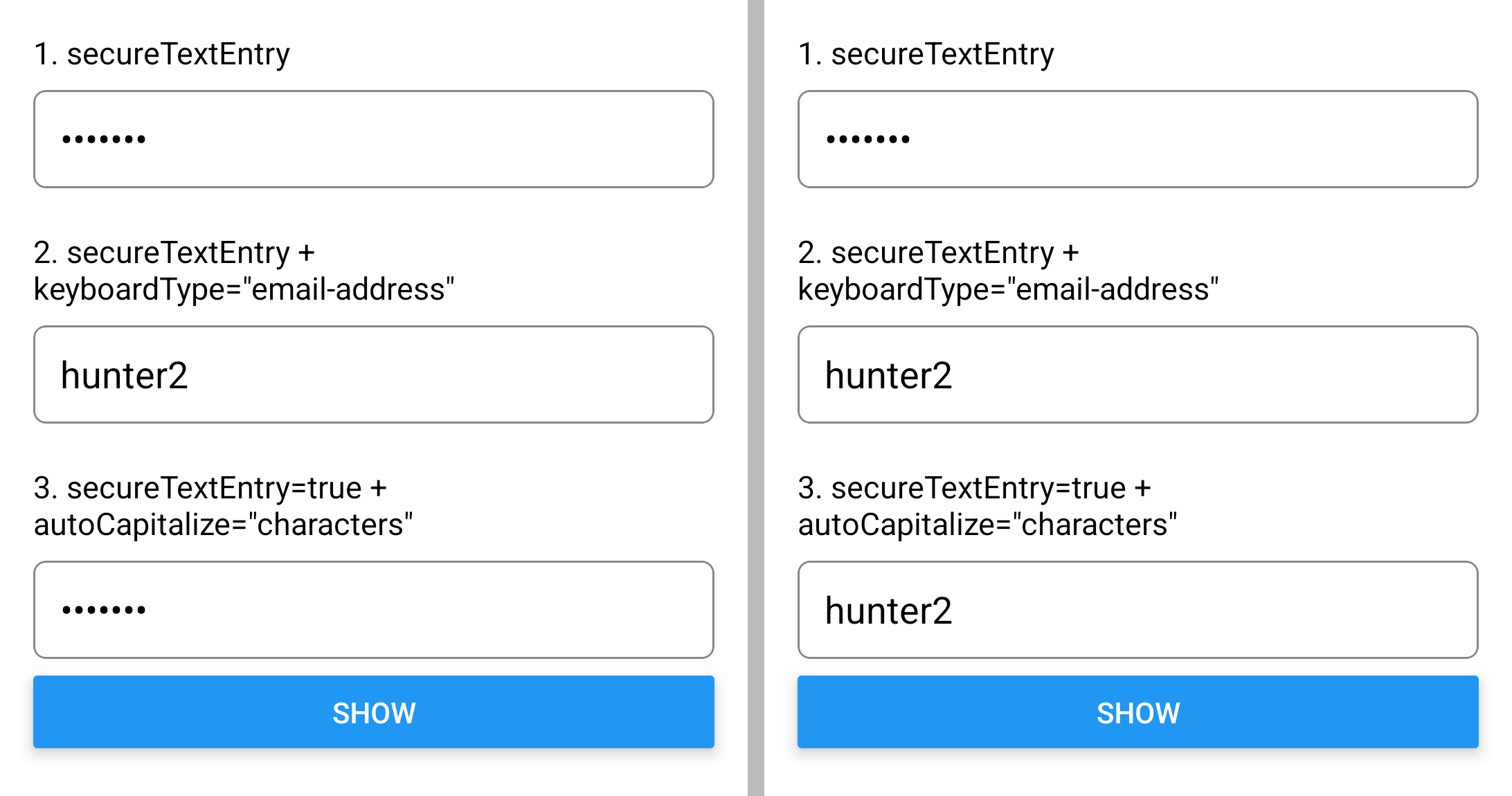
cd ReproducerApp/android && ./gradlew assembleRelease && adb install -r app/build/outputs/apk/release/app-release.apk. - Open the app. Field 1 (
secureTextEntry) is masked. Field 2 (secureTextEntrywithkeyboardType="email-address") showshunter2. - Tap Show, then Hide. Field 3 (
secureTextEntrywithautoCapitalize="characters") keeps showinghunter2while its label readssecureTextEntry=true.
Expected: fields 2 and 3 are masked, as field 1 is.
Actual: both show hunter2.
React Native Version
0.89.0-nightly-20261030-4afc5d5b9
Affected Platforms
Runtime - Android
Output of npx @react-native-community/cli info
System:
  OS: Windows 11 10.0.26300
  CPU: "(32) x64 AMD Ryzen 9 9950X3D 16-Core Processor          "
  Memory: 152.53 GB / 255.67 GB
Binaries:
  Node:
    version: 26.12.1
    path: C:\Program Files\nodejs\node.EXE
  Yarn:
    version: 1.22.22
    path: C:\Users\<user>\AppData\Roaming\npm\yarn.CMD
  npm:
    version: 12.2.1
    path: C:\Program Files\nodejs\npm.CMD
  Watchman: Not Found
SDKs:
  Android SDK:
    API Levels:
      - "33"
      - "35"
      - "35"
      - "35"
      - "36"
      - "37"
      - "37"
    Build Tools:
      - 35.0.0
      - 36.0.0
      - 36.1.0
      - 37.0.0
    System Images:
      - android-26 | Google APIs Intel x86_64 Atom
      - android-28 | Google APIs Intel x86_64 Atom
      - android-29 | Google APIs Intel x86_64 Atom
      - android-30 | Google APIs Intel x86_64 Atom
      - android-31 | Google APIs Intel x86_64 Atom
      - android-32 | Google APIs Intel x86_64 Atom
      - android-33 | Google APIs Intel x86_64 Atom
      - android-34 | Google APIs Intel x86_64 Atom
      - android-35 | Google APIs Intel x86_64 Atom
      - android-36.1 | Google Play Intel x86_64 Atom
      - android-36.1 | Pre-Release 16 KB Page Size Google Play Intel x86_64 Atom
      - android-37.0 | Google APIs Intel x86_64 Atom
    Android NDK: Not Found
  Windows SDK: Not Found
IDEs:
  Android Studio: AI-262.9437.185.2621.16467767
  Visual Studio: Not Found
Languages:
  Java:
    version: 17.0.20.1
    path: C:\Program Files\Microsoft\jdk-17.0.20.101-hotspot\bin\javac.EXE
  Ruby: Not Found
npmPackages:
  "@react-native-community/cli":
    installed: 21.0.0-alpha.1
    wanted: 21.0.0-alpha.1
  react:
    installed: 19.3.0
    wanted: 19.3.0
  react-native:
    installed: 0.89.0-nightly-20261030-4afc5d5b9
    wanted: 0.89.0-nightly-20261030-4afc5d5b9
  react-native-windows: Not Found
npmGlobalPackages:
  "*react-native*": Not Found
Android:
  hermesEnabled: true
  newArchEnabled: true
iOS:
  hermesEnabled: Not found
  newArchEnabled: Not found
Stacktrace or Logs
Galaxy S23 (SM-S911B), Android 14 (API 34), release build. Each EditText in the view tree, then the inputType
`adb shell dumpsys input_method` reads with each field focused:

== at launch
text="•••••••" password=true bounds=[48,250][1032,392]
text="hunter2" password=false bounds=[48,590][1032,732]
text="•••••••" password=true bounds=[48,930][1032,1072]
== after Show, then Hide, on field 3
text="•••••••" password=true bounds=[48,250][1032,392]
text="hunter2" password=false bounds=[48,590][1032,732]
text="hunter2" password=false bounds=[48,930][1032,1072]
== the EditorInfo of each field, focused in turn
field 1: inputType=0x4081 fieldId=10
field 2: inputType=0x40a1 fieldId=16
field 3: inputType=0x1011 fieldId=26
MANDATORY Reproducer
https://github.com/YevheniiKotyrlo/rn-secure-text-entry-keyboard-repro
Screenshots and Videos
The reproducer on the Galaxy S23, at launch (left) and after Show, then Hide (right):
Activity