

An AI-powered system that automatically generates high-quality documentation for any software repository using multi-agent architecture and Google Gemini AI.
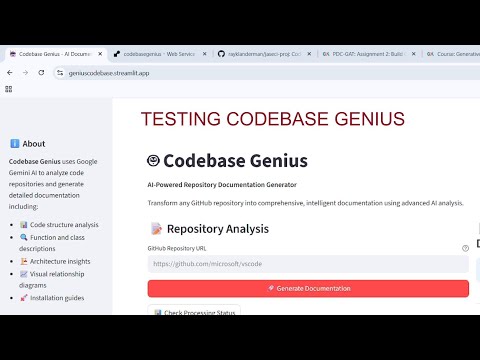
Click the image above to watch a comprehensive demonstration of Codebase Genius in action!
📋 View Screenshots & Interface Demo - See the application interface and generated documentation examples.
- Frontend (Streamlit): https://geniuscodebase.streamlit.app/
- Backend API (Render): https://codebasegenius.onrender.com/
- Deployment: Fully deployed on Streamlit Cloud and Render
- AI Integration: Google Gemini 2.5 Flash API integrated and working
- CORS: Cross-origin requests configured for production
- Testing: Successfully tested with multiple repositories
- API Limits: Handles small to medium repositories (large repos may hit API limits)
- 🤖 AI-Powered Analysis: Uses Google Gemini AI for intelligent code understanding
- 🔄 Multi-Agent System: Supervisor, RepoMapper, CodeAnalyzer, and DocGenie agents
- 📊 Code Structure Analysis: Parses code relationships and dependencies
- 🌐 Graph Visualization: Builds Code Context Graphs with NetworkX
- 📝 Professional Documentation: Generates comprehensive markdown docs
- 🎨 Modern Web UI: Streamlit-based interface with real-time progress
- ☁️ Cloud Deployed: Accessible online without local setup
- 🔒 Secure: Environment variable management for API keys
- Visit https://geniuscodebase.streamlit.app/
- Enter any GitHub repository URL
- Click "Generate Documentation"
- Download the AI-generated markdown documentation
- Python 3.8+
- Google Gemini API key
- Git
-
Clone and navigate:
git clone https://github.com/rayklanderman/jaseci-proj.git cd jaseci-proj/codebase_genius/backend -
Install dependencies:
pip install -r requirements.txt
pip install jaseci
-
Configure environment:
cp .env.example .env # Edit .env with your GEMINI_API_KEY -
Start the Jac server:
jac serve main.jac
-
Navigate to frontend:
cd ../frontend -
Install dependencies:
pip install -r requirements.txt
-
Run the app:
streamlit run app.py
The system uses a sophisticated multi-agent architecture:
- Supervisor Agent: Orchestrates the entire documentation workflow
- RepoMapper Agent: Clones repositories and generates file structure analysis
- CodeAnalyzer Agent: Parses code using Tree-sitter and builds relationship graphs
- DocGenie Agent: Synthesizes all data into professional markdown documentation
GitHub Repo → Jac Agents → Python Modules → Gemini AI → Markdown Docs
POST /walker/generate_docs- Generate documentation for a repository{ "repo_url": "https://github.com/microsoft/vscode", "session_id": "" }POST /walker/get_status- Check processing statusPOST /walker/download_docs- Download generated documentation
- Jac Language: Agent orchestration and graph-based logic
- Google Gemini 2.5 Flash: AI analysis and documentation generation
- Tree-sitter: Advanced code parsing and syntax analysis
- NetworkX: Graph construction and code relationship visualization
- GitPython: Repository cloning and version control operations
- Streamlit: Modern web interface framework
- FastAPI/Uvicorn: High-performance API server
- Requests: HTTP client for API communications
codebase_genius/
├── backend/
│   ├── main.jac              # Main Jac server with CORS-enabled walkers
│   ├── python/
│   │   ├── orchestrator.py   # Coordinates AI analysis pipeline
│   │   ├── repo_parser.py    # Repository processing with Gemini integration
│   │   └── gemini_connector.py # Google AI API wrapper
│   ├── outputs/              # Generated documentation storage
│   ├── render.yaml           # Render deployment configuration
│   ├── start.sh              # Linux-compatible startup script
│   ├── requirements.txt
│   └── .env                  # Environment variables (API keys)
└── frontend/
    ├── app.py                # Streamlit UI with production API support
    └── requirements.txt
- Automatically deployed from GitHub
- Environment variable:
BACKEND_URL=https://codebasegenius.onrender.com
- Auto-deploys on git push
- Includes CORS configuration for cross-origin requests
- Environment variables managed securely
502 Bad Gateway Error
- Check that
BACKEND_URLis set correctly in Streamlit Cloud - Verify Render service is running
API Rate Limits
- Google Gemini has free tier limits (15 RPM, 1M tokens/month)
- Try smaller repositories or upgrade to paid plan
Large Repository Timeouts
- Complex repos may exceed Render's 30-second timeout
- Consider processing in chunks or using paid Render plan
CORS Errors
- Ensure all Jac walkers have CORS configuration
- Check browser developer tools for specific errors
Test local backend:
Invoke-WebRequest -Uri "http://localhost:8000/walker/generate_docs" -Method POST -ContentType "application/json" -Body '{"repo_url": "https://github.com/octocat/Hello-World"}'- Small repos (< 50 files): Fast processing, reliable
- Medium repos (50-200 files): May take 30-60 seconds
- Large repos (> 200 files): May hit API limits or timeouts
- Free tier limits: Monitor Google AI Studio usage dashboard
- Fork the repository
- Create a feature branch
- Make your changes
- Test locally and on deployed version
- Submit a pull request
- Google Gemini API Key: Stored securely as environment variables, never committed to code
- Environment Variables: All sensitive credentials managed through platform-specific secure storage
- Access Control: API keys are validated server-side before processing requests
- Repository URLs: Validated to ensure they are valid GitHub HTTPS URLs
- Rate Limiting: Built-in protections against abuse and excessive API usage
- Content Filtering: Only processes public GitHub repositories
- Cross-Origin Requests: Properly configured for Streamlit Cloud domain
- Origin Validation: Restricted to allowed domains in production
- Secure Headers: Appropriate CORS headers implemented in Jac walkers
- Temporary Processing: Repositories cloned to temporary directories, cleaned up after processing
- No Data Persistence: Generated documentation is transient and not stored long-term
- Privacy: Repository content is processed in-memory and not retained
- HTTPS Only: All communications use secure HTTPS protocols
- Error Handling: Sensitive information never exposed in error messages
- Logging: Minimal logging to prevent data leakage
- Updates: Regular dependency updates for security patches
- Public Repositories Only: Only processes publicly accessible GitHub repositories
- API Limits: Respects Google Gemini API rate limits and quotas
- No Authentication: Currently designed for public use without user accounts
- Data Privacy: Repository analysis is performed server-side and results are returned to user
If you discover a security vulnerability, please report it responsibly by creating an issue in the GitHub repository.