ArgoCd is a continuous delivery tool with GitOps principles that can use to easily deploy applications to Kubernetes clusters. With ArgoCd application deployment, it can track the git repository status and can apply necessary changes to application deployment. It compares desired configuration in the Git repo with the actual state in the Kubernetes cluster. So Git repo remains as the single source of truth for the cluster.
Create a new minikube cluster
minikube start --memory=8192 --cpus=6 --profile argocd
Check current minikube profiles on the local machine
minikube profile listSelect newly created minikube cluster as the default cluster
minikube profile argocd
Create new namespace and install the argocd
kubectl create namespace argocd
kubectl apply -n argocd -f https://raw.githubusercontent.com/argoproj/argo-cd/stable/manifests/install.yaml
Port forward argocd-server service so it can be accessed locally on http://127.0.0.1:8000
kubectl port-forward -n argocd services/argocd-server 8000:443
Find the initial password for admin account
kubectl -n argocd get secret argocd-initial-admin-secret -o jsonpath="{.data.password}" | base64 -d; echo
Install ArgoCd CLI and login via CLI to access Argocd Server (Optional)
brew install argocd
kubectl port-forward -n argocd services/argocd-server 8000:443
argocd login 127.0.0.1:8080

argocd app create ..
argocd app list
argocd help
Apply application-config.yaml and it will create new application with following options enabled
- automatic sync
- automatic pruning (ex. delete deployment to match with the git code)
- self-healing (Revert manual changes to the cluster)
kubectl apply -f application-config.yaml
Makesure new CustomResourceDefinition is created
kubectl -n argocd get applications.argoproj.io
NAME                     SYNC STATUS   HEALTH STATUS
myapp-argo-application   Synced        Healthy
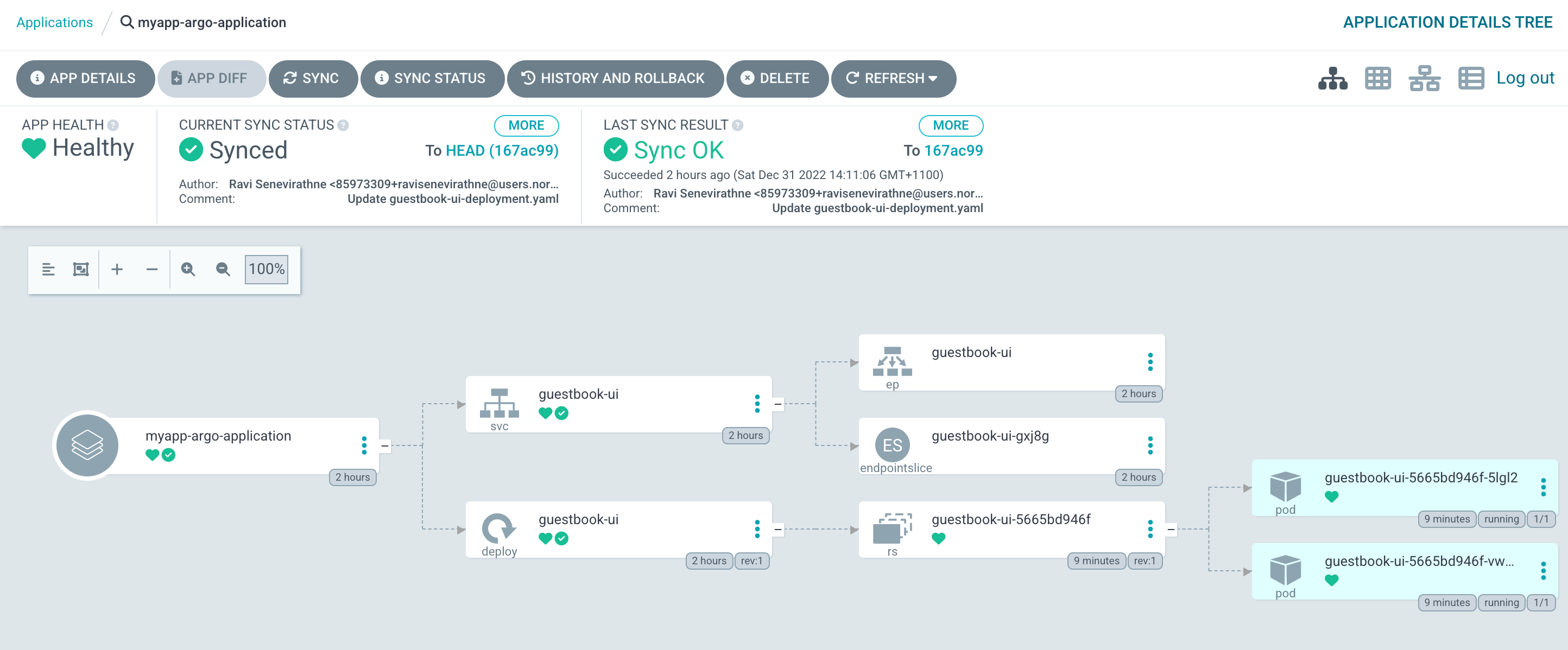
Now Application is visible on ArgoCD portal and you can click on each item send any commands or to view more details.
Once you finish stop and delete the minikube cluster
 minikube stop -p argocd
 minikube delete -p argocd