A Frappe (v15 and v16) app that adds SVG icons to Input Field Label, Section Break, and Column Break fields in your forms
Icons are stored in a dedicated Section Icon doctype and rendered inline next to section titles at runtime via a lightweight client script.
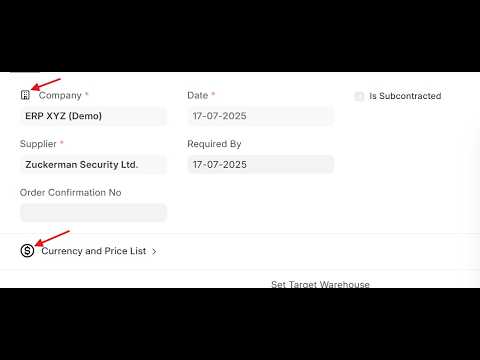
Light Theme

Dark Theme

- You create a Section Icon record linking a DocType, a Section Break fieldname, and an SVG icon.
- Uncheck Use same icon in dark mode to upload separate icon for dark and light theme. (optional)
- A bundled JS script listens for
form-refreshevents, fetches the icons for the current DocType (cached per session), and prepends each SVG inline next to the matching section title. - Cache is invalidated automatically via a Frappe realtime event whenever an icon is saved or deleted.
- Change your svg icon color to either black #000000 or white #ffffff so that icon color changes automatically with the theme
No Custom Fields are added to any DocType. No monkey-patching of core forms.
- Frappe Framework v15 or v16
- Python 3.10+
# From your bench directory
bench get-app https://github.com/raisulislam0/section_icon.git
bench --site your-site install-app section_icon
bench --site your-site migrate
bench --site your-site clear-cache
bench build --app section_iconGo to Section Icon List → New and fill in:
| Field | Description |
|---|---|
| DocType | The target DocType (e.g. Employee) |
| Section Break Fieldname | Select the section break fieldname (e.g. passport_details_section) |
| SVG File | Upload an .svg file — markup is extracted automatically. Uncheck Use same icon in dark mode for separate icons for each theme |
| SVG Markup | Or paste raw SVG markup directly |
Either SVG File or SVG Markup must be provided. If you upload a file, the markup field is populated automatically on save.
Open any document of the target DocType. The icon appears immediately to the left of the section title.
Example SVG markup:
<svg xmlns="http://www.w3.org/2000/svg" viewBox="0 0 24 24" fill="none"
     stroke="currentColor" stroke-width="2" stroke-linecap="round" stroke-linejoin="round">
  <rect x="3" y="3" width="18" height="18" rx="2"/>
  <path d="M3 9h18"/>
  <path d="M9 21V9"/>
</svg>bench --site your-site uninstall-app section_icon
bench remove-app section_iconMIT — see LICENSE for details.