Frappe Version 15 and Version 16
This Frappe app allows you to customize the width, height, background color, hover effects, label color, and text color of fields and Column Breaks directly from the UI. It helps you design and personalize form layouts efficiently without writing custom code, giving you more flexibility beyond the default Frappe layout system.
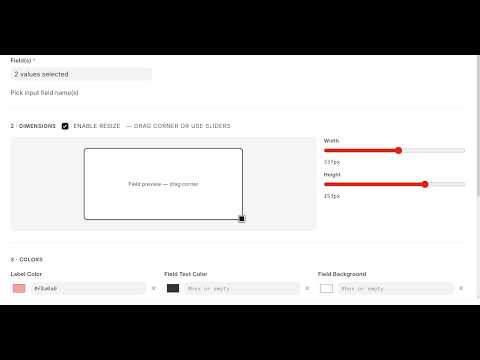
Run these on your bench once:
cd ~/frappe-bench
bench get-app https://github.com/raisulislam0/form_styler.git
bench --site YOUR_SITE install-app form_styler
bench --site YOUR_SITE migrate
bench --site YOUR_SITE clear-cache
Replace YOUR_SITE with your site name (e.g. site1.local).
Then in the browser: hard refresh the desk (Ctrl+Shift+R).
Confirm the app is loaded: open browser DevTools → Network → filter form_styler_runtime.js — it should load with status 200.


- Open Form Styler (search in Awesomebar).
- Click + New Rule.
- Fill in exactly:
| Field | Value |
|---|---|
| Rule Name | Asset wide fields |
| Active | ✓ checked |
| Apply To | All Fields in DocType |
| Target Element | Field · Column — switch to resize column-break containers |
| DocType | Asset |
| Field Width | 400px |
- Click Save Rule.
- Click Reload Rules (menu).
- Open Asset → New Asset (or any existing Asset). You should see inputs noticeably wider (~400px). Colors/hover on the same rule also prove CSS is working.
If Apply To is left as By Field Type, the DocType field is ignored. The rule only targets field types (e.g. all Data fields on every form), not “all fields on Asset”.
For one DocType, always use:
- All Fields in DocType + DocType =
Asset, or - Specific Field + DocType + fieldname (e.g.
item_code), or - Multiple Fields in DocType + DocType +
item_code, location
- Save Rule in Form Styler.
- Reload Rules (or reopen the target form).
- If still no change:
bench --site YOUR_SITE clear-cacheand hard refresh the browser.
- Field Style Rule records are stored in the database.
- On every form refresh, the runtime calls
form_styler.utils.get_style_rules. - For each field in
frm.fields_dict, rules are matched in JavaScript (Apply To / DocType / field type). - Matching fields get inline styles on their Frappe control (
$wrapper,.control-input-wrapper, inputs). - Column/section/hover use a small global CSS block.
Same steps: set Apply To = All Fields in DocType, DocType = exact name (Sales Invoice, Customer, …), save, reload form.
No extra setup per DocType.