

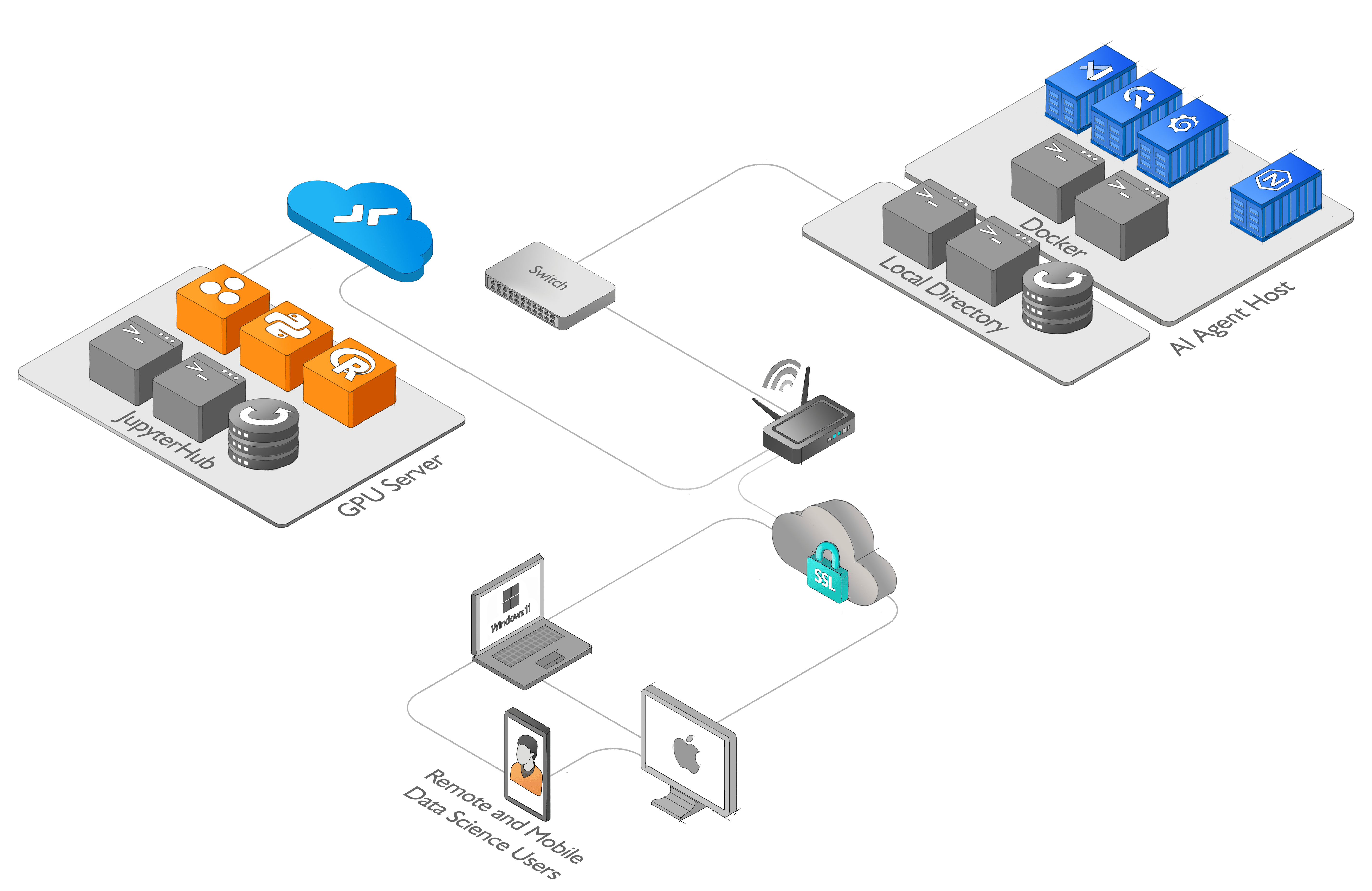
The AI Agent Host is a module-based environment designed to facilitate rapid experimentation and testing. It includes a docker-compose configuration with QuestDB, Grafana, Code-Server and Nginx. The AI Agent Host provides a seamless interface for managing and querying data, visualizing results, and coding in real-time.
The AI Agent Host is agent-agnostic — it provides the environment, not the agent. Its design follows two principles: being data-aware (connecting an AI agent to other sources of data, enabling a comprehensive understanding and analysis of information) and agentic (allowing the agent to actively interact with its environment). Rather than depending on any specific agent framework, the AI Agent Host provides a module-based environment for seamless data management, visualization, and real-time coding — so an agent such as Claude Code can operate directly against the stack like a developer with terminal access.
-
QuestDB: QuestDB is a high-performance, open-source time-series database. It allows for efficient storage and querying of time-series data, making it ideal for working with real-time data streams.
-
Grafana: Grafana is a popular open-source platform for data visualization and monitoring. It provides a rich set of features for creating interactive dashboards and visualizing data from various sources.
-
Code-Server: Code-Server is a web-based IDE based on Visual Studio Code. It provides a familiar coding environment with features such as code completion, syntax highlighting, and debugging capabilities.
-
Nginx: Nginx is a widely-used web server and reverse proxy server. It enhances the AI Agent Host by providing additional functionality for routing and load balancing, improving performance and security.
To use the AI Agent Host, follow these steps:
-
Set up or use an existing environment with Docker installed.
-
Clone the AI Agent Host repository and navigate to the docker directory.
git clone https://github.com/quantiota/AI-Agent-Host.git
cd AI-Agent-Host/docker
-
Follow all prerequisite steps that should be completed before bringing the Docker Stack. Refer to the Docker Readme file for guidance
-
Launch the AI Agent Host using the provided docker-compose configuration.
docker compose up --build -d
- Once the services are up and running, you can access the AI Agent Host interfaces:
- QuestDB: Visit https://questdb.domain.tld in your web browser.
- Grafana: Visit https://grafana.domain.tld in your web browser.
- Code-Server: Visit https://vscode.domain.tld in your web browser.
- To connect the AI Agent Host to a remote JupyterHub environment from Code-Server:
-
Set up or use an existing remote JupyterHub that includes the necessary dependencies for working with your notebooks and data.
-
Connect to the remote JupyterHub environment from within the Code-Server interface provided by the AI Agent Host
Start working with your notebooks and data, using the pre-installed tools and libraries that are included in your remote environment.
This example shows how to add an AI agent to the AI Agent Host without changing the core stack. The agent runs in its own service and talks directly to Code-Server, QuestDB and Grafana over the internal Docker network, preserving the Host’s role as an agentic environment.
Claude Code is functioning like a human developer with terminal access — using curl, database clients, and file operations rather than AI-specific middleware layers.
The agentic behavior comes from its ability to autonomously chain these basic system tools together, not from specialized AI agent frameworks.
- Updated
docker/vscode/Dockerfileto include Claude Code installation. - Updated
docker/docker-compose.yamlto mount persistent config/data volumes for Claude Code. - instructions
README.mdto run Claude Code
└── 📁claude-code
    └── 📁docker
        └── 📁vscode
            ├── Dockerfile
        ├── docker-compose.yaml
    └── README.md

📝 High resolution diagram Application architecture diagram
-
Connect to a JupyterHub from Visual Studio Code. Visual Studio Code
-
Create an API Token. JupyterHub