
- How to use the Procivis One Wallet
- Getting started
- Background
- EU Digital Identity Ecosystem
- Interoperability and conformance
- Standards and technologies
- Support
- License
The Procivis One Wallet is a digital wallet solution for decentralized digital identities and credentials. The Wallet enables the secure storage, management, and sharing of identity data, credentials, and attributes as needed via a multitude of technologies and protocols.
The Procivis One Wallet uses the Procivis One Core for all SSI functionality via the One Core React Native SDK.
The Procivis One Core is a complete solution capable of powering every element of the digital identity credential lifecycle. See the key features and complete solution architecture.
- Use the Wallet for a free-standing solution that can be white-labeled
- Use the One Core React Native SDK to embed wallet capabilities into an existing app
- Use the One Core React Components library for UI elements for your digital wallet app
The fastest way to get started with the Procivis One Wallet is to download the app from the iOS or Android app stores and join our Trial Environment. In the trial environment, you are given control of an organization on our server solution, the Procivis One Desk, and can quickly begin issuing and verifying credentials.
See our documentation:
Each flavor has a separate configuration script defined in package.json file, named rnuc:{flavor}.
To build the app using one of flavors, configuration script needs to be called before starting the bundler and compiling the app. For example, to build Dev Wallet flavor for iOS, run:
pnpm rnuc:dev
pnpm build-ios
or to debug same flavor:
pnpm rnuc:dev
pnpm start
pnpm ios- Install yalc:
pnpm global add yalc - Go to dep package and increase package version in package.json
- Run in dep package:
yalc publish --push - Go to one-wallet and run:
yalc add my-package-name
There are .env files in the app/config folder of the project for each of the app flavors. For each flavor there is a separate config file in app/config/flavors/{CONFIG_NAME} defining the backend urls, and Aries connections. In the same folder, there is an assets configuration containing flavor-specific assets for some UI components like a splash screen, or credential cards. In addition, each flavor has a UI theme defined in app/theme/flavors/{CONFIG_NAME} i.e. a color scheme, and palette.
For each flavor, there is a separate set of icons and splashscreens in Android and iOS projects.
Splashscreen under android/app/src/main/res/values/styles.xml
Square icon under android/src/main/res/minimap-{screen-size}/ic_launcher_{CONFIG_NAME}.png
Round icon under android/src/main/res/minimap-{screen-size}/ic_launcher_{CONFIG_NAME}_round.png
Splashscreen image is added in assets folder under Splashscreen.{CONFIG_NAME} image set, and in addition there is a separate Storyboard named LaunchScreen.{CONFIG_NAME}.storyboard for each flavor.
Icons are in asstes folder under AppIcon.{CONFIG_NAME} image set.
- Restart adb server
adb kill-server
adb start-serverSource:
Installation:
- Install
cdxgen
npm install -g @cyclonedx/cdxgen- Install
blint(python) for generateandroidSBOM (optional)
pip install blint- Prepare env
export FETCH_LICENSE=true- ReactNative SBOM
cdxgen --required-only -p -t js -o react-native-sbom.json- Android (Java) SBOM
cdxgen --required-only -p -t java -o android-sbom.jsonDecentralized digital identities and credentials is an approach to identity that relocates digital credentials from the possession and control of centralized authorities to the digital wallet of the credentials holder. This architecture eliminates the need for the user to "phone home" to use their credentials as well as the verifier to communicate to the issuer via back-channels, keeping the wallet holder's interactions private between only those parties directly involved in each interaction. This model of digital identity is often referred to as Self-Sovereign Identity, or SSI.
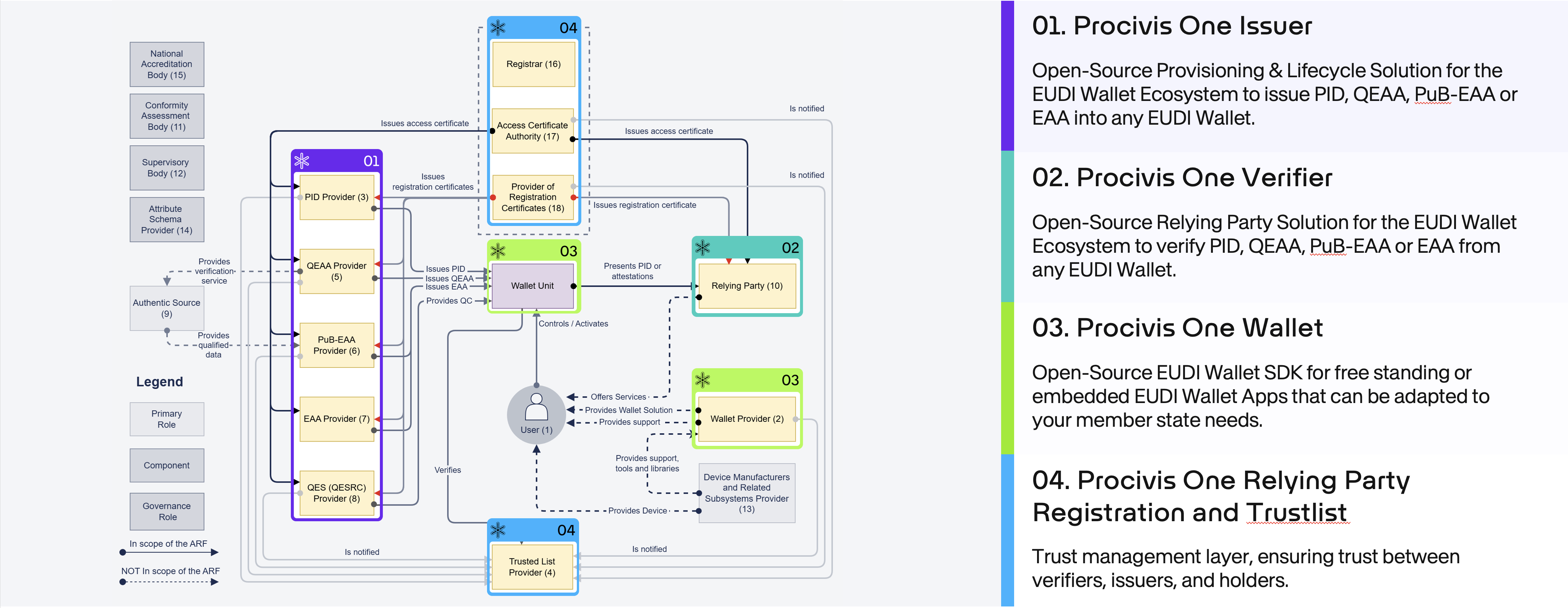
For an EU Digital Identity Wallet, you can also use the One Core React Native SDK.
For issuing into an EUDI Wallet or offering services to an EUDI Wallet holder, use the Procivis One Core.
Procivis One is built using open standards and tested to ensure interoperability with different software vendors and across different international regulatory ecosystems.
- W3C standards
- The W3C offers several test suites for standards conformance. See the latest test results for Procivis One at canivc.com.
- ISO/IEC 18013-5 mDL
- Procivis One's implementation of the ISO mDL standard is compatible with the OpenWallet Foundation's verifier: Procivis One can successfully issue mDL credentials to a Procivis One Wallet, and these credentials can successfully be verified by the OpenWallet Foundation's verifier. See the OpenWallet Foundation libraries.
- eIDAS 2.0; EUDI Wallet
We continue to look for more opportunities for interoperability testing as the standards and regulations mature and harden.
| Category | Supported |
|---|---|
| Credential formats | SD-JWT VC, ISO mdoc, W3C VC |
| Issuance protocol | OpenID4VCI |
| Presentation protocols | OpenID4VP, ISO/IEC 18013-5, ISO/IEC 18013-7 |
| Transport and engagement | BLE, MQTT, NFC, QR code |
| Revocation | Bitstring Status List, Token Status List, CRL |
| Key storage | Secure Enclave, Android Keystore, Azure Key Vault, HSM, internal database |
| DID methods | did:key, did:web, did:jwk, did:webvh |
| Trust infrastructure | ETSI Trusted Lists, Lists of Trusted Lists (LoTL), and Lists of Trusted Entities (LoTE), EUDI Access and Registration Certificates |
| Cryptographic suites | ES256, Ed25519, ML-DSA-65, BBS |
| Wallet attestations | Wallet Unit Attestation (WUA) and Wallet Instance Attestation (WIA) |
For the full list of supported standards, specifications, protocol versions, and ETSI coverage, see the [Supported Standards and Technologies][supptech] page in the Procivis One documentation.
Need support or have feedback? Contact us.
Thanks to Samuel Rinnetmäki, CTO of Findynet, for the Finnish translation.
Some rights reserved. This library is published under the Apache License Version 2.0.

© Procivis AG, https://www.procivis.ch.