English | 日本語 | 简体中文 | 繁體中文 | 한국어 | Tiếng Việt | ไทย | Bahasa Indonesia | Deutsch | Français | Español | Português | العربية | עברית
From Japanese, Chinese, and Korean to Arabic script — a report engine that turns the world's writing systems into beautiful PDFs, in pure TypeScript.
tsreport-core handles OpenType font parsing, text typesetting (arranging characters on the page with the correct glyph shapes, widths, and positions), band-based report layout, Canvas/SVG preview, and PDF generation — all through one consistent rendering model. It has zero runtime dependencies. With no native modules and no WASM, this single package runs on both Node.js and modern browsers.
The code samples in this document intentionally use Japanese business data (quotations, invoices): they double as a live demonstration of this engine's CJK typesetting.
npm install tsreport-coreThis README is full of samples you can copy and run as-is, covering everything from your first PDF generation to all 16 report elements, vertical writing, multilingual typesetting, font embedding and converting text to outlines, and browser preview. If report tools are new to you, start with Report layout basics to get a feel for the concepts, then build your first PDF with the tutorial.
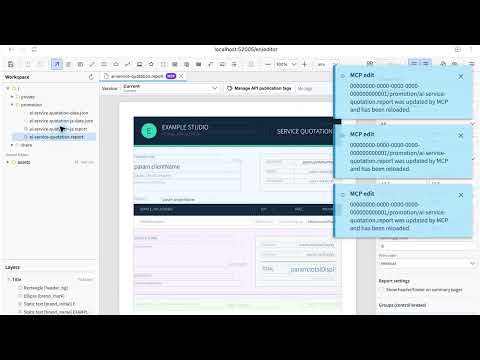
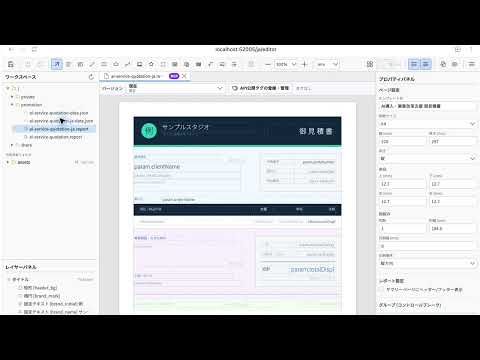
tsreport-editor is a WYSIWYG report designer built on tsreport-core. You can lay out bands and elements visually, bind JSON test data, inspect the print preview, import PDFs, and generate PDFs with the same core rendering engine. These videos show AI editing a report through MCP and opening the completed preview in the Editor.
| English demo | Japanese demo |
|---|---|
 |
 |
A multilingual report cannot be displayed correctly by simply writing strings straight into a PDF. Glyph selection, character-width measurement, positioning, line breaking, vertical writing, and font embedding into the PDF — only when this whole chain of processing meshes together do you get the page you expect.
tsreport-core takes on this entire flow, from font parsing to PDF generation.
- Japanese, Chinese, and Korean — Simplified and Traditional Chinese, Hangul, punctuation handling, and vertical-writing glyphs are all typeset correctly based on Unicode and OpenType data
- Arabic script and right-to-left (RTL) typesetting — contextual glyph shaping, joining and ligatures (multiple characters merging into a single glyph shape), and Unicode bidirectional processing (ordering control when right-to-left text is mixed with digits and Latin letters) are handled by the same layout pipeline as every other script
- Complex writing systems — glyph substitution and positioning driven by the font's built-in typesetting rules (OpenType Layout), combining characters, glyph variants (alternate designs of the same character), and per-language typesetting features are supported
- Vertical writing — handles
vertical-rl/vertical-lr, vertical-writing glyphs, vertical metrics (dimension data such as advance widths specific to vertical text), and character rotation - Automatic font subset embedding — only the glyphs actually used (the per-character shape data stored in the font) are embedded into the PDF, so the document looks the same even on machines that do not have the font installed
- Converting text to outlines — per element, text can be output as font-independent vector paths
- System font references — for workflows that rely on the viewer's fonts, you can also produce lightweight PDFs with no embedded fonts
- Detecting garbled text before it happens —
checkGlyphCoverage()flags characters missing from the font, per page and per character, before output
And this text typesetting works as one unit with a layout engine built specifically for reports — because the ability to set characters correctly and the ability to paginate correctly cannot be separated.
- Layout that responds to text volume — rows stretch with the amount of text (
stretchWithOverflow) and band heights adjust automatically. Long product names never get cut off - Automatic page breaks driven by data volume — when detail rows overflow, the engine starts a new page and re-emits the header and heading rows automatically. Per-group subtotals and page breaks take nothing more than a declaration
- Nested layout — even complex reports combining tables, crosstabs, and subreports are placed consistently by the same layout engine
- WYSIWYG (preview = print) — elements are fixed at exactly the pt coordinates you specify, and the Canvas/SVG preview shares the identical layout result with the PDF output. What you see on screen is what you get on paper
tsreport-core grew out of three concerns.
TypeScript has no serious reporting solution. Producing quotations and invoices is a basic business need, yet the TypeScript/Node.js ecosystem — while it has libraries for low-level PDF drawing — had nothing that deserved to be called a "report engine": band layout, automatic page breaks, aggregation, and preview-print fidelity in one package. We wanted to end the practice of dragging in another language runtime or an external server product just for reports.
Reporting is a fundamental capability, and everyone should be able to use it for free. Report output is not a premium feature reserved for a few expensive products; it is part of the foundation of any business system. With no commercial licenses to buy and no usage-based fees, everyone — from personal tools to commercial products — should be able to use the same engine as-is. tsreport-core publishes all of its features under a dual MIT OR Apache-2.0 license as the embodiment of this belief.
Few solutions tackle multilingual support — Asian scripts, Arabic script, and beyond — head-on. Most reporting and PDF tools are designed around Latin text, treating Japanese, Chinese, and Korean typesetting or right-to-left Arabic script as afterthoughts. tsreport-core made "typesetting the world's writing systems correctly, with one engine" a design goal from day one, implementing everything from font parsing to typesetting and PDF embedding in-house.
These motivations take shape as three strengths.
When pages are assembled from a template and data, the result is captured in a single rendering model called RenderDocument. That same model can be rendered to PDF, Canvas, or SVG, so there is no need to maintain duplicate layout logic for on-screen preview and print — the PDF looks exactly like what you saw on screen. There is no need to wire a band-layout report engine and a PDF library together.
Font parsing, text typesetting, PDF generation, DEFLATE compression, encryption, PNG decoding, and barcode generation are all implemented in pure TypeScript. With no native modules and no external processes, it behaves identically in every environment, and auditing the code that runs during report generation means reading just this one package.
- Band layout with title, page header, detail, group, summary, and more
- Tables, crosstabs, subreports, variables, expressions, page breaks, table of contents, merging multiple reports
- Importing existing PDFs — converting PDF pages into report elements (
ElementDef), styles, images, and font information - Code 39/93/128, EAN, UPC, ITF, Codabar, MSI, QR Code, Data Matrix, PDF417
- SVG, gradients, clipping, transparency, mathematical typesetting, images
- PDF encryption, PDF/A-1b, 2b, and 3b (international standards for long-term archiving), PDF/X-1a (an international standard for print submission), bookmarks, links, forms, annotations
- TTF, OTF, TTC, OTC, WOFF, WOFF2, EOT, variable fonts (fonts whose weight, width, and other axes vary continuously), and color fonts
For readers new to report engines, this section walks through the foundational concepts in order.
In tsreport-core, a report is built from two parts: a template (the layout definition) and data (JSON).
The template contains no actual values. It defines only the frames — "the item name goes here; the amount goes there, at this width and in this format" — and references to which data field to display in each (written as field.item, meaning the item field of the data).
The actual values are passed as JSON data. Each element of the rows array is one detail row.
{
  "rows": [
    { "item": "りんご", "amount": 100 },
    { "item": "みかん", "amount": 80 },
    { "item": "ぶどう", "amount": 300 }
  ]
}
When the report is generated, the engine walks rows from top to bottom, emitting the detail layout once per row. In the example above, three detail rows are printed, and field.item resolves to りんご, みかん, and ぶどう in turn. If the data grows to 10,000 rows, the report becomes 10,000 rows long without changing a single character of the template. This division of labor — layout is fixed, row count follows the data — is the starting point of every report engine.
On the template side, you then design the page as a stack of horizontal strips called bands. Rather than computing Y coordinates yourself and placing elements on the page, you declare only "which band holds what," and the engine assembles the pages automatically according to the number of data rows. One page has the following structure.
┌──────────────────────────┐
│ title                    │ ← once at the start of the report (title, addressee, …)
├──────────────────────────┤
│ pageHeader               │ ← top of every page (company name, issue date, …)
├──────────────────────────┤
│ columnHeader             │ ← heading row for the detail rows (item, quantity, amount, …)
├──────────────────────────┤
│ details                  │ ┐
│ details                  │ │ once per row of rows,
│ details                  │ │ repeated for as many rows as there are
│   :                      │ ┘
├──────────────────────────┤
│ columnFooter             │ ← closes the detail rows (per page/column)
├──────────────────────────┤
│ pageFooter               │ ← bottom of every page (page numbers, …)
└──────────────────────────┘
On the final page, after the last details, summary (grand totals for the whole report and the like) is output exactly once. Beyond these there are background, laid under every page; lastPageFooter, used only on the final page; and noData, which appears only when the data has zero rows — ten kinds of bands in total can be defined in bands.
| Band | When it is output | Typical use |
|---|---|---|
background |
Background of every page | Watermarks, decorative borders |
title |
Once at the start of the report | Title, addressee |
pageHeader |
Top of every page | Company name, issue date |
columnHeader |
Before the detail rows (per page/column) | Detail heading row |
details |
Once per row of data (rows) |
Detail rows |
columnFooter |
After the detail rows (per page/column) | Subtotal area |
pageFooter |
Bottom of every page | Page numbers |
lastPageFooter |
Bottom of the final page (replaces pageFooter when specified) |
Closing remarks |
summary |
Once after all detail rows | Grand total, notes |
noData |
When the data has zero rows | "No matching data" |
If you additionally define groups, group headers and footers are inserted automatically wherever the group key changes, giving you layouts like "subtotal per department, then start a new page."
You can also specify columns in the template (count = number of columns, spacing = gap between columns in pt) to flow the detail area into multiple vertical columns, newspaper style. The default is one column, in which case anything described as "per column" in this document means the same as "per page." Moving to the next column is referred to as a "column break."
When detail rows no longer fit on the page, the engine automatically closes that page (outputting pageFooter), starts the next one, outputs pageHeader and columnHeader again, and then continues flowing the remaining detail rows. You never need to count rows or compute the remaining height of a page.
Only when you want control do you reach for the following.
- The
breakelement — force a page break or column break at any position - A band's
startNewPage— always start that band on a fresh page - A band's
splitType— when there is not enough height, choose whether the band may straddle pages mid-way (stretch) or must be moved to the next page unsplit (prevent)
The subreport element embeds an entire separate .report inside the parent report's layout. "Print a list of orders, and inside each order print its line items as a table" — it is the mechanism for laying out nested data like this.
Suppose each row of the parent's rows (one order) carries an items array of line items.
{
  "rows": [
    {
      "orderNo": "A-001",
      "customer": "サンプル商事",
      "items": [
        { "name": "りんご", "qty": 10 },
        { "name": "みかん", "qty": 5 }
      ]
    },
    {
      "orderNo": "A-002",
      "customer": "テスト物産",
      "items": [
        { "name": "ぶどう", "qty": 2 }
      ]
    }
  ]
}
Place a subreport element in the parent's details band and pass "this order's items" through dataSourceExpression.
{
  "type": "subreport",
  "x": 20, "y": 24, "width": 300, "height": 40,
  "templateExpression": "'order-items.report'",
  "dataSourceExpression": "field.items"
}
templateExpression is, as the name says, an expression. To pass a fixed file name, wrap it in '...' as a string literal inside the expression (you can also switch it dynamically with an expression such as "field.templatePath").
The subreport then runs once for each parent detail row, and the items passed in are treated as the subreport's own rows. The subreport (order-items.report) is an independent template in its own right: it has its own band definitions and refers to each line item via field.name and field.qty. On the page it unfolds like this.
┌──────────────────────────────┐
│ details                      │ ← parent rows, row 1 (order A-001)
│   ┌────────────────────────┐ │
│   │ subreport              │ │ ← receives this order's items (2 rows)
│   │   details              │ │ ← items row 1 (りんご 10)
│   │   details              │ │ ← items row 2 (みかん 5)
│   └────────────────────────┘ │
├──────────────────────────────┤
│ details                      │ ← parent rows, row 2 (order A-002)
│   ┌────────────────────────┐ │
│   │ subreport              │ │ ← receives this order's items (1 row)
│   │   details              │ │ ← items row 1 (ぶどう 2)
│   └────────────────────────┘ │
└──────────────────────────────┘
The line-item table inside an invoice, a detail block repeated per customer — "small reports inside a report" can be carved out as components and reused. Parameters (heading strings and the like) can also be passed down from the parent. The later section Working samples for every element contains a complete, ready-to-run example of exactly this setup (the parent element plus the subreport-side template).
A .report file is a report template: a ReportTemplate written as JSON. Since it is plain JSON, you can track diffs in Git and generate it from any language or tool.
The minimal setup is these three files.
reports/
├── quotation.report
├── quotation.test-data.json
└── fonts/
    ├── NotoSansJP-Regular.otf
    └── NotoSansJP-Bold.otf
print-report.mjs
The two font file names assume the Regular / Bold weights of a Japanese font (e.g. Noto Sans JP). Substitute the fonts you have at hand. Handling multiple languages in a single report is covered later in Building multilingual reports.
Coordinates, dimensions, margins, and font sizes are all in pt (points, 1pt = 1/72 inch ≈ 0.353mm), the standard unit of PDF. "size": "A4" is treated as 595 × 842pt (the ISO dimensions of 210×297mm converted to pt and rounded to integers), and the 36pt margins in this example are about 12.7mm.
One more premise: fontFamily in styles is not a font file name but a key (logical name) that you will later register in the runtime code's fontMap and fonts. Using the same names in the template and the code (jp and jpBold in this example) is what ties them together.
{
  "name": "quotation",
  "page": {
    "size": "A4",
    "margins": { "top": 36, "right": 36, "bottom": 36, "left": 36 }
  },
  "parameters": [
    { "name": "title", "type": "string", "defaultValue": "御見積書" }
  ],
  "fields": [
    { "name": "item", "type": "string" },
    { "name": "quantity", "type": "number" },
    { "name": "amount", "type": "number" }
  ],
  "variables": [
    {
      "name": "grandTotal",
      "expression": "field.amount",
      "calculation": "sum",
      "resetType": "report"
    }
  ],
  "styles": [
    { "name": "title", "fontFamily": "jpBold", "fontSize": 20 },
    { "name": "body", "fontFamily": "jp", "fontSize": 10 },
    { "name": "header", "fontFamily": "jpBold", "fontSize": 10 },
    { "name": "amount", "fontFamily": "jp", "fontSize": 10, "hAlign": "right" }
  ],
  "bands": {
    "title": {
      "height": 52,
      "elements": [
        {
          "type": "textField",
          "x": 0, "y": 0, "width": 523, "height": 30,
          "expression": "param.title",
          "style": "title"
        }
      ]
    },
    "columnHeader": {
      "height": 24,
      "elements": [
        {
          "type": "staticText",
          "x": 0, "y": 0, "width": 300, "height": 20,
          "text": "品名",
          "style": "header"
        },
        {
          "type": "staticText",
          "x": 300, "y": 0, "width": 80, "height": 20,
          "text": "数量",
          "style": "header",
          "hAlign": "right"
        },
        {
          "type": "staticText",
          "x": 380, "y": 0, "width": 143, "height": 20,
          "text": "金額",
          "style": "header",
          "hAlign": "right"
        }
      ]
    },
    "details": [
      {
        "height": 24,
        "elements": [
          {
            "type": "textField",
            "x": 0, "y": 0, "width": 300, "height": 20,
            "expression": "field.item",
            "style": "body"
          },
          {
            "type": "textField",
            "x": 300, "y": 0, "width": 80, "height": 20,
            "expression": "field.quantity",
            "pattern": "#,##0",
            "style": "amount"
          },
          {
            "type": "textField",
            "x": 380, "y": 0, "width": 143, "height": 20,
            "expression": "field.amount",
            "pattern": "¥#,##0",
            "style": "amount"
          }
        ]
      }
    ],
    "summary": {
      "height": 36,
      "elements": [
        {
          "type": "line",
          "x": 300, "y": 0, "width": 223, "height": 0,
          "lineWidth": 0.5,
          "lineColor": "#333333"
        },
        {
          "type": "staticText",
          "x": 300, "y": 8, "width": 80, "height": 20,
          "text": "合計",
          "style": "header"
        },
        {
          "type": "textField",
          "x": 380, "y": 8, "width": 143, "height": 20,
          "expression": "vars.grandTotal",
          "pattern": "¥#,##0",
          "style": "amount"
        }
      ]
    }
  }
}
The pattern used in the detail rows is a number/date format specifier (#,##0 = thousands separators, ¥#,##0 = thousands separators with a yen sign; see "Formatting numbers and dates" later in this document for details).
Each row in rows is bound to field.* in the detail band, and parameters is bound to param.* for the whole report.
{
  "parameters": {
    "title": "御見積書"
  },
  "rows": [
    {
      "item": "高耐久ボールベアリング",
      "quantity": 12,
      "amount": 48000
    },
    {
      "item": "産業用制御モジュール",
      "quantity": 3,
      "amount": 126000
    }
  ]
}
The bindings map as follows.
| JSON | Expression in .report |
Purpose |
|---|---|---|
rows[n].item |
field.item |
Current detail row |
parameters.title |
param.title |
Report-wide argument |
Variable grandTotal |
vars.grandTotal |
Report variables for sums, counts, etc. |
| Page context | PAGE_NUMBER / TOTAL_PAGES |
Page number, total page count |
// print-report.mjs
import { readFileSync, writeFileSync } from 'node:fs'
import {
  Font,
  TextMeasurer,
  checkGlyphCoverage,
  createReportFromFile,
  renderToPdf,
} from 'tsreport-core'

function loadFont(path) {
  const bytes = readFileSync(path)
  // Node.js Buffers can share a larger memory pool; pass Font.load an ArrayBuffer
  // sliced to exactly this file's bytes
  const buffer = bytes.buffer.slice(
    bytes.byteOffset,
    bytes.byteOffset + bytes.byteLength,
  )
  return Font.load(buffer)
}

const regular = loadFont('./reports/fonts/NotoSansJP-Regular.otf')
const bold = loadFont('./reports/fonts/NotoSansJP-Bold.otf')
const fontMap = new Map([
  ['default', new TextMeasurer(regular)],
  ['jp', new TextMeasurer(regular)],
  ['jpBold', new TextMeasurer(bold)],
])
const fonts = { default: regular, jp: regular, jpBold: bold }
const dataSource = JSON.parse(
  readFileSync('./reports/quotation.test-data.json', 'utf8'),
)

const report = createReportFromFile(
  './reports/quotation.report',
  dataSource,
  { fontMap },
)
const coverageIssues = checkGlyphCoverage(report, fonts)
if (coverageIssues.length > 0) {
  throw new Error(`Missing glyphs: ${JSON.stringify(coverageIssues)}`)
}

const pdf = renderToPdf(report, {
  fonts,
  metadata: { title: dataSource.parameters.title },
})
writeFileSync('./quotation.pdf', pdf)
node print-report.mjsThe same fonts are registered twice, in both fontMap and fonts, because the two serve different roles: fontMap is used for character-width measurement at layout time (TextMeasurer), while fonts is used for font embedding at PDF generation time. Register the same font in both, under the same key names as the template's fontFamily.
createReportFromFile() resolves relative paths for images and subreports against the directory of the main .report. If you specify workingDirectory, that directory becomes the base instead. To restrict what can be read, declare the permitted root explicitly in resources.fileRoot; relative references that escape the root, and symbolic links pointing outside it, are rejected.
Instead of using a .report file, you can write the template as a TypeScript object. With type checking and completion at your fingertips, this suits generating templates from code. The content is the same quotation as the tutorial. Coordinates and dimensions are in pt.
import { readFileSync, writeFileSync } from 'node:fs'
import {
  Font,
  TextMeasurer,
  checkGlyphCoverage,
  createReport,
  renderToPdf,
  type ReportTemplate,
} from 'tsreport-core'

function loadFont(path: string): Font {
  const bytes = readFileSync(path)
  const buffer = bytes.buffer.slice(
    bytes.byteOffset,
    bytes.byteOffset + bytes.byteLength,
  ) as ArrayBuffer
  return Font.load(buffer)
}

const jpFont = loadFont('./fonts/NotoSansJP-Regular.otf')
const jpBoldFont = loadFont('./fonts/NotoSansJP-Bold.otf')

const template: ReportTemplate = {
  name: 'quotation',
  page: {
    size: 'A4',
    margins: { top: 36, right: 36, bottom: 36, left: 36 },
  },
  styles: [
    { name: 'title', fontFamily: 'jpBold', fontSize: 20 },
    { name: 'body', fontFamily: 'jp', fontSize: 10 },
    { name: 'amount', fontFamily: 'jp', fontSize: 10, hAlign: 'right' },
    { name: 'header', fontFamily: 'jpBold', fontSize: 10 },
    { name: 'amountHeader', fontFamily: 'jpBold', fontSize: 10, hAlign: 'right' },
  ],
  fields: [
    { name: 'item', type: 'string' },
    { name: 'quantity', type: 'number' },
    { name: 'amount', type: 'number' },
  ],
  bands: {
    title: {
      height: 52,
      elements: [{
        type: 'staticText',
        x: 0, y: 0, width: 523, height: 32,
        text: '御見積書',
        style: 'title',
      }],
    },
    columnHeader: {
      height: 24,
      elements: [
        { type: 'staticText', x: 0, y: 0, width: 300, height: 20, text: '品名', style: 'header' },
        { type: 'staticText', x: 300, y: 0, width: 80, height: 20, text: '数量', style: 'amountHeader' },
        { type: 'staticText', x: 380, y: 0, width: 143, height: 20, text: '金額', style: 'amountHeader' },
      ],
    },
    details: [{
      height: 24,
      elements: [
        { type: 'textField', x: 0, y: 0, width: 300, height: 20, expression: 'field.item', style: 'body' },
        { type: 'textField', x: 300, y: 0, width: 80, height: 20, expression: 'field.quantity', pattern: '#,##0', style: 'amount' },
        { type: 'textField', x: 380, y: 0, width: 143, height: 20, expression: 'field.amount', pattern: '¥#,##0', style: 'amount' },
      ],
    }],
  },
}

const dataSource = {
  rows: [
    { item: '高耐久ボールベアリング', quantity: 12, amount: 48000 },
    { item: '産業用制御モジュール', quantity: 3, amount: 126000 },
  ],
}

const fontMap = new Map([
  ['default', new TextMeasurer(jpFont)],
  ['jp', new TextMeasurer(jpFont)],
  ['jpBold', new TextMeasurer(jpBoldFont)],
])
const document = createReport(template, dataSource, { fontMap })
const fonts = { default: jpFont, jp: jpFont, jpBold: jpBoldFont }

const coverageIssues = checkGlyphCoverage(document, fonts)
if (coverageIssues.length > 0) {
  throw new Error(`Missing glyphs: ${JSON.stringify(coverageIssues)}`)
}

const pdf = renderToPdf(document, {
  fonts,
  metadata: { title: '御見積書' },
})
writeFileSync('./quotation.pdf', pdf)Give an element an arbitrary id and you can retrieve it with findElementById(), no matter how deeply it sits inside bands or frames. The return value is not a copy but the element inside template itself, so any changes made before createReport() are reflected in layout and rendering.
import { findElementById, getElementChildren } from 'tsreport-core'

const template: ReportTemplate = {
  page: { size: 'A4' },
  bands: {
    details: [{
      height: 40,
      elements: [{
        id: 'customer-block',
        type: 'frame',
        x: 0, y: 0, width: 300, height: 40,
        elements: [{
          id: 'customer-name',
          type: 'staticText',
          x: 0, y: 0, width: 300, height: 20,
          text: '変更前',
        }],
      }],
    }],
  },
}

const customerName = findElementById(template, 'customer-name')
if (customerName?.type === 'staticText') {
  customerName.text = '株式会社サンプル'
}

const customerBlock = findElementById(template, 'customer-block')
if (customerBlock !== undefined) {
  const directChildren = getElementChildren(customerBlock)
  console.log(directChildren.map((element) => element.id)) // ['customer-name']
}

const document = createReport(template, dataSource, { fontMap })
findElementById() searches regular bands, detail bands, group headers/footers, frames, soft masks, and table cells depth-first. When the same ID appears more than once, it returns the first element in search order, so keep any ID you intend to modify unique within the template. The elements in the array returned by getElementChildren() are likewise references into the original template.
Font files are not bundled with the package. Choose fonts whose licenses suit your use case, distribution method, and embedding permissions. One style can name only one font. To mix characters of multiple languages within a single element, you need a Pan-CJK font that covers them all in one file (a font bundling Japanese, Chinese, and Korean characters; e.g. Source Han Sans, Noto Sans CJK). To use a separate font per language, split elements by language and switch styles, as in the next section, "Building multilingual reports."
Each style can name exactly one font, and there is no automatic fallback between fonts. The basic pattern for a multilingual report is therefore to load a font per language and apply each language's style to that language's elements.
The following excerpt is from a quotation that presents Japanese and Simplified Chinese side by side. First, load a font for each language.
const jaFont = loadFont('./fonts/NotoSansJP-Regular.otf')
const zhFont = loadFont('./fonts/NotoSansSC-Regular.otf')
const fontMap = new Map([
  ['default', new TextMeasurer(jaFont)],
  ['ja', new TextMeasurer(jaFont)],
  ['zh', new TextMeasurer(zhFont)],
])
const fonts = { default: jaFont, ja: jaFont, zh: zhFont }
In the template, apply the ja style to the Japanese wording and the zh style to the Chinese wording, splitting the elements by language.
{
  "styles": [
    { "name": "ja", "fontFamily": "ja", "fontSize": 12 },
    { "name": "zh", "fontFamily": "zh", "fontSize": 12 }
  ],
  "bands": {
    "title": {
      "height": 40,
      "elements": [
        { "type": "staticText", "x": 0, "y": 0, "width": 160, "height": 28, "text": "御見積書", "style": "ja" },
        { "type": "staticText", "x": 170, "y": 0, "width": 160, "height": 28, "text": "报价单", "style": "zh" }
      ]
    },
    "columnHeader": {
      "height": 22,
      "elements": [
        { "type": "staticText", "x": 0, "y": 0, "width": 150, "height": 18, "text": "品名", "style": "ja" },
        { "type": "staticText", "x": 160, "y": 0, "width": 150, "height": 18, "text": "商品名称", "style": "zh" }
      ]
    },
    "details": [
      {
        "height": 22,
        "elements": [
          { "type": "textField", "x": 0, "y": 0, "width": 150, "height": 18, "expression": "field.nameJa", "style": "ja" },
          { "type": "textField", "x": 160, "y": 0, "width": 150, "height": 18, "expression": "field.nameZh", "style": "zh" }
        ]
      }
    ]
  }
}
The data likewise carries a field per language.
{
  "rows": [
    { "nameJa": "高耐久ボールベアリング", "nameZh": "高耐久滚珠轴承" },
    { "nameJa": "産業用制御モジュール", "nameZh": "工业控制模块" }
  ]
}
The exception is a single field whose language is unknown until runtime, such as a free-form remarks box. Since that field cannot be split into per-language elements, the practical answer is to assign — to that style alone — a Pan-CJK font that covers many writing systems in one file (Source Han Sans, Noto Sans CJK, and the like). Either way, checkGlyphCoverage() detects any gaps in font coverage before output.
Even within one report, you can specify the output mode per staticText or textField: searchable embedded text for the body, outlines for the logo, system font references for boilerplate.
| Mode | How to specify | State in the PDF | Suited to |
|---|---|---|---|
| Subset embedding | pdfFontMode: 'embedded' (default) |
Embeds the glyphs used plus the font program. Text can be selected and searched | Distribution, long-term archiving, printing, multilingual reports |
| Converting to outlines | outlineText: true |
Converts glyph shapes to vector paths. Carries no font information | Logos, camera-ready art — text whose shapes must be frozen exactly |
| System font reference | pdfFontMode: 'reference' |
Embeds no font; records only the font name and the characters | Lightweight PDFs for internal distribution where the font environment is under control |
const textElements = [
  {
    type: 'staticText' as const,
    x: 0, y: 0, width: 220, height: 24,
    text: '検索できる日本語',
    style: 'body',
    pdfFontMode: 'embedded' as const,
  },
  {
    type: 'staticText' as const,
    x: 0, y: 28, width: 220, height: 24,
    text: '形状を固定する標章',
    style: 'body',
    outlineText: true,
  },
  {
    type: 'staticText' as const,
    x: 0, y: 56, width: 220, height: 24,
    text: '端末のフォントを参照',
    style: 'body',
    pdfFontMode: 'reference' as const,
  },
]
Subset embedding is the recommended mode for preserving glyph shapes regardless of the destination environment. System font references require a compatible font wherever the PDF is opened, and the appearance may vary from one environment to another. Text converted to outlines cannot be selected or searched as ordinary text.
Just specify writingMode on a style, and the text is set vertically using vertical-writing glyphs and vertical-specific dimension data (vertical metrics — advance widths and the like). vertical-rl advances lines from right to left; vertical-lr advances them from left to right.
const verticalStyle = {
  name: 'vertical',
  fontFamily: 'jp',
  fontSize: 14,
  writingMode: 'vertical-rl' as const,
}

const verticalText = {
  type: 'staticText' as const,
  x: 440, y: 0, width: 70, height: 260,
  text: '四季を通じて美しく読みやすい縦書き帳票',
  style: 'vertical',
}The RenderDocument you built for PDF can be rendered straight to a Canvas as well. Preview and print share the same layout result, so "the screen and the paper look different" simply cannot happen. Combined with the fixed pt-based layout, this is the foundation for a WYSIWYG preview and editing experience (font embedding is the default; only the system-font-reference mode depends on the viewing environment for its appearance). A single call to renderPage() draws the page, including page setup and teardown.
import { CanvasBackend, Font, TextMeasurer, createReport, renderPage } from 'tsreport-core'

const [regularBuffer, boldBuffer] = await Promise.all([
  fetch('/fonts/NotoSansJP-Regular.otf').then(response => response.arrayBuffer()),
  fetch('/fonts/NotoSansJP-Bold.otf').then(response => response.arrayBuffer()),
])
const jpFont = Font.load(regularBuffer)
const jpBoldFont = Font.load(boldBuffer)
const fontMap = new Map([
  ['default', new TextMeasurer(jpFont)],
  ['jp', new TextMeasurer(jpFont)],
  ['jpBold', new TextMeasurer(jpBoldFont)],
])
const reportDocument = createReport(template, dataSource, { fontMap })
const page = reportDocument.pages[0]
const canvas = document.querySelector<HTMLCanvasElement>('#preview')!
const context = canvas.getContext('2d')!

renderPage(page, new CanvasBackend(context, {
  scale: 1.5, // display scale: 1.0 draws 1pt as 1px
  devicePixelRatio: window.devicePixelRatio, // keeps text and lines crisp on high-DPI displays
  fonts: { default: jpFont, jp: jpFont, jpBold: jpBoldFont },
}))
If you are building a preview UI in React, the tsreport-react package is also available.
Even without building a report, you can use each capability on its own: font parsing, shaping (converting a string into the sequence and positions of the glyphs actually drawn), text measurement, and subset generation.
import { Font, TextMeasurer } from 'tsreport-core'

const fontBuffer = await fetch('/fonts/NotoSansJP-Regular.otf').then(response => response.arrayBuffer())
const font = Font.load(fontBuffer)
const measurer = new TextMeasurer(font)
const measurement = measurer.measure('御見積書', 12) // measurement.width: string width in pt at 12pt
const shaped = font.shapeText('「縦書き。」', { direction: 'vertical' }) // glyph IDs and positions after shaping
const glyph = font.getGlyph(font.getGlyphId('請'.codePointAt(0)!)) // glyph.outline: Bezier path data

console.log(measurement.width, shaped, glyph.outline)importPdfPage() parses a page of an existing PDF and converts it into an array of tsreport-core report elements (ElementDef). This is no mere viewer: text comes in as staticText, images as image, shapes as path — components you can edit and rearrange directly in this report engine.
Take the PDF of a form you have been running on paper, or a PDF produced by another system, and use it as the base — adding data-merge fields, reshuffling the layout. It is the entry point for turning existing report assets into templates.
import { readFileSync } from 'node:fs'
import { getPdfPageCount, importPdfPage } from 'tsreport-core'

const bytes = readFileSync('./existing-form.pdf')

const pageCount = getPdfPageCount(bytes)
const page = importPdfPage(bytes, 0)

// page.elements: array of report elements (staticText / image / path, …)
// page.styles:   text style definitions referenced by the elements
// page.images:   image data referenced by the elements
// page.fonts:    information about the referenced fonts
console.log(pageCount, page.width, page.height, page.elements.length)
The imported elements and styles can be placed straight into template bands. Passwords for encrypted PDFs, annotation import, converting imported text to outlines, and more are controlled via PdfImportOptions.
Everything "dynamic" in a report is written as an expression: the content a textField prints, the print condition in printWhenExpression, barcode data, image paths, data passed to a subreport — every property whose type is Expression accepts the same expression language.
Expressions come in two forms.
- String expressions — strings such as
"field.price * field.quantity". They are a safe subset of JavaScript interpreted by a dedicated parser;evalandnew Functionare never used. Templates remain saveable as JSON (.reportfiles) - Callback expressions — TypeScript functions of the form
(field, vars, param, report) => …. You get the full power of the language, but the template can no longer be saved as JSON (this assumes you keep templates in TypeScript)
We recommend first seeing how far string expressions take you, and moving on to callbacks only when they fall short.
| Name | Description |
|---|---|
field.* |
The current data row. Nested access such as field.customer.name is supported |
vars.* |
Variables (aggregate values defined in variables, described below). var.* works the same |
param.* |
Report-wide values: values passed via the data source's parameters and the defaultValues of the template's parameters. In a subreport, parameters passed from the parent also appear here |
PAGE_NUMBER |
The current page number (1-based) |
COLUMN_NUMBER |
The current column number (1-based) |
REPORT_COUNT |
The number of data rows processed |
TOTAL_PAGES |
The total page count. Referenced as-is it yields "the page count so far", so to print the final total page count combine it with evaluationTime: 'report' or 'auto' (described below) |
Referencing a nonexistent field does not throw; it evaluates to undefined (even when an intermediate part of field.a.b is null, it safely returns null).
| Category | Available |
|---|---|
| Literals | numbers (1200, 0.5), strings ('見積' or "見積", with escapes such as \n), true / false / null / undefined |
| Template literals | `合計 ${vars.total} 円` — a full expression may appear inside ${} |
| Arithmetic | + (numeric addition and string concatenation), -, *, / |
| Comparison | >, >=, <, <=, ===, !== |
| Logical | &&, ||, ! (short-circuit evaluation, as in JavaScript) |
| Nullish coalescing | ?? — returns the right-hand side when the left is null/undefined |
| Conditional (ternary) | condition ? valueIfTrue : valueIfFalse |
| Other | unary - / +, parentheses ( ), dot-notation member access (property names may be Japanese: field.顧客名) |
| Built-in functions | format(value, pattern) = formatting (described below) / round(value, digits?) = round half up / roundUp, roundDown, roundHalfEven (banker's rounding), ceil, floor, trunc (for each, the second argument is the number of decimal places, 0 when omitted) / now() = current time |
Not available: == / != (use === / !==), % and **, bracket notation (field['a-b']) and array indexing, method calls (field.name.toUpperCase() fails at evaluation time — the only callable functions are the built-ins above), assignment, function definitions, new, optional chaining (?. — unnecessary anyway, since intermediate nulls never throw). When you need any of these, use a callback expression.
These restrictions exist for safety. String expressions are interpreted by a dedicated parser and are never executed as code, so a template received from outside cannot smuggle in arbitrary code.
{
  "type": "textField",
  "x": 0, "y": 0, "width": 120, "height": 20,
  "expression": "round(field.price * field.quantity * (1 + field.taxRate), 0)",
  "pattern": "¥#,##0",
  "style": "amount"
}
Sample data:
{ "rows": [{ "price": 1200, "quantity": 3, "taxRate": 0.1 }] }This prints ¥3,960.
{
  "type": "textField",
  "x": 0, "y": 0, "width": 300, "height": 20,
  "expression": "`${field.familyName} ${field.givenName ?? ''} 様`",
  "style": "body"
}
Values embedded in a template literal's ${} are stringified and concatenated. null becomes the string "null", so append ?? '' to values that may be missing, as in the example.
Use the ternary operator to switch what gets printed.
{
  "type": "textField",
  "x": 0, "y": 0, "width": 80, "height": 20,
  "expression": "field.stock > 0 ? '在庫あり' : '取り寄せ'",
  "style": "body"
}
When you want to change whether something is shown rather than what is shown, use the element-common printWhenExpression (see "Printing an element only when a condition is met"). To switch styling (color, bold) on a condition, specify a condition expression of the same form in the style definition's conditionalStyles.
{
  "name": "amount",
  "fontFamily": "jp", "fontSize": 10, "hAlign": "right",
  "conditionalStyles": [
    { "condition": "field.amount < 0", "forecolor": "#CC0000" }
  ]
}textField can format the expression result at print time via the pattern property. To format part of a value inside an expression, use the built-in format(value, pattern) function.
{
  "type": "textField",
  "x": 0, "y": 0, "width": 300, "height": 20,
  "expression": "`発行日: ${format(now(), 'yyyy年M月d日')}`",
  "style": "body"
}
Number patterns combine # (show the digit if present), 0 (zero padding), and , (thousands separator), and may carry a prefix and suffix. Rounding is half-up.
| Pattern | Input | Output |
|---|---|---|
#,##0 |
1234567.8 | 1,234,568 |
#,##0.00 |
1234.5 | 1,234.50 |
¥#,##0 |
1980 | ¥1,980 |
0000 |
42 | 0042 |
The date pattern tokens are yyyy (4-digit year), MM / M (zero-padded month / month), dd / d (zero-padded day / day), HH (zero-padded hour, 24-hour clock), mm (minutes), and ss (seconds). A null/undefined value produces an empty string.
For formats beyond these (Japanese era dates, weekday names, currency digit handling, and so on), register named TypeScript functions in the template's formatters and write the name in pattern.
const template = {
  // ...
  formatters: {
    wareki: (value) => new Intl.DateTimeFormat('ja-JP-u-ca-japanese', { dateStyle: 'long' }).format(value as Date),
  },
}
// On the element side: { type: 'textField', expression: 'field.issuedAt', pattern: 'wareki', ... }
pattern first looks for a registered formatter of that name, and is interpreted as a built-in format if none is found. Formatters are functions, so templates using this feature are kept in TypeScript rather than JSON.
Aggregation that spans detail rows is defined in the template's variables. Each time a data row is processed, a variable feeds the result of its expression into its aggregate, and expressions can reference the current value as vars.name.
{
  "variables": [
    { "name": "pageTotal", "expression": "field.amount", "calculation": "sum", "resetType": "page" },
    { "name": "grandTotal", "expression": "field.amount", "calculation": "sum" }
  ]
}
Place a textField with "expression": "vars.pageTotal" in the pageFooter band for a page subtotal, and one with "expression": "vars.grandTotal" in the summary band for a grand total.
Property list (each entry of variables)
| Property | Type / allowed values | Required | Description |
|---|---|---|---|
name |
string | ✓ | Variable name, referenced from expressions as vars.name |
expression |
Expression | ✓ | Evaluated for each row; the result is fed into the aggregate |
calculation |
'sum' = total / 'average' = average / 'count' = count / 'distinctCount' = count of distinct values / 'min' = minimum / 'max' = maximum / 'first' = first value / 'nothing' = overwritten every row (last value) |
✓ | Aggregation method |
resetType |
'report' = keep aggregating across the whole report (no reset; default) / 'page' = reset per page / 'column' = reset per column / 'group' = reset per group named in resetGroup / 'none' = never resets, like 'report', but under delayed evaluation (evaluationTime) the value stays fixed as of the moment the element was placed (it is not later replaced by the final aggregate) |
Reset scope of the aggregation | |
resetGroup |
string | Target group name when resetType: 'group' |
|
incrementCondition |
Expression | When set, rows whose evaluation result is falsy are not fed into the aggregate (conditional aggregation) | |
initialValue |
Expression | Initial value at initialization and on each reset |
With incrementCondition, a conditional aggregation such as "sum only a particular category" fits in a single variable:
{ "name": "urgentCount", "expression": "field.id", "calculation": "count", "incrementCondition": "field.urgent" }To aggregate subreport execution results in the parent, use the subreport element's returnValues, which writes the child's variables back into the parent's vars.* (see the subreport property list).
{
  "type": "textField",
  "x": 0, "y": 0, "width": 100, "height": 16,
  "expression": "`${PAGE_NUMBER} / ${TOTAL_PAGES}`",
  "evaluationTime": "auto",
  "hAlign": "center",
  "style": "body"
}
The key is evaluationTime: 'auto'. Expressions are normally evaluated the moment an element is placed, but at that point the final total page count is not yet known. With 'auto', the expression is statically analyzed and each reference is evaluated at its own correct timing — PAGE_NUMBER when the page is finalized, TOTAL_PAGES when the report completes. Because 'auto' needs to analyze the expression, it is only available for string expressions (specifying it on a callback expression throws).
If your template is defined in TypeScript, you can write a function directly anywhere an Expression is accepted. It takes four arguments, (field, vars, param, report); through report you can reach built-in values such as PAGE_NUMBER, the format function, and the registered formatters.
{
  type: 'textField',
  x: 0, y: 0, width: 300, height: 20,
  expression: (field, vars, param, report) => {
    const code = String(field.productCode)
    return code.match(/^[A-Z]{2}-\d{4}$/) ? code.toUpperCase() : `不正なコード: ${code}`
  },
  style: 'body',
}
Method calls, regular expressions, external functions — anything you can write in TypeScript is available. There are two trade-offs: the template can no longer be saved or transferred as JSON, and evaluationTime: 'auto' is unavailable (explicit values such as 'report' still work).
- Syntax errors and forbidden constructs (method calls, etc.) throw an
ExpressionLanguageErrorwith position information, which propagates as-is to the caller ofcreateReport(). It is never swallowed into a blank cell - References to nonexistent fields or variables are not errors; they evaluate to
undefined. In atextField, an empty string is printed whenblankWhenNull: trueis set; without it, the stringnullis printed - To validate user-supplied expressions before execution,
validateExpressionSource(source)returns the syntax check result (an error, ornull)
Here are all 16 elements provided by ElementDef. Every element takes x, y, width, and height (in pt, 1pt = 1/72 inch) and is placed into the elements of a band or a frame.
| What you want to do | Element |
|---|---|
| Print fixed text | staticText |
| Print data, variables, or expression results | textField |
| Draw a line | line |
| Draw a rectangle or rounded box | rectangle |
| Draw a circle or ellipse | ellipse |
| Draw an arbitrary vector shape | path |
| Place an image | image |
| Group multiple elements inside a border | frame |
| Print a table | table |
| Print a cross-tab | crosstab |
| Embed one report inside another | subreport |
| Print a barcode or QR code | barcode |
| Print a mathematical formula | math |
| Print SVG | svg |
| Create a fillable PDF form | formField |
| Force a page or column break anywhere | break |
| Print an element only when a condition is met | printWhenExpression (an attribute common to all elements) |
Below, each element gets one definition you can drop straight into a band's elements array, plus sample data for the elements that use expressions. At the end of each element's section is the property list specific to that element. For the properties common to all elements (position, colors, print conditions, and so on) and the style properties, see "Element property reference" below.
Prints a string written in the template, exactly as-is. Use it for headings and labels.
{
  "type": "staticText",
  "x": 0, "y": 0, "width": 150, "height": 24,
  "text": "固定テキスト",
  "style": "body"
}
Property list
| Property | Type / allowed values | Required | Description |
|---|---|---|---|
type |
'staticText' |
✓ | Element type |
text |
string | ✓ | The fixed string to print |
actualText |
string | Replacement text for when the visible characters differ from the text obtained by copy and search (PDF /ActualText). Used mainly by PDF import to preserve the source PDF's setting | |
hyperlink |
HyperlinkDef | Hyperlink (see HyperlinkDef in the common properties section) |
|
anchorName |
string | Anchor name. Registered as a destination for bookmarks and in-document links (hyperlink of 'localAnchor') |
|
bookmarkLevel |
number | Hierarchy level (1 = top level, 1–6) for listing this element's text in the table of contents (bookmarks) shown in the PDF viewer's sidebar |
Note: in addition, all element-common properties and every TextProperties property may be specified.
Prints the result of evaluating expression. It can reference field.* (data), vars.* (variables), param.* (parameters), PAGE_NUMBER, and more, and template literals let you build strings. For the full expression language, see "Mastering expressions". Use pattern for number/date formatting and stretchWithOverflow to let the height grow with the amount of text.
{
  "type": "textField",
  "x": 0, "y": 0, "width": 350, "height": 24,
  "expression": "`${field.customer} 様`",
  "style": "body",
  "stretchWithOverflow": true
}
Sample data:
{ "rows": [{ "customer": "サンプル商事" }] }Property list
| Property | Type / allowed values | Required | Description |
|---|---|---|---|
type |
'textField' |
✓ | Element type |
expression |
Expression | ✓ | Expression returning the value to print |
pattern |
string | Format pattern. A custom formatter registered on the template (a formatters name) takes precedence; otherwise the value is formatted with the built-in formatter |
|
blankWhenNull |
boolean | Print an empty string when the expression result is null/undefined (without this, the string 'null' is printed) |
|
stretchWithOverflow |
boolean | When the content does not fit within height, stretch the element's height to fit the content | |
evaluationTime |
'now' = evaluate immediately in place (default) / 'band' = evaluate when the band is finalized / 'column' = evaluate at the end of the column / 'page' = evaluate at the end of the page / 'group' = evaluate when the group named in evaluationGroup closes / 'report' = evaluate at the end of the report (TOTAL_PAGES etc. are final) / 'auto' = evaluate each variable and built-in value the expression references individually at its own reset timing (string expressions only; callback expressions throw) |
When the expression is evaluated. With any non-default value, the area is first reserved empty at placement time and filled in once the value is finalized at the corresponding timing. Typical uses: showing a group total ahead of the group ('group'), printing the final total page count ('report') |
|
evaluationGroup |
string | Target group name when evaluationTime: 'group' |
|
textTruncate |
'none' = lines that do not fit are not drawn (default; identical to 'truncate' in the current implementation) / 'truncate' = cut off non-fitting text line by line / 'ellipsisChar' = trim the last line at a character boundary and append ... / 'ellipsisWord' = trim the last line at a word boundary and append ... |
Handling of text that does not fit the height when stretchWithOverflow is off. Default: none |
|
hyperlink |
HyperlinkDef | Hyperlink (see HyperlinkDef in the common properties section) |
|
anchorName |
string | Anchor name. Registered as a destination for bookmarks and in-document links (hyperlink of 'localAnchor') |
|
bookmarkLevel |
number | Hierarchy level (1 = top level, 1–6) for listing this element's text in the table of contents (bookmarks) shown in the PDF viewer's sidebar |
Note: in addition, all element-common properties and every TextProperties property may be specified. isPrintRepeatedValues: false is honored by this element (suppresses printing consecutive identical values).
This example is a horizontal line of height 0. lineStyle accepts dashed and others besides solid.
{
  "type": "line",
  "x": 0, "y": 0, "width": 350, "height": 0,
  "lineWidth": 1,
  "lineStyle": "dashed",
  "lineColor": "#4B5563"
}
Property list
| Property | Type / allowed values | Required | Description |
|---|---|---|---|
type |
'line' |
✓ | Element type. The segment is drawn from the element's top-left (x, y) to its bottom-right (x+width, y+height) (height: 0 gives a horizontal line, width: 0 a vertical line, both non-zero a diagonal) |
lineWidth |
number | Line width (pt). Default: 1 | |
lineStyle |
'solid' = solid / 'dashed' = dashed / 'dotted' = dotted |
Line style. Default: solid | |
lineColor |
string | Line color. Default: the element's forecolor, or #000000 if that is also absent |
cornerRadii lets you round each corner individually.
{
  "type": "rectangle",
  "x": 0, "y": 0, "width": 100, "height": 60,
  "cornerRadii": {
    "topLeft": 12,
    "topRight": 12,
    "bottomRight": 4,
    "bottomLeft": 4
  },
  "fill": "#E0F2FE",
  "stroke": "#0369A1",
  "strokeWidth": 1
}
Property list
| Property | Type / allowed values | Required | Description |
|---|---|---|---|
type |
'rectangle' |
✓ | Element type |
radius |
number | Corner radius (pt, shared by all corners) | |
cornerRadii |
{ topLeft?, topRight?, bottomRight?, bottomLeft?: number } | Per-corner radius (pt) | |
fill |
FillDef | Fill (see FillDef in the common properties section). Default: the style's backcolor (when it is not transparent) |
|
stroke |
string | Border color. Default: the style's forecolor |
|
strokeWidth |
number | Border width (pt). Default: 1 |
Draws an ellipse inscribed in the element's width and height.
{
  "type": "ellipse",
  "x": 0, "y": 0, "width": 80, "height": 60,
  "fill": "#FCE7F3",
  "stroke": "#BE185D",
  "strokeWidth": 1
}
Property list
| Property | Type / allowed values | Required | Description |
|---|---|---|---|
type |
'ellipse' |
✓ | Element type. Draws the ellipse inscribed in the element's bounding box (center (x+width/2, y+height/2), radii width/2 × height/2) |
fill |
FillDef | Fill (see FillDef in the common properties section). No fill when omitted |
|
stroke |
string | Border color. No border when omitted | |
strokeWidth |
number | Border width (pt). Default: 1 (when stroke is set) |
Put SVG path syntax in d and its coordinate system in viewBox. The shape is scaled to fit the element's frame.
{
  "type": "path",
  "x": 0, "y": 0, "width": 100, "height": 60,
  "viewBox": [0, 0, 100, 60],
  "d": "M 5 55 L 50 5 L 95 55 Z",
  "fill": "#FEF3C7",
  "stroke": "#B45309",
  "strokeWidth": 2
}
Property list
| Property | Type / allowed values | Required | Description |
|---|---|---|---|
type |
'path' |
✓ | Element type |
d |
string | ✓ | SVG path data (M/L/C/Z etc.). Coordinates are element-local pt |
pdfSourceVector |
PdfSourceVectorDef | Produced by PDF import to preserve a shape that appears repeatedly (map symbols, etc.) as "one definition + N placements" (see PdfSourceVectorDef later). When set, d is not parsed. Not needed in hand-written templates |
|
affineTransform |
[number, number, number, number, number, number] | Affine transform matrix mapping path coordinates into element-local coordinates before drawing. [a, b, c, d, e, f] gives x' = a·x + c·y + e, y' = b·x + d·y + f |
|
viewBox |
[number, number, number, number] | [minX, minY, width, height]. Path coordinates are scaled from this region to the element's width and height |
|
fill |
FillDef | Fill (see FillDef in the common properties section). No fill when omitted |
|
fillRule |
'nonzero' (default) / 'evenodd' |
Rule deciding which regions count as "inside" for self-intersecting or nested paths. To punch a donut-style hole, 'evenodd' is the reliable choice |
|
fillOpacity |
number | Fill opacity (0.0–1.0) | |
stroke |
FillDef | Stroke (solid colors as well as gradients and more). No stroke when omitted | |
strokeWidth |
number | Stroke width (pt). Default: 1 (when stroke is set) |
|
strokeOpacity |
number | Stroke opacity (0.0–1.0) | |
strokeLinecap |
'butt' = cut at the end / 'round' = rounded cap / 'square' = square cap (extended by half the line width) |
Line cap shape | |
strokeLinejoin |
'miter' = miter (pointed) / 'round' = rounded / 'bevel' = beveled |
Line join shape | |
strokeMiterLimit |
number | Miter limit. Default: 10 | |
strokeDasharray |
number[] | Dash pattern (array of dash and gap lengths, pt) | |
strokeDashoffset |
number | Starting offset into the dash pattern (pt) |
Specify the image with sourceExpression (an expression) or source (a fixed value). scaleMode controls how the image fits the frame, and onError chooses the behavior when the image cannot be found (error = raise an error / blank = leave blank / icon = show an icon).
{
  "type": "image",
  "x": 0, "y": 0, "width": 100, "height": 72,
  "sourceExpression": "field.logoPath",
  "scaleMode": "retainShape",
  "hAlign": "center",
  "vAlign": "middle",
  "onError": "error"
}
Sample data:
{ "rows": [{ "logoPath": "assets/logo.png" }] }Property list
| Property | Type / allowed values | Required | Description |
|---|---|---|---|
type |
'image' |
✓ | Element type |
source |
string | Fixed image reference (image ID). Write a path relative to the .report file, an absolute path, a URL, a data URI, etc. as-is (for the ID rules, see "Resource loading restrictions and image ID rules" later). Used when sourceExpression is absent or its result does not resolve |
|
sourceExpression |
Expression | Dynamic image source expression. A string result is resolved as an image ID; a Uint8Array result is treated as the image data itself |
|
scaleMode |
'clip' | 'fillFrame' | 'retainShape' | 'realSize' |
How the image is scaled. 'clip' = place the image at natural size and clip to the element frame / 'fillFrame' = stretch to fill the frame, ignoring aspect ratio / 'retainShape' = keep the aspect ratio and scale to the largest size that fits in the frame / 'realSize' = natural size plus frame clipping (implemented identically to 'clip'). Default: 'retainShape'. When the image size cannot be determined, it behaves like 'fillFrame' |
|
hAlign |
'left' | 'center' | 'right' |
Horizontal placement of the image within the frame (affects the margin placement with retainShape and the crop position with clip/realSize). Default: 'left' |
|
vAlign |
'top' | 'middle' | 'bottom' |
Vertical placement of the image within the frame. Default: 'top' |
|
onError |
'error' | 'blank' | 'icon' |
Behavior when the image source is undefined or fails to resolve. 'error' = throw an exception / 'blank' = draw nothing / 'icon' = draw a gray placeholder box with an × mark. Default: 'icon' |
|
lazy |
boolean | Exists in the type definition only; not referenced by the current layout engine or renderer implementations (not covered by the specification) | |
rotation |
0 | 90 | 180 | 270 |
Image rotation angle (degrees) | |
affineTransform |
[number, number, number, number, number, number] | Alternative way to specify placement directly as a matrix. [a, b, c, d, e, f] is a transform mapping the unit-square (0–1) image through x' = a·x + c·y + e, y' = b·x + d·y + f; when set, the placement computation from scaleMode/hAlign/vAlign/rotation is skipped. Used mainly by PDF import to preserve the original placement |
|
opacity |
number | Opacity (0.0–1.0) | |
interpolate |
boolean | Have the viewer smooth pixel boundaries when a low-resolution image is enlarged (PDF /Interpolate). Enable for photos; disable for images that must stay crisp, such as barcodes | |
alternates |
PdfImageAlternateDef[] | PDF alternate images (/Alternates) for using different images on screen and in print. Each entry has two properties: source = reference to the alternate image (required) and defaultForPrinting = whether this one is used when printing |
|
opi |
PdfOpiMetadataDef | OPI information for commercial printing, where a low-resolution placeholder image is swapped for the high-resolution image at output time. Mainly for PDF-import preservation (see PdfOpiMetadataDef later) |
|
measure |
PdfMeasurement | Scale and coordinate-system information used by viewer measuring tools in drawing and map PDFs. Mainly for PDF-import preservation (see PdfMeasurement later) |
|
pointData |
PdfPointData[] | Point data (latitude/longitude, etc.) in map PDFs. Mainly for PDF-import preservation (see PdfPointData later) |
|
hyperlink |
HyperlinkDef | Hyperlink (type: 'reference' = URL / 'localAnchor' = in-document anchor / 'localPage' = in-document page / 'remoteAnchor', 'remotePage' = anchor/page inside an external PDF; target: expression for the link destination; remoteDocument?: expression for the external PDF path) |
Groups child elements; border draws a border and clip crops any overflow. Child element coordinates use the frame's top-left corner as their origin.
{
  "type": "frame",
  "x": 0, "y": 0, "width": 200, "height": 72,
  "clip": true,
  "border": {
    "top": { "width": 1, "color": "#6B7280", "style": "solid" },
    "right": { "width": 1, "color": "#6B7280", "style": "solid" },
    "bottom": { "width": 1, "color": "#6B7280", "style": "solid" },
    "left": { "width": 1, "color": "#6B7280", "style": "solid" }
  },
  "elements": [
    {
      "type": "staticText",
      "x": 8, "y": 8, "width": 184, "height": 20,
      "text": "frame内の子要素",
      "style": "body"
    },
    {
      "type": "textField",
      "x": 8, "y": 36, "width": 184, "height": 20,
      "expression": "field.note",
      "style": "body"
    }
  ]
}
Sample data:
{ "rows": [{ "note": "frameの子要素に表示する備考です" }] }Property list
| Property | Type / allowed values | Required | Description |
|---|---|---|---|
type |
'frame' |
✓ | Element type |
clip |
boolean | Whether to clip children at the frame boundary. Default: true | |
border |
BorderDef | Border (see BorderDef in the common properties section) |
|
padding |
Padding | Inner padding (top?/bottom?/left?/right?, each in pt) |
|
rotation |
number | Frame rotation angle (degrees, counterclockwise in page coordinates) | |
rotationOriginX |
number | Rotation origin X (frame-relative, pt). Default: 0 | |
rotationOriginY |
number | Rotation origin Y (frame-relative, pt). Default: 0 | |
affineTransform |
[number, number, number, number, number, number] | Affine matrix mapping frame-local coordinates (Y pointing up) into the parent coordinate space (matrix layout and meaning as in image's affineTransform). Used mainly by PDF import to preserve the original placement |
|
pdfForm |
PdfFormXObjectDef | On PDF import, retains and re-emits the coordinate system and metadata that a component (Form XObject) of the source PDF carried (see PdfFormXObjectDef later). Not needed in hand-written templates |
|
hyperlink |
HyperlinkDef | Hyperlink (same structure as the property of the same name on image) |
|
clipPath |
{ d: string, fillRule?: 'nonzero' | 'evenodd' } |
Clip path in SVG path syntax. d = path data, fillRule = fill rule |
|
transparencyGroup |
boolean | Keeps the PDF transparency-group boundary even when neither isolated nor knockout is enabled. Keeping it ensures the composited result of opacity and blending stays the same as if the frame were composited as a single flattened image (mainly for PDF-import fidelity) |
|
isolated |
boolean | Isolated transparency group (PDF /Group /I). When this (or knockout / softMask) is set, the frame is composited as a unit before opacity, blending, and masks are applied |
|
knockout |
boolean | Knockout transparency group (PDF /Group /K). Overlapping children within the group do not show through one another; at each position only the topmost child is composited with the backdrop | |
softMask |
FrameSoftMaskDef | Soft mask that makes the frame partially transparent (see FrameSoftMaskDef in the table below). Uses the rendering of its elements as a "map of transparency", enabling effects such as gradually fading out along a gradient |
|
deviceParams |
DeviceParamsDef | Parameters for the prepress stage of commercial printing (see DeviceParamsDef in the table below). Not needed for ordinary reports; used mainly by PDF import to preserve the source PDF's settings |
|
elements |
ElementDef[] | Child elements inside the frame |
FrameSoftMaskDef (structure of softMask)
| Field | Type | Required | Description |
|---|---|---|---|
type |
'luminosity' | 'alpha' |
✓ | Mask type. 'luminosity' = the brighter a mask area, the more opaque the frame / 'alpha' = the more opaque a mask area, the more opaque the frame |
colorSpace |
PdfProcessColorSpaceDef | Blend color space of the soft-mask transparency group | |
isolated |
boolean | Isolation flag of the soft-mask transparency group | |
knockout |
boolean | Knockout flag of the soft-mask transparency group | |
backdrop |
[number, number, number] | /BC backdrop color for luminosity masks (DeviceRGB 0–1). Default: black | |
elements |
ElementDef[] | ✓ | Elements composited as a transparency group to define the mask |
transferFunction |
'Identity' | TransferFunctionDef |
/SMask /TR transfer function remapping mask values (0..1) |
DeviceParamsDef (structure of deviceParams. For commercial-print prepress and normally not needed — mainly for PDF-import preservation)
| Field | Type | Required | Description |
|---|---|---|---|
transferFunction |
'Identity' | 'Default' | TransferFunctionDef | TransferFunctionDef[] |
/TR transfer function: 'Identity' / 'Default' / a single function shared by all color plates / an array of functions, one per plate of the four colors |
|
blackGeneration |
'Default' | CalculatorFunctionDef |
/BG black-generation function ('Default' = device default via /BG2) |
|
undercolorRemoval |
'Default' | CalculatorFunctionDef |
/UCR undercolor-removal function ('Default' = device default via /UCR2) |
|
halftone |
'Default' | HalftoneDef |
/HT halftone (type 1 screen / type 6, 10, 16 threshold arrays / type 5 per-colorant collection) | |
halftoneOrigin |
[number, number] | PDF 2.0 halftone origin (/HTO, device-space pixels) | |
useBlackPointCompensation |
'on' | 'off' | 'default' |
PDF 2.0 black-point compensation control (/UseBlackPtComp) | |
flatness |
number | Flatness tolerance (/FL) | |
smoothness |
number | Shading smoothness tolerance (/SM) | |
strokeAdjustment |
boolean | Automatic stroke adjustment (/SA) |
A table with header rows, detail rows, and footer rows. Pass an array of row data via dataSourceExpression, and the detail rows repeat once per element of the array.
{
  "type": "table",
  "x": 0, "y": 0, "width": 440, "height": 100,
  "dataSourceExpression": "field.items",
  "columns": [
    { "width": 280, "style": { "fontId": "jp", "fontSize": 9 } },
    { "width": 80, "style": { "fontId": "jp", "fontSize": 9, "hAlign": "right" } },
    { "width": 80, "style": { "fontId": "jp", "fontSize": 9, "hAlign": "right" } }
  ],
  "headerRows": [
    {
      "height": 20,
      "cells": [
        { "text": "品名", "backcolor": "#E5E7EB" },
        { "text": "数量", "backcolor": "#E5E7EB" },
        { "text": "金額", "backcolor": "#E5E7EB" }
      ]
    }
  ],
  "detailRows": [
    {
      "height": 18,
      "cells": [
        { "expression": "field.name" },
        { "expression": "field.quantity" },
        { "expression": "field.amount" }
      ]
    }
  ],
  "footerRows": [
    {
      "height": 20,
      "cells": [
        { "text": "以上", "colSpan": 3, "hAlign": "right" }
      ]
    }
  ]
}
Sample data (each element of items becomes one detail row of the table):
{
  "rows": [
    {
      "items": [
        { "name": "部品A", "quantity": 2, "amount": 12000 },
        { "name": "部品B", "quantity": 4, "amount": 36000 }
      ]
    }
  ]
}
Property list
| Property | Type / allowed values | Required | Description |
|---|---|---|---|
type |
'table' |
✓ | Element type |
columns |
TableColumnElementDef[] | ✓ | Array of column definitions. If the sum of all column widths differs from the element's width, all columns are scaled proportionally so they fit the element width exactly |
headerRows |
TableRowElementDef[] | Array of header rows. When the table splits across pages, they are drawn again at the top of each page | |
detailRows |
TableRowElementDef[] | Array of detail rows. Drawn repeatedly, once per data row (data rows × all rows in detailRows) | |
footerRows |
TableRowElementDef[] | Array of footer rows. When the table splits across pages, drawn only on the last page | |
dataSourceExpression |
Expression | Uses the array the expression evaluates to as this table's data rows. When omitted, the main data source's rows are used. Throws an exception when the result is not an array |
TableColumnElementDef (each entry of columns = a column definition)
| Property | Type / allowed values | Required | Description |
|---|---|---|---|
width |
number | ✓ | Column width (pt). If the total across all columns does not match the element width, widths are distributed proportionally |
style |
TableCellStyleDef | Default cell style for this column. When a cell specifies a property of the same name, the cell's setting wins (borders are merged edge by edge) |
TableRowElementDef (each entry of headerRows/detailRows/footerRows = a row definition)
| Property | Type / allowed values | Required | Description |
|---|---|---|---|
height |
number | ✓ | Row height (pt). Treated as a minimum: the row expands automatically when wrapped text or in-cell child elements do not fit (for rowSpan cells, content overflow expands the last row of the merged range) |
cells |
TableCellElementDef[] | ✓ | Array of cell definitions for this row. Columns occupied by a rowSpan from a row above are skipped automatically during placement |
TableCellElementDef (each entry of cells = a cell definition. In addition to the following, every TableCellStyleDef property may be specified directly)
| Property | Type / allowed values | Required | Description |
|---|---|---|---|
text |
string | Fixed cell text | |
expression |
Expression | Data-binding expression. The bare field.name form reads the value directly from the data row; anything else is resolved through the engine's expression evaluation. Takes precedence over text when specified |
|
colSpan |
number | Number of columns to merge horizontally. Default: 1 | |
rowSpan |
number | Number of rows to merge vertically. Default: 1. The cell height is the sum of the row heights across the merged range | |
elements |
ElementDef[] | Array of child elements placed inside the cell. When specified, it takes precedence over text/expression rendering and is drawn clipped to the area minus padding. The row height expands automatically to the height the children need |
TableCellStyleDef (cell style used in cell definitions and a column's style)
| Property | Type / allowed values | Required | Description |
|---|---|---|---|
hAlign |
'left' = left-aligned / 'center' = centered / 'right' = right-aligned |
Horizontal text alignment | |
vAlign |
'top' = top-aligned / 'middle' = centered / 'bottom' = bottom-aligned |
Vertical text alignment | |
rotation |
0 | 90 | 180 | 270 | Text rotation (degrees). Default: 0 | |
backcolor |
string | Cell background color | |
forecolor |
string | Text color. Default: #000000 |
|
fontId |
string | Font ID. Default: 'default' |
|
fontSize |
number | Font size (pt). Default: 10 | |
bold |
boolean | Bold | |
italic |
boolean | Italic | |
underline |
boolean | Underline | |
strikethrough |
boolean | Strikethrough | |
lineSpacing |
LineSpacingDef | Line spacing settings (see LineSpacingDef in the common properties section) |
|
letterSpacing |
number | Letter spacing (pt). Adds a fixed amount between all characters (negative values tighten) | |
wordSpacing |
number | Word spacing (pt; extra width added to space characters) | |
firstLineIndent |
number | First-line indent (pt) | |
leftIndent |
number | Left indent (pt) | |
rightIndent |
number | Right indent (pt) | |
wrap |
boolean | Text wrapping. Default: true | |
shrinkToFit |
boolean | Automatically shrink the font size so the text fits the cell | |
minFontSize |
number | Minimum font size (pt) under shrinkToFit. Default: 4 |
|
fitWidth |
boolean | Automatically adjust the font size (in both directions, shrinking and enlarging) so the longest line exactly fits the cell width. Such a cell does not contribute to automatic row-height expansion | |
outlineText |
boolean | Draw the text converted to outlines (paths) | |
padding |
number | Cell padding (pt). Default: 2 | |
border |
BorderDef | Per-cell border (see BorderDef in the common properties section). Merged with the column style's border; the cell's setting wins |
|
opacity |
number | Opacity (0.0–1.0). Below 1, the entire cell is drawn as an opacity group |
Aggregates data by row groups × column groups. This example sums amount by region × category and also outputs subtotals and a grand total.
{
  "type": "crosstab",
  "x": 0, "y": 0, "width": 440, "height": 140,
  "dataSourceExpression": "field.sales",
  "rowGroups": [{ "field": "region" }],
  "columnGroups": [{ "field": "category" }],
  "measures": [
    { "field": "amount", "calculation": "sum", "format": "#,##0" }
  ],
  "rowHeaderWidth": 90,
  "cellWidth": 80,
  "cellHeight": 20,
  "showSubtotals": true,
  "showGrandTotal": true,
  "border": { "color": "#9CA3AF", "width": 0.5 }
}
Sample data:
{
  "rows": [
    {
      "sales": [
        { "region": "東日本", "category": "製品", "amount": 48000 },
        { "region": "東日本", "category": "保守", "amount": 8000 },
        { "region": "西日本", "category": "製品", "amount": 36000 }
      ]
    }
  ]
}
Property list
| Property | Type / allowed values | Required | Description |
|---|---|---|---|
type |
'crosstab' |
✓ | Element type |
rowGroups |
{ field, headerFormat? }[] | ✓ | Array of row-group definitions. Multiple entries form nested group levels, each level occupying one row-header column from the left. Header cells of outer groups are merged vertically across their range |
columnGroups |
{ field, headerFormat? }[] | ✓ | Array of column-group definitions. Outer groups stack on top and inner groups below; outer headers are merged horizontally across the width of their columns |
measures |
{ field, calculation, format? }[] | ✓ | Array of measure (aggregate cell) definitions. With multiple entries, they are stacked vertically inside each data cell, each taking one slot (at least cellHeight) and applying its own calculation/format. An empty array is treated as an implicit single measure with field: '' and calculation: 'sum' |
rowHeaderWidth |
number | Row-header width (pt), applied to each level of the row groups. Default: 80 | |
columnHeaderHeight |
number | Column-header height (pt), applied to each level of the column groups. Default: 20 | |
cellWidth |
number | Data-cell width (pt). Default: 60 | |
cellHeight |
number | Data-cell height (pt; the slot height for one measure). Expands automatically with text wrapping. Default: 20 | |
border |
{ color?, width? } | Border settings (see the table below). Only when specified are the outer frame, row/column separators, and header-level separators drawn (they never cross a merged outer header cell) | |
showSubtotals |
boolean | Show subtotals. Default: false. When true, a subtotal row/column labeled "Total" is inserted at the end of each group's block, except for the innermost level. Subtotal values are re-aggregated from the raw values using each measure's calculation |
|
showGrandTotal |
boolean | Show the grand total. Default: false. When true, a grand-total row/column labeled "Total" is appended at the end (not emitted when there are zero data rows). Grand-total values are also re-aggregated from the raw values | |
dataSourceExpression |
Expression | Uses the array the expression evaluates to as this cross-tab's data rows. When omitted (or when the result is not an array), the main data source's rows are used |
Row/column group definition (each entry of rowGroups/columnGroups)
| Property | Type / allowed values | Required | Description |
|---|---|---|---|
field |
string | ✓ | Field name to group by. Groups appear in order of first occurrence in the data |
headerFormat |
string | Display format for header values. A simple format applied only when the value is numeric ('#,##0' or anything containing , → thousands separators; a decimal spec such as '.00' → fixed decimals at that precision; anything else → plain stringification) |
Measure definition (each entry of measures)
| Property | Type / allowed values | Required | Description |
|---|---|---|---|
field |
string | ✓ | Field name to aggregate. Non-numeric values are converted to numbers; values that cannot be converted count as 0 |
calculation |
'sum' = total / 'count' = count / 'average' = average / 'min' = minimum / 'max' = maximum |
✓ | Aggregation method. Subtotals and grand totals are also re-aggregated from the set of raw values using the same method, so even average and the like come out correct |
format |
string | Display format for aggregate values (the same simple format as headerFormat: '#,##0' or , → thousands separators, '.NN' → NN fixed decimals, none → plain stringification) |
Border settings (border)
| Property | Type / allowed values | Required | Description |
|---|---|---|---|
color |
string | Line color. Default: #000000 |
|
width |
number | Line width (pt) of the outer frame and the header/data boundaries. Default: 0.5. Interior row/column separators are drawn at half this width |
The idea was explained in Report layout basics. Here is a complete definition that works as-is. The subreport runs once per parent detail row, and the array passed via dataSourceExpression becomes the subreport's rows.
{
  "type": "subreport",
  "x": 0, "y": 0, "width": 240, "height": 64,
  "templateExpression": "'subreport.report'",
  "dataSourceExpression": "field.items",
  "parameters": [
    { "name": "heading", "expression": "'内訳'" }
  ],
  "usingCache": true
}
Sample data:
{
  "rows": [
    {
      "items": [
        { "name": "部品A", "amount": 12000 },
        { "name": "部品B", "amount": 36000 }
      ]
    }
  ]
}
The embedded subreport.report is an independent template in its own right. It references each element of the received items as ordinary field.* values and receives the parameters passed from the parent through param.*. Note that templates executed as subreports do not output their pageHeader, pageFooter, or background bands (page management is the parent report's job). Headings go into the title band, like this:
{
  "name": "subreport",
  "page": {
    "width": 240,
    "height": 100,
    "margins": { "top": 0, "right": 0, "bottom": 0, "left": 0 }
  },
  "parameters": [
    { "name": "heading", "type": "string" }
  ],
  "styles": [
    { "name": "body", "fontFamily": "jp", "fontSize": 9 }
  ],
  "bands": {
    "title": {
      "height": 18,
      "elements": [
        {
          "type": "textField",
          "x": 0, "y": 0, "width": 240, "height": 16,
          "expression": "param.heading",
          "style": "body"
        }
      ]
    },
    "details": [
      {
        "height": 16,
        "elements": [
          {
            "type": "textField",
            "x": 0, "y": 0, "width": 160, "height": 14,
            "expression": "field.name",
            "style": "body"
          },
          {
            "type": "textField",
            "x": 160, "y": 0, "width": 80, "height": 14,
            "expression": "field.amount",
            "pattern": "#,##0",
            "hAlign": "right",
            "style": "body"
          }
        ]
      }
    ]
  }
}
Property list
| Property | Type / allowed values | Required | Description |
|---|---|---|---|
type |
'subreport' |
✓ | Element type |
templateExpression |
Expression | ✓ | Expression returning the child template name. When using createReportFromFile() it is resolved automatically as a file path; when calling createReport() directly, resolve it with the resolveSubreportTemplate option (a function receiving the name and the working directory and returning { template, workingDirectory? }, or null when it cannot resolve) |
dataSourceExpression |
Expression | Expression returning the child report's data source (an array of row objects). When omitted, the parent's data source rows are used as-is. A non-array result is treated as empty data | |
parameters |
SubreportParamDef[] | Parameters passed to the child report (see SubreportParamDef in the table below). They take precedence over same-named entries from parametersMapExpression |
|
parametersMapExpression |
Expression | Expression returning an object merged into the child parameters (individual parameters win) |
|
returnValues |
ReturnValueDef[] | Definitions returning child report variable values to the parent (see ReturnValueDef in the table below) |
|
usingCache |
boolean | Within one execution of the parent report, cache and reuse resolved child templates per template name | |
runToBottom |
boolean | After the subreport content, consume the remaining space of the page/column (pushing subsequent elements below the remaining space) |
SubreportParamDef (each entry of parameters = a parameter passed to the child report)
| Property | Type / allowed values | Required | Description |
|---|---|---|---|
name |
string | ✓ | Parameter name passed to the child report (referenced on the child side as param.name) |
expression |
Expression | ✓ | Expression computing the parameter value. Evaluated in the parent report's context |
ReturnValueDef (each entry of returnValues = a definition returning a value from child to parent)
| Property | Type / allowed values | Required | Description |
|---|---|---|---|
name |
string | ✓ | Variable name that receives the value on the parent side. This variable is excluded from being overwritten by the parent's normal variable calculation |
subreportVariable |
string | ✓ | Source variable name on the child side. When the child report finishes running, its value is propagated to the parent |
calculation |
'nothing' = assign the child's value as-is (overwritten on each run) / 'count' = count / 'sum' = total / 'average' = average / 'min' = minimum / 'max' = maximum / 'first' = keep the first value obtained |
✓ | How the value is folded into the parent variable. Everything other than 'nothing' aggregates across runs when the subreport executes multiple times |
barcodeType accepts Code 39/93/128, EAN, UPC, ITF, Codabar, MSI, QR Code (qrcode), Data Matrix, PDF417, and more. showText adds the human-readable text for scanning reference.
{
  "type": "barcode",
  "x": 0, "y": 0, "width": 180, "height": 64,
  "barcodeType": "code128",
  "expression": "field.code",
  "showText": true
}
Sample data:
{ "rows": [{ "code": "TSR-2026-0001" }] }Property list
| Property | Type / allowed values | Required | Description |
|---|---|---|---|
type |
'barcode' |
✓ | Element type |
barcodeType |
string | ✓ | Barcode symbology (case-insensitive). Allowed values: 'code39' = Code 39 / 'code128' = Code 128 / 'ean13', 'ean-13' = EAN-13 / 'ean8', 'ean-8' = EAN-8 / 'qrcode', 'qr' = QR Code / 'datamatrix', 'data-matrix' = Data Matrix / 'pdf417' = PDF417 / 'upca', 'upc-a' = UPC-A / 'upce', 'upc-e' = UPC-E / 'itf', 'interleaved2of5' = ITF (Interleaved 2 of 5) / 'codabar' = Codabar (NW-7) / 'code93' = Code 93 / 'msi' = MSI. Any other value is unsupported and draws a placeholder |
expression |
Expression | ✓ | Expression returning the barcode data (the evaluation result is stringified and encoded) |
showText |
boolean | Show human-readable text below one-dimensional barcodes (text area height 10pt, font size 8pt; the bar height shrinks by that amount). Not used for two-dimensional codes (QR / Data Matrix / PDF417) | |
errorCorrectionLevel |
'L' | 'M' | 'Q' | 'H' |
QR Code error-correction level — the ability to remain readable even when part of the code is smudged or missing. Resilience rises from 'L' to 'H', at the cost of a finer pattern. 'Q' or 'H' is recommended for coarse print media. Default: 'M'. Effective for QR Codes only (PDF417's error-correction level is selected automatically from the data length) |
Typesets LaTeX-style formulas. Math typesetting requires a dedicated font that carries math-specific metrics (the OpenType MATH table); freely available examples include STIX Two Math and Latin Modern Math. An ordinary body-text font cannot substitute. formula is evaluated as an expression (this example references the data's formula field).
{
  "type": "math",
  "x": 0, "y": 0, "width": 220, "height": 60,
  "formula": "field.formula",
  "mathFontFamily": "math",
  "fontSize": 18,
  "color": "#111827"
}
Sample data:
{ "rows": [{ "formula": "\\frac{-b \\pm \\sqrt{b^2-4ac}}{2a}" }] }When using the math element, register a font that has an OpenType MATH table in both fontMap and the PDF-output fonts.
const math = loadFont('./reports/fonts/MathFont.otf')
fontMap.set('math', new TextMeasurer(math))
fonts.math = math
Property list
| Property | Type / allowed values | Required | Description |
|---|---|---|---|
type |
'math' |
✓ | Element type |
formula |
Expression | ✓ | Expression returning a LaTeX formula string (wrap a fixed formula in '...' as a string literal inside the expression). Nothing is drawn when the result is an empty string |
mathFontFamily |
string | Font used for math rendering (a font ID registered in fontMap). Default: the element style's fontFamily, or 'default' if that is also absent |
|
fontSize |
number | Font size (pt). Default: the element style's fontSize, or 12 if that is also absent | |
color |
string | Text color. Default: resolved in order — the element's forecolor → the style's forecolor → #000000 |
Renders an SVG document directly into the report. svgContent is evaluated as an expression (a fixed SVG string can be supplied via data or parameters).
{
  "type": "svg",
  "x": 0, "y": 0, "width": 200, "height": 60,
  "svgContent": "field.svgMarkup"
}
Sample data:
{
  "rows": [
    {
      "svgMarkup": "<svg viewBox=\"0 0 200 60\"><defs><linearGradient id=\"g\"><stop stop-color=\"#2563eb\"/><stop offset=\"1\" stop-color=\"#7c3aed\"/></linearGradient></defs><rect width=\"200\" height=\"60\" rx=\"8\" fill=\"url(#g)\"/></svg>"
    }
  ]
}
Property list
| Property | Type / allowed values | Required | Description |
|---|---|---|---|
type |
'svg' |
✓ | Element type |
svgContent |
Expression | ✓ | Expression returning an SVG markup string. The result is stringified and rendered as SVG at the element's position and size |
Places form fields that whoever opens the PDF can fill in. fieldType accepts text, checkbox, radio, pushbutton, dropdown, listbox, and signature.
{
  "type": "formField",
  "fieldType": "text",
  "fieldName": "contactName",
  "x": 0, "y": 0, "width": 180, "height": 24,
  "value": "field.contact",
  "style": "body",
  "borderColor": "#777777",
  "backgroundColor": "#FFFFFF"
}
Sample data (becomes the form's initial value):
{ "rows": [{ "contact": "帳票担当者" }] }Property list
| Property | Type / allowed values | Required | Description |
|---|---|---|---|
type |
'formField' |
✓ | Element type. An interactive form field. Preview backends draw its initial appearance, and PDF output emits it as a genuinely fillable field |
fieldType |
'text' = text input field (PDF /Tx) / 'checkbox' = checkbox (/Btn) / 'radio' = radio button (/Btn; widgets sharing the same fieldName form one mutually exclusive group) / 'pushbutton' = push button (/Btn; caption plus optional URI action) / 'dropdown' = drop-down (combo box, /Ch) / 'listbox' = list box (/Ch) / 'signature' = signature field (/Sig) |
✓ | Field type |
fieldName |
string | ✓ | Fully qualified field name. Must be unique within the document (duplicates throw). The exception is radio, where sharing the same name forms one mutually exclusive group |
value |
Expression | Initial value (text: the input value; dropdown/listbox: the selected value; for a multiSelect listbox, specify multiple values separated by newlines). Evaluated as an expression. Combining with valueStream throws |
|
checked |
Expression | Initial checked state (checkbox/radio). Evaluated as an expression. For radios, the checked button's exportValue becomes the group's selected value |
|
exportValue |
string | The string recorded as the value meaning this checkbox/radio is "on" when the form's input is submitted or extracted (checkbox/radio). Default: 'Yes'. In a radio group, this value distinguishes the individual options |
|
options |
FormFieldOption[] | Array of options (dropdown/listbox). See the table below | |
editable |
boolean | Allow free-form input in addition to the options (makes a dropdown accept combo-style typing) | |
multiSelect |
boolean | Allow multiple selection (listbox) | |
caption |
string | Button caption (pushbutton) | |
action |
string | URI opened when the pushbutton is pressed | |
multiline |
boolean | Multi-line input (text) | |
readOnly |
boolean | Make the field read-only | |
required |
boolean | Make the field required | |
noExport |
boolean | Do not export this field's value on form submission | |
password |
boolean | Password input (text; typed characters are masked) | |
fileSelect |
boolean | Make it a file-selection field (text). Combining with multiline/password throws |
|
doNotSpellCheck |
boolean | Disable spell checking (text/dropdown/listbox) | |
doNotScroll |
boolean | Disallow scrolling for input that exceeds the visible area (text) | |
comb |
boolean | Display as evenly spaced character boxes (comb) (text). maxLength must be specified; combining with multiline/password/fileSelect throws |
|
richText |
string | Rich-text value (PDF /RV) displayed with formatting (bold, colors, etc.) in supporting viewers. Setting it raises the field's rich-text flag. Combining with richTextStream throws |
|
richTextStream |
Uint8Array | Stream form of richText. For byte-level preservation when the source PDF's /RV was a stream during PDF import; hand-written templates normally use richText. Combining with richText throws |
|
defaultStyle |
string | Default style for rich text (PDF /DS). A CSS-like format string (e.g. font: Helvetica 12pt) that provides defaults for whatever richText does not specify |
|
valueStream |
Uint8Array | For PDF-import preservation. When the source PDF's field value (/V) was a stream object rather than a string, re-emits those bytes losslessly. Hand-written templates normally use value. Combining with value throws |
|
defaultValue |
string | Default value the field returns to on form reset (/DV) | |
sort |
boolean | Display the options sorted (dropdown/listbox) | |
commitOnSelectionChange |
boolean | Commit the value immediately when the selection changes (dropdown/listbox) | |
radiosInUnison |
boolean | Toggle radio buttons within a group that share the same exportValue on and off in unison |
|
additionalActions |
Partial<Record<'K' | 'F' | 'V' | 'C', PdfActionDef>> | Attaches input scripts to the field that run in PDF viewers. K = on each keystroke (e.g. strip non-digits), F = display formatting (e.g. show two decimal places), V = value validation (e.g. reject negative numbers), C = recalculation (e.g. compute automatically from other fields' values). The content is normally a PdfActionDef (described later) with subtype: 'JavaScript'. The core engine only embeds the scripts into the PDF and never executes them. For a radio group, all widgets must carry identical definitions or an exception is thrown |
|
calculationOrder |
number | When multiple fields have a 'C' (recalculation) action, the order in which the viewer recalculates them (PDF /CO). Ascending order of integers ≥ 0. Duplicates, negative values, and non-integers throw |
|
maxLength |
number | Maximum input length (text) | |
borderColor |
string | Border color (#RRGGBB). No border when omitted. Drawn as a 1pt outline — circular for radios, rectangular otherwise |
|
backgroundColor |
string | Background color (#RRGGBB). Transparent when omitted. Filled as a circle for radios, a rectangle otherwise |
FormFieldOption (each entry of options = an option definition)
| Property | Type / allowed values | Required | Description |
|---|---|---|---|
value |
string | ✓ | Export value stored in the field's value (/V) |
label |
string | Display label. Default: same as value |
Note: in addition, all element-common properties and every TextProperties property may be specified (applied to the font, alignment, etc. of the input text).
Forces a switch to the next page ("breakType": "page") or column ("column") in the middle of the detail flow. Place it directly in a band; it cannot go inside a frame.
{
  "type": "break",
  "x": 0, "y": 0, "width": 0, "height": 0,
  "breakType": "page"
}
Property list
| Property | Type / allowed values | Required | Description |
|---|---|---|---|
type |
'break' |
✓ | Element type |
breakType |
'page' | 'column' |
✓ | Break type. Splits the band at the element's y position; 'page' = continue on the next page / 'column' = continue in the next column when the layout is multi-column (template columns.count of 2 or more; see Report layout basics) and this is not the last column (otherwise it acts as a page break) |
printWhenExpression is not a distinct element type but an attribute common to all elements. The element is printed only on rows where the expression evaluates truthy. The following example prints "※ 至急" (urgent) only on detail rows where urgent is true.
{
  "type": "staticText",
  "x": 360, "y": 0, "width": 60, "height": 20,
  "text": "※ 至急",
  "style": "body",
  "printWhenExpression": "field.urgent"
}
Sample data (printed only for the first row):
{
  "rows": [
    { "item": "部品A", "urgent": true },
    { "item": "部品B", "urgent": false }
  ]
}
Bands accept a printWhenExpression of the same name too, suppressing the whole band's output (e.g. emit a remarks band only when param.showNotes is set). When the template is defined in TypeScript, the element's onBeforeRender callback gives even finer control — return null to skip printing the element, or return an ElementDef to print with attributes such as text, dimensions, and colors overridden on the spot.
The "Property list" attached to each element's sample covers only the properties specific to that element. In addition, every element accepts common properties for position, size, print conditions, colors, and more. This section summarizes the properties common to all elements and the properties of the styles defined in the template's styles.
| Property | Type / allowed values | Required | Description |
|---|---|---|---|
id |
string | Identifier for looking up and modifying an element before rendering with findElementById(). Does not affect the printed content itself. Keep IDs used as modification targets unique within the template (when duplicated, the first element in search order is returned) |
|
x |
number | ✓ | X coordinate within the parent band/container (pt) |
y |
number | ✓ | Y coordinate within the parent band/container (pt) |
width |
number | ✓ | Width (pt) |
height |
number | ✓ | Height (pt) |
style |
string | Name of the style to apply (references the name of a StyleDef defined in styles; when unspecified, the isDefault style is applied) |
|
positionType |
'float' = moves down by the amount the elements above it have stretched / 'fixRelativeToTop' = fixes the position from the band's top edge (default) / 'fixRelativeToBottom' = keeps the distance from the band's bottom edge (moves down by the band's stretch amount) |
Positioning rule when the band stretches. Default: fixRelativeToTop |
|
stretchType |
'noStretch' = does not stretch (default) / 'containerHeight' = makes the element's height match the band's effective height / 'containerBottom' = stretches the element's bottom edge to the band's effective bottom (changes the height only) |
Stretch rule for the element when the band stretches. Default: noStretch |
|
printWhenExpression |
Expression | null | When the evaluation result is falsy, this element is not printed | |
onBeforeRender |
OnBeforeRenderCallback | Callback invoked immediately before rendering: (elem, field, vars, param, report) => ElementDef | null. Returning null skips printing (a superset of printWhenExpression); returning an ElementDef renders with that definition (dynamically overriding any attribute). Evaluation order: onBeforeRender → printWhenExpression (evaluated against the overridden definition) → conditionalStyles |
|
isRemoveLineWhenBlank |
boolean | When the element is not printed, if no other printed element overlaps the vertical strip the element occupies, removes that strip and pulls the elements below upward, shrinking the band | |
isPrintRepeatedValues |
boolean | When set to false, printing is suppressed when the value (textField) is the same as the previous one (while suppressed, the element is treated as height 0 if isRemoveLineWhenBlank is truthy) |
|
isPrintWhenDetailOverflows |
boolean | Reprints this element on each page/column segment onto which the band overflows | |
mode |
'opaque' = fills the background with backcolor / 'transparent' = does not fill the background |
Display mode. Default: transparent (resolved element-first, then style) |
|
forecolor |
string | Foreground color (#RRGGBB or #RRGGBBAA) |
|
backcolor |
string | Background color (drawn when mode is opaque) |
|
border |
BorderDef | Border (see BorderDef below). For line/rectangle/ellipse/path elements the border is not drawn (whether it comes from a style or is specified directly on the element; these elements specify lines through their own stroke and similar properties) |
|
padding |
Padding | Padding (see Padding below) |
|
blendMode |
BlendModeDef | How this element's colors are composited with the content already drawn beneath it (see BlendModeDef below). Typical example: specifying 'multiply' on a seal or stamp image overlays it translucently without hiding the text underneath |
|
overprintFill |
boolean | For commercial-printing prepress. Specifies overprinting for fills (the faces of text and shapes): they are printed on top of the underlying color plates without knocking them out | |
overprintStroke |
boolean | For commercial-printing prepress. Overprint setting for lines (strokes) | |
overprintMode |
0 | 1 | Selects the behavior when overprintFill/overprintStroke are enabled (PDF /OPM). 0 = every color component overwrites the underlying color (default) / 1 = color components with value 0 leave the underlying color intact |
|
renderingIntent |
'AbsoluteColorimetric' = colorimetrically faithful / 'RelativeColorimetric' = faithful after matching white points / 'Saturation' = prioritizes vividness / 'Perceptual' = prioritizes a natural appearance |
Priority policy for converting colors that do not fit within the output device's gamut (PDF rendering intent). Intended for commercial printing and color management; normally no need to specify | |
alphaIsShape |
boolean | Fine-grained control of PDF transparency compositing (interprets opacity and masks as "shape"; /AIS). Normally no need to specify; used mainly for faithful re-output of imported PDFs | |
textKnockout |
boolean | When translucent characters overlap, avoids double-compositing the overlaps within the same text (PDF /TK). Default: true. Normally no need to specify |
|
optionalContent |
OptionalContentDef | Places this element on a PDF "layer". Visibility and printing can be toggled from the viewer's layers panel (e.g. show a watermark on screen but drop it when printing). See OptionalContentDef below |
|
opacity |
number | Element opacity (0.0–1.0). For elements with children, applied after compositing them as a group |
BlendModeDef (blend modes that can be specified for blendMode)
Elements normally paint over whatever has been drawn beneath them ('normal'). Specifying a blend mode combines the upper and lower colors computationally. In business documents, typical uses are overlaying a personal or company seal on top of text ('multiply') and producing a white-knockout-like effect on a dark background ('screen').
| Constant | Effect |
|---|---|
'normal' |
Paints with the upper color without blending (equivalent to the default) |
'multiply' |
Multiply. Overlaps always become darker. For seals, stamps, and highlighter-style overlays |
'screen' |
Inverse multiply. Overlaps always become lighter |
'overlay' |
Multiplies where the base is dark, screens where it is light. Emphasizes contrast |
'darken' |
Takes the darker of the two colors |
'lighten' |
Takes the lighter of the two colors |
'color-dodge' |
Brightens (blows out) the base according to the upper color |
'color-burn' |
Burns the base darker according to the upper color |
'hard-light' |
Switches between multiply and inverse multiply based on the lightness of the upper color (strong lighting effect) |
'soft-light' |
A weaker version of 'hard-light' (soft lighting effect) |
'difference' |
Absolute value of the difference between the two colors |
'exclusion' |
A lower-contrast version of 'difference' |
'hue' |
Upper hue + lower saturation and luminosity |
'saturation' |
Upper saturation + lower hue and luminosity |
'color' |
Upper hue and saturation + lower luminosity (for tinting a monochrome base) |
'luminosity' |
Upper luminosity + lower hue and saturation |
Expression (see "Mastering expressions" for details)
| Form | Description |
|---|---|
| string | Expression mini-language. Examples: 'field.customer.name', 'field.price * field.quantity', '`Page ${PAGE_NUMBER} / ${TOTAL_PAGES}`', 'field.amount > 0 ? "OK" : "NG"' |
| ExpressionCallback | A TypeScript function (field, vars, param, report) => unknown. report (ReportContext) provides PAGE_NUMBER (current page number, 1-based), COLUMN_NUMBER (current column number, 1-based), REPORT_COUNT (number of records processed), TOTAL_PAGES (total page count; finalized with evaluationTime=report), RETURN_VALUE (present in the type definition but always undefined in the current implementation — subreport return values are received via vars.*), format (built-in formatting functions), and formatters (custom formatters registered on the template) |
BorderDef
| Property | Type / allowed values | Required | Description |
|---|---|---|---|
width |
number | Line width (pt). Default shared by all sides | |
color |
string | Line color. Default shared by all sides | |
style |
'solid' = solid line / 'dashed' = dashed line / 'dotted' = dotted line |
Line style. Default shared by all sides | |
top / bottom / left / right |
BorderSideDef | null | Per-side settings (see BorderSideDef below). They take precedence over the all-sides settings; null hides that side |
BorderSideDef (used in BorderDef's top/bottom/left/right)
| Property | Type / allowed values | Required | Description |
|---|---|---|---|
width |
number | ✓ | Line width (pt) |
color |
string | ✓ | Line color |
style |
'solid' = solid line / 'dashed' = dashed line / 'dotted' = dotted line |
✓ | Line style |
Padding
| Property | Type / allowed values | Required | Description |
|---|---|---|---|
top / bottom / left / right |
number | Padding on each side (pt) |
HyperlinkDef
| Property | Type / allowed values | Required | Description |
|---|---|---|---|
type |
'reference' = external URL / 'localAnchor' = to an anchor within the same document / 'localPage' = to a page number within the same document / 'remoteAnchor' = to an anchor in another PDF document / 'remotePage' = to a page in another PDF document |
✓ | Link type |
target |
Expression | ✓ | Link destination (a URL, an anchor name, or a page-number expression) |
remoteDocument |
Expression | Remote PDF file path (for remotePage / remoteAnchor) |
TextProperties (text and paragraph properties of staticText / textField / formField)
| Property | Type / allowed values | Required | Description |
|---|---|---|---|
markup |
'none' = plain text / 'styled' = styled markup (<style forecolor=... isBold=...>, <b>/<i>/<u>, etc.) / 'html' = HTML subset (<b>/<i>/<u>/<s>/<font>/<br>/<sup>/<sub>) |
Markup type | |
hAlign |
'left' = left-aligned / 'center' = centered / 'right' = right-aligned / 'justify' = justified |
Horizontal alignment | |
vAlign |
'top' = top-aligned / 'middle' = middle-aligned / 'bottom' = bottom-aligned |
Vertical alignment | |
rotation |
0 | 90 | 180 | 270 | Text rotation (degrees) | |
lineSpacing |
LineSpacingDef | Line spacing settings (see LineSpacingDef below) |
|
letterSpacing |
number | Letter spacing (pt). Adds a fixed amount between all characters (negative values tighten) | |
tracking |
number | Another kind of letter-spacing adjustment. Whereas letterSpacing adds a fixed amount uniformly, this uses the spacing-adjustment table built into the font itself (the AAT trak table) to tighten or widen spacing by design values that depend on the font size. The number is the table's "track value": 0 = normal, negative = tighter, positive = wider (intermediate values are interpolated). No effect on fonts without a trak table |
|
wordSpacing |
number | Word spacing (pt; extra width added to space characters) | |
horizontalScale |
number | Scale factor that stretches glyph shapes horizontally (below 1 = condensed, narrowing the width; above 1 = expanded, widening it). Wrapping and line advance are computed from the scaled widths. Default: 1 | |
baselineOffset |
number | Explicitly sets the baseline position (the reference line the characters sit on) in pt from the element's top edge. Normally computed automatically, so no need to specify (set mainly by PDF import to reproduce the original text positions) | |
firstLineIndent |
number | First-line indent (pt) | |
leftIndent |
number | Left indent (pt) | |
rightIndent |
number | Right indent (pt) | |
padding |
Padding | Padding | |
direction |
'ltr' = left to right / 'rtl' = right to left / 'auto' = detected automatically from the content (bidirectional text analysis) |
Text direction | |
openTypeScript |
string | OpenType tag specifying which writing system's rules in the font are used when converting text to glyph shapes (shaping) (e.g. 'latn' = Latin script, 'arab' = Arabic script). Normally no need to specify (handled automatically from the text content) |
|
openTypeLanguage |
string | OpenType tag that makes the language explicit for fonts that vary glyph shapes by language within the same writing system. Normally no need to specify | |
openTypeFeatures |
Record<string, number> | Turns the font's built-in glyph-switching features on or off. Examples: { "palt": 1 } = tighten Japanese letter spacing, { "liga": 0 } = disable ligatures, { "zero": 1 } = slashed zero. Values: 0 = off / 1 = on; for glyph-selection features, a 1-based alternate glyph number |
|
shrinkToFit |
boolean | Auto-shrink: reduces the font size so the text fits within the element's width and height | |
minFontSize |
number | Minimum font size (pt) for shrinkToFit. Default: 4 |
|
fitWidth |
boolean | Automatically adjusts the font size so the longest line exactly fits the element's content width (in both directions, shrinking and enlarging) | |
outlineText |
boolean | Converts the text to outlines (paths). Default: false |
|
pdfFontMode |
'embedded' = embeds the font program / 'reference' = outputs a system-font reference without embedding |
How the PDF font program is handled | |
textPaintMode |
'fill' = fill / 'stroke' = outline only / 'fillStroke' = fill + outline |
Text painting semantics preserved through PDF import. Default: fill |
|
textStrokeColor |
string | Stroke color for stroke / fillStroke | |
textStrokeWidth |
number | Outline stroke width for text (pt) | |
tabStops |
TabStopDef[] | Tab stop definitions (see TabStopDef below) |
|
tabStopWidth |
number | Default tab interval (pt). 40pt when unspecified | |
wrap |
boolean | Text wrapping. Default: true (undefined means wrapping is enabled) |
LineSpacingDef
| Property | Type / allowed values | Required | Description |
|---|---|---|---|
type |
'single' = single line / '1.5' = 1.5 lines / 'double' = double / 'proportional' = ratio / 'fixed' = fixed value / 'minimum' = minimum value |
✓ | Line spacing type |
value |
number | Value for fixed / minimum / proportional |
TabStopDef
| Property | Type / allowed values | Required | Description |
|---|---|---|---|
position |
number | ✓ | Tab position (pt) |
alignment |
'left' / 'center' / 'right' |
Tab alignment. Default: left |
FillDef (the union of types accepted by path's fill (fill) and stroke (stroke) and by the fill (fill) of rectangle/ellipse. The stroke of rectangle/ellipse accepts a solid-color string only)
| Form | Description |
|---|---|
| string | Solid color (#RRGGBB or #RRGGBBAA) |
| PdfSpecialColorDef | Spot color (Separation/DeviceN). Color specification for particular inks such as gold, silver, or corporate colors (see the table below) |
| LinearGradientDef | Linear gradient — colors change along an axis connecting two points (see the table below) |
| RadialGradientDef | Radial gradient — colors change outward from a center (see the table below) |
| MeshGradientDef | Mesh gradient — colors change along free-form shapes (see the table below) |
| TilingPatternDef | Tiling pattern — fills by tiling a small motif (see the table below) |
| FunctionShadingDef | Function shading — colors are computed from coordinates by a formula (see the table below) |
GradientStopDef (color stops of a gradient; used in each gradient's stops)
| Property | Type / allowed values | Required | Description |
|---|---|---|---|
offset |
number | ✓ | Position along the gradient axis, as a ratio from 0 to 1 (0 = start point, 1 = end point) |
color |
string | ✓ | Color at this position (#RRGGBB) |
opacity |
number | Opacity at this position (0–1). Default: 1 |
LinearGradientDef (linear gradient — a fill whose colors change along an axis connecting two points)
| Property | Type / allowed values | Required | Description |
|---|---|---|---|
type |
'linearGradient' |
✓ | Discriminator indicating a linear gradient |
x1 |
number | X coordinate of the start point, as a ratio of the element bounding box's width (0 = left edge, 1 = right edge). Default: 0 | |
y1 |
number | Y coordinate of the start point, as a ratio of the element bounding box's height (0 = top edge, 1 = bottom edge). Default: 0 | |
x2 |
number | X coordinate of the end point (ratio of the width). Default: 1 (with the defaults unchanged, a left-to-right horizontal gradient) | |
y2 |
number | Y coordinate of the end point (ratio of the height). Default: 0 | |
stops |
GradientStopDef[] | ✓ | Array of color stops (see the table above) |
spreadMethod |
'pad' = fills with the edge colors / 'reflect' = repeats while mirroring / 'repeat' = repeats as-is |
How to paint outside the gradient range. Default: 'pad' |
|
pdfShading |
PdfAxialRadialShadingDef | Preservation metadata for re-outputting an imported PDF gradient losslessly. No need to specify in hand-written templates |
RadialGradientDef (radial gradient — a fill whose colors change outward from a center)
| Property | Type / allowed values | Required | Description |
|---|---|---|---|
type |
'radialGradient' |
✓ | Discriminator indicating a radial gradient |
cx |
number | X coordinate of the outer circle's center (ratio of the element bounding box's width). Default: 0.5 | |
cy |
number | Y coordinate of the outer circle's center (ratio of the height). Default: 0.5 | |
r |
number | Radius of the outer circle, as a ratio of the larger of the width and height. Default: 0.5 | |
fx |
number | X coordinate of the focal point (where the gradient starts) (ratio of the width). Default: cx |
|
fy |
number | Y coordinate of the focal point (ratio of the height). Default: cy |
|
fr |
number | Radius of the focal circle (ratio of the larger of the width and height). Default: 0 | |
stops |
GradientStopDef[] | ✓ | Array of color stops |
spreadMethod |
'pad' / 'reflect' / 'repeat' |
How to paint outside the range (same as LinearGradientDef). Default: 'pad' |
|
pdfShading |
PdfAxialRadialShadingDef | Metadata for lossless re-output of PDF import. No need to specify in hand-written templates |
MeshGradientDef (mesh gradient — a fill that assigns colors to the vertices of lattices or triangles and varies colors along free-form shapes)
| Property | Type / allowed values | Required | Description |
|---|---|---|---|
type |
'meshGradient' |
✓ | Discriminator indicating a mesh gradient |
patches |
MeshPatchDef[] | Array of surface patches. Each patch has points (a 4×4 control-point mesh expressed as 32 numbers in x,y order; coordinates are element-local pt) and colors (the colors of the 4 corners) |
|
triangles |
MeshTriangleDef[] | Array of gradient triangles. Each triangle has points (x0,y0,x1,y1,x2,y2; element-local pt) and colors (the colors of the 3 vertices); colors are interpolated between vertices |
|
lattice |
MeshLatticeDef | Lattice-form mesh. Has columns (number of vertices per row, 2 or more), points (sequence of vertex coordinates; element-local pt), and colors (one color per vertex, in the same order as points) |
|
packedPatches |
{ points: Float32Array, colors: Uint32Array } | Compact representation of native mesh data imported from a PDF. No need to specify in hand-written templates | |
packedTriangles |
{ points: Float32Array, colors: Uint32Array } | Same as above, for gradient triangles | |
pdfShading |
PdfMeshShadingDef | Metadata for lossless re-output of PDF import. No need to specify in hand-written templates |
TilingPatternDef (tiling pattern — fills by tiling a small motif; for hatching, checkerboards, repeated logos, and the like)
"Pattern space" in the table is the pattern's own coordinate system. If matrix is not specified, it coincides with element-local pt coordinates.
| Property | Type / allowed values | Required | Description |
|---|---|---|---|
type |
'tilingPattern' |
✓ | Discriminator indicating a tiling pattern |
bbox |
[number, number, number, number] | ✓ | Bounding box of one motif (the pattern cell), in pattern-space coordinates |
xStep |
number | ✓ | Horizontal repeat interval of the cell (pattern space) |
yStep |
number | ✓ | Vertical repeat interval of the cell (pattern space) |
graphics |
TileGraphicDef[] | ✓ | Array of graphics drawn inside the cell, discriminated by kind: 'path' (SVG path data + fill/stroke) / 'image' (references an image resource ID via source) / 'text' (text with font, size, and color) / 'group' (nested group with transform, clip, opacity, etc.). All coordinates are in pattern space |
tilingType |
1 = constant spacing (cells may be slightly distorted to suit the output device) | 2 = no distortion (spacing may vary slightly) | 3 = constant spacing with fast tiling | Tiling precision mode. Default: 1 | |
paintType |
'colored' = the pattern carries its own colors / 'uncolored' = tinted as a single color with the consumer's color |
How color is carried. Default: 'colored' |
|
color |
string | Tint color when using an 'uncolored' pattern |
|
matrix |
[number, number, number, number, number, number] | Affine transformation matrix from pattern space to element-local space. Default: identity matrix |
FunctionShadingDef (function shading — a fill whose color is computed by a formula from the coordinates (x, y); appears mainly in PDF import)
| Property | Type / allowed values | Required | Description |
|---|---|---|---|
type |
'functionShading' |
✓ | Discriminator indicating function shading. There are two variants: a formula form with expression and a sampled form with sampled |
domain |
[number, number, number, number] | ✓ | Input domain [x0, x1, y0, y1] |
expression |
string | ✓ (formula form only) | PostScript calculator expression (PDF FunctionType 4). Takes x, y and returns r, g, b. Example: '{ 2 copy add 2 div }' |
sampled |
SampledFunctionDef | ✓ (sampled form only) | Sampled function data (PDF FunctionType 0). Has size (dimensions of the sample grid), bitsPerSample (1/2/4/8/12/16/24/32), range (output range), samples (sample values per grid point), and optional encode/decode |
matrix |
[number, number, number, number, number, number] | Mapping matrix from the input domain to element-local pt. Default: identity matrix | |
background |
[number, number, number] | Background color outside the domain (DeviceRGB components, 0–1) | |
bbox |
[number, number, number, number] | Bounding box that limits painting | |
antiAlias |
boolean | Anti-aliasing hint | |
paintOperator |
'pattern' = painted as a pattern (default) / 'sh' = drawn directly under the current clip |
Painting method for PDF output |
PdfSpecialColorDef (spot-color fill — color specification for printing with particular inks, such as gold, silver, or corporate colors, that ordinary CMYK mixing cannot reproduce)
| Property | Type / allowed values | Required | Description |
|---|---|---|---|
type |
'pdfSpecialColor' |
✓ | Discriminator indicating a spot-color fill |
colorSpace |
PdfSeparationColorSpaceDef | PdfDeviceNColorSpaceDef | ✓ | The spot color's color space. A single ink uses kind: 'separation' with name (ink name), alternate (the process color space used instead in environments without the spot ink; see the table below), and tintTransform (specifies the tint-to-alternate-color conversion as a PDF function, e.g. { functionType: 2, domain: [0, 1], c0: [1, 1, 1], c1: [0, 0.2, 0.6], exponent: 1 } = white at tint 0 and blue at 1). Multiple inks use kind: 'deviceN' with names (array of ink names), alternate, tintTransform, subtype ('DeviceN' = standard / 'NChannel' = extended form that can carry per-ink attribute information), colorants (a map from each ink name to a single-ink definition), process, and mixingHints |
components |
number[] | ✓ | Tint value of each ink (0–1) |
displayColor |
string | ✓ | Color used instead for on-screen display and previews, which do not have the spot ink |
PdfProcessColorSpaceDef (process color space — the color space of "ordinary colors" expressed by mixing standard inks such as CMYK. Used in a spot color's alternate and a soft mask's colorSpace, discriminated by kind)
Variant (kind) |
Additional properties | Description |
|---|---|---|
'gray' |
None | Grayscale (DeviceGray) |
'rgb' |
None | RGB (DeviceRGB) |
'cmyk' |
None | CMYK (DeviceCMYK) |
'calgray' |
whitePoint, blackPoint, gamma (all required) |
Colorimetrically calibrated gray (CalGray) |
'calrgb' |
whitePoint, blackPoint, gamma (per component), matrix (3×3) (all required) |
Colorimetrically calibrated RGB (CalRGB) |
'lab' |
whitePoint, blackPoint, range (all required) |
L*a*b* color space |
'icc' |
components (1|3|4), range, profile (ICC profile bytes) (all required) |
Color space based on an ICC profile |
whitePoint/blackPoint are specified as [x, y, z] arrays in the CIE XYZ color space.
The ten kinds of bands specified in the template's bands (see "A page is a stack of "bands"") are all defined with the following BandDef (only details is an array of BandDef).
BandDef
| Property | Type / allowed values | Required | Description |
|---|---|---|---|
height |
number | ✓ | Minimum height of the band (pt). Grows as elements stretch |
elements |
ElementDef[] | Elements placed on the band | |
startNewPage |
boolean | Always starts this band on a new page | |
spacingBefore |
number | Space before the band (pt) | |
spacingAfter |
number | Space after the band (pt) | |
splitType |
'stretch' = prints as much as fits on the page and continues the rest on the next page (default) / 'prevent' = does not split; sends the whole band to the next page (it is split if it does not fit on the new page either) / 'immediate' = splits immediately at the current position, even in the middle of an element |
How the band is split when it does not fit at a page boundary | |
printWhenExpression |
Expression | null | When the evaluation result is falsy, this band is not output |
GroupDef (each entry of groups)
| Property | Type / allowed values | Required | Description |
|---|---|---|---|
name |
string | ✓ | Group name. Referenced from a variable's resetGroup and a textField's evaluationGroup |
expression |
Expression | ✓ | Group key. Evaluated for each row; wherever the value changes, the previous group is closed and a new group starts |
header |
BandDef | Band output at the start of the group | |
footer |
BandDef | Band output at the end of the group | |
keepTogether |
boolean | When the whole group does not fit in the remaining space but would fit on a new page, starts it after a page break | |
minHeightToStartNewPage |
number | Starts the group on a new page when the page's remaining height is less than this value (pt) | |
reprintHeaderOnEachPage |
boolean | When the group spans multiple pages, reprints the header on each continuation page | |
resetPageNumber |
boolean | Resets PAGE_NUMBER to 1 when the group starts |
|
startNewPage |
boolean | Starts each group on a new page | |
startNewColumn |
boolean | Starts each group on a new column | |
footerPosition |
'normal' = output immediately after the detail rows (default) / 'stackAtBottom' = stacked toward the bottom of the page / 'forceAtBottom' = always placed at the very bottom of the page, consuming the remaining space in between / 'collateAtBottom' = lines up at the bottom only when another group's footer is bottom-aligned (same as 'normal' on its own) |
Vertical position of the group footer |
Styles are defined in the template's styles array and referenced by name from an element's style property. Fonts, text alignment, colors, and other text-related settings are made primarily through styles.
| Property | Type / allowed values | Required | Description |
|---|---|---|---|
name |
string | ✓ | Style name (referenced from elements' style) |
parentStyle |
string | Parent style name. Inherits the parent's properties and overrides them with its own settings (circular references are ignored) | |
isDefault |
boolean | A style with true is applied as the default to elements without a style |
|
fontFamily |
string | Font family. Default: 'default' |
|
fontSize |
number | Font size (pt). Default: 10 | |
bold |
boolean | Bold. Default: false |
|
italic |
boolean | Italic. Default: false |
|
underline |
boolean | Underline. Default: false |
|
strikethrough |
boolean | Strikethrough. Default: false |
|
forecolor |
string | Foreground color (#RRGGBB or #RRGGBBAA). Default: #000000 |
|
backcolor |
string | Background color. Default: transparent |
|
hAlign |
'left' = left-aligned / 'center' = centered / 'right' = right-aligned / 'justify' = justified |
Horizontal alignment. Default: left |
|
vAlign |
'top' = top-aligned / 'middle' = middle-aligned / 'bottom' = bottom-aligned |
Vertical alignment. Default: top |
|
rotation |
0 | 90 | 180 | 270 | Text rotation (degrees) | |
padding |
Padding | Padding | |
border |
BorderDef | Border | |
mode |
'opaque' = fills the background with backcolor / 'transparent' = does not fill the background |
Display mode | |
opacity |
number | Opacity (0.0–1.0) | |
variation |
Record<string, number> | Variable font axis values (e.g. { wght: 700, wdth: 75 }) |
|
writingMode |
'horizontal-tb' = horizontal writing / 'vertical-rl' = vertical writing with lines advancing right to left / 'vertical-lr' = vertical writing with lines advancing left to right |
Writing direction | |
conditionalStyles |
ConditionalStyleDef[] | Conditional styles (see the table below). When a condition holds, the corresponding properties are overridden | |
direction |
'ltr' / 'rtl' / 'auto' |
Text direction (ltr = left to right / rtl = right to left / auto = detected automatically from the content) | |
openTypeScript |
string | OpenType tag specifying which writing system's rules in the font are used when converting text to glyph shapes (shaping) (e.g. 'latn' = Latin script, 'arab' = Arabic script). Normally no need to specify (handled automatically from the text content) |
|
openTypeLanguage |
string | OpenType tag that makes the language explicit for fonts that vary glyph shapes by language within the same writing system. Normally no need to specify | |
openTypeFeatures |
Record<string, number> | Turns the font's built-in glyph-switching features on or off. Examples: { "palt": 1 } = tighten Japanese letter spacing, { "liga": 0 } = disable ligatures, { "zero": 1 } = slashed zero. Values: 0 = off / 1 = on; for glyph-selection features, a 1-based alternate glyph number |
ConditionalStyleDef
| Property | Type / allowed values | Required | Description |
|---|---|---|---|
condition |
Expression | ✓ | Condition for applying. When truthy, the properties below override the style |
fontFamily / fontSize / bold / italic / forecolor / backcolor / hAlign / openTypeScript / openTypeLanguage / openTypeFeatures |
Same types as the identically named StyleDef properties | Values overridden when the condition holds (the meanings are the same as the corresponding StyleDef properties) | |
underline / strikethrough / vAlign / opacity |
Same types as the identically named StyleDef properties | Declared in the type definition, but the current implementation does not apply their overrides when the condition holds |
The types listed here serve two purposes: (1) "preservation" types for re-outputting an imported PDF without losing a single byte, and (2) types for using advanced features such as PDF layers, form scripts, and commercial-printing prepress settings. You will almost never specify them when writing an ordinary report by hand. Types described as "set by PDF import" appear inside the elements generated by importPdfPage().
OptionalContentDef (PDF layers feature)
PDF can place content on "layers" (optional content groups, OCGs), whose visibility and printing can be toggled from the viewer's layers panel. Specifying this in an element's optionalContent places that element on a layer. Example: put a "Confidential" watermark on a layer that appears only when printing.
| Property | Type / allowed values | Required | Description |
|---|---|---|---|
name |
string | ✓ | Layer name shown in the viewer's layers panel |
visible |
boolean | Initial on-screen visibility. Default: true | |
print |
boolean | Initial print state. Default: follows visible |
|
membership |
PdfOptionalContentGroupDef | PdfOptionalContentMembershipDef | Set by PDF import. Preserves the source PDF's layer definition (OCG) or a membership definition (OCMD) that decides visibility from a combination of multiple layers. A membership has groups (the target layers), policy ('AllOn' = visible when all are on / 'AnyOn' = when any is on / 'AnyOff' = when any is off / 'AllOff' = when all are off), and an optional visibility logic expression expression |
|
properties |
PdfOptionalContentPropertiesDef | Set by PDF import. Preserves the document-wide layer configuration (the list of all layers, the default configuration, the layers panel's display-order tree, mutually exclusive selection groups, locking, etc.) |
PdfRawValueDef (PDF "raw values")
Many of the preservation properties carry PDF-internal data as "raw values", without interpreting it. A raw value is a JavaScript value of the following shape: null, booleans, and numbers as-is; a PDF name is { kind: 'name', value: 'DeviceRGB' }; a string is { kind: 'string', bytes: Uint8Array }; an array is { kind: 'array', items: [...] }; a dictionary is { kind: 'dictionary', entries: { ... } }; a stream is { kind: 'stream', entries: { ... }, data: Uint8Array }.
PdfActionDef (actions executed by a PDF viewer)
Used in form fields' additionalActions and elsewhere, this defines "what the viewer should do". The contents are only serialized and imported — the core engine never executes them (execution is done by a viewer that supports them).
| Property | Type / allowed values | Required | Description |
|---|---|---|---|
subtype |
string | ✓ | Action type. 'JavaScript' = run a script (form input formatting, validation, and automatic calculation use this) / 'GoTo' = go to a destination within the document / 'GoToR' = go to another document / 'GoToE' = go to an embedded document / 'URI' = open a URL / 'Launch' = launch an application or file / 'Named' = predefined command (next page, etc.) / 'SubmitForm' = submit the form / 'ResetForm' = reset the form / 'ImportData' = import data / 'Hide' = toggle annotation visibility / 'SetOCGState' = toggle layer visibility / 'Thread', 'Sound', 'Movie', 'Rendition', 'Trans', 'GoTo3DView', 'RichMediaExecute', 'GoToDp' = other standard PDF actions |
entries |
Record<string, PdfRawValueDef> | ✓ | Dictionary holding each action type's settings as raw values (see PdfRawValueDef above). Example: for 'JavaScript', { JS: { kind: 'string', bytes: new TextEncoder().encode('AFNumber_Format(2, 0, 0, 0, "¥", true);') } } |
destination |
PdfDestinationDef | Destination for the 'GoTo' family. Either named ({ kind: 'named', name, representation: 'name' | 'string' }) or explicit (target page + how the view is fitted) |
|
structureDestination |
PdfStructureDestinationDef | Destination based on a document structure element (PDF 2.0) | |
annotationTarget |
PdfActionAnnotationTargetDef | Specifies the annotation targeted by media actions | |
optionalContentState |
PdfOptionalContentStateDef[] | Sequence of layers and operations ('ON' / 'OFF' / 'Toggle') switched by 'SetOCGState' |
|
fieldTargets |
PdfActionFieldTargetsDef | Specifies the field names targeted by 'Hide' / 'SubmitForm' / 'ResetForm' |
|
embeddedTarget |
PdfEmbeddedTargetDef | Embedded-file specification for 'GoToE' (recursive structure) |
|
launchParameters |
PdfLaunchPlatformParametersDef | Platform-specific parameters for 'Launch'. Preserved only, never executed |
|
articleTarget |
PdfArticleActionTargetDef | Article thread specification for 'Thread' |
|
documentPartIndex |
number | Destination document part number for 'GoToDp' |
|
richMediaInstanceIndex |
number | Rich media instance number | |
next |
PdfActionDef | PdfActionDef[] | Action(s) to execute next (chaining) |
PdfFormXObjectDef (metadata preservation for imported PDF components)
Inside a PDF, drawing content that is used repeatedly can be packaged into components called "Form XObjects". PDF import converts such a component into a frame element and keeps the component's coordinate system and metadata in this type so they can be restored on re-output. No need to specify in hand-written templates.
| Property | Type / allowed values | Required | Description |
|---|---|---|---|
bbox |
[number, number, number, number] | ✓ | Bounding box of the component (/BBox) |
matrix |
[number, number, number, number, number, number] | ✓ | Transformation matrix of the component's coordinate system (/Matrix) |
invocationMatrix |
[number, number, number, number, number, number] | ✓ | Coordinate transformation that was in effect when this component was drawn in the source PDF |
formType |
1 | Form type number of the component (the PDF specification defines only 1) | |
group |
Record<string, PdfRawValueDef> | Raw-value preservation of the transparency group dictionary | |
reference |
Record<string, PdfRawValueDef> | Raw-value preservation of the external PDF reference dictionary | |
metadata |
Stream form of PdfRawValueDef (kind: 'stream') |
Preserves the metadata stream | |
pieceInfo |
Record<string, PdfRawValueDef> | Preserves creator-application-specific data (/PieceInfo) | |
lastModified |
PdfRawValueDef | Preserves the last-modified timestamp | |
structParent / structParents |
number | Preserves the correspondence keys into tagged PDF (document structure such as reading order) | |
opi |
PdfOpiMetadataDef | Preserves OPI information (see the table below) | |
name |
string | Component name | |
measure |
PdfMeasurement | Preserves measurement information (see the table below) | |
pointData |
PdfPointData[] | Preserves point-cloud data (see the table below) |
PdfSourceVectorDef (shared definitions of imported repeated shapes)
When importing a PDF in which the same shape repeats in large numbers — like map symbols — the shape outline data is preserved in the form of "one definition + N placements". It appears in a path element's pdfSourceVector; when specified, no parsing of d is performed. No need to specify in hand-written templates.
| Property | Type / allowed values | Required | Description |
|---|---|---|---|
definitions |
PdfSourceVectorDefinitionDef[] | ✓ | Array of reusable shape definitions. Each definition has commands (0 = move to start point [2 coordinates], 1 = straight line [2], 2 = cubic Bezier curve [6], 3 = close path [0]) and coords (a flattened array of coordinates in command order) |
instances |
PdfSourceVectorInstanceDef[] | ✓ | Array of placements of the definitions. Each placement has definitionIndex (definition number) and matrix (6-element affine matrix) |
PdfOpiMetadataDef (image-replacement information for commercial printing)
OPI (Open Prepress Interface) is a commercial-printing mechanism in which a light, low-resolution image is used during editing and swapped for the high-resolution image when the print shop produces the output. Preserved when the imported PDF carried this specification.
| Property | Type / allowed values | Required | Description |
|---|---|---|---|
version |
'1.3' | '2.0' |
✓ | OPI version |
entries |
Record<string, PdfRawValueDef> | ✓ | Holds the contents of the OPI dictionary as PDF raw values (source file name for the replacement, crop area, etc.) |
PdfMeasurement (measurement information for drawings and maps)
In drawing and map PDFs, the viewer's measurement tools can measure distances and areas at a scale such as "1 cm on paper corresponds to 1 m in the real world". This type preserves that scale and coordinate-system information, and comes in a rectilinear form (kind: 'rectilinear') and a geospatial form (kind: 'geospatial').
Property ('rectilinear') |
Type / allowed values | Required | Description |
|---|---|---|---|
kind |
'rectilinear' |
✓ | Discriminator for rectilinear measurement |
scaleRatio |
string | ✓ | Display text of the scale (e.g. '1in = 1ft') |
x / y |
PdfNumberFormat[] | ✓ (y is optional) |
Chain of number display formats for the X/Y directions (unit labels, conversion factors, decimal/fraction display, etc.). When y is omitted, x is used |
distance / area |
PdfNumberFormat[] | ✓ | Number display formats for distance/area |
angle / slope |
PdfNumberFormat[] | Number display formats for angle/slope | |
origin |
[number, number] | Measurement origin | |
yToX |
number | Conversion factor from Y to X units |
Property ('geospatial') |
Type / allowed values | Required | Description |
|---|---|---|---|
kind |
'geospatial' |
✓ | Discriminator for geospatial measurement |
coordinateSystem |
{ kind: 'geographic' | 'projected', epsg?, wkt? } | ✓ | Geodetic coordinate system. Either an EPSG code or a WKT string is required |
geographicPoints / localPoints |
PdfMeasurementPoint[] | ✓ | Control points in geodetic coordinates and the corresponding local control points within the image or component (same count) |
dimension |
2 | 3 | Coordinate dimension. Default: 2 | |
bounds |
[number, number][] | Polygon of the measurable area | |
displayCoordinateSystem |
Same as coordinateSystem |
Coordinate system for display | |
preferredDisplayUnits |
PdfPreferredDisplayUnits | Preferred display units for distance, area, and angle | |
projectedCoordinateSystemMatrix |
12-element number tuple | 4×4 affine matrix for the projected coordinate system (12 elements in row order, with the constant fourth column omitted) |
PdfPointData (map point-cloud data)
For preserving point-data tables embedded in map PDFs, with named columns such as LAT (latitude), LON (longitude), and ALT (altitude).
| Property | Type / allowed values | Required | Description |
|---|---|---|---|
names |
string[] | ✓ | Array of column names (unique and non-empty; the LAT/LON/ALT columns must be numeric) |
rows |
PdfRawValueDef[][] | ✓ | Values of each row. The row length matches names |
TransferFunctionDef / CalculatorFunctionDef (prepress tone-transfer functions)
Functions used in frame's deviceParams and softMask that map a value (0–1) to another value. In prepress they express tone curves — "ink of this density is printed at that density". A TransferFunctionDef is either a CalculatorFunctionDef (a PostScript calculator expression, e.g. { expression: '{ 1 exch sub }' } = invert black and white) or a PdfFunctionDef (a PDF function object: a table of sampled values, exponential interpolation, or a combination of these); where it is used, 'Identity' (no transformation) can also be specified.
HalftoneDef (prepress halftone definition)
Printing presses express tonal gradation with the size of small dots (halftone dots). This specifies how those dots are constructed, and is used for PDF-import preservation and for creating prepress data. type distinguishes five forms:
| Form | Main properties | Description |
|---|---|---|
| type 1 (screen) | frequency (screen ruling) ✓, angle (angle) ✓, spotFunction (dot shape; a predefined name such as 'Round' or a calculator expression) ✓, accurateScreens (requests high-precision screen construction; optional) |
Standard form defining the halftone by ruling, angle, and dot shape (type may be omitted) |
| type 6 (threshold array) | width ✓, height ✓, thresholds (width × height values, 0–255) ✓ |
Defines the halftone directly with a threshold table |
| type 10 (angled thresholds) | xsquare ✓, ysquare ✓, thresholds ✓ |
Threshold definition with angled cells |
| type 16 (16-bit thresholds) | width ✓, height ✓, thresholds (16-bit values) ✓, optional second rectangle |
High-precision threshold definition |
| type 5 (per-plate collection) | halftones (array of { colorant: ink name, halftone: any of the forms above }) ✓ |
Assigns a different halftone to each color plate, such as cyan and magenta |
The four forms other than type 5 can carry an optional transferFunction ('Identity' or a TransferFunctionDef) (for type 5, each per-plate inner halftone definition carries its own).
The most frequently used APIs, listed one by one with a minimal sample so you can look them up by "what you want to do". template, dataSource, fontMap, and fonts are assumed to be exactly the ones built in the tutorial.
Lays out the template and data and returns a page-oriented RenderDocument. Expressions use a safe built-in expression language that can reference field.*, vars.*, param.*, PAGE_NUMBER, TOTAL_PAGES, and more — no eval or Function is used. TypeScript callback expressions are also an option.
const document = createReport(template, dataSource, { fontMap })
console.log(document.pages.length) // number of laid-out pagesconst element = findElementById(template, 'customer-name')
if (element?.type === 'staticText') element.text = '変更後の文字列'
const parent = findElementById(template, 'customer-block')
const children = parent === undefined ? [] : getElementChildren(parent)Both APIs return references to elements of the original template. Make your changes before calling createReport(). getElementChildren() returns child elements only for frame and table (in-cell elements); for other elements it returns an empty array. For details on the search scope, see "Looking up elements by ID and modifying them before rendering".
Reads a JSON template and resolves relative paths for images and subreports against the template's directory.
const document = createReportFromFile('./reports/quotation.report', dataSource, { fontMap })Concatenates multiple templates — a cover, a body, and so on — into a single RenderDocument with continuous page numbering.
const book = createReportBook(
  [
    { template: coverTemplate, data: { rows: [] } },
    { template: detailTemplate, data: dataSource },
  ],
  { continuousPageNumbers: true },
)const merged = combineReports([documentA, documentB])Colliding image IDs are renamed automatically.
Collects table-of-contents entries from anchors (anchorName) in the report and inserts the TOC pages at the front.
const withToc = insertTableOfContents(
  document,
  // TOC page size and margins in pt (this example: A4 portrait)
  { width: 595, height: 842, marginTop: 36, marginBottom: 36 },
  'default', // font ID (fontMap key) used for the TOC text
  { title: '目次' },
)const pageCount = getPdfPageCount(pdfBytes)For details, see Converting an existing PDF into report elements (PDF import).
const page = importPdfPage(pdfBytes, 0)
console.log(page.elements.length, page.styles, Object.keys(page.images))const pdf = renderToPdf(document, { fonts, metadata: { title: '御見積書' } })
writeFileSync('./quotation.pdf', pdf)Page-by-page rendering. Use it to draw only the page currently shown in a browser preview.
const context = canvas.getContext('2d')!
renderPage(document.pages[0], new CanvasBackend(context, { fonts }))Renders all pages to any output target that implements the RenderBackend interface.
const backend = new PdfBackend({ fonts })
render(document, backend)
const pdf = backend.toUint8Array()const backend = new CanvasBackend(context, {
scale: 1.5,
devicePixelRatio: window.devicePixelRatio,
fonts,
})
renderPage(document.pages[0], backend)Generates one self-contained <svg> string per page.
const backend = new SvgBackend({ fonts })
render(document, backend)
const svgPages = backend.getPages() // array of <svg> strings, one per pagePDF-specific options such as page thumbnails are passed to the constructor.
const backend = new PdfBackend({ fonts, pageOptions: [{ thumbnailImageId: 'thumb.png' }] })
render(document, backend)
const pdf = backend.toUint8Array()
pageOptions[i] applies to the i-th page. For thumbnailImageId (the thumbnail image shown in the page list), specify an image ID that exists in document.images.
Merges multiple PDFs into one with a pure TypeScript PDF parser.
const merged = mergePdfFiles([pdfBytesA, pdfBytesB])Parses TTF, OTF, TTC, OTC, WOFF, WOFF2, and EOT.
const font = Font.load(fontBuffer)Fast text measurement backed by Font's glyph cache. Registered in the fontMap, it is also used for layout.
const measurer = new TextMeasurer(font)
const measurement = measurer.measure('御見積書', 12)
console.log(measurement.width)Uses OpenType / AAT (the extension specification of Apple-lineage fonts) / Graphite (the extension specification of SIL-lineage fonts) information to obtain a glyph sequence (glyph numbers with positions and advances) with glyph selection, ligatures, and positioning adjustments applied.
const shaped = font.shapeText('「縦書き。」', { direction: 'vertical' })const issues = checkGlyphCoverage(document, fonts)
if (issues.length > 0) {
throw new Error(`Missing glyphs: ${JSON.stringify(issues)}`)
}Generates barcode drawing nodes directly, without going through a report element.
const qr = renderBarcode('qrcode', 'https://example.com', {
  x: 0, y: 0, width: 120, height: 120,
})const svgDocument = parseSvg('<svg viewBox="0 0 100 60"><circle cx="50" cy="30" r="20"/></svg>')
renderSvg(svgDocument, backend, 0, 0, 200, 120)Requires a font that includes dimension information for math formulas (the OpenType MATH table) — for example STIX Two Math or Latin Modern Math.
const ast = parseMathLaTeX('\\frac{-b \\pm \\sqrt{b^2-4ac}}{2a}')
// arguments: parsed formula, Font object, font ID (fontMap key), font size in pt, text color
const box = layoutMathFormula(ast, mathFont, 'math', 18, '#111827')
// box is the laid-out result; template math elements run this same layout internallySupports PNG/JPEG/WebP/AVIF.
const size = getImageDimensions(imageBytes) // { width, height } | nullA pure TypeScript PNG decoder.
const png = decodePng(pngBytes) // { width, height, pixels } (RGBA)JPEG is stored into the PDF directly, and PNG is handled by the built-in decoder. When generating a PDF containing WebP/AVIF in the browser, tsreport-core/browser first decodes only the images actually referenced by the RenderDocument using the browser's standard codecs, and passes the results to PDF generation. Unreferenced images are kept as-is and are not decoded.
import { prepareBrowserPdfImageResources, renderToPdf } from 'tsreport-core/browser'

// suppliedImages: image bytes supplied at render time; catalog: PDF document catalog
// settings; collection: PDF portfolio settings — omit any of these you do not use
const pageOptions = [{ thumbnailImageId: 'page-1-thumbnail.webp' }]
const preparationOptions = { images: suppliedImages, catalog, collection, pageOptions }
const { images, rasterImageDecoder } = await prepareBrowserPdfImageResources(document, preparationOptions)
const pdf = renderToPdf({ ...document, images }, {
  fonts, images, rasterImageDecoder, catalog, collection, pageOptions,
})
To decode WebP/AVIF in Node.js, use createNodeExternalRasterImageDecoder() from tsreport-core/node.
Detailed rules to consult when they become relevant for server operation or library embedding.
Loading of image files can be confined to explicitly allowed directories.
const document = createReport(template, dataSource, {
  fontMap,
  resources: { fileRoot: '/srv/report-assets' },
})
createReportFromFile() resolves relative paths against the main template's directory by default, but for backward compatibility it does not implicitly restrict the loading scope itself. When resources.fileRoot is specified, the same restriction applies to images, the main template, and subreports alike. Missing images are handled according to each element's onError setting, and references pointing outside the allowed directory (including via symbolic links) always result in an error.
Each image of a RenderDocument is looked up from RenderDocument.images using RenderImage.imageId (likewise for an alternate's imageId) as the key. Consumers must use this ID as the key exactly as-is and must not reassemble keys through path joining or the like. IDs are assigned by the following rules.
- Loading an image via a relative path does not replace the ID with the server's absolute path or the symlink-resolved path. The reference as written in the template remains the key (if written as an absolute path, that value is kept as-is)
- The symlink-resolved physical path is used internally only to decide whether two references are the same file. Even when the base directories differ, images pointing at the same physical file reuse the same ID
- In configurations where the root report defers an image to render-time supply — using
createReport()directly without passing the image in question throughresourceseither, so the reference written in the template becomes the ID as-is and the bytes are supplied later viarenderToPdf(document, { images })— relative-path local images loaded by subreports are always assigned host-independent internal IDs. Because references in expressions and dynamic subreports cannot be enumerated in advance, this does not depend on whether a name actually collided or on the layout order. As a result, a subreport's local image can never hijack a render-time-supply ID of the same name
When an alternate could not be resolved at layout time, the original image ID is kept. Canvas/SVG previews therefore do not stop, and the bytes can be supplied later via renderToPdf(document, { images }). Explicitly passed images are merged into document.images, with the explicitly passed value taking precedence for the same ID. During PDF generation as well, unsupplied alternates are merely excluded from the alternate candidates — neither the rendering of the main image nor the report as a whole stops.
Image reference collection handles not only ordinary image elements but also alternates, group soft masks, and the tiling patterns of fills (fill/stroke) along with their nested soft masks, all through the same mechanism. When using PDF-specific page thumbnails, collection folder thumbnails, or Web Capture images in the browser, pass the same catalog, collection, and pageOptions to both prepareBrowserPdfImageResources(document, options) and renderToPdf(document, options) (with the primitive API, pass the same options to new PdfBackend(options) and call render(document, backend)). These WebP/AVIF images, too, are decoded only as needed before PDF generation.
- Node.js 18 or later
- ES Modules / CommonJS
- Modern browsers
- No runtime dependency packages
WOFF2 Brotli compression and decompression use the pure TypeScript implementation built into tsreport-core on both Node.js and browsers. No external packages, WASM, or native libraries are required.
tsreport-core is available, at your option, under the MIT License or the Apache License 2.0 (SPDX: MIT OR Apache-2.0). For copyright notices and license terms of third-party code and data, see THIRD_PARTY_NOTICES.md.