Using the Symfony Form Factory
The Symfony Form Factory is part of the kitFramework and makes the dealing with forms very easy.
Please have a look at the very well documentation to the Symfony Forms - you will find a step by step example and many information about the supported field types, form validation, HTML 5 support, CSRF Protection and many more.
Please check the second step of ~~ HelloIFrame ~~, you will see a form:
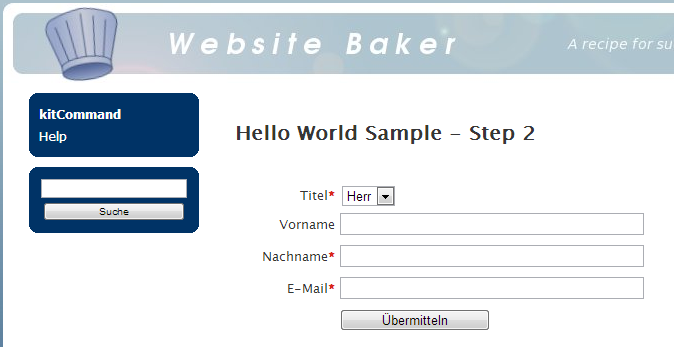
The route for the Step 02:
$app->match('/helloworld/iframe/step02',
    'thirdParty\HelloWorld\Control\HelloIFrame::step02');
use the class HelloIFrame as controller and execute the function step02():
public function step02(Application $app)
{
    $this->initParameters($app);
    $this->setRedirectRoute('/helloworld/iframe/step02');
    $form = $this->createForm();

    return $this->app['twig']->render($this->app['utils']->templateFile(
        '@thirdParty/HelloWorld/Template', 'hello.iframe.step02.twig',
        $this->getPreferredTemplateStyle()),
        array(
            'form' => $form->createView(),
            'basic' => $this->getBasicSettings()
    ));
}
The function get the Application $app as parameter for injection, initialize the class Basic with
$this->initParameters($app);
and set - like you have seen in the last step - also the redirect route
$this->setRedirectRoute('/helloworld/iframe/step02');
The parameter $form receives the complete form:
$form = $this->createForm();
The function createForm():
protected function createForm()
{
    return $this->app['form.factory']->createBuilder('form')
    ->add('title', 'choice', array(
        'choices' => array('mister' => 'Mister', 'lady' => 'Lady'),
        'expanded' => false,
        'label' => 'Title'
    ))
    ->add('first_name', 'text', array(
        'label' => 'First name',
        'required' => false
    ))
    ->add('last_name', 'text', array(
        'label' => 'Last name',
        'required' => true
    ))
    ->add('email', 'email', array(
        'label' => 'Email',
        'required' => true
    ))
    ->getForm();
}
return a complete form, created with the Form Factory. In this case the form contains the fields
-
titleas choice with radio buttons -
first_nameas text field -
last_nameas text field and -
emailas HTML5 email field
In the controller the Twig template will receive the form data as form with:
array(
    'form' => $form->createView(),
    'basic' => $this->getBasicSettings()
)
together with the Basic settings basic.
No open the Twig template /HelloWorld/Template/default/hello.iframe.step02.twig:
{% block content %}
<h2>{{ 'Hello World Sample - Step 2'|trans }}</h2>
{{ parent() }}
<div class="framework_form">
<form action="{{ FRAMEWORK_URL }}/helloworld/iframe/step03?pid={{ basic.pid }}" method="post">
{{ form_widget(form) }}
<label for="form_submit"> </label>
<input id="form_submit" type="submit" value="{{ 'Submit'|trans }}" />
<div class="clear"></div>
</form>
</div>
<div class="clear"></div>
{% endblock content %}
the block content calls the {{ parent() }} to enable prompting messages and then you see the form. With
{{ form_widget(form) }}
the form widget take care to build the complete HTML5 form - that's very easy handling.
If the form will be submitted the action route to
'/helloworld/iframe/step03'
which we will look to in the next step.
- If you spot a typo or want to contribute an article, a how-to or a tip, please feel free to edit the Wiki directly
- If you you have any question or suggestion, please contact the phpManufaktur Support Group
© 2013 by phpManufaktur, kitFramework & kfHelloWorld are published under MIT license.