
Keep your PC active. Automatically.
OpenAlive prevents your workstation from going idle by simulating subtle mouse movements and optional keystrokes at configurable intervals — so your status stays green and your screen stays on while you work.
No installation of runtimes required. Single .exe — ~4 MB installer, ~6.5 MB installed, ~5–15 MB of RAM at idle.
Working remotely or in a monitored environment, your PC going to sleep or showing "Away" on Teams/Slack breaks your workflow. OpenAlive keeps Windows 10 and Windows 11 awake without requiring admin rights, installing drivers, or using physical mouse jigglers. It runs silently in the system tray, respects your work schedule, and collects zero telemetry.
- Mouse activity simulation — moves the cursor by a configurable number of pixels and returns it to the exact position, imperceptibly
- Keystroke simulation — optionally sends a configurable key (e.g. Shift) alongside the mouse movement
- Work schedule — activates only during your configured work hours; pauses automatically outside them
- Lunch break — define a lunch window inside your work hours and OpenAlive pauses itself during it
- Manual toggle — enable or disable at any time regardless of the schedule
- System tray — runs silently in the background with a colored icon that reflects the current state (Active, Inactive, Outside hours, Lunch)
- Start with Windows — optional autostart at login, no admin rights required
- Minimize to tray — closing the window keeps OpenAlive running in the background
- Start active on open — skip the manual toggle on launch
- 8 languages — English, Español, Português (BR), Français, 日本語, 中文 (简体), 한국어, Kreyòl ayisyen
- Single instance guard — launching a second copy focuses the existing window instead
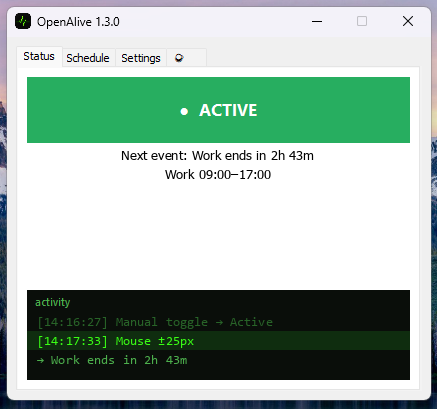
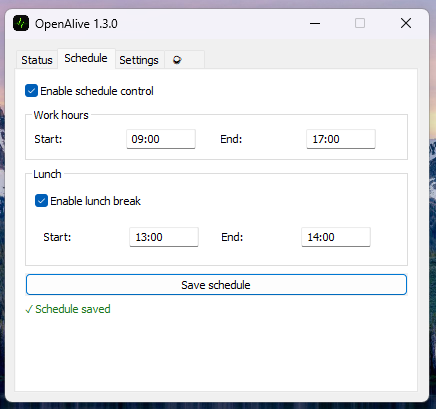
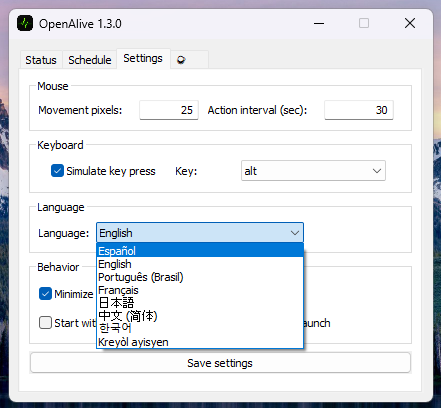
⬇ Installer — OpenAlive_Setup_v1.3.0.exe (3.7 MB)
⬇ Portable — OpenAlive_Portable_v1.3.0.zip (2.4 MB)
Or browse all versions on the Releases page.
Run the installer, launch OpenAlive, and it will appear in your system tray. The portable build works the same way: unzip anywhere (including a USB drive), run OpenAlive.exe, and it will create its config.json right next to itself.
OpenAlive has four tabs:
| Tab | Purpose |
|---|---|
| Status | Current state, manual on/off toggle, live activity log |
| Schedule | Work hours (start/end) and optional lunch break window |
| Settings | Movement pixels, interval, keystroke, language, startup behavior |
| ☕ | Support the project |
The tray icon changes color to show the current state at a glance. Right-clicking it gives you a quick toggle and exit option.
Build from source (Linux / WSL)
The exe cross-compiles from Linux/WSL — no C toolchain required.
GOOS=windows GOARCH=amd64 go build -ldflags "-H windowsgui -s -w" \
-o build/OpenAlive.exe ./cmd/openalivego test ./...
go vet ./...- Fix: program icon embedded again in the compiled binary (
build_release.shwas missing thegoversioninfo -iconflag) - Fix:
app.manifestversion was stale since v1.1.0 - UX: "next event" countdown now humanized (e.g. "8h 21m" / "30 min" instead of raw minutes)
- UX: default
Action Intervalraised to 30s; first action now waits 5s instead of firing instantly on launch - UX:
Simulate key pressnow defaults to disabled - Cleanup: GDI fonts/icons now released alongside brushes on exit;
main.gouses typedx/sys/windowscalls instead of manual syscalls
- Performance: GDI brushes cached as Window fields — eliminates per-paint kernel alloc/dispose
- Performance: lock-free i18n via
atomic.Value(no mutex on the 26-call hot path) - Performance:
strconv.Itoareplacesfmt.Sprintffor int→string in the activity loop - Code:
i18n.T()now takes variadic string pairs instead ofmap[string]string
- Window no longer has a maximize button
- Common Controls v6 manifest correctly embedded in binary (fixes startup crash on clean installs)
- Initial public release
OpenAlive runs entirely on your machine. It makes no network requests, sends no telemetry, and stores no personal data. All configuration is saved locally in config.json, next to the executable — so a portable copy stays fully self-contained.
GNU General Public License v3.0
