




A cross-platform desktop music player built with JavaFX and Spring Boot, on top of music-commons and lirp persistence. Manage your local music library, organize playlists, play tracks with waveform visualization, and import from iTunes.
I started this project in my university years as a small pet project to solve a problem with audio metadata tagging, in the times when I started to DJ. Back then I used iTunes to organize my music library and when I started to use DJ software and import my files there, it turned out that iTunes was not writing the track information I spent so much time curating into the file metadata tags, therefore having a frustrated experience since I spent so much time tagging my entire music library in order to find the tracks I wanted to play in my sets with ease.
Therefore I started a cli tool that parsed the itunes library xml file and wrote the info into the track metadata using JAudioTagger. Easy-peasy. However, why stop there? I was studying to become a software engineer so, why not build my own music library app? That became Musicott, the project I spent countless hours learning to code alongside my studies with the ambition to have some features that I did not find in other similar apps while helping me become a better Software Engineer.
That was 9 years ago and since then I decided to refactor and redesign its architecture with the knowledge I started to accumulate, and as a result, this project got split into 3:
-
lirp = Lightweight Reactive Persistence: initially Musicott was persisting the state of the audio library to a json file using Json-io asynchronously. I decided to create my own library to supply this need that I did not find anywhere else, since using another smaller solution like SQLite seemed an overkill to me. LIRP does that and became its own project where I learned Kotlin Coroutines, and kotlinx.serialization, inspired by Domain-Driven Design concepts and an opinionated approach to Object Oriented Programming and event sourcing for lightweight projects, that supports asynchronous serialization to json and sql databases.
-
music-commons: as a result of splitting the persistence layer and the presentation layer from the project, what remains in the middle is the core 'business' logic of the app: a music library and related utilities library that is persistence-agnostic built on top of LIRP. This project became the central development of the last 3-4 years since I envisioned it to be a library that other Java and Kotlin developers could use to build their music-related apps in an event-driven/event sourcing way, opening the way to other projects I have in mind too.
-
Musicott, this project itself, the desktop app written in JavaFX isolating the view on top of music-commons. Under the hood it boots Spring Boot in non-web mode and uses
javafx-weaver-springto wire FXML controllers as Spring beans, with components talking to each other through SpringApplicationEventpublishing rather than direct references.
After years of this refactoring and redesign work, in April 2026 I moved the old code to the master-legacy branch and I will start releasing again.
For a deeper look at how the three projects fit together, the Spring Boot + JavaFX wiring, and the event-driven design — with diagrams — see the Architecture wiki page.
- Branded startup splash with progress text — on launch, a window with the app logo, name, and version appears with a progress bar that ticks through loading the music library, playlists, and waveform cache, so the first thing you see is a clear signal that the app is working
- Local-first music library — your collection lives on your disk under
~/.config/musicott/(no cloud sync): the audio library is stored in a local SQLite database (audioItems.db) for fast import and startup at large library sizes, while playlists and the waveform cache are kept as plain JSON files - Guided iTunes import — a four-step wizard walks you through picking the
iTunes Library.xml, choosing which playlists to bring across, deciding how metadata is read (file tags vs the iTunes database) and whether play counts and tag write-back are preserved, then confirming before import starts - Player-bar queue popover — the play queue opens from the player bar as a popover anchored to the queue button, keeping queue and history actions close to playback controls while dismissing itself when you click elsewhere or leave the app window
- Hierarchical playlists — folders of playlists, drag-and-drop reordering, and full-text search across titles, artists, involved artists, albums, labels, and comments
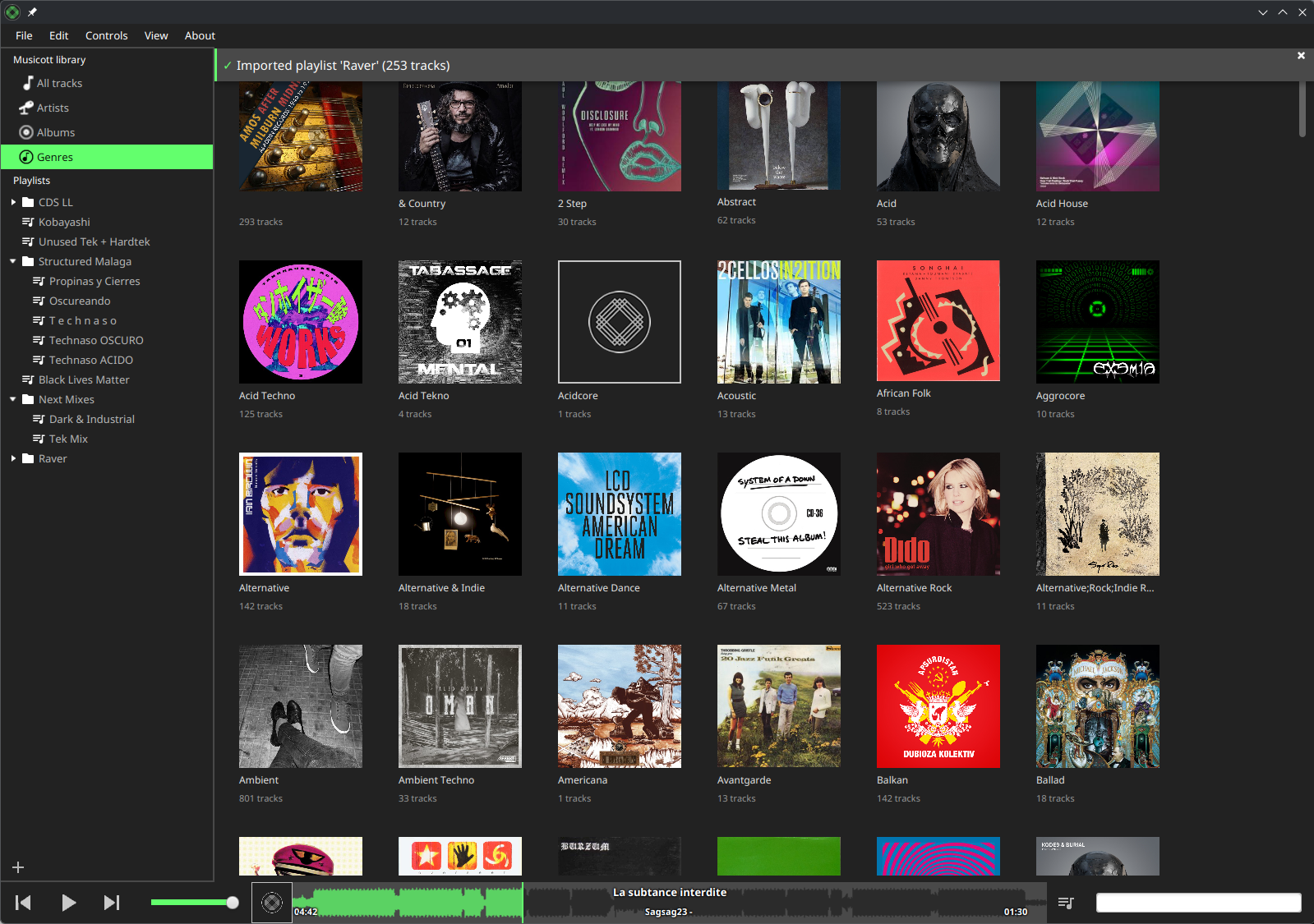
- Cover-grid browsing modes — browse your library visually through the Artists, Albums, and Genres navigation modes, each presenting a grid of cover art. In the Genres mode each genre cell shows a cover drawn from that genre's tracks and cycles through a different cover on hover; clicking a genre cell opens a right overlay drawer that lists the genre's tracks grouped by album, with a textual header showing the genre name and track count. An album may appear with only a subset of its tracks when just some of them carry that genre. Tracks with no album metadata collect under an "Unknown Album" section at the bottom. Double-click a track in the drawer to play it; press Esc or click outside the drawer to close it.
- Contextual random playback — pressing play with an empty queue or clicking shuffle starts random playback from the active view (all tracks, the selected playlist, or the selected artist), with a status message when no playable tracks exist
- Waveform visualization — generated once per track, cached locally, and used for visual seeking during playback
- In-app log viewer — a "Show Application Logs" item in the View menu opens a resizable, modeless window showing the most recent application log lines (read-only, selectable, scrollable). A level-filter combo box (TRACE / DEBUG / INFO / WARN / ERROR, defaulting to INFO) limits the visible lines; an export button saves the full current buffer to a
.logfile of your choice. Use the A- and A+ toolbar buttons (or Ctrl/Cmd +/-) to decrease or increase the log text font size. When a completed operation (import, metadata edit, export) produces warnings or errors, the status bar label turns amber and becomes clickable — clicking it opens the log viewer directly so you can inspect what happened without digging through the file system - Native installers for Linux (AppImage / AUR), Windows, and macOS — no JDK install required by end users
| Platform | Installer |
|---|---|
| Linux | Musicott-X.Y.Z-x86_64.AppImage (or yay -S musicott from the AUR) |
| Windows | Musicott-X.Y.Z.exe |
| macOS | Musicott-X.Y.Z.dmg |
Note: Installers are unsigned. See the Install guide for the one-time security workaround on macOS and Windows.
WIP documentation lives in the GitHub wiki:
- Importing music (including iTunes XML)
- Playback
- Playlists
- Search
- Application logs
- JDK 25+ with JavaFX modules (Liberica Full or Azul Zulu FX bundle the SDK; alternatively install JavaFX SDK separately and pass it on the module path). The application, tests, and benchmarks run with compact object headers (
-XX:+UseCompactObjectHeaders) enabled to shrink heap footprint — a JDK 25 product feature - Gradle 9.4+ — the system
gradlebinary is recommended; the bundled wrapper also works - Linux only: GTK and the Monocle native bits are required for headless tests in CI; on a desktop you already have them
# Compile Java + Kotlin
gradle clean compileJava compileKotlin

# Launch the app
gradle run

# Build the fat JAR
gradle jar

# Full build with all tests + coverage
gradle build
Tests are split across four Gradle source sets and run headless by default via TestFX/Monocle:
gradle test               # Unit tests        (src/test/, *Test)
gradle integrationTest    # Spring + DI tests (src/integrationTest/, *IT)
gradle uiTest             # TestFX UI tests   (src/uiTest/, *UIT)
gradle e2eTest            # End-to-end tests  (src/e2eTest/, *E2E)
gradle check              # All of the above + JaCoCo coverage
Pass -Dtestfx.headless=false on any test task to watch the UI execute against a real screen.
Features and topics covered in depth in the wiki rather than here:
| Topic | Wiki page |
|---|---|
| Browsing by all tracks, artists, albums, and genres | Browsing |
| The four-step iTunes import wizard | Import |
| Play queue, history, and contextual random playback | Playback |
| Playlists and folder hierarchy | Playlists |
| Full-text search across metadata | Search |
| In-app log viewer and the amber warning signal | Logs |
| Ecosystem, Spring/JavaFX wiring, startup lifecycle | Architecture |
| Terminology reference | Glossary |
Contributions are welcome — bug reports, feature suggestions, and pull requests. Please read CONTRIBUTING.md before opening a PR; it documents the branch naming convention, test source-set structure, problem-statement requirement, and commit-message format.
Copyright (c) 2026 Octavio Calleya Garcia.
Musicott is free software under the GNU GPL v3 license text.