[CS2113T-T10-2] PlanITarium#7
Conversation


| The `Person` component, | ||
|
|
||
| * Stores the logical grouping of persons added i.e., all `Person` objects must belong to one of the `PersonList`s. | ||
| * Stores the total number of `Person`s in the `Family`, as well as each of the generational `PersonList`s. | ||
| * Depends on the `Money` component to help keep track of each `Person`'s income and expenditure as each `Person` | ||
| contains an `IncomeList` and `ExpenditureList`. |

There was a problem hiding this comment.
maybe can include some diagrams when explaining Person
|
|
||
| ### Family Component | ||
|
|
||
| The **Class** of this component is specified in [`Family.java`]( |
There was a problem hiding this comment.
Maybe can include a class diagram for Family
| and the `Family` object of the current session will consist of the data in `Family` of `Storage`. | ||
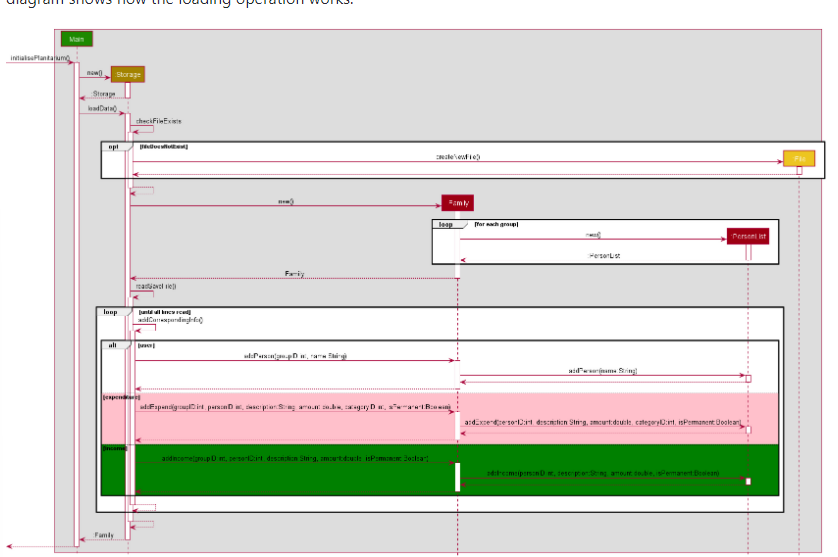
| The following sequence diagram shows how the loading operation works: | ||
|
|
||
|  |
There was a problem hiding this comment.
Maybe can split the diagram into separate diagrams, right now looks a little too small
| `personList`. | ||
|
|

 emilysim00
left a comment
emilysim00
left a comment
emilysim00
left a comment
There was a problem hiding this comment.
I find that the diagrams in the document are easily understandable and neat. Good Job!
| [`Family`](#Family-Component) is responsible for holding the user data of PlanITarium in memory. | ||
|
|
||
| [`Money`](#Money-Component) is responsible for holding the monetary information in memory. |
There was a problem hiding this comment.
Perhaps more description or examples could be added as it is not clear between the "Family" and "Money".
|
|
||
| **How the components interact with each other** | ||
|
|
||
| The slightly simplified *Sequence Diagram* below shows how the components interact for the scenario where the user issues |
There was a problem hiding this comment.
Perhaps you would want to explain what do you mean by "slightly simplified"? I got confused as to what is the difference between "simplified" and "slightly simplified".
| **How the components interact with each other** | ||
|
|
||
| The slightly simplified *Sequence Diagram* below shows how the components interact for the scenario where the user issues | ||
| the command `add /n Alice /g 2`. |
There was a problem hiding this comment.
Perhaps you could add in a description or explanation on this command so the sequence diagram can be more understandable.
| The `Commands` component consists following classes: [`CommandFactory.java` | ||
| ](https://github.com/AY2122S2-CS2113T-T10-2/tp/blob/master/src/main/java/seedu/planitarium/commands/CommandFactory.java) | ||
| [`Command.java` | ||
| ](https://github.com/AY2122S2-CS2113T-T10-2/tp/blob/master/src/main/java/seedu/planitarium/commands/Command.java) | ||
| [`AddPersonCommand.java` | ||
| ](https://github.com/AY2122S2-CS2113T-T10-2/tp/blob/master/src/main/java/seedu/planitarium/commands/AddPersonCommand.java) | ||
| [`DeletePersonCommand.java` | ||
| ](https://github.com/AY2122S2-CS2113T-T10-2/tp/blob/master/src/main/java/seedu/planitarium/commands/DeletePersonCommand.java) | ||
| [`AddRecordCommand.java` | ||
| ](https://github.com/AY2122S2-CS2113T-T10-2/tp/blob/master/src/main/java/seedu/planitarium/commands/AddRecordCommand.java) | ||
| [`DeleteRecordCommand.java` | ||
| ](https://github.com/AY2122S2-CS2113T-T10-2/tp/blob/master/src/main/java/seedu/planitarium/commands/DeleteRecordCommand.java) | ||
| [`EditRecordCommand.java` | ||
| ](https://github.com/AY2122S2-CS2113T-T10-2/tp/blob/master/src/main/java/seedu/planitarium/commands/EditRecordCommand.java) | ||
| [`HelpCommand.java` | ||
| ](https://github.com/AY2122S2-CS2113T-T10-2/tp/blob/master/src/main/java/seedu/planitarium/commands/HelpCommand.java) | ||
| [`ListCommand.java` | ||
| ](https://github.com/AY2122S2-CS2113T-T10-2/tp/blob/master/src/main/java/seedu/planitarium/commands/ListCommand.java) | ||
| [`ListCatCommand.java` | ||
| ](https://github.com/AY2122S2-CS2113T-T10-2/tp/blob/master/src/main/java/seedu/planitarium/commands/ListCatCommand.java) | ||
| [`OverviewCommand.java` | ||
| ](https://github.com/AY2122S2-CS2113T-T10-2/tp/blob/master/src/main/java/seedu/planitarium/commands/OverviewCommand.java) | ||
| [`SearchCommand.java` | ||
| ](https://github.com/AY2122S2-CS2113T-T10-2/tp/blob/master/src/main/java/seedu/planitarium/commands/SearchCommand.java) | ||
| [`ExitCommand.java` | ||
| ](https://github.com/AY2122S2-CS2113T-T10-2/tp/blob/master/src/main/java/seedu/planitarium/commands/ExitCommand.java) |
There was a problem hiding this comment.
Perhaps you might want to format this set of data as a list? It might be clearer if a list is used to illustrate the classes that is inside the commands component
|
|
||
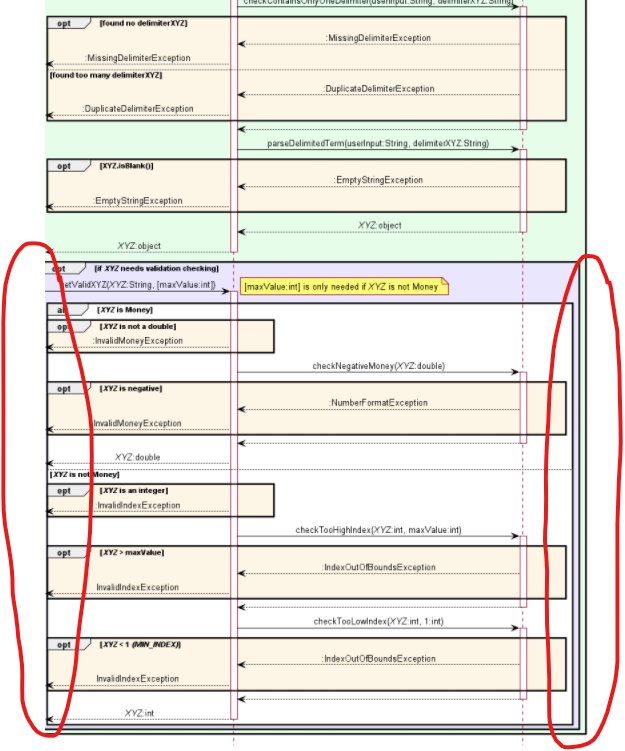
| The following Sequence Diagram shows how the classes of the `Parser` component interacts for each user command. | ||
|
|
||
|  |
There was a problem hiding this comment.
Perhaps a new attachment of the sequence diagram could be uploaded as currently the sequence diagram is being cut off at the edges.
|
|
||
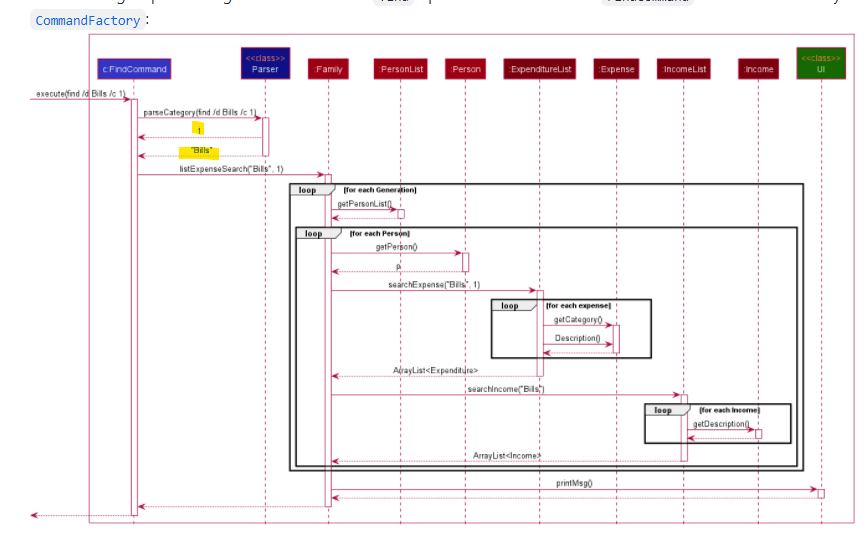
| The following sequence diagram shows how the `find` operation works after the `FindCommand` has been created | ||
| by [`CommandFactory`](#PlaceholderToCommandFactory): | ||
|  |
There was a problem hiding this comment.
Is it clearer if you add in the return type? In addition, some of the sequence diagram state the data return type and some do not, there might be some inconsistency.
| and the `Family` object of the current session will consist of the data in `Family` of `Storage`. | ||
| The following sequence diagram shows how the loading operation works: | ||
|
|
||
|  |
There was a problem hiding this comment.
Perhaps a new screenshot can be used for this sequence diagram? The wordings in current sequence diagram being shown is too small and hard to read in the web browser

 kktai1512
left a comment
kktai1512
left a comment
kktai1512
left a comment
There was a problem hiding this comment.
Great job with the detailed DG! Learnt a lot from looking at your implementation! All the best !
|
|
||
| [`Parser`](#Parser-Component) is responsible for parsing and validating user input. | ||
|
|
||
| [`Family`](#Family-Component) is responsible for holding the user data of PlanITarium in memory. |
There was a problem hiding this comment.
At first glance, it is hard to understand what does family do here
| ### Commands Component | ||
|
|
||
| The `Commands` component consists following classes: [`CommandFactory.java` | ||
| ](https://github.com/AY2122S2-CS2113T-T10-2/tp/blob/master/src/main/java/seedu/planitarium/commands/CommandFactory.java) |
There was a problem hiding this comment.
Good that it includes a reference to the actual javafile for easy access
| * Depends on the `Money` component to help keep track of each `Person`'s income and expenditure as each `Person` | ||
| contains an `IncomeList` and `ExpenditureList`. | ||
|
|
||
| ### Money Component |
There was a problem hiding this comment.
For the different classes, perhaps a class diagram would be clearer than text?
|
|
||
| The following diagram is the sequence diagram of this entire process. | ||
|
|
||
|  |
There was a problem hiding this comment.
perhaps the return type of Parser can be included in the diagram ? currently it's just return with dotted line, I think it is fine based on google, but you may want to write "Command" instead so that it is clear that a command object is returned...Can look into it!
| @@ -1,38 +1,584 @@ | |||
| # Developer Guide | |||
|
|
|||
| --- | |||
There was a problem hiding this comment.
I think the sequence diagrams or any other diagrams theme can be the same for a more unified look

 yuhaochua
left a comment
yuhaochua
left a comment
yuhaochua
left a comment
There was a problem hiding this comment.
I like that many diagrams have been used in this developer guide to illustrate the features of this application! Some diagrams may be overwhelming and it is hard to tell which parts of the diagrams to pay attention to be overall, this is a comprehensive developer's guide.
| user's instructions. This keyword is parsed by `Parser`. There're 11 cases, and it would throw an exception called | ||
| `UnknownInputException` if the keyword from user input is neither of the 11 cases provided. | ||
|
|
||
| The `Command` class is an abstract class that has abstract method `` |
There was a problem hiding this comment.
Is there supposed to be a description of the abstract method over here?
| > check the index provided using `Parser#checkValidCategory` before iterating `Family`. If the check | ||
| > fails, an error message will be displayed to the user instead of continuing with the execution. | ||
|
|
||
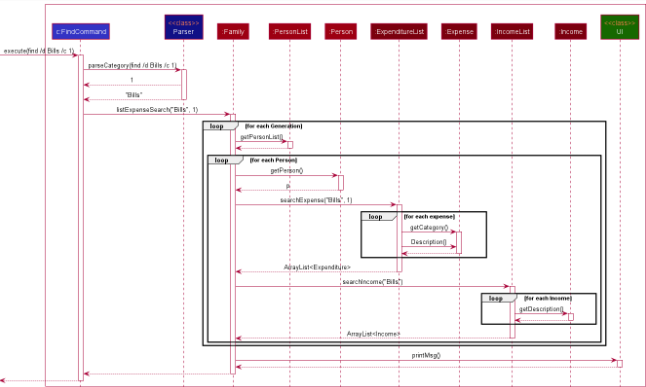
| The following sequence diagram shows how the `find` operation works after the `FindCommand` has been created |
There was a problem hiding this comment.
I think this sequence diagram may be too complicated? There seems to be too many classes in the diagram?
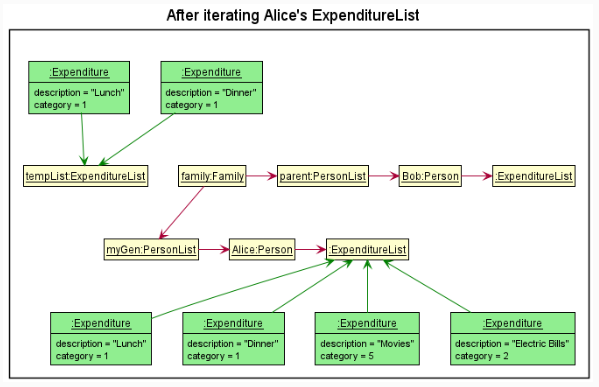
| `Expenditure#getCategory()` on each expenditure, collecting and returning the expenditure if its category matches the | ||
| given index. The returned expenditures are then appended to the temporary array list. | ||
|
|
||
|  |
There was a problem hiding this comment.
Maybe can consider to show just the important parts of this diagrams? It seems that the point is to illustrate the new state of the tempList so maybe the other details not too important?
| and the `Family` object of the current session will consist of the data in `Family` of `Storage`. | ||
| The following sequence diagram shows how the loading operation works: | ||
|
|
||
|  |
There was a problem hiding this comment.
The diagram seems unnecessarily wide? Maybe could break the method calls into smaller chunks, and not write them into same line so that the diagram can be smaller?

 cheshire-doge
left a comment
cheshire-doge
left a comment
cheshire-doge
left a comment
There was a problem hiding this comment.
Overall, I think your group did a good job with the DG! It's very comprehensive, and breaks down complex processes into manageable steps. However, there are a few diagrams which I feel could be broken down using reference frames to simplify/ make it easier to read.
|
|
||
| The following Sequence Diagram shows how the classes of the `Parser` component interacts for each user command. | ||
|
|
||
|  |
There was a problem hiding this comment.
Perhaps you can consider using reference frames so that it can be broken up into a less complex diagram
| Step 1. The user launches the application. A `Family` object will be initialised with its 3 generational | ||
| `PersonList`s. They are `parents`, `myGen`, and `children`. | ||
|
|
||
|  | ||
|
|
||
| Step 2. The user wishes to add a person, say `John Doe`, to the `children` list. The user executes | ||
| `add /n John Doe /g 3` command, adding a `Person` with `name` as `John Doe` to group 3, which is the `children`. | ||
|
|
||
| ## Design & implementation | ||
|  | ||
|
|
||
| {Describe the design and implementation of the product. Use UML diagrams and short code snippets where applicable.} | ||
| Step 3. The user executes `addin /g 3 /u 1 /i ...` to add a new income to index 1 of the `children` list, who is | ||
| `John Doe`. This causes an income object to be added to the `IncomeList` of `John Doe`. | ||
|
|
||
|  | ||
|
|
||
|  | ||
|
|
||
| Step 4. The user now decides to have an overview of his family's finances by executing the `list` command. The `list` | ||
| command will call `Family#list()`, which will go through each generation to sum up their incomes and expenditures and | ||
| print that out. | ||
|
|
||
|  |
There was a problem hiding this comment.
I like that you split it up into steps to make it easier to understand.
| * Depends on the `Money` component to help keep track of each `Person`'s income and expenditure as each `Person` | ||
| contains an `IncomeList` and `ExpenditureList`. | ||
|
|
||
| ### Money Component |
There was a problem hiding this comment.
Seems like this section is missing
| Step 1. given that user input is | ||
|
|
||
| ```md | ||
| add \n Alice | ||
| ``` | ||
|
|
||
| and this string will be passed to `CommandFactory` together with `personList` that contains all the people who had been | ||
| added previously by calling `getCommand()`. | ||
|
|
||
| Step 2. The `CommandFactory` will pass the input to `Parser` to parse the keyword by calling `Parser.parseKeywords`, and | ||
| the `Parser` should return `add` as keyword. | ||
|
|
||
| Step 3. The `CommandFactory` will then match the keyword to the type of command. In this case, `add` is corresponding | ||
| to `AddPersonCommand`. The `CommandFactory` will then create a new `AddPersonCommand` with `userInput` and `personList`, | ||
| and return this object to `PlanITarium`. | ||
|
|
||
| Step 4. `PlanITarium` will then execute this command by calling `execute()`. Alice will then be added to the | ||
| `personList`. |
There was a problem hiding this comment.
Maybe a diagram can be used to explicitly show the interactions
| and the `Family` object of the current session will consist of the data in `Family` of `Storage`. | ||
| The following sequence diagram shows how the loading operation works: | ||
|
|
||
|  |
There was a problem hiding this comment.
You can consider using reference frames so that the diagram can be clearer to read

 wli-linda
left a comment
wli-linda
left a comment
wli-linda
left a comment
There was a problem hiding this comment.
Clear diagrams, though minor stylistic changes would be much appreciated.
I also agree with another reviewer that the styles of diagrams could be more consistent, but overall good work!
|
|
||
|  | ||
|
|
||
| > :information_source: **Note:** The that `.puml` files used to create diagrams in this document |
There was a problem hiding this comment.
Minor point, but perhaps there's an extra "that" here in "The that .puml files..."?
| Command -> Family : addin(group, personIndex, incomeInfo) | ||
| activate Family | ||
| Family -> PersonList : addin(personIndex, incomeInfo) | ||
| activate PersonList | ||
| PersonList -> Person : addin(incomeInfo) | ||
| activate Person | ||
| Person -> IncomeList : addin(incomeInfo) |
There was a problem hiding this comment.
Consider using more descriptive statements here instead of function calls so the graph is more readable?
| loop for each Generation | ||
| Family -> PList : getPersonList() | ||
| activate PList | ||
| PList --> Family | ||
| deactivate PList | ||
|
|
||
| loop for each Person |
There was a problem hiding this comment.
Is it possible to extract out this portion of the diagram using ref? There's a lot of things going on here and the font size becomes very small, making the diagram less readable.
| else #PINK expenditure | ||
| Storage -> Family : addExpend(groupID:int, personID:int, description:String, amount:double, categoryID:int, isPermanent:Boolean) | ||
| activate Family | ||
| Family -> PersonList : addExpend(personID:int, description:String, amount:double, categoryID:int, isPermanent:Boolean) | ||
| activate PersonList | ||
| PersonList --> Family | ||
| deactivate PersonList | ||
| Family --> Storage | ||
| deactivate Family | ||
| else #GREEN income | ||
| Storage -> Family : addIncome(groupID:int, personID:int, description:String, amount:double, isPermanent:Boolean) | ||
| activate Family | ||
| Family -> PersonList : addIncome(personID:int, description:String, amount:double, isPermanent:Boolean) | ||
| activate PersonList | ||
| PersonList --> Family | ||
| deactivate PersonList | ||
| Family --> Storage | ||
| deactivate Family |
There was a problem hiding this comment.
Is there a reason why the boxes are pink and green here? The green background might make the text in black hard to read.
There was a problem hiding this comment.
In addition, again, consider not writing the full function call so the graph is less stretched horizontally and more readable?
| Command <|-[LOGIC_COLOR_T3]- AddRecordCommand | ||
| Command <|-[LOGIC_COLOR_T3]- DeleteRecordCommand | ||
| Command <|-[LOGIC_COLOR_T3]-AddPersonCommand | ||
| Command <|-[LOGIC_COLOR_T3]- DeletePersonCommand | ||
| Command <|-[LOGIC_COLOR_T3]- EditRecordCommand | ||
| Command <|-[LOGIC_COLOR_T3]- ExitCommand | ||
| Command <|-[LOGIC_COLOR_T3]- ListCategoriesCommand | ||
| Command <|-[LOGIC_COLOR_T3]- OverviewCommand | ||
| Command <|-[LOGIC_COLOR_T3]- HelpCommand | ||
| Command <|-[LOGIC_COLOR_T3]- ListCommand | ||
| Command <|-[LOGIC_COLOR_T3]- SearchCommand |
There was a problem hiding this comment.
While it makes sense logically that these commands are positioned at the same horizontal level, maybe the diagram would be more readable if these classes were placed at different levels? E.g. Placing the Record and Person related commands at a different level as OverviewCommand and HelpCommand, with the usage of hidden direction arrows.


Update DG Diagrams, PPP and warning message in Parser
Update instructions for manual testing in Dev guide
# Conflicts:
#	docs/assets/css/style.scss

Fixed Double Amount Comparison and Minor DG Update

update diagram
Finalise v2.1 submission material
Update PPP
Add page break to PPP
update diagram
Fix broken link in Dev guide
Update PPP
Improve UG Readability
11 participants


PlanITarium is an expenditure tracker that allows the one person of the couple to keep track and provide a summary of their expenses.