[CS2113T-T09-4] Simplst#6
Conversation


 khseah
left a comment
khseah
left a comment
khseah
left a comment
There was a problem hiding this comment.
Overall good implementation! One more thing to consider is to put the UML diagrams on a new line. Some UML diagrams are right after the sentence, causing formatting issues
| #### Description | ||
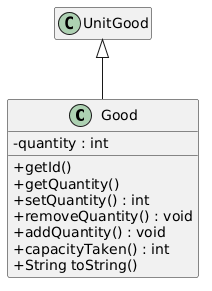
| The goods class keeps track of the various inventory that will be input into the system through the commands class. | ||
| The diagram below shows the model component of the orderline class. | ||
|  |
There was a problem hiding this comment.
I think the UML format does not really follow the standards we learnt in lecture. Eg we use "+", "-", "#" or "~" to indicate the visibilities, but in the UML diagram shown it used a red square and green circle
Also the return type should be at the end instead. Eg:
getId(): Int
instead of:
int getId()
| {Describe the design and implementation of the product. Use UML diagrams and short code snippets where applicable.} | ||
| ### Good Class | ||
| #### Description | ||
| The goods class keeps track of the various inventory that will be input into the system through the commands class. |
There was a problem hiding this comment.
Can consider highlighting important words to aid readability
| The goods class keeps track of the various inventory that will be input into the system through the commands class. | |
| The `goods` class keeps track of the various inventory that will be input into the system through the commands class. |
| ### Regex Class | ||
| #### Description | ||
| The Regex Class is created to simplify the use of regular expressions in Java. | ||
|  |
There was a problem hiding this comment.
This diagram indicates that a new Regex class is instantiated and the red marking shows that the activation bar is a constructor, which is not the case. You should add a dotted line before the activation bar

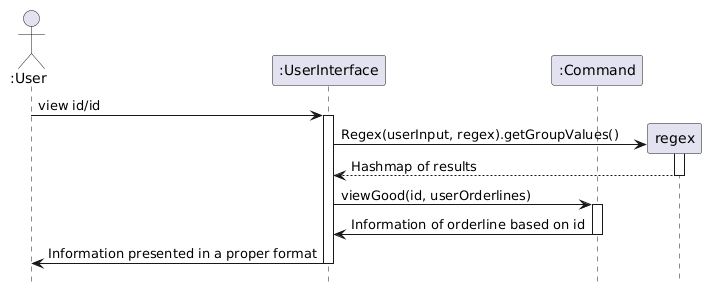
| View Good belongs as part of the Commands Class. It is used when a user would like to know more information about an inventory item has an item id linked to it in the warehouse. | ||
|
|
||
| #### Operation | ||
|  |
|
|
||
| ## Design & implementation | ||
|
|
||
| ## Design |
There was a problem hiding this comment.
Can consider giving a high level overview of the architecture first, before diving deep into explaining each detail

| #### Description | ||
| The goods class keeps track of the various inventory that will be input into the system through the commands class. | ||
| The diagram below shows the model component of the orderline class. | ||
|  |

There was a problem hiding this comment.
Consider adding a <br> to move this diagram to a new line.

|  | ||
| The Class Diagram above shows the different variables and methods associated with the regex class. | ||
| This class takes in the regular expression as a string and the string to be matched in the class contructor, and stores the results | ||
| in the private variable `groupValues` which is a Hash Map where the key would be the capture group name and the value as the matched results. |
There was a problem hiding this comment.
Consider using HashMap in a code block instead of Hash Map to make it clear that it is a class.

| View Good belongs as part of the Commands Class. It is used when a user would like to know more information about an inventory item has an item id linked to it in the warehouse. | ||
|
|
||
| #### Operation | ||
|  |
There was a problem hiding this comment.
Consider making the return lines dotted lines.

| 3.1.1 Lastly, the list of orders is printed to the command line. | ||
| 3.2 Else, if the flag is `g/`, the User Interface Class will call the listGoods() method in the Warehouse class | ||
| 3.2.1 Following that, the Warehouse class will call the getGoods() method on the Good class | ||
| 3.2.2 Lastly, the list of goods is printed to the command line. |
There was a problem hiding this comment.
Consider adding <br> lines to properly format these numbered lists, as they currently appear as one big paragraph.

| 4. This method will then iterate through orderLists and sum up each quantity of each Good object in each order. | ||
| 5. The totalGoods() method will return an integer of the number of goods in the warehouse. | ||
|
|
||
| For more examples of how a user can use a command, refer to the [UserGuide](/UserGuide.md) |
There was a problem hiding this comment.
This line seems unnecessary, but it could be more useful if it linked to this command's section specifically in the User Guide. Consider changing it or removing it.

| View Good belongs as part of the Commands Class. It is used when a user would like to know more information about an inventory item has an item id linked to it in the warehouse. | ||
|
|
||
| #### Operation | ||
|  |
There was a problem hiding this comment.
User is not a class, so the colon before User should not be included. Consider removing it.

|
|
||
| ### View Good Method | ||
| #### Description | ||
| View Good belongs as part of the Commands Class. It is used when a user would like to know more information about an inventory item has an item id linked to it in the warehouse. |
There was a problem hiding this comment.
It would be good to show the command format separately in text form as a code block, as well as an example. They are currently only visible in the sequence diagrams which makes it hard to copy and paste them, and is less obvious to the reader.
| 3. The Regex Class will then be called to match the rest of the user's input to find the values required to remove goods from the inventory. | ||
| 4. Afterwards, the User Interface class will call removeGood() method from the Commands Class | ||
| 5. This method will then reduce the quantity of a type of goods if the quantity input is not larger than the existing quantity. If the quantity input is the same as the existing quantity, the goods object will be removed from the inventory. | ||
| 6. The UI will show a message of format |
There was a problem hiding this comment.
Consider including more details on what methods are called and what types of objects are returned by each method, to make the implementation of this program clearer.
| View Good belongs as part of the Commands Class. It is used when a user would like to know more information about an inventory item has an item id linked to it in the warehouse. | ||
|
|
||
| #### Operation | ||
|  |
There was a problem hiding this comment.
The stickman figures are not covered in this module, so consider replacing them with boxes.

| View Good belongs as part of the Commands Class. It is used when a user would like to know more information about an inventory item has an item id linked to it in the warehouse. | ||
|
|
||
| #### Operation | ||
|  |
There was a problem hiding this comment.
The boxes + User at the bottom should not be present. Use an X instead to mark end of life for an object instead if necessary, or leave it empty.


| ### Good Class | ||
| #### Description | ||
| The goods class keeps track of the various inventory that will be input into the system through the commands class. | ||
| The diagram below shows the model component of the orderline class. |

There was a problem hiding this comment.
An orderline class is mentioned here, but there is no prior explanation or link to this class beforehand.
| ``` | ||
| String regex = "id/(?<id>\\d*) n/(?<name>.*) q/(?<qty>\\d*) d/(?<desc>\\.*)"; | ||
| Regex regexMatch = new Regex(userInput, regex); | ||
| HashMap<String, String> matches = regexMatch.getGroupValues(); | ||
| String id = matches.get("id"); | ||
| String name = matches.get("name"); | ||
| String quantity = matches.get("qty"); | ||
| String description = matches.get("desc"); | ||
| ``` |
There was a problem hiding this comment.
good that an example is given on how it works, but perhaps some explanation could be given for the regex pattern?
| 3. Together with the previous step, the User Interface Class will check the flag followed by `list` | ||
| 3.1 If the flag is `o/`, the User Interface Class will call the listOrders() method in the Warehouse class | ||
| 3.1.1 Lastly, the list of orders is printed to the command line. | ||
| 3.2 Else, if the flag is `g/`, the User Interface Class will call the listGoods() method in the Warehouse class | ||
| 3.2.1 Following that, the Warehouse class will call the getGoods() method on the Good class | ||
| 3.2.2 Lastly, the list of goods is printed to the command line. |
| #### Description | ||
| The Commands Class is the class which contains all the available commands that can be used in the Simplst CLI application. | ||
|  | ||
|
|
||
| More about how each feature is run can be seen in each of the methods that can be found below. |
There was a problem hiding this comment.
perhaps an explanation can be given for why this design of putting all commands into a single class was chosen rather than subclassing different commands.

 Lim-Shi-Han
left a comment
Lim-Shi-Han
left a comment
Lim-Shi-Han
left a comment
There was a problem hiding this comment.
Looks good in general, slight changes to the formatting and diagrams would make it better!:)
| {Describe the design and implementation of the product. Use UML diagrams and short code snippets where applicable.} | ||
| ### Good Class | ||
| #### Description | ||
| The goods class keeps track of the various inventory that will be input into the system through the commands class. |
There was a problem hiding this comment.
Yes as @khseah said, I also think denoting the class names as code would be good. In addition I think it would be better to capitalise it as well (e.g. Good)
| > `quantity` `name` have been removed | ||
| to show that the operation is successful. |
There was a problem hiding this comment.
The formatting could be improved here
| 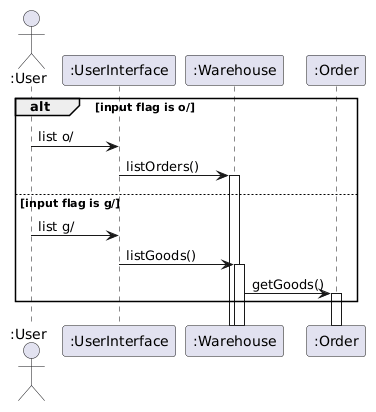 | ||
|
|
There was a problem hiding this comment.
The activation bar for the first condition should not spill over into the "else" condition

| ### Regex Class | ||
| #### Description | ||
| The Regex Class is created to simplify the use of regular expressions in Java. | ||
|  |
There was a problem hiding this comment.
I think there might be some issues with the dummyClass calling Regex, as it should be a new activation bar (and the previous activation bar should have ended prior).

| View Good belongs as part of the Commands Class. It is used when a user would like to know more information about an inventory item has an item id linked to it in the warehouse. | ||
|
|
||
| #### Operation | ||
|  |

Branch shyun yin dg

All features should be done except storage. Small fixes here and there included


This reverts commit 29dce37.
Checkstyle and bug fixes

Branch jun leong storage
Branch jun leong storage
2101 userguide updates
# Conflicts:
#	src/main/java/seedu/simplst/Simplst.java
adding tips for UG
…into branch-Shyunyin-2101UG1

# Conflicts:
#	docs/UserGuide.md
Branch shyunyin 2101 ug1
Update UserGuide.md
This reverts commit e719c1d.
Revert "Update StorageTest.java"
9 participants


Simplst is a laptop app for managing warehouse inventory and processes, optimized for use via a Command Line Interface (CLI) for warehouse management workers.