[CS2113-T12-1] Study It#33
Conversation


 ivanderjmw
left a comment
ivanderjmw
left a comment
ivanderjmw
left a comment
There was a problem hiding this comment.
This developer guide contains many details, including specific methods. However, it looks a bit messy and disorganized in Github Pages. Some errors are also present in the diagrams. You can improve it much more!
|
|
||
|  | ||
|
|
There was a problem hiding this comment.
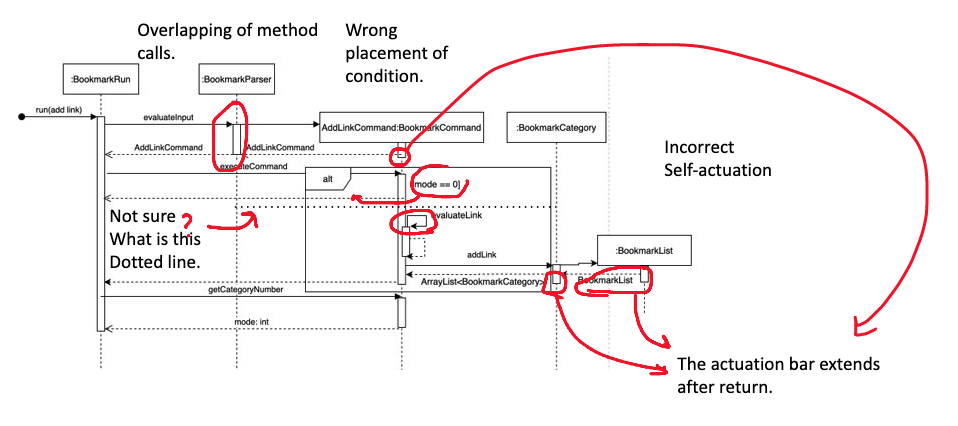
There are some problems in this diagram.
- Overlapping of method calls.
- Placement of conditional in alt block is not correct.
- I am unsure of the use of the dotted line that cuts horizontally through alt block.
- Self invocation is not drawn correctly.
- Some actuation bars extends after the method returns a value.
|
|
||
|  | ||
|
|
There was a problem hiding this comment.
Is this an exact copy of the Bookmark Sequence diagram above?
|
|
||
|  | ||
|
|
There was a problem hiding this comment.
It would be nice to have a label for each association.
There was a problem hiding this comment.
You can add lables under each figure.
|
|
||
|  | ||
|
|
There was a problem hiding this comment.
Some lines are detached. Use the inheritance arrow instead of association here.
There was a problem hiding this comment.
You might also need to use dotted lines.
|
|
||
|  | ||
|
|
There was a problem hiding this comment.
Some arrows are not quite clear. Maybe you can point out both directions of multiplicity.
There was a problem hiding this comment.
Are Flashcard and FlashcardSotorage abstract? Would be nice if you specify using the label {abstract}, if they are not, you can remove the italics.
| 1. SEVERE: A critical problem detected which may cause the termination of the application. | ||
| 2. WARNING: Can continue, but with caution. | ||
| 3. INFO: Information showing the noteworthy actions by the App. | ||
| 4. FINE: Details that are not usually noteworthy but may be useful in debugging. |
There was a problem hiding this comment.
You can emphasize the log message levels.
| This project uses code coverage that is in IntelliJ IDE to check for the coverage of the code. | ||
|
|
||
| ### Value proposition | ||
| ##Appendix: Requirement |
| [to be filled] | ||
|
|
There was a problem hiding this comment.
Add an introduction to the developer guide.
| [to be filled] | ||
|
|
||
| ## Setting up, Getting Started | ||
| ###Setting up the project in your computer |
There was a problem hiding this comment.
This header is incorrectly rendered in Github Pages
There was a problem hiding this comment.
You can instead use a space before the title.
### Setting up...
instead of
###Setting up...
| 1. Configure the coding style. | ||
| Ensure Coding style is standardised throughout. | ||
| 2. Learn the design. | ||
| When you are ready to start coding, we recommend that you get some |
There was a problem hiding this comment.
I think it would be good to specify more details? Learn which design, and what coding style to refer to.

|
You guys probably should change the name of the project to CS2113T-T12-1. Now the name (CS2113-T12-1) is missing a T. |

 gua-guargia
left a comment
gua-guargia
left a comment
gua-guargia
left a comment
There was a problem hiding this comment.
Overall, I think your developer guide is very concise and easy to follow. It will be better if you can standardize the size and resolution of the diagrams.
| ### **Major components** | ||
| This section introduces the multiple components in Study It. | ||
|
|
||
|  |
There was a problem hiding this comment.
Perhaps you can consider the following format to standardize your diagrams which might will help with the document's neatness :

| This section will describe in detail how some features inside the academic tracker section have been implemented. | ||
| Figure x illustrates the general overview, the associations and the multiplicity of the academic classes. | ||
|
|
||
|  |
There was a problem hiding this comment.
The resolution of this image is a bit low, perhaps can export the diagram with a higher resolution?

There was a problem hiding this comment.
Perhaps the diagram can be broken down into two separate parts. The :BookmarkRun, :TimetableRun, :AcademicRun and :FlashcardRun components could be grouped into a separate sub diagram and represented in the main diagram with a black-box. This will make the diagram more readable.
|
|
||
|  | ||
|
|
||
| API: `java.academic` |
There was a problem hiding this comment.
Should it be academic.java instead?
| ### **Major components** | ||
| This section introduces the multiple components in Study It. | ||
|
|
||
|  |
There was a problem hiding this comment.
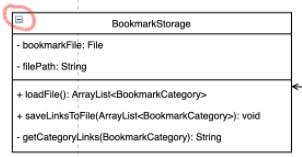
Perhaps can remove the small negative sign box on the top of every class box. It can be a little bit confusing.
| general commands, it'll be processed and provide output. Otherwise, the command will be relayed | ||
| to different components to be processed based on the software's current mode. | ||
|
|
||
| ### **Main Component** |
There was a problem hiding this comment.
This title 'Main Component' can be a little bit confusing with the previous title 'Major Components', and the content for these two sections also have some replications. Perhaps you can try to combine these two sections into one entity or introduce directly to the separated sub-components sections (i.e. skips the general 'main component' and directly shows the 'Bookmark Component' section)

| ## Design & implementation | ||
| This section explains the architecture of our software and the design of each component. | ||
|
|
||
| ### **Major components** |
There was a problem hiding this comment.
Should be in title case for consistency.
| ### **Main Component** | ||
| This section will give an overview of the main component of Study It | ||
|
|
||
|  |
There was a problem hiding this comment.
Diagram is quite difficult to read. Maybe a font change or size increase could increase the readability?
| As there are multiple modes of our app (main menu/bookmark/timetable/academic/flashcard), | ||
| the Mode enumeration and a private static currentMode of Mode type is introduced to monitor the current | ||
| operating mode of StudyIt. This is to allow the program to respond to different commands under different modes. | ||
|
|
||
| Each command input by the user will be processed by CommandParser class to determine the command type. | ||
| This information, along with the original command string will be passed into Command class and executed under | ||
| executeCommand(). If it is one of the general commands, it will be processed by that class. | ||
| If it isn’t, the Command class will detect the current mode of the program and run that command string under that | ||
| specific mode, distributed under handleNonGeneralCommand() method. If it still doesn’t parse successfully, | ||
| it will be considered an invalid command and an error message will be printed out. | ||
|
|
||
| The classes Ui, ErrorMessage, HelpMessage and MainMenu help handle the printing of various user interfaces of the | ||
| program. ErrorMessage, HelpMessage and MainMenu are subclasses of Ui to make use of the methods in Ui. | ||
|
|
||
| StudyIt class will also initialize various instances of classes such as TimeTableRun, FlashCardRun, | ||
| ArrayList<BookmarkCategory>, ArrayList<Grade>, ArrayList<Person> and pass it to Command class to perform | ||
| each mode’s functionality. |
There was a problem hiding this comment.
Maybe surround all classes like Ui, ErrorMessage and so on with ` ` instead of just StudyIt.
|
|
||
|  | ||
|
|
||
| ###Timetable Component |
There was a problem hiding this comment.
Not rendered properly on github pages due to the missing space in between # and T



…into Finalizing-V2.1
Add javadocs

change uml diagram
Add author tags for CS2101
Update DG About section
Update DG About section
Fix typo in user guide
9 participants


Study It helps manage your study-related matters. It can keep track of your various study matters, present them in an organized and thoughtful manner to help you organize your study life.