[CS2113T-T12-4] Scheduler--;#32
Conversation


 iamchenjiajun
left a comment
iamchenjiajun
left a comment
iamchenjiajun
left a comment
There was a problem hiding this comment.
Overall well done! Some parts could be improved but I like the Architecture section where the diagrams were clearly used to explain the interactions between the components.
|
|
||
| #### Command Component | ||
|
|
||
|  |
There was a problem hiding this comment.
Was it necessary to show all the Command classes?
According to the CS2113 website,
Omit repetitive details e.g., a class diagram can show only a few representative ones in place of many similar classes (note how the AB3 Logic class diagram shows concrete
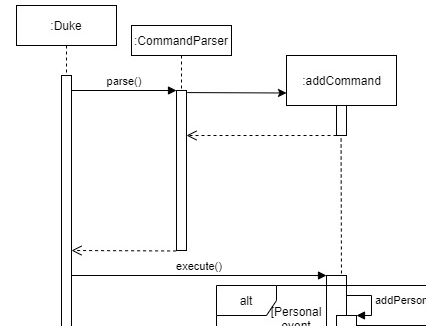
*Commandclasses).
|
|
||
| API: [Command.java](https://github.com/AY2021S1-CS2113T-T12-4/tp/blob/master/src/main/java/seedu/duke/command/Command.java) | ||
| 1. `Parser` class to parse the user command | ||
| 1. This results in a `Command` object executed by the `Parser` |
There was a problem hiding this comment.
Is the Command being executed by the Parser or Duke? According to one of the sequence diagrams below, it seems that Duke calls the execute() method on Command.
| The repeat command first locates the event that is to be repeated along with its starting date. | ||
| Next, it creates an empty ArrayList called `repeatEventList` that will contain all repeated events. | ||
|
|
||
|  |
There was a problem hiding this comment.
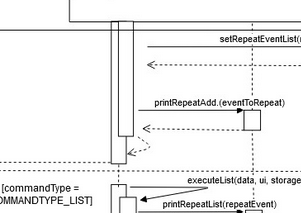
Are the arrow heads and tails supposed to connect here?
|
|
||
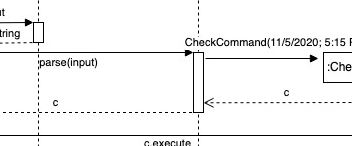
| The following sequence diagram shows how the check operation works: | ||
|
|
||
|  |
There was a problem hiding this comment.
Maybe a more descriptive return value can be written here instead of c.
|
|
||
| This sequence diagram shows how the `getDate` method functions: | ||
|
|
||
|  |
There was a problem hiding this comment.
Could this diagram be split into smaller parts? Especially with so many sections of the alt frames, it makes the diagram a little difficult to comprehend.

 Artemis-Hunt
left a comment
Artemis-Hunt
left a comment
Artemis-Hunt
left a comment
There was a problem hiding this comment.
Good architecture diagrams. Could consider using more sequence diagrams in the earlier half. Later half could use more class diagrams. Good mix of both ensures maximum clarity
| It is also responsible for printing messages from commands and exception messages. | ||
|
|
||
| #### Parser Component | ||
|  |
There was a problem hiding this comment.
Perhaps a sequence diagram would be helpful here. The current diagram does not show where the Command goes to, and as such does not match the explanation given below.
| The `Parser` object uses its `parse` method to parse inputs passed to it from `Ui`. This method returns a `Command` object to be executed by `Duke`. | ||
|
|
||
| #### UserData Component | ||
|  |
There was a problem hiding this comment.
Indicating multiplicities may be helpful. Also, it may be better to omit the aggregation relationship, according to the textbook, since it does not really add anything of value in my opinion.

| - does not depend on the other components. | ||
|
|
||
| #### Storage Component | ||
|  |
There was a problem hiding this comment.
The diagram implies that storage knows about UI but UI does not know about storage. Should change to double-headed arrow if both are aware of each other, or reverse the direction of the arrow if UI knows about Storage.
Also, consider replacing the 4 classnames connected to Storage with the actual classnames. For the class attribute name, consider using the standard notation of name:type = default-value e.g. name:String = personal.txt. Unless the 4 classes are not actually classes, in which case they should not be shown on a class diagram as it is non-standard notation.
Consider having some multiplicities in general.
Storage to StorageParser might be better represented by a solid line, since it seems that Storage cannot function fully without the StorageParser i.e. the dependency is not temporary.
| - is able to store all event and goal information onto the computer | ||
| - is able to load all event and goal information from the computer into the program | ||
|
|
||
|  |
There was a problem hiding this comment.
Consider using sequence diagrams instead of non-standard diagram. More chance to showcase diagramming skills is always good. See below: some other type used ... UML ... worked just as well.
| 1. Description | ||
| 2. Description and date | ||
| 3. Description, date and time | ||
|
|
||
| The zoom event can contain the following fields: | ||
| 1. Description and link | ||
| 2. Description, link, date and time | ||
|
|
||
| The Timetable event can contain the following fields: | ||
| 1. Description, date and time | ||
| 2. Description, location, date and time |
There was a problem hiding this comment.
Consider using class/object diagram to represent the attributes of each event
|
|
||
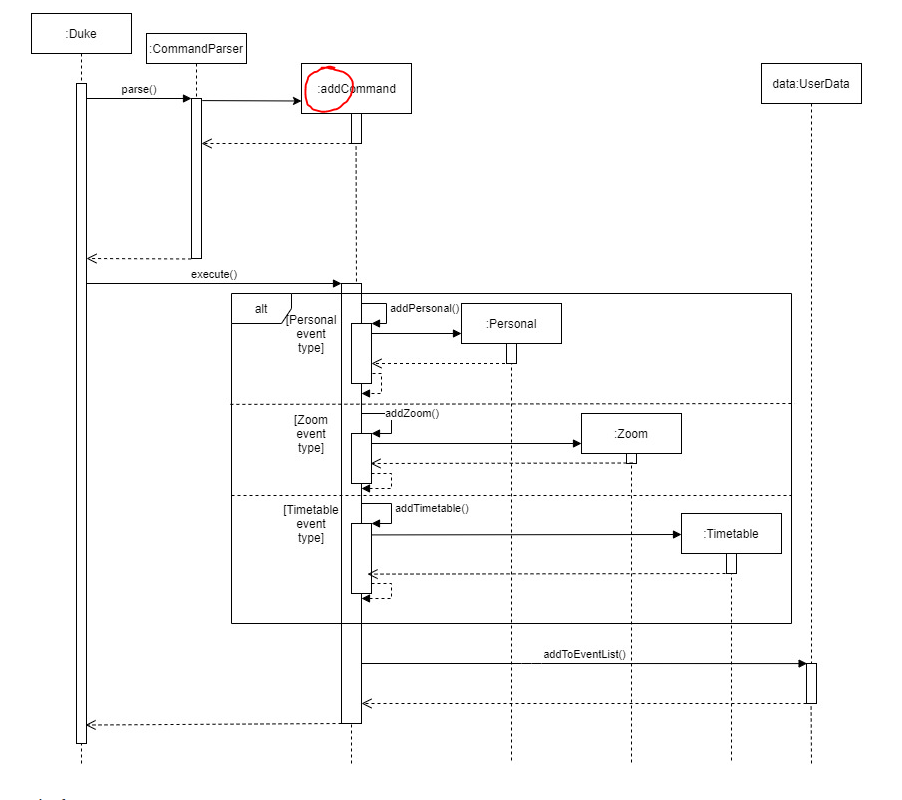
| The following sequence diagram shows how the whole add feature works: <br> | ||
|
|
||
|  |
There was a problem hiding this comment.
Consider adding details about what is being returned. The current diagram implies that addCommand, for example, is returning void, which is probably not the case.
Class names should have a capital first letter i.e. AddCommand and not addCommand.
Consider using a general addEvent and general :Event object to represent the 3 classes, as the method calls and invocations are identical except for the names of the object/method. (e.g. diagram drawn in week 10 lecture, where Cat and Dog were represented by a single Animal class)

 jerroldlam
left a comment
jerroldlam
left a comment
jerroldlam
left a comment
There was a problem hiding this comment.
Overall still readable but some diagrams can be improved to enhance readability of the developer guide! Overall a very decent effort
| - does not depend on the other components. | ||
|
|
||
| #### Storage Component | ||
|  |
There was a problem hiding this comment.
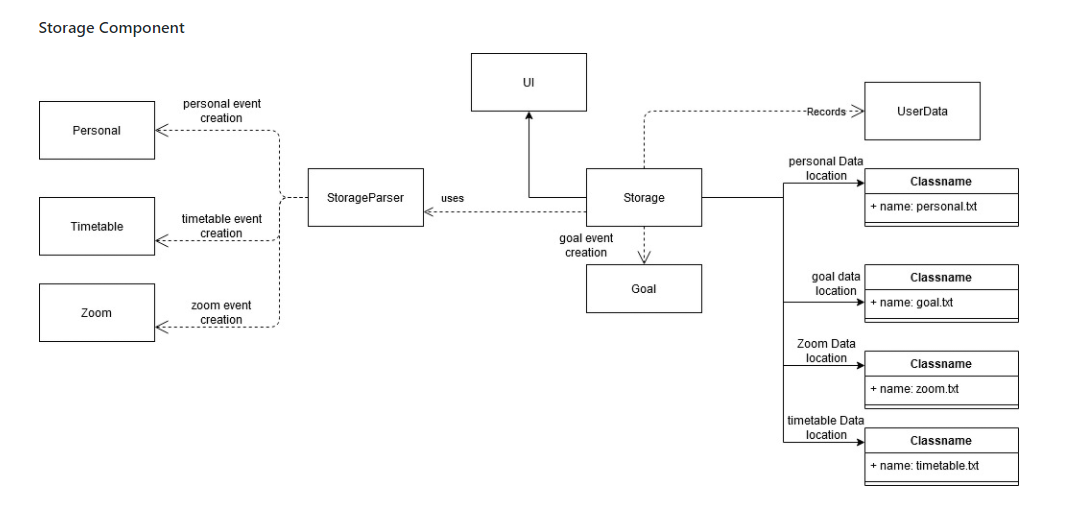
Should the classnames be with colon and underline in the titles to follow the UML notation? Also, do consider using all sharp bends or rounded bends for the arrows for consistency.
| - is able to store all event and goal information onto the computer | ||
| - is able to load all event and goal information from the computer into the program | ||
|
|
||
|  |
There was a problem hiding this comment.
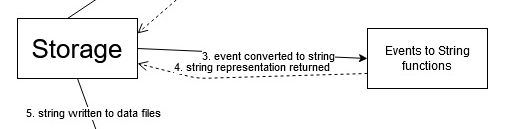
In addition to the above comment, you can consider finding a common place to label the arrows, ie label all below / on top of the arrow as the current diagram has labels on top of and on the arrows itself. This would make the diagram look neater for the reader.
Also it is not immediately clear which you are referring to, loading or saving. Perhaps putting the loading or saving on top in the middle would help with this as putting it in the top left makes it easier to miss
|
|
||
| The following sequence diagram shows how the whole add feature works: <br> | ||
|
|
||
|  |
|
|
||
| The following sequence diagram shows the overall process of repeating an event: | ||
|
|
||
|  |
There was a problem hiding this comment.
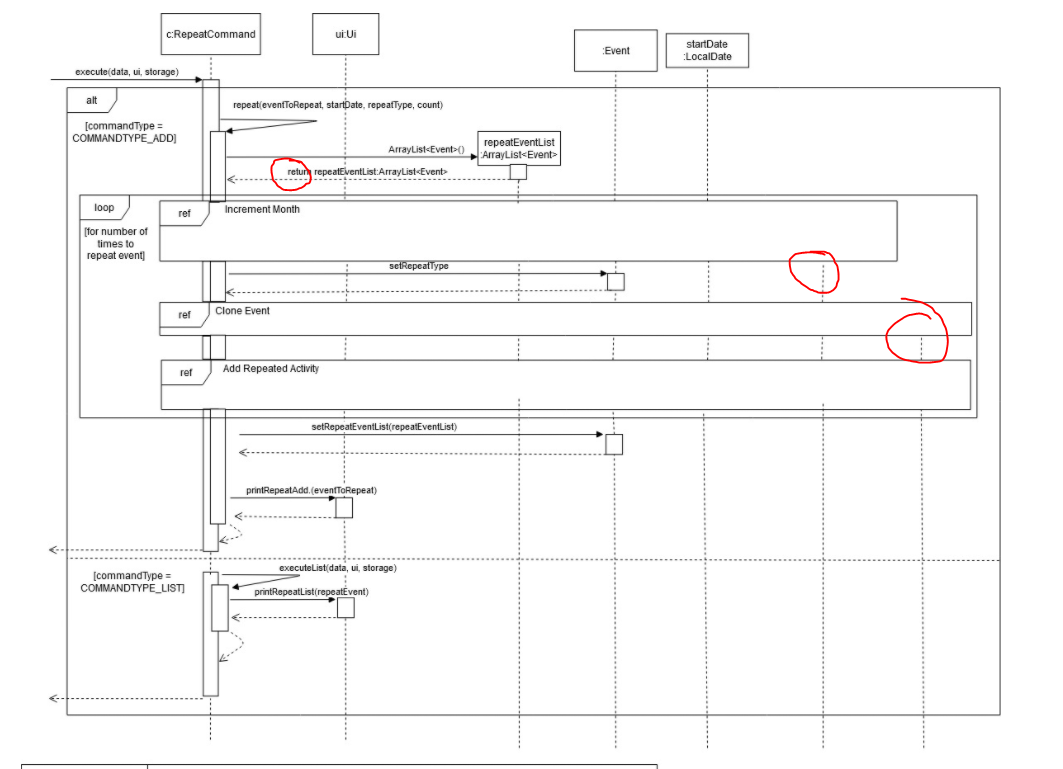
For the left most circle, should the return be included? The other return lines do not have them.
For the 2 right-most circles, the lifelines come out of nowhere and have no constructor for this diagram. Should they have more information about how they are initialized as there is no indication of what classes they are. This would help greatly when a developer looks at the overall picture instead of needing to look at the references.
Should the alt box be opt instead?
| Given below is how the deadline command behave: <br> | ||
|
|
||
| <p align="center"> | ||
| <img width="414" height="562" src="./diagrams/DeadlineScenario.jpg"> |
There was a problem hiding this comment.
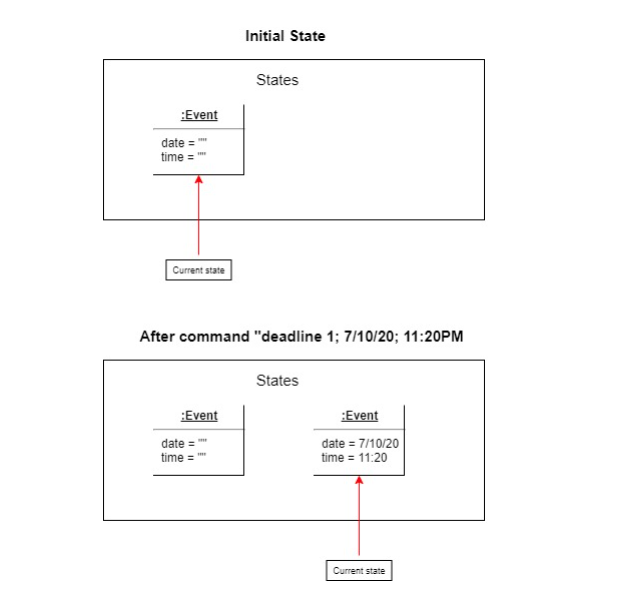
should the states in the state diagrams be full boxes instead of the half boxes here?
|
|
||
| <ul> | ||
| <li>has a need to organise events using scheduler</li> | ||
| <li>prefer desktop application</li> |
| |v1.0|university student having projects|be informed of the goals of my project|keep track of the project details| | ||
| |v1.0|university student|customise repeated task|set events like tutorials to weekly| | ||
| |v1.0|teacher|organise all my zoom links for my classes|it can be easily accessible.| | ||
| |v1.0|user|see the events that I have created|refer to them when I forget| |
There was a problem hiding this comment.
I think it would be best to specify user of your app as user is a really broad term and can refer to a user of anything

 OngDeZhi
left a comment
OngDeZhi
left a comment
OngDeZhi
left a comment
There was a problem hiding this comment.
Overall good job! I think maybe just a minor issue with the arrows not connecting, otherwise you guys did a great job making the diagram easy to read!
|
|
||
| #### Command Component | ||
|
|
||
|  |
There was a problem hiding this comment.
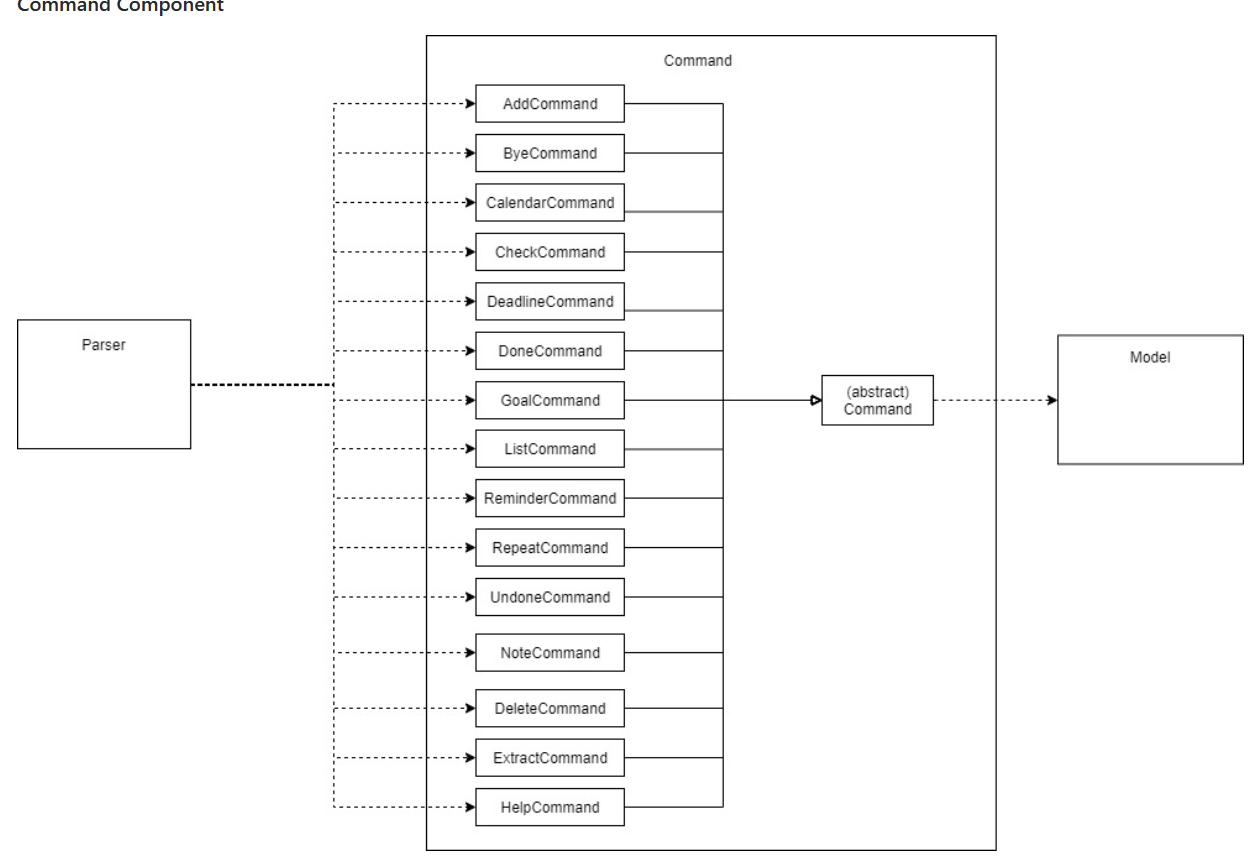
You may want to consider using XYZCommand to represent all of these classes, it is a little lengthy.
|
|
||
| Steps 2 to 5 are repeated up till the number specified by `count` as shown in the loop. | ||
|
|
||
|  |
There was a problem hiding this comment.
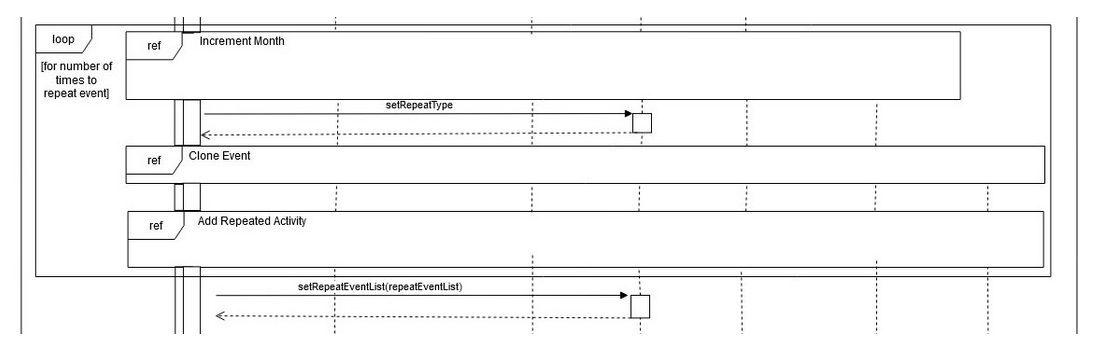
The arrows (at the end) are supposed to be connected I think? May want to consider joining it :)
|
|
||
| The following sequence diagram shows how the deadline operation works: <br> | ||
|
|
||
|  |
There was a problem hiding this comment.
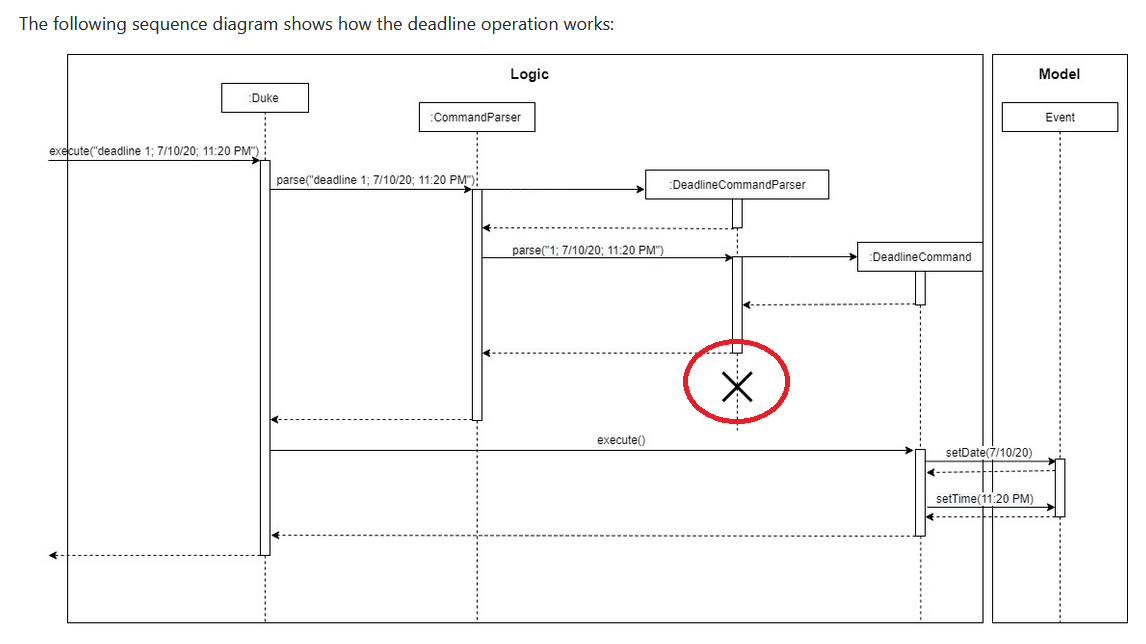
You may want to consider ending the dotted line before the cross.

|
|
||
| The following sequence diagram shows how the `list zoom` command is parsed: | ||
|
|
||
|  |

There was a problem hiding this comment.
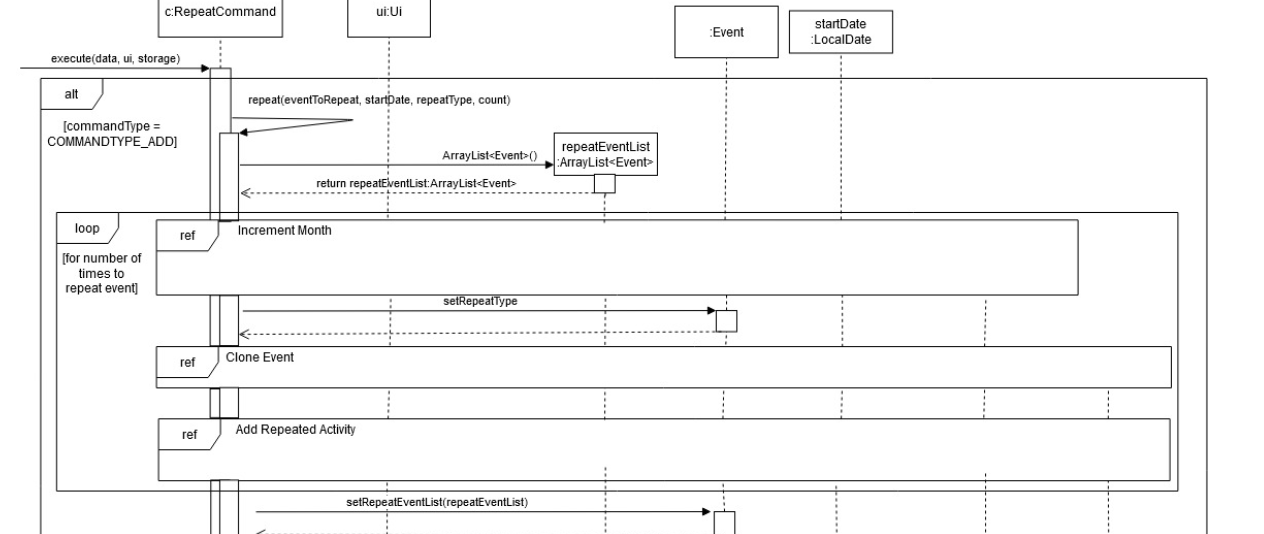
Perhaps instead of using ref block inside the picture you can use other representation to reduce confusion with the developer.
| The repeat command first locates the event that is to be repeated along with its starting date. | ||
| Next, it creates an empty ArrayList called `repeatEventList` that will contain all repeated events. | ||
|
|
||
|  |
There was a problem hiding this comment.
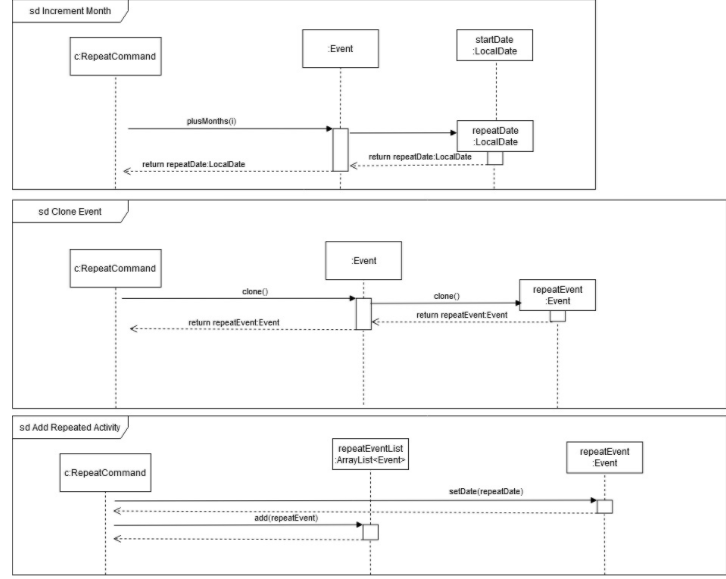
Consider connecting the arrows to the activation bar.


Add logging for Deadline, Note, Reminder, View
Branch helpfileupdate
Updated the user guide
Blank string saved to indicate no location.
Updating View command in UG
Used for checking empty location details
Update user guide
Update developer guide with diagrams for list and calendar

…oes not match any event and detect missing event type or event index

Add Junit for done, undone, delete
…the last repeat sub-event

Update Junits
Branch save timetable fix
Logging now will only print to text file rather than the terminal
Branch logging repeat
Update UG
Updating UG

# Conflicts:
#	docs/UserGuide.md
Fix command summary table border
Branch cs2101 UG
add scenario for reminder
Branch user guide v5
Branch cs2101 ug
Update scenario
bullet points added
10 participants


Scheduler--; (S--) is a desktop app for managing deadlines from different sources. The user will use a Command Line Interface to control it. It is specially designed for Computing students who are comfortable in using CLI and have Git project deadlines as well as consolidated Zoom session links due which will suit home based learning in this COVID period.