[CS2113T-T12-3] Zer0Note#31
Conversation


 alstontham
left a comment
alstontham
left a comment
alstontham
left a comment
There was a problem hiding this comment.
Overall, a well explained DG! The information was well spaced out and sorted into categories clearly. I left some comments for possible improvements/clarifications, such as standardization of sequence diagrams as each style seems to have its own quirks/features that could be confusing for the reader.
| [4.3. Notebook Mode](#43-notebook-mode) <br> | ||
| [4.3.1. Notebook Management Feature](#431-notebook-management-feature) <br> | ||
| [4.3.1.1. Implementation](#4311-implementation) | ||
| [4.3.2. Tag Feature](#432-tag-feature) <br> |
There was a problem hiding this comment.
Is this line displayed the way you want it to be? Not sure if its unintentional but maybe it would look better on a line of its own?
There was a problem hiding this comment.
Looks like we forgot a <br> tag. Thanks for pointing this out.
| contributing code to the project. | ||
|
|
||
| {Describe the target user profile} | ||
| ### 1.2. How to use this document |
There was a problem hiding this comment.
I was a bit confused when reading this section. It kind of looks like one giant section and I had some trouble distinguishing one example from the next. Perhaps there could be a better way to separate/space out the examples to make it clearer?
There was a problem hiding this comment.
Thanks for the tip. I wrote this section, and looking at it I definitely see what you mean. We'll experiment with subheadings and <hr>s to try and make it more readable.

There was a problem hiding this comment.
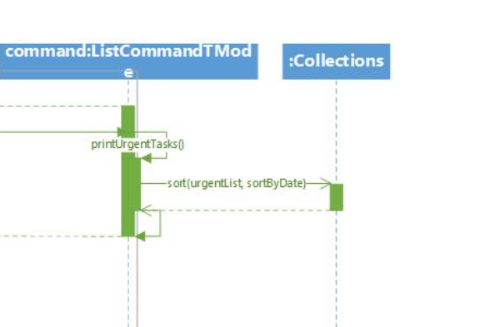
There is some design or alignment issues on the ListCommand sequence diagram. Maybe you want to look into it.
There was a problem hiding this comment.
There is error in the Storage UML Diagram, I cant view it from my end. Maybe you want to look into it

| The `UserInterface` component, | ||
|
|
||
| * Executes user commands using the `Commands` component. | ||
| * // how it interacts with the other components |
There was a problem hiding this comment.
Are the double slashes on this line intentional?
There was a problem hiding this comment.
Yes, we are not done with this section so the "double slash" is an homage to the Java/C comment style, indicating that this isn't the actual guide, but rather a description of what should go here :)
| * Executes user commands using the `Commands` component. | ||
| * // how it interacts with the other components | ||
|
|
||
| /* TODO explain the various variables and methods */ |
There was a problem hiding this comment.
Will this section be explaining the UML diagram in section 3.3? If not then I think it would be beneficial to have a brief description of how the different components of Command (and other like Tasks, Notebooks, etc) work together.
There was a problem hiding this comment.
3.3 will indeed explain the UML diagrams in that section, yes. We didn't realise it needed to be done for today so bits of it like this one are incomplete. Sorry about that.
|
|
||
| #### 4.2.1. TaskList Management Feature | ||
|
|
||
| ##### 4.2.1.1. Implementation |
There was a problem hiding this comment.
Perhaps you could make this heading a bit larger? I find it a bit strange if the size of the heading text is smaller than the body text below it.
There was a problem hiding this comment.
We've been having some issues with headings; we're still experimenting with different heading levels to make it the most readable. Thanks for the feedback, we'll try to fix this as best as possible.
| Step 6. To signal that the user has successfully added a task, a message is printed with `CliMessages#printAddedTaskMessage`. | ||
|
|
||
| The UML sequence diagram below shows how the add task command works. | ||
|  |
There was a problem hiding this comment.
Would it be possible to standardize the UML diagrams? For example in this diagram in the top right corner there is a box showing me what the user input is, but for the next two diagrams its shown on the left most arrow.
There was a problem hiding this comment.
Another point is to ensure that the return value for each method is shown in the arrow pointing back and to make sure it is standardized across the diagrams.
| <hr> | ||
|
|
||
| The figure below shows how the delete task command works: | ||
| <img src= "https://user-images.githubusercontent.com/60319628/96657942-02dc6900-1376-11eb-9284-38322e1a2b09.png"> |
There was a problem hiding this comment.
For this UML diagram, for the methods that execute within a class like "executeCommand(userInput)", isn't there supposed to be another box overlaid on top of the existing box? Like how it's shown for the executeCommand in the tag operation sequence diagram?
| 1. The `CliUserInterface` receives the "delete 1" input by the user and passes it to the `InputParser` class. | ||
| 2. `InputParser` parses the input to determine the type of command and the index of the task that is required to delete. | ||
| The Parser then constructs a `RemoveCommandTimetableMode` with constructor as shown below. | ||
| ```java |
There was a problem hiding this comment.
Not too sure if this is necessary? It's nice to include but there isn't a description that expands on it, and if this part of the code was changed, then this code snippet would need to change as well.
There was a problem hiding this comment.
Good point about having to change it if we change the code. We'll reconsider this section.
|
|
||
| The following sequence diagram shows how the list operation works: | ||
|
|
||
|  |
There was a problem hiding this comment.
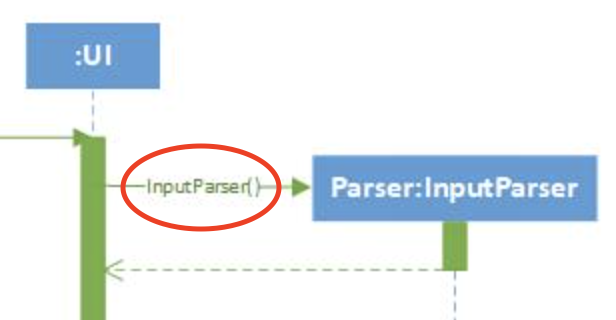
Not sure if it's a hard rule, but I think the labels for the method calls should be above the lines pointing to the right, not in the middle of the line? e.g. InputParser()
There was a problem hiding this comment.
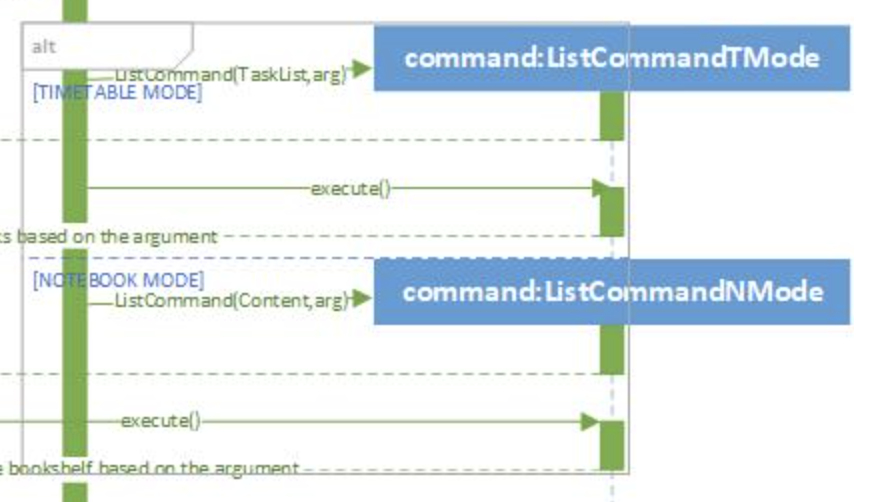
Also, another suggestion: perhaps space out the alt block? All the content within looks very crammed together and hard to read.
| Some of these members may be empty. | ||
| 2. `InputParser` constructs and returns the `RemoveCommandNotebookMode` class with constructor as shown below: | ||
| ```java | ||
| public RemoveCommandNotebookMode(String notebookTitle, String sectionTitle, |
There was a problem hiding this comment.
The code snippet is nice to have, but I don't feel like it adds that much to the description, and if the code changes then this needs to be changed too.

| ### 1.2. How to use this document | ||
|
|
||
| ### Value proposition | ||
| Text that looks like this is normal text. It should be read as-is; it has no special meaning beyond what it says. |

There was a problem hiding this comment.
I feel like this statement is redundant.You do clearly show the other types of syntax available in this document in the subsequent lines. Hence, it is not necessary to point out how a normal text should be read.
There was a problem hiding this comment.
Got it. We'll reconsider this section then. I wrote this section and wanted it to be as unambiguous as possible. However I agree that it does seem extremely redundant.
| ##### 4.3.2.1. Implementation | ||
| The `Notebook`, `Section` and `Page` classes each contain a member `tag` of type String. | ||
|
|
||
| The figure below shows how the tag operation works: |
There was a problem hiding this comment.
The image inserted here is too pixelized. It is not clear.
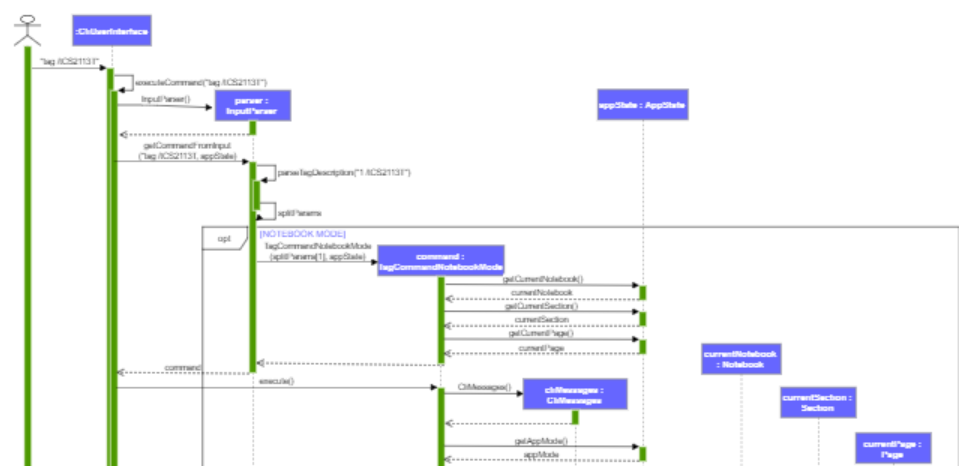
There was a problem hiding this comment.
Oof yeah, we'll rework this one. Thanks for pointing it out.
|
|
||
| <hr> | ||
|
|
||
| The figure below shows how the "remove task" command works: |
There was a problem hiding this comment.
Personally, I think that this is the best UML diagram in the DG. It is clear and is formal.
Nonetheless, I think that the line used for the command getAppMode() should not be dotted.
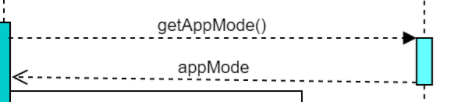
|
|
||
| The following sequence diagram describes the operation of the `saveToFile()` operation | ||
|
|
||
|  |
There was a problem hiding this comment.
This diagram seems too colorful. You could try out another color instead of pink. Furthermore, the methods should be labeled on top of the arrows. Right now, some of the methods completely cover the arrows.
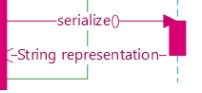
There was a problem hiding this comment.
Do you think I should leave it to be the same blue as the rest of the blocks?
Noted on the labels, that was what Visio did by default and I didn't think to change it.

| <hr> | ||
|
|
||
| The figure below shows how the delete task command works: | ||
| <img src= "https://user-images.githubusercontent.com/60319628/96657942-02dc6900-1376-11eb-9284-38322e1a2b09.png"> |

There was a problem hiding this comment.
Should the lines be a solid line instead?
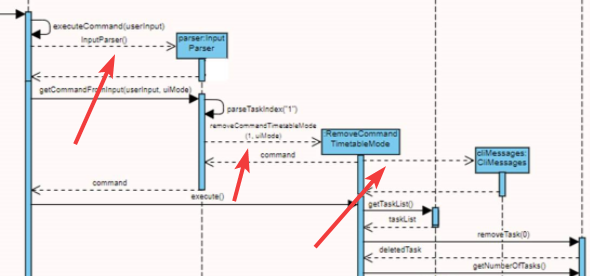
There was a problem hiding this comment.
I believe you're right, we'll change that.
|
|
||
| The figure below shows how the tag operation works: | ||
|
|
||
|  |
There was a problem hiding this comment.
Same as the previous diagram, should the lines be a solid line instead?
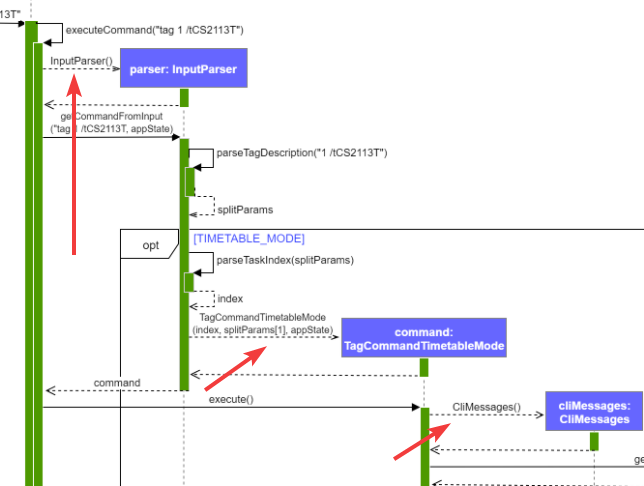
|  | ||
|
|
||
| There are 3 crucial processes during the tag operation. When the user enters `tag /tCS2113T` into the command window while using the application: |
There was a problem hiding this comment.
Would it be possible to separate the sequence diagrams into the 3 processes mentioned here? Right now it's quite hard to understand the diagram because the text in the diagram is quite small (opening it as a new image doesn't help). You could also consider breaking it into ref frames too.
There was a problem hiding this comment.
Agreed, it does look quite pixelated and hard to read. We'll try to break it up into smaller parts.
|
|
||
| ### 3.3. Commands Component (Neil) | ||
|
|
||
|  |
There was a problem hiding this comment.
Maybe you can consider omitting some less important details from the class diagram, such as private members?

|
@alstontham @jerichochua @syncode98 Thank you for your reviews and feedback. We'll be sure to improve the DG based on your comments! 😄 |

 gohsonghan98
left a comment
gohsonghan98
left a comment
gohsonghan98
left a comment
There was a problem hiding this comment.
Overall, the Developer Guide is developing well, but do be careful of the accuracy of the sequence diagram. To further improve, you may also consider using labels for your diagrams and make more references to those diagrams. Good luck!
|
|
||
| ### 3.1 Architecture (Neil) | ||
|
|
||
| **How the architecture components interact with each other** |
There was a problem hiding this comment.
This seems like a subheading. You may want to consider using a new line after this to differentiate between a subheading and your contents.
There was a problem hiding this comment.
Agreed. I've changed this and submitted a PR.
| <hr> | ||
|
|
||
| The figure below shows how the delete task command works: | ||
| <img src= "https://user-images.githubusercontent.com/60319628/96657942-02dc6900-1376-11eb-9284-38322e1a2b09.png"> |
There was a problem hiding this comment.
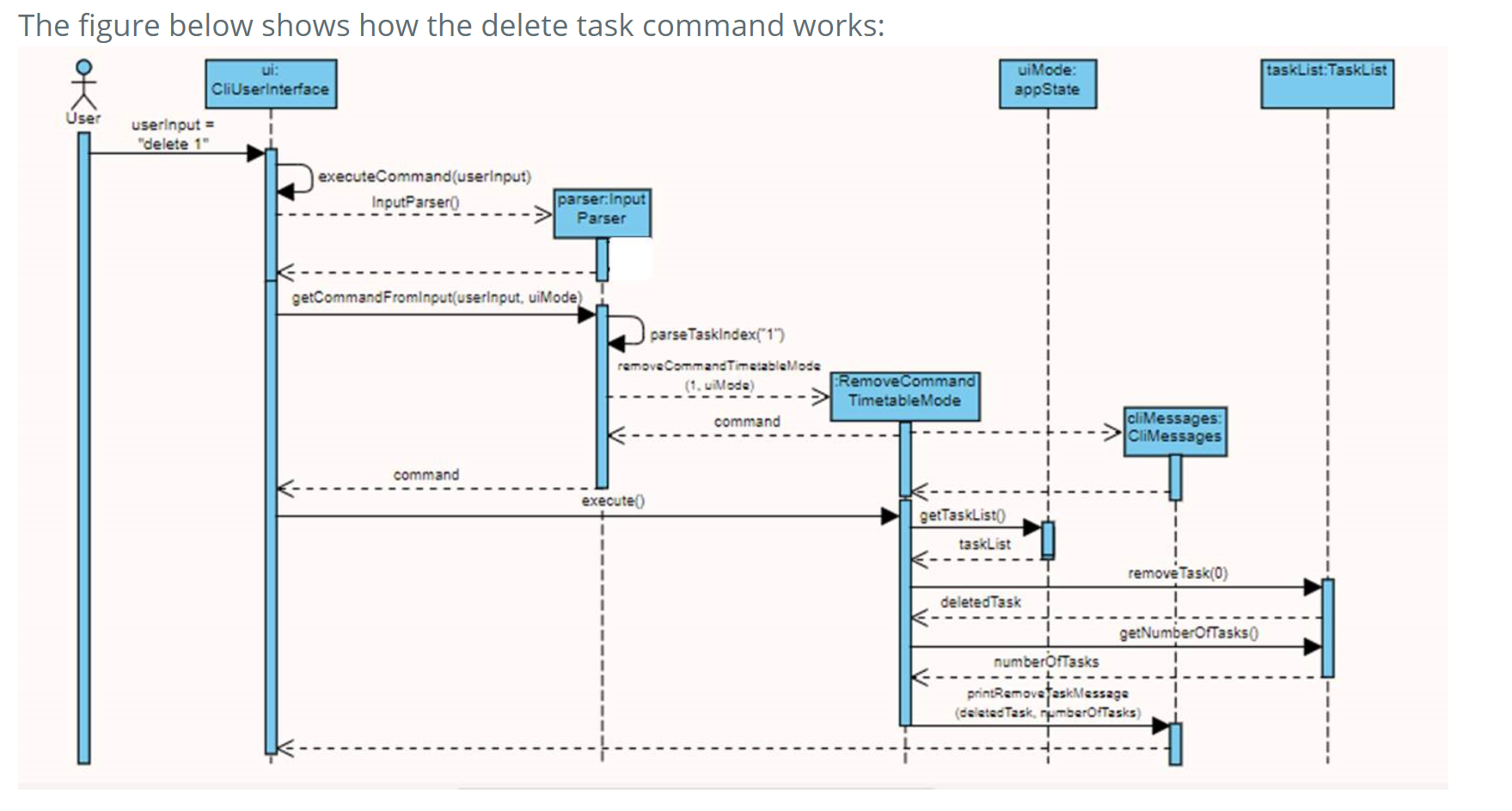
I think there are some inaccuracies in the method call and return arrow in the class diagram. For example the getCommandFromInput(userInput,uiMode) method call should have its solid arrow pointed to the top edge of the activation bar in the parser object. Whereas for the parser constructor, the return arrow should begin from the bottom edge of the activation bar.
|
|
||
| The figure below shows how the tag operation works: | ||
|
|
||
|  |
There was a problem hiding this comment.
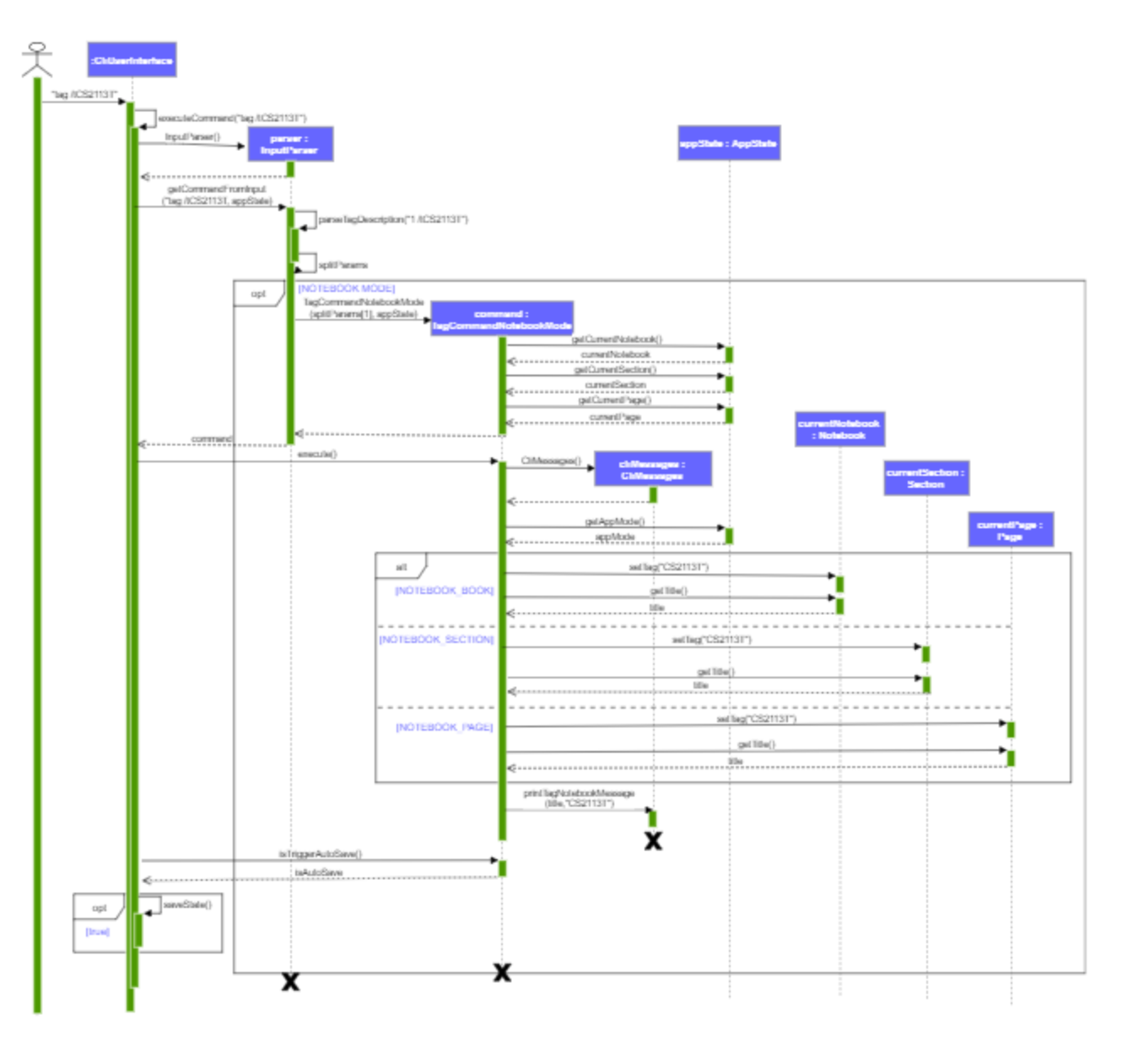
The labels in this sequence diagram is too small and blurry, perhaps due to the compression of the image size. If your sequence diagram is too large, I think it would be better if you could split it up into multiple parts where possible.
|
|
||
|  | ||
|
|
||
| /* to insert UML diagram */ |
There was a problem hiding this comment.
I think it will be good if you could give a brief description of the diagram. You may also consider labelling your diagrams.
|
|
||
| ### 3.4. Tasks Component | ||
|
|
||
| /* to insert UML diagram */ |
There was a problem hiding this comment.
As mentioned above, you may consider having a brief description of the diagrams to be presented.
There was a problem hiding this comment.
Thanks. The document is still a WIP as you can tell, so we'll have to add those once we have the UML diagrams.
|
@gohsonghan98 Thanks for your review and feedback 😄 |

|
|
||
| ### 3.5. Notebooks Component | ||
|
|
||
|  |

There was a problem hiding this comment.
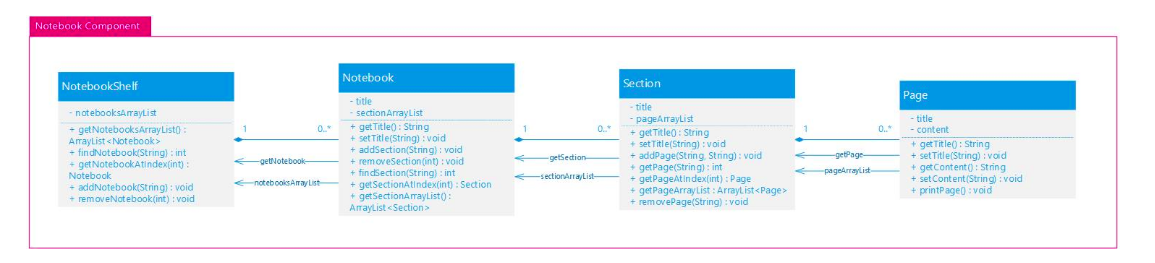
The methods are being covered by the arrow. Please look into it. Thanks
|
|
||
| The `NotebookShelf` class, | ||
|
|
||
| - has methods to add new `Notebook` object and remove existing one. |
There was a problem hiding this comment.
One suggestion might be to refer to the method names so that it is easier for the developer. It is hard to see from the diagram.
|
|
||
| ### 3.6. Storage Component | ||
|
|
||
|  |
There was a problem hiding this comment.

I believe you are missing the diagram?
|
|
||
| The `Storage` component, | ||
|
|
||
| * Contains the method `saveToFile` to save the current AppState of the application in the `notebooks.txt` and `tasks.txt` files. |
There was a problem hiding this comment.
Is the txt file stored in the same directory or is it stored in another directory?
|
|
||
| #### 4.1.1. Implementation | ||
|
|
||
| The mode switch mechanism is facilitated by `AppState`. It contains an `AppMode` object and can be accessed from |
There was a problem hiding this comment.
I believe it might be better if you had talked about the different modes before this feature as it is a bit difficult to keep track of the different modes that are present in the app?
|
|
||
| Step 2. `execute()` is called, which then initialises a variable `taskList` of type TaskList. The method then calls `AppState#getTaskList`, which returns all exisiting tasks in the current tasklist. | ||
|
|
||
| Step 3. The `execute()` method proceeds to parse the user's intended task index to be marked as done through `Integer.parseInt()`. Using this index, it initialises a varible `taskDone` of type task and calls `AppState#markAsDone(index)`. |
There was a problem hiding this comment.
Spelling mistake with 'variable'. Isnt the variable already initialized to False and this method changes it to True?
| - **Alternative 2:** Store as a Hash Table with the key as the tag and value as `Task` | ||
| - Pros: It has a better time complexity for search operations since this data structure is more optimized (O(1) can | ||
| be achieved). | ||
| - Cons: It is hard to retrieve the tag for a specific `Task` due to the structure of the key-value pair. |
There was a problem hiding this comment.
If you use the approach from the first method, wouldnt this be fixed?
| This section describes some considerations involved when designing the find feature. | ||
|
|
||
| **Aspect: Distinction between finding by keyword and finding by tag** | ||
| - **Alternative 1 (current choice):** Handle as a if-else statement in a single class |
| `TaskList`, `Task`,`NotebookShelf`, `Notebook`, `Section`, and `page` contain methods called `serialize()`. | ||
| These methods return`String` representations of themselves, as specified [here](#441-storage-format). | ||
|
|
||
| The `serialize()` method in `TaskList` calls the `serialize()` methods for every `Task` object within |
There was a problem hiding this comment.
1 suggestion - an example of how it serializes might be a bit more informative?
|
|
||
| 1. The user launches the application for the first time. `CliUserInterface#executeCommand` is called when the user types in `hello`. | ||
|
|
||
| 2. The `hello` command is passed through a switch-case block within `InputParser#getCommandFromInput`. |
There was a problem hiding this comment.
A small snippet of the switch case might be better


Add JUnit tests for ListCommand (both mode) and InputParser (command part)

Final few Junit tests before 2.1rc1
Update neilbaner PPP

Changed longngyugen to longngng
Add space to PPP
Final edits to UG
Final final edits
Rearrange bullet points
Fixed Data directory
Update UG for submission to CS2101
11 participants


OneNote meets vim. Zer0Note is a command-line note-taking and organisation application, that combines the easy-to-use hierarchical structure of popular GUI based applications like OneNote, Evernote, Notion etc. with the speed of the command line.