


Python module for ggseg-like visualizations.
Requires matplotlib>=3.4, numpy>=1.21, and scikit-image>=0.19
(the last is used to resample 2D arrays when rendering them inside region
outlines — see "Plotting arrays inside regions" below).
pip install ggseg
In order to work with python-ggseg, the data should be prepared as a
dictionary where each item is one region of a given atlas assigned with some
numeric value. The current version includes four atlases: the
Desikan-Killiany (DK) atlas,
the Johns Hopkins University (JHU) white-matter atlas,
the FreeSurfer aseg atlas,
and a hippocampal-subregion atlas (CA1/CA2/CA3/DG/EC/LEC/MEC/sub/presub/parasub).
Each plot_* function returns (ax, plt_objs, cmap), where plt_objs is a
dict of the matplotlib artists that were drawn — see
Animations for what that enables.
Cortical ROI data such as using the DK atlas may be structured as follows:
{'bankssts_left': 1.1,
 'caudalanteriorcingulate_left': 1.0,
 'caudalmiddlefrontal_left': 2.6,
 'cuneus_left': 2.6,
 'entorhinal_left': 0.6,
 ...}
Then be passed to the ggseg.plot_dk function:
import ggseg
ax, plt_objs, cmap = ggseg.plot_dk(data, cmap='Spectral', figsize=(15,15),
                                   background='k', edgecolor='w', bordercolor='gray',
                                   ylabel='Cortical thickness (mm)', title='Title of the figure')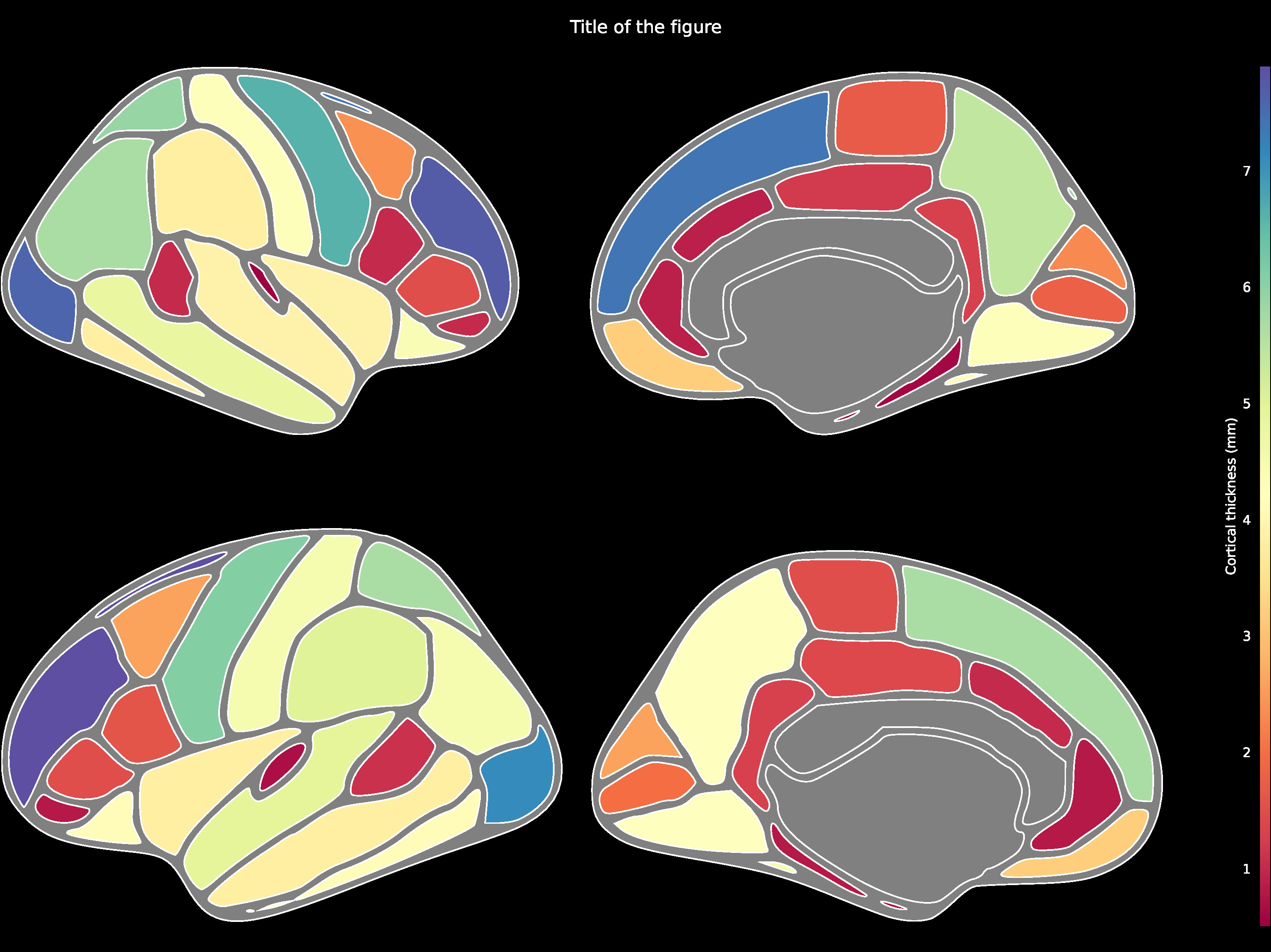
The comprehensive list of applicable regions can be found in this folder.
data = {'Left-Lateral-Ventricle': 12289.6,
        'Left-Thalamus': 8158.3,
        'Left-Caudate': 3463.3,
        'Left-Putamen': 4265.3,
        'Left-Pallidum': 1620.9,
        '3rd-Ventricle': 1635.6,
        '4th-Ventricle': 1115.6,
...}ax, plt_objs, cmap = ggseg.plot_aseg(data, cmap='Spectral',
background='k', edgecolor='w', bordercolor='gray',
ylabel='Volume (mm3)', title='Title of the figure')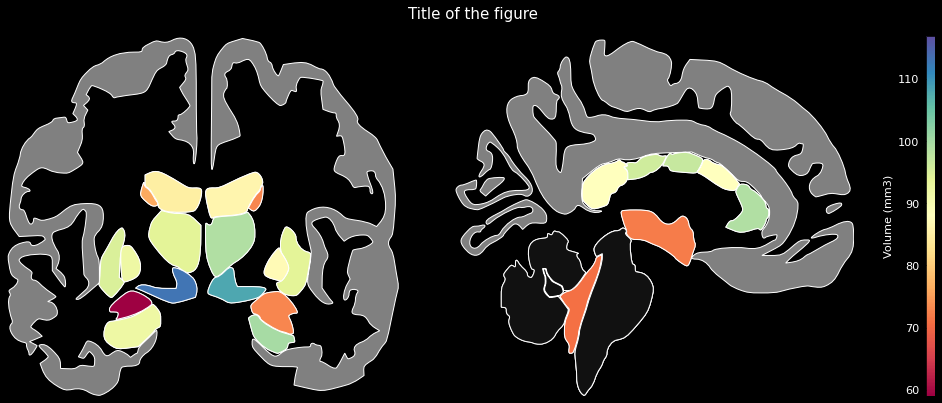
The comprehensive list of applicable regions can be found in this folder.
data = {'Anterior thalamic radiation L': 0.3004812598228455,
        'Anterior thalamic radiation R': 0.2909256815910339,
        'Corticospinal tract L': 0.3517134189605713,
        'Corticospinal tract R': 0.3606771230697632,
        'Cingulum (cingulate gyrus) L': 0.3149917721748352,
        'Cingulum (cingulate gyrus) R': 0.3126821517944336,
...}ax, plt_objs, cmap = ggseg.plot_jhu(data, background='k', edgecolor='w', cmap='Spectral',
bordercolor='gray', ylabel='Mean Fractional Anisotropy',
title='Title of the figure')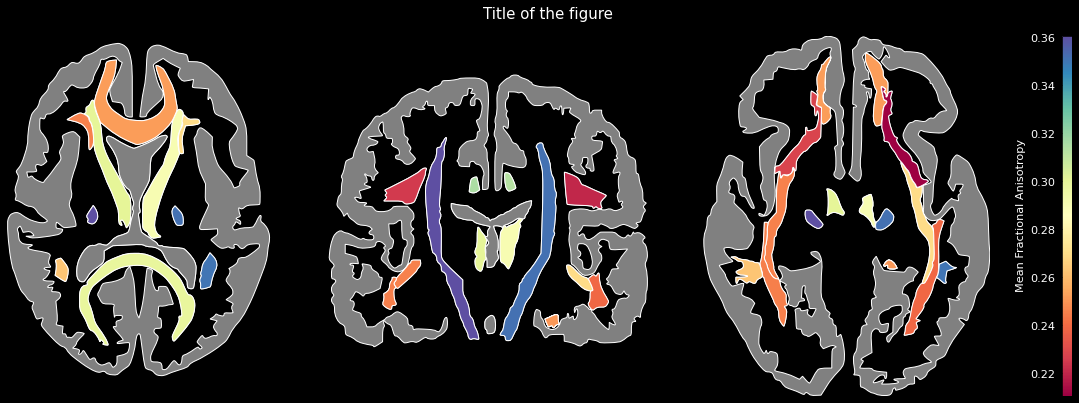
The comprehensive list of applicable regions can be found in this folder.
A hippocampus + entorhinal-cortex atlas is also bundled. Keys correspond to
subregion files in ggseg/data/hippo:
CA1, CA2, CA3, DG, EC (with LEC / MEC for the lateral and
medial entorhinal subdivisions), sub, presub, parasub. The
formation outline is used to size the figure and is not a data region.
data = {'CA1': 0.72,
        'CA2': 0.41,
        'CA3': 0.55,
        'DG':  0.83,
        'LEC': 0.30,
        'MEC': 0.38,
        'sub': 0.61,
        'presub': 0.48,
        'parasub': 0.52}

ax, plt_objs, cmap = ggseg.plot_hippo(data, cmap='viridis',
                                      background='k', edgecolor='w', bordercolor='gray',
                                      ylabel='Activation', title='Hippocampal subregions')
Instead of (or alongside) a single scalar per region, a region's value can
be a 2D numpy array — it will be rendered as a heatmap, resampled to the
region's bounding box and masked to the region outline. Scalars and arrays
can be freely mixed in the same data dict, and the colormap bounds are
computed across both.
import numpy as np
import ggseg

# Synthetic activation maps for two DK regions; the rest are flat scalars.
y, x = np.mgrid[0:50, 0:50]
data = {
    'precentral_left':   np.sin(x / 8) * np.cos(y / 8),
    'superiorfrontal_left': np.exp(-((x - 25)**2 + (y - 25)**2) / 200),
    'cuneus_left':       0.4,
    'lingual_left':      0.7,
}
ax, plt_objs, cmap = ggseg.plot_dk(data, cmap='viridis',
                                   background='w', edgecolor='k', bordercolor='gray')
The artist returned in plt_objs[region] is a matplotlib.patches.PathPatch
for scalar values and a matplotlib.collections.QuadMesh (from
ax.pcolormesh) for array values.
Because each plot_* returns the dict of patch / mesh artists, you can
drive a matplotlib.animation.FuncAnimation by mutating them frame by
frame — no need to redraw the atlas on every tick.
import numpy as np
import matplotlib.pyplot as plt
from matplotlib.animation import FuncAnimation
import ggseg

regions = ['precentral_left', 'superiorfrontal_left',
           'cuneus_left',     'lingual_left']
timeseries = {r: np.random.RandomState(i).randn(60).cumsum()
              for i, r in enumerate(regions)}

# Initial frame
data0 = {r: timeseries[r][0] for r in regions}
ax, plt_objs, cmap = ggseg.plot_dk(data0, cmap='viridis',
                                   background='w', edgecolor='k', bordercolor='gray',
                                   vminmax=[-5, 5])

def update(frame):
    norm = plt.Normalize(vmin=-5, vmax=5)
    for r in regions:
        plt_objs[r].set_facecolor(cmap(norm(timeseries[r][frame])))
    return list(plt_objs.values())

anim = FuncAnimation(ax.figure, update, frames=60, interval=80, blit=False)
anim.save('animation.gif', writer='pillow', fps=15)
For array-valued regions the artist is a QuadMesh, so use
plt_objs[region].set_array(new_array.ravel()) inside update instead of
set_facecolor.
The current development version of python-ggseg has a coverage rate close to 100%.
The corresponding tests can be found in this folder.
A Jupyter Notebook with examples can be found there.