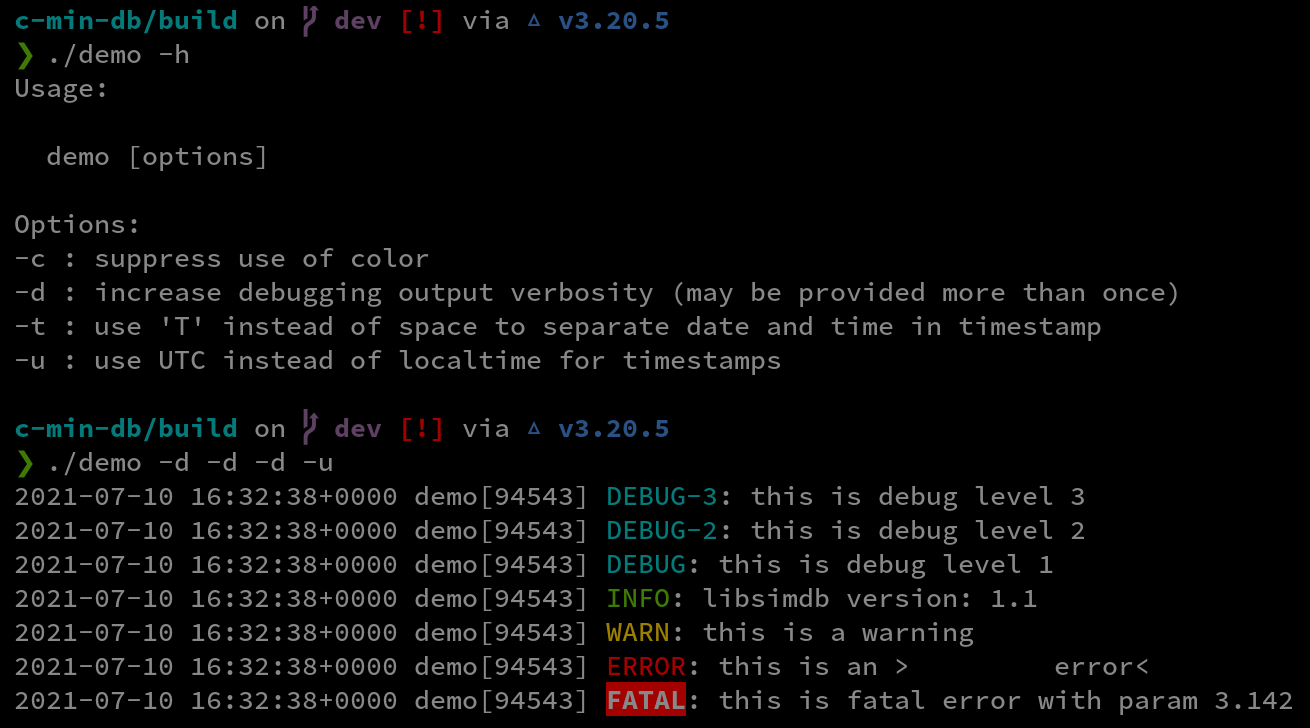
- Prefix each log message with timestamp, program name, PID and message level
- Colorized output
- Printf-style formatting
- Nine levels (fatal, error warn, info, debugs 1 .. 5)
- Set debugging output level at runtime
- pkg-config script for easy use
The initial debugging level is specified when db_init() is called, and can be
modified later by calling db_set_level(). The debugging level determines which
messages in your program will produce output - if the message level is less than
or equal to the verbosity of the current debugging level, the message will produce
output, otherwise it will not.
The following level are available from least to most verbose:
| Level | Message | Color (bg/fg) | Notes |
|---|---|---|---|
db_f |
FATAL |
red/white | calls exit(EXIT_FAILURE); |
db_e |
ERROR |
-/red | |
db_w |
WARN |
-/yellow | |
db_i |
INFO |
-/green | |
db_1 |
DEBUG-1 |
-/cyan | |
db_2 |
DEBUG-2 |
-/cyan | |
db_3 |
DEBUG-3 |
-/cyan | |
db_4 |
DEBUG-4 |
-/cyan | |
db_5 |
DEBUG-5 |
-/cyan |
Make sure dependencies are satisfied:
- Some C compiler
- CMake >= 3.0
Extract / clone the source and note the path, e.g. ~/src/simdb, create a build directory somewhere and then:
$ mkdir ~/simdb_build && cd ~/simdb_build
$ cmake ~/src/simdb
$ make
$ make install
By default, installation will be in /usr/local. To choose a different destination, use the -D option to cmake to define CMAKE_INSTALL_PREFIX. For example:
$ cmake -DCMAKE_INSTALL_PREFIX=/opt/mouse ~/src/simdb
A pkg-config configuration file is provided, and will be installed to $CMAKE_INSTALL_PREFIX/share/pkgconfig/simdb.pc. Use this with the pkg-config program to determine the correct compiler and linker options to use when building your own projects with this library. Typically this would be done from your project Makefile or similar:
$ pkg-config --cflags simdb
$ pkg-config --libs simdb
Note: If simdb is installed in a non-stanard location, it may be necessary to add the path to the simdb.pc file in the PKG_CONFIG_PATH environment variable.
db_init should be called before any other calls to library functions. This is typically done from main(). argv[0] may be passed as the program name - the basename will be extracted and copied to th global db_prog_name. Subsequent calls to the db() function are used to generare debugging output (or not, based on the debugging level), as follows:
#include <stdio.h>
#include <simdb.h>

int main(int argc, char** argv) {
    db_init(stderr, argv[0], db_i, 0);
    db(db_i, "This message will be printed because the debugging level is set to db_i\n");
    db(db_1, "Not printed because db_1 is below the current level, db_i\n.");
}
See demo.c for a more complete example.