
Navigate your entire screen without touching the mouse.
Built for the person who already remapped Caps Lock.



Free and open-source. No subscription. No trial. No catch.
| macOS | Linux | Windows |
|---|---|---|
| Stable ✅ | Beta — daily 🔵 | Alpha — try it 🟡 |
What these mean — stable is fully featured, beta is good for daily driving, alpha is worth trying but not yet worth switching to.
If you use Vimium in the browser, you already know what this feels like. Neru brings that to your entire operating system — every app, every window, every menu bar item. Navigate with labels, grids, or vim-style keys. Click, right-click, drag, scroll, select text — all without leaving your keyboard.
Here's the whole flow:
Cmd+Shift+Space   →  labels appear on every clickable element
type the label    →  cursor jumps there
Shift+L           →  left click
The mouse is now optional.
Unlike most tools in this space, Neru is CLI-first — every action is a command, every setting is a plain toml file, everything is scriptable. No settings panel. No GUI preferences window. It lives in your dotfiles like it was always supposed to be there.
See it in action — recursive grid mode in real use:
demo.mp4
macOS — Homebrew (recommended):
brew tap y3owk1n/tap
brew install --cask y3owk1n/tap/neru
All platforms — prebuilt binaries
Download the latest release for your OS from GitHub Releases:
| Platform | Architecture | File |
|---|---|---|
| macOS | Intel (x86_64) | neru-darwin-amd64.zip |
| macOS | Apple Silicon (arm64) | neru-darwin-arm64.zip |
| Linux | x86_64 | neru-linux-amd64.zip |
| Linux | ARM64 | neru-linux-arm64.zip |
| Windows | x86_64 | neru-windows-amd64.zip |
| Windows | ARM64 | neru-windows-arm64.zip |
Extract the binary or executable and place it on your PATH.
Linux — Nix flake
Add to your flake inputs, then enable the module:
services.neru.enable = true;See Installation Guide for nix-darwin, NixOS, and home-manager examples.
From source
git clone https://github.com/y3owk1n/neru.git && cd neru
just build   # or just bundle on macOS
just install
Once you're done with the installation, you can just run the Neru.app (macOS) or the neru launch binary (macOS / Linux / Windows). On Windows you can also start Neru from the Start Menu, which runs the same neru.exe without a console window. Neru will prompt for config initialization and accessibility permission whenever is needed.
Five modes, one tool — mix and match as the situation calls for it.
 Recursive Grid · start here |
 Grid |
 Hints (AX + Vision OCR) |
| Mode | Default hotkey | How it works | Best for |
|---|---|---|---|
| Recursive Grid ⭐ | Primary+Shift+C |
Divides screen into cells; narrow down with home-row keys | Everything — any app, canvas, or game |
| Hints | Primary+Shift+Space |
Labels every clickable element via Accessibility API or Vision OCR | Native apps, Electron (VS Code, Slack), Figma |
| Grid | Primary+Shift+G |
Jump directly to a cell by row + column label | Fast coarse movement across large monitors |
| Scroll | Primary+Shift+S |
Vim-style j/k scrolling, u/d for half pages |
Reading docs and code without lifting your hands |
| Monitor Select | unbound | Labels each display; type a label to jump the cursor there | Multi-monitor setups |
Primary is Cmd on macOS and Ctrl on Linux and Windows. Monitor Select
ships without a default binding — bind monitor_select to any key you like.
On Linux there are no default global hotkeys. They are cleared at startup to
avoid colliding with terminal and desktop shortcuts such as Ctrl+Shift+C. Bind
the modes yourself in [hotkeys], or in your compositor — see
Global hotkeys on Linux.
All bindings are fully remappable — Colemak, Dvorak, whatever you're on. → Configuration Reference
Most tools in this space are GUI apps with a settings panel. Neru is the opposite — the CLI is the interface, and config is a file you own.
neru hints          # trigger hints mode
neru grid           # trigger grid mode
neru recursive_grid # trigger recursive grid mode
neru scroll         # trigger scroll mode
neru config reload  # hot-reload config without restarting
neru status         # check daemon state and permissions
Config lives at ~/.config/neru/config.toml — plain text, version-controllable, and hot-reloadable. Every action is available over IPC, so Neru composes naturally with skhd, Raycast, Alfred, Hammerspoon, or any shell script. If it can run a command, it can drive Neru.
neru config init      # generate a fully-commented starter config
neru config validate  # check for errors before applying
neru config reload    # apply changes without restarting
→ CLI Reference · Configuration Reference · Config Showcases
"neru: the ACTUAL BEST app for ditching mouse"
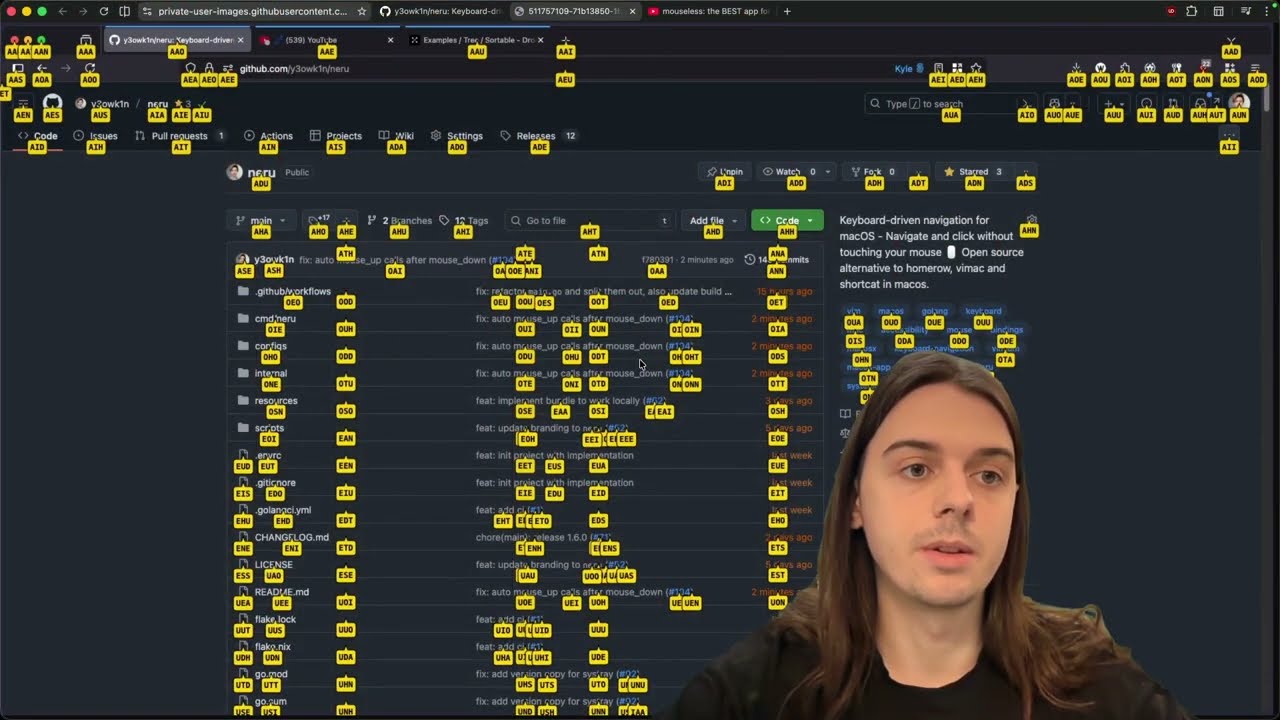
Watch the author run their entire daily workflow without touching the mouse → HOW-I-USE-NERU.md
Got questions or want to share your setup? Join the Discord →
The community built a browser-based training game to help you get fast with recursive grid and hints. Practice target acquisition, sharpen your reaction time, get reps in before it clicks.
👉 Play Neru Dojo — no install, works in any browser.
test.mp4
| Tool | Approach | Price | Open Source |
|---|---|---|---|
| Neru | Grid + Recursive Grid + AX Hints + Vision OCR | Free | ✅ |
| Homerow | AX-Tree Hints | Paid | ❌ |
| Wooshy | AX-Tree Search-to-click | Paid | ❌ |
| Mouseless | Grid pointer control | Paid | ❌ |
| Scoot | AX Hints + Grid | Free | ✅ |
| Glyphlow | Hints + vim text editing | Free | ✅ |
| Stochos | Keyboard driven mouse control | Free | ✅ |
| warpd | Grid + Hints + Normal Pointer | Free | ✅ |
| Mousemaster | Grid + Hints + Continuous Pointer + Key Remapping | Free | ✅ |
| Vimac | AX Hints | Free | ✅ (unmaintained) |
More modes, more engines, more platforms — and it's free. If you've been paying for any of the tools above, Neru is worth 10 minutes of your time.
| Capability | macOS | Linux | Windows |
|---|---|---|---|
| Recursive Grid | ✅ | ✅ | ✅ |
| Grid | ✅ | ✅ | ✅ |
| Vim-Style Scroll | ✅ | ✅ | ✅ |
| Hints (Accessibility API) | ✅ | 🔵 | 🔵 |
| Hints (Vision OCR) | ✅ | 🔲 | 🔲 |
| Direct Mouse Injection | ✅ | ✅ | ✅ |
| Global Hotkeys | ✅ | ✅ | ✅ |
| Native Overlays | ✅ | ✅ | ✅ |
| Monitor Select | ✅ | ✅ | 🔲 |
✅ full · 🔵 works with limits · 🔲 not available
Hints caveats. On Linux, hints work through AT-SPI, so coverage depends
on the app exposing an accessibility tree (GTK/Qt do; Chromium and Electron apps
need --force-renderer-accessibility). On Windows, UI Automation coverage is
initial and the tree walk is shallow, and per-app config does not re-apply when
you change windows. Linux requires X11 or Wayland on wlroots/KWin — GNOME
Wayland is not supported; use a GNOME X11 session.
→ Roadmap · Cross-platform details
Everything you need to go deep:
Using Neru
| Guide | What's in it |
|---|---|
| Installation | Homebrew, Nix, prebuilt binaries, source, permissions |
| CLI Reference | Every command, flag, and argument |
| Configuration Reference | Every option, with types, defaults, and platform support |
| Tips & Tricks | Worked configuration recipes |
| Config Showcases | Real setups shared by the community |
| Troubleshooting | Common issues and fixes |
Platform support
| Guide | What's in it |
|---|---|
| Cross-Platform Guide | What works on each platform, and how it is implemented |
| Linux Setup | Dependencies, permissions, building, deployment |
| Linux Desktops | Per-desktop setup, protocol support, and known issues |
Working on Neru
| Guide | What's in it |
|---|---|
| Contributing | How to propose, commit, and land a change |
| Development Guide | Setup, building, testing, debugging, where code goes |
| Architecture | Layers, boundaries, data flow, platform isolation |
| Agent Guide | Conventions and contracts, for humans and AI agents |
| Roadmap | What's coming next |
Neru is written in Go and Objective-C with a hexagonal architecture whose rules
are executable: the guardrail tests in
internal/architecture/ pin the layering, platform
isolation, port/mock parity, and even doc-link integrity — each with a comment
explaining the real bug it prevents. If you break a rule, the failure message
tells you how to fix it. Adding a feature or platform adapter is straightforward,
and pull requests are very welcome.
git checkout -b feature/your-feature
just ci   # everything CI checks, locally
# open a pull request
→ Contributing Guide · Development Guide · Good first issues
Neru is built and maintained by one person, entirely in spare time. If it's earned a place in your workflow, a sponsorship goes a long way:
mimi grew out of this project — it's the window and space management pieces extracted into a standalone tool, for when neru is more than you need.
brew install --cask y3owk1n/tap/mimiMIT — see LICENSE.
Stop reaching for the mouse. It takes one command.
brew install --cask y3owk1n/tap/neru  # macOS
# or download a binary: github.com/y3owk1n/neru/releases/latest
Welcome to the mouseless life.
Made with ❤️ by y3owk1n