Author: Mirenge Innocent Course: Applied Cryptography — Spring 2026
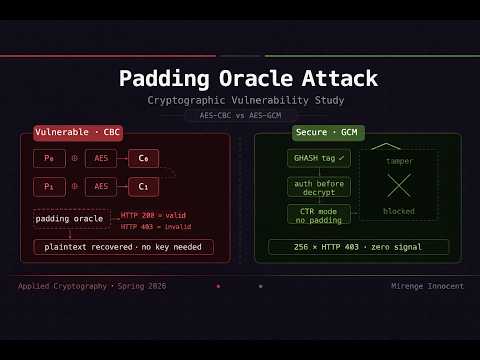
This project is a full-stack cryptographic vulnerability study demonstrating how AES-CBC encryption is vulnerable to padding oracle attacks, implementing a live byte-wise attack with browser visualization, then proving that migrating to AES-256-GCM completely eliminates the attack surface. The project spans four interconnected phases, each running as an independent server with its own browser UI.
| Phase | Description | Port |
|---|---|---|
| Phase 1 | Vulnerable AES-CBC server with live internals visualization | 5000 |
| Phase 2 | Padding oracle attack engine + attacker tool + GCM probe | 5002 |
| Phase 3 | Secure AES-GCM server with encryption/decryption pipeline | 5001 |
| Phase 4 | Live analytics dashboard + PDF report export | 5004 |
padding_oracle_project/
├── phase1/
│   ├── server.py                    # Vulnerable AES-CBC Flask server
│   ├── crypto_utils.py              # AES-CBC + PKCS#7 implementation
│   ├── .env.example                 # Example environment file
│   └── templates/
│       └── index.html               # Interactive encryption/decryption UI
│
├── phase2/
│   ├── attack_visualizer.py         # Attack server + proxy routes (port 5002)
│   ├── attack.py                    # Terminal-based attack script
│   ├── dashboard.py                 # Matplotlib stats dashboard (offline)
│   ├── templates/
│   │   ├── visualizer.html          # Base layout + CSS
│   │   └── tabs/
│   │       ├── tab_attack.html      # Live Attack tab
│   │       ├── tab_howit.html       # How It Works tab
│   │       ├── tab_manual.html      # Attacker Tool tab
│   │       └── gcm/
│   │           ├── tab_gcm_attack.html   # GCM Oracle Probe tab
│   │           ├── tab_gcm_result.html   # GCM Results tab
│   │           └── tab_gcm_why.html      # Why It Fails tab
│   └── static/js/
│       ├── tab_attack.js            # Live attack logic
│       ├── tab_manual.js            # Attacker tool logic
│       └── tab_gcm_attack.js        # GCM probe logic
│
├── phase3/
│   ├── server.py                    # Secure AES-GCM server + UI (port 5001)
│   ├── templates/
│   │   ├── gcm.html                 # Base layout + CSS
│   │   └── tabs/
│   │       ├── tab_encrypt.html     # Encryption pipeline tab
│   │       ├── tab_decrypt.html     # Decryption pipeline tab
│   │       └── tab_howit.html       # How It Works tab
│   └── static/js/
│       ├── tab_encrypt.js           # Encryption pipeline logic
│       └── tab_decrypt.js           # Decryption pipeline logic
│
├── phase4/
│   ├── server.py                    # Dashboard + PDF export server (port 5004)
│   ├── attack_stats.json            # Written by Phase 2, read by Phase 4
│   └── templates/
│       └── dashboard.html           # 5-tab analytics dashboard
│
├── start_all.sh                         # Launch all servers + open browser tabs (local)
├── docker_start.sh                      # Launch all containers + open browser tabs (Docker)
├── Dockerfile                           # Single image for all phases (Python 3.10-slim)
├── docker-compose.yml                   # Orchestrates all 4 services with health checks
├── .dockerignore                        # Excludes venv, .env, caches from build context
├── requirements.txt
├── .env.example
└── README.md
git clone https://github.com/minnocent12/padding-oracle-project.git
cd padding-oracle-project
Then choose how you want to run the project below.
python -m venv venv

# macOS / Linux
source venv/bin/activate

# Windows
venv\Scripts\activatepip install -r requirements.txtcp .env.example .envThe .env file sets the AES-CBC secret key for Phase 1. The default value works out of the box. Do not use the default key in any real system.
# macOS / Linux — make executable first (one-time setup)
chmod +x start_all.sh
./start_all.sh

# Windows (Git Bash or WSL)
bash start_all.sh
This will:
- Start Phase 1 (port 5000), Phase 2 (port 5002), Phase 3 (port 5001), and Phase 4 (port 5004)
- Wait for all servers to initialize
- Open all four UIs in your default browser
Press Ctrl+C in the terminal to stop all servers at once.
Compatibility: Works on macOS, Linux, and Windows (via Git Bash or WSL). The script auto-detects the OS for opening the browser and auto-detects the venv location (
venv/bin/pythonon macOS/Linux,venv/Scripts/python.exeon Windows).
Docker is the easiest way to run the project — no Python setup, no virtual environment, no dependency conflicts. All four services start in isolated containers with a single command.
Prerequisites: Docker Desktop installed and running.
cp .env.example .envThe .env file sets the secret keys for Phase 1 and Phase 3. The default values work out of the box. Do not use the default keys in any real system.
docker compose build./docker_start.shdocker_start.sh starts all 4 containers in the background, waits until each service passes its health check, then opens all four browser tabs automatically.
Service URLs (Local Docker):
| Service | URL |
|---|---|
| Phase 1 — Vulnerable CBC Server | http://localhost:5000 |
| Phase 2 — Attack Visualizer | http://localhost:5002 |
| Phase 3 — Secure GCM Server | http://localhost:5001 |
| Phase 4 — Analytics Dashboard | http://localhost:5004 |
Common Docker commands:
# Check if Docker is installed
docker --version

# Check if Docker daemon is running
docker info

# Start Docker daemon
open -a Docker                  # macOS only
sudo systemctl start docker     # Linux only
# Windows: launch Docker Desktop manually from the Start Menu

# Check if Docker Compose plugin is available
docker compose version

# Check which containers are currently up
docker compose ps

# Check all containers (including stopped ones)
docker ps -a

# Start containers (background, no browser)
docker compose up -d

# Start containers (foreground, stream logs)
docker compose up

# Follow live logs from all containers
docker compose logs -f

# Follow logs from a specific phase
docker compose logs -f phase1

# Stop all containers
docker compose down

# Stop and delete the shared stats volume
docker compose down -v

# Rebuild after code changes
docker compose build
./docker_start.sh               # macOS/Linux only — use 'docker compose up -d' on Windows
How the containers are wired:
All four services run as separate containers on a shared Docker network. Inter-service communication uses container hostnames (phase1, phase2, phase3, phase4) instead of 127.0.0.1. Phase 2 and Phase 4 share a named Docker volume (stats) so attack results written by Phase 2 are immediately visible to the Phase 4 dashboard.
┌─────────────┐     ┌─────────────┐
│   phase1    │     │   phase3    │
│  port 5000  │     │  port 5001  │
└──────┬──────┘     └──────┬──────┘
       │  HTTP (healthy)   │
       └────────┬──────────┘
                │ depends_on
       ┌────────┴──────────┐
       ▼                   ▼
┌─────────────┐     ┌─────────────┐
│   phase2    │     │   phase4    │
│  port 5002  │     │  port 5004  │
└──────┬──────┘     └──────┬──────┘
       │   shared volume   │
       └────── stats ──────┘
               (attack_stats.json)
Open a separate terminal for each phase.
cd phase1
python server.pyThe server runs AES-128-CBC with PKCS#7 padding and intentionally leaks padding validity through HTTP response codes:
HTTP 200— padding is validHTTP 403— padding is invalid ← this is the oracle signal
The browser UI has three tabs: Encryption (step-by-step byte visualization), Decryption + Oracle (live oracle signal with padding analysis), and How It Works (PKCS#7 reference).
Phase 1 must be running before starting Phase 2.
Terminal attack:
cd phase2
python attack.py                        # interactive prompt
python attack.py "Hello World"          # attack a specific message
python attack.py "My secret message"    # any length works
Browser visualization:
cd phase2
python attack_visualizer.pyThe browser UI has two top-level sections:
⚔ Attack AES-CBC Server — three tabs:
- Live Attack: type any plaintext, watch byte recovery in real time via SSE streaming
- How It Works: step-by-step explanation of the attack algorithm and XOR math
- Attacker Tool: manually probe the oracle, craft IV bytes, brute-force a single byte
🛡 Attack AES-GCM Server — three tabs (requires Phase 3 running):
- Oracle Probe: encrypt a message via GCM, run 256 tampered requests, observe all-403 silence
- Results: response breakdown + CBC vs GCM comparison
- Why It Fails: explanation of why authenticated encryption prevents the oracle
Offline Matplotlib dashboard (requires phase4/attack_stats.json from a prior attack run):
cd phase2
python dashboard.pycd phase3
python server.pyThe server runs AES-256-GCM with a 96-bit random nonce and 128-bit authentication tag. The auth tag is verified before decryption begins. Any tampered ciphertext returns the same generic HTTP 403 — no padding oracle is possible.
The browser UI has three tabs:
- Encryption: 5-step live pipeline (read plaintext → generate nonce → AES-CTR encrypt → compute GHASH tag → package output)
- Decryption: 5-step live pipeline showing tag verification before decrypt; the Tamper Then Decrypt button demonstrates auth tag catching modification at Step 3
- How It Works: GCM internals, CBC vs GCM comparison table, CVE history
Requires Phase 1, Phase 2 (with at least one completed attack), and Phase 3 running.
cd phase4
python server.pyThe dashboard has five tabs:
- Overview: live server status for all phases, key stats at a glance
- Attack Stats: queries-per-byte bar chart, query distribution breakdown, efficiency analysis
- CBC vs GCM: side-by-side comparison table + live GCM oracle probe
- Timeline: project phase timeline + animated attack replay
- Report: full project report preview + PDF export
The project is deployed on AWS EC2 using Docker Compose. The setup mirrors the local Docker workflow exactly.
| Resource | Details |
|---|---|
| Instance type | t3.small (2 vCPU, 2 GiB RAM) |
| OS | Amazon Linux 2023 |
| Region | us-east-2 (Ohio) |
| Storage | 20 GiB gp3 |
| Public IP | 18.221.87.226 |
| Port | Protocol | Purpose |
|---|---|---|
| 22 | TCP | SSH access |
| 5000 | TCP | Phase 1 — CBC Server |
| 5001 | TCP | Phase 3 — GCM Server |
| 5002 | TCP | Phase 2 — Attack Visualizer |
| 5004 | TCP | Phase 4 — Dashboard |
# 1. SSH into the instance
ssh -i your-key.pem ec2-user@<your-ec2-ip>

# 2. Install Docker and Docker Compose
sudo dnf update -y
sudo dnf install -y docker git
sudo systemctl start docker && sudo systemctl enable docker
sudo usermod -aG docker ec2-user

# Install Docker Compose
sudo curl -SL "https://github.com/docker/compose/releases/latest/download/docker-compose-$(uname -s)-$(uname -m)" -o /usr/local/bin/docker-compose
sudo chmod +x /usr/local/bin/docker-compose

# Install Docker Buildx (required for compose build)
sudo mkdir -p /usr/local/lib/docker/cli-plugins
sudo curl -SL https://github.com/docker/buildx/releases/download/v0.19.3/buildx-v0.19.3.linux-amd64 -o /usr/local/lib/docker/cli-plugins/docker-buildx
sudo chmod +x /usr/local/lib/docker/cli-plugins/docker-buildx

# 3. Clone the repository
git clone https://github.com/minnocent12/padding-oracle-project.git
cd padding-oracle-project

# 4. Create the environment file
nano .env
# Paste your CBC_SECRET_KEY, GCM_SECRET_KEY, FLASK_DEBUG=False

# 5. Build and start all containers
sudo docker-compose up -d --buildsudo docker-compose psAll four containers should show Up and (healthy) status.
AES-CBC requires PKCS#7 padding on every message. On decryption, the server checks whether the padding is valid. If the server returns a different response for valid versus invalid padding — even just different HTTP status codes — an attacker can:
- Submit crafted ciphertexts with one modified byte
- Observe whether the response is
200(valid padding) or403(invalid) - Use XOR arithmetic to recover the intermediate AES output
- Compute the plaintext byte from the intermediate and the real ciphertext
Repeating this for all 16 bytes per block and all blocks recovers the full plaintext. The secret key is never needed.
Expected queries:  ~128 per byte  (average)
Worst case:        256 per byte
16-byte message:   ~2,048 total HTTP requests → full plaintext
AES-GCM uses authenticated encryption. Before decryption begins, the server recomputes the GHASH authentication tag over the received ciphertext and compares it to the transmitted tag. If they do not match — which is always the case for tampered attacker-crafted ciphertext — the request is rejected with a generic error. No decryption occurs. No padding check occurs. No oracle signal is produced.
256 oracle guesses against CBC:  ~1 HTTP 200 → byte recovered
256 oracle guesses against GCM:  256 × HTTP 403 → nothing learned
# When oracle returns HTTP 200 for guess at byte position j:

intermediate[j] = guess ⊕ pad_value
plaintext[j]    = intermediate[j] ⊕ prev_ciphertext_block[j]

# Two XOR operations. No key. Full plaintext byte recovered.
| CVE | Name | Year | System | Impact |
|---|---|---|---|---|
| CVE-2014-3566 | POODLE | 2014 | SSL 3.0 | Forced deprecation of SSL 3.0 globally |
| CVE-2013-0169 | Lucky Thirteen | 2013 | TLS 1.0/1.1/1.2 | Timing-based oracle; required TLS library patches |
| CVE-2010-3332 | ASP.NET Oracle | 2010 | ASP.NET ViewState | Session cookie decryption; emergency Microsoft patch |
| ✔ Do | ✗ Do not |
|---|---|
| Use AES-GCM or ChaCha20-Poly1305 | Use AES-CBC for new systems |
| Verify integrity before decrypting | Decrypt then check padding |
| Return the same error for all failures | Differentiate padding vs auth errors |
| Use constant-time tag comparison | Use early-exit equality checks |
| Use a fresh random nonce every encryption | Reuse a nonce with the same key |
flask
python-dotenv
pycryptodome
cryptography
requests
rich
matplotlib
numpy
reportlab
python-pptx
This project is intended for educational purposes in a graduate cryptography course. All implementations are original. Do not use the vulnerable Phase 1 server in any production environment.