Skip to content

Change the way Survol differentiates URLs, not only by domain, but also subdomain#149

Open
daflh wants to merge 3 commits into
mdolr:masterfrom
daflh:master
Open

Change the way Survol differentiates URLs, not only by domain, but also subdomain#149
daflh wants to merge 3 commits into
mdolr:masterfrom
daflh:master

Conversation

@daflh

@daflh daflh commented Oct 24, 2020

Copy link
Copy Markdown
Contributor

For example, this and this are completely different website, although has same domain name. But, Survol treat those as same.
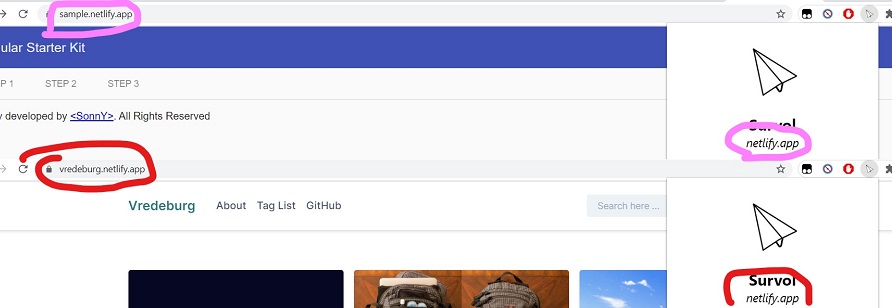
This changes will make Survol treat those websites different. So if you disable Survol on one page, the other page have no effect.

@mdolr

mdolr commented Oct 24, 2020

Copy link
Copy Markdown
Owner

It makes sense, then maybe we should add some kind of regex in the settings when disabling inner links also, so people can type in something like *.github.com or just gist.github.com for example.

@daflh

daflh commented Oct 24, 2020

Copy link
Copy Markdown
Contributor Author

@mdolr

mdolr commented Oct 24, 2020

Copy link
Copy Markdown
Owner

hum no, this is manifest related. Currently the extension has 2 options to disable it :

  • The page setting : which disables Survol completely on the page, when disabled you won't be able to preview any link, this option is toggled with the switch in the popup.
  • The inner-link setting : which disables Survol for some links on certain pages, e.g: github.com links are disabled on github. The list of websites where inner-link preview is disabled is situated in the global settings.

Things that should be done :

  • Display a list of websites disabled completely, and let the user input directly into the list with regex inputs *.github.com, github.com, gist.github.com
  • Modify the current inner-link setting to work with regex inputs
  • Migrate current page settings from domain to domain + subdomain / *.domain.tld

@daflh

daflh commented Oct 24, 2020

Copy link
Copy Markdown
Contributor Author

I don't actually understand what you mean by "manifest related", but the first point, basically you want user to be able to see a list of the pages they disabled right? So it must be something like this:

@mdolr

mdolr commented Oct 24, 2020

Copy link
Copy Markdown
Owner

The link you sent earlier explains how to enable / disable the extension via the manifest.json file, which is not what we want, we want to enable / disable the extension programatically through the extension itself.

But yea basically we should implement it like you did in the image you sent, the user should be able to input things like "*.github.com" (== "github.com") "gist.github.com", ...

@daflh

daflh commented Oct 24, 2020

Copy link
Copy Markdown
Contributor Author

Ohh, you misunderstood me 😆
I sent that link just to provide a pattern examples that maybe we might use, but not to implement into manifest.json

@daflh

daflh commented Oct 24, 2020

Copy link
Copy Markdown
Contributor Author

I don't actually understand what you mean by "manifest related", but the first point, basically you want user to be able to see a list of the pages they disabled right? So it must be something like this:

So, if I want to try to implement this, should I add a commit here or create a new PR?

@mdolr

mdolr commented Oct 24, 2020

Copy link
Copy Markdown
Owner

I think all the changes should be implemented in this PR as otherwise everything would break

@mdolr

mdolr commented Oct 26, 2020

Copy link
Copy Markdown
Owner

I'm not sure if you're done with this, but we need to adapt the way we disable the extension in core.js - master - 230 in order to make sure if someone blocks the extension on github.com it blocks it on every subdomain, but if someone blocks only 1 subdomain the extension will be disabled only on this one.

Should also apply the same way of blocking to inner link preview core.js - master - 218

@daflh

daflh commented Oct 27, 2020

Copy link
Copy Markdown
Contributor Author

Wouldn't it be better to be left like this? If user blocks the extension on github.com and it blocks on every subdomain, then why do we need regex you've mentioned earlier. So my suggestion, if user wants to disable extension on every subdomain, they can do it using asterisk, something like `*.github.com*.

@mdolr

mdolr commented Oct 27, 2020

Copy link
Copy Markdown
Owner

Yes but right now without modifying anything if you block "github.com" it will only block the extension on github.com and not on every subdomains because you've added subdomains in you getDomain function. That's why I think we should differentiate :
*.domain.tld blocks - blocks everything on this domain
domain.tld - blocks only the domain but not subdomains
subdomain.domain.tld - blocks a specific subdomain

Also when the user turns the switch off in the popup it should add the domain as domain.tld or subdomain.tld and not *.domain.tld to the list of blocked sites. Then if the user wants to block every subdomain they can by going in the settings page and adding a *. before the domain

Anyway changes are needed to how we detect when to block the extension

@daflh

daflh commented Oct 27, 2020

Copy link
Copy Markdown
Contributor Author

That's what I mean mate.

But there's a problem, what if user wants to block all subdomains except for one.
For example, someone wants to block all netlify-hosted sites, so he adds *.netlify.app in the settings page. Then, he goes to sample.netlify.app for example, the switch should be turned off right, but what will happen if he turns the switch on, will it remove the whole *.netlify.app or how? Should we make a whitelist mechanism?

@mdolr

mdolr commented Oct 28, 2020

Copy link
Copy Markdown
Owner

I guess we could modify the regex to to add an exception for a list of selected subdomains

@daflh

daflh commented Oct 28, 2020

Copy link
Copy Markdown
Contributor Author

Maybe we could use exclamation mark ! or something. If so, the above case can be resolved with *.netlify.app,!sample.netlify,app.

@daflh

daflh commented Oct 28, 2020

Copy link
Copy Markdown
Contributor Author

Or could be like UserScript, but that would be very complicated.

@mdolr

mdolr commented Oct 29, 2020

Copy link
Copy Markdown
Owner

I'm not a regex pro but something like this I guess (assuming gist is blocked)

^((gist|cdn).*).github.com|github.com$

In this example gist.github.com, github.com and cdn.github.com are whitelisted, everything else is blocked,
You could remove the last github.com to remove the main domain

Sign up for free to join this conversation on GitHub. Already have an account? Sign in to comment

Labels

None yet

Projects

None yet

Development

Successfully merging this pull request may close these issues.

2 participants