


Converts Codex CLI JSONL session transcripts into single-file HTML viewers with sidebar navigation, search, and filtering. No external dependencies. Just open the .html in any browser.
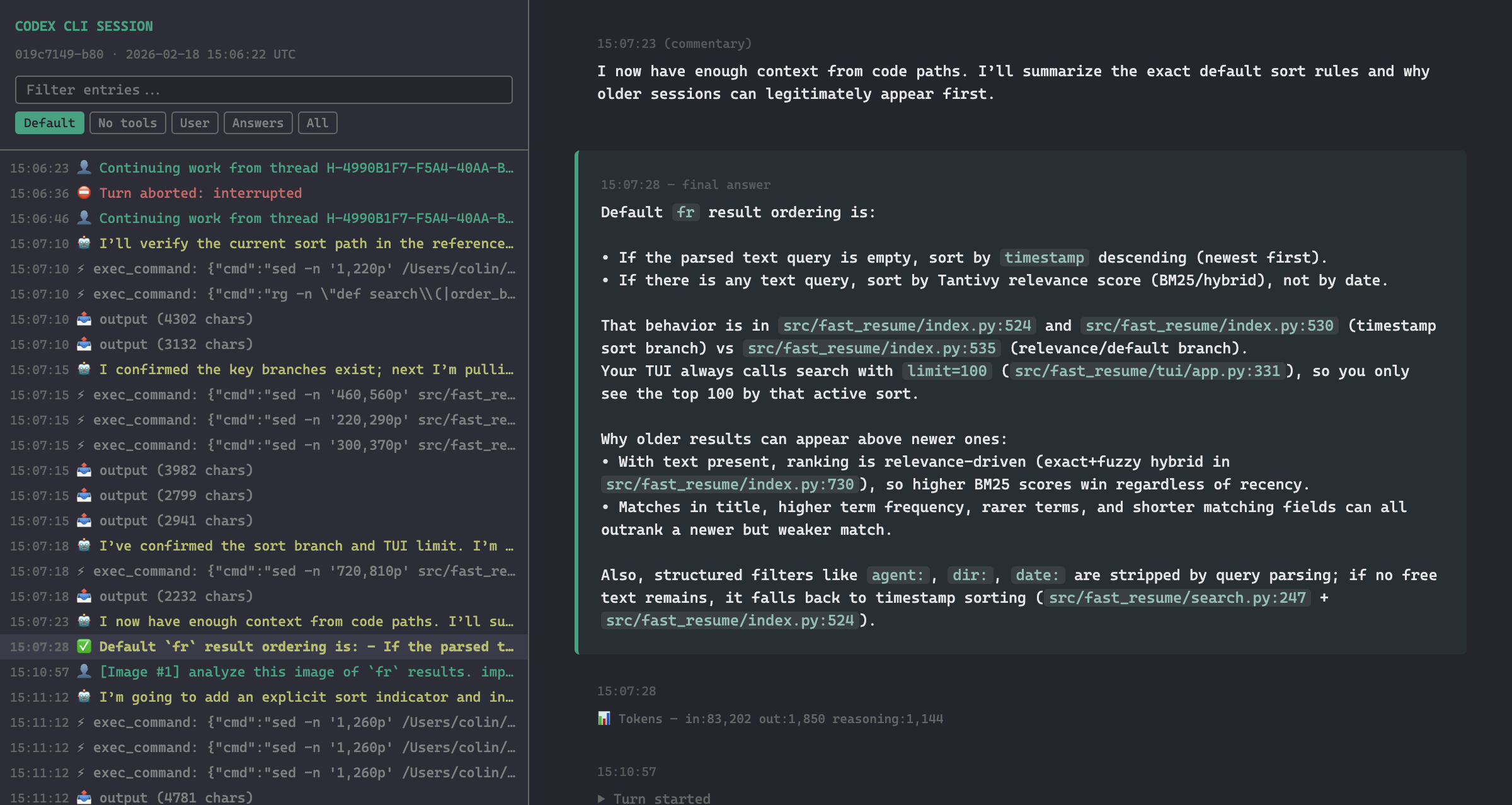
See the full demo for more screenshots and a walkthrough of every feature.
It's on PyPI, so install it with uv or pipx, or run it once without installing anything:
uv tool install codex-transcript-viewer
pipx install codex-transcript-viewer
uvx codex-transcript-viewer <session.jsonl>
For the latest unreleased changes, install straight from GitHub:
uv tool install git+https://github.com/masonc15/codex-transcript-viewer.git
To hack on it, clone the repo and install from the checkout instead, or run it without installing:
git clone https://github.com/masonc15/codex-transcript-viewer.git
uv tool install ./codex-transcript-viewer
uv run --directory ./codex-transcript-viewer codex-transcript-viewer <session.jsonl>
codex-transcript-viewer <session.jsonl> [output.html]
If you omit the output path it writes <input-stem>.html in the current directory.
Codex stores sessions as JSONL files under ~/.codex/sessions/. Find one and point the tool at it:
codex-transcript-viewer ~/.codex/sessions/2026/02/18/rollout-2026-02-18T10-06-22-019c7149.jsonl
open rollout-2026-02-18T10-06-22-019c7149.html
Images are embedded, so the page stays a single file. Images you attached to a prompt are always included, taken from the copy saved in the session log, since the original file is often a temp file that's long gone. Screenshots returned by tools are embedded until they add up to 25 MB, after which the rest show as placeholders and a note at the top says how many were left out. --max-image-mb N changes that budget (0 means no limit), and --no-images replaces every image with a labelled placeholder, which is handy when you want a small page or would rather not share what was on your screen.
Tool output text is embedded in full. Codex already trims what the model sees to roughly 200K characters, so the viewer's own --max-output-chars guard (default 250,000, 0 to disable) only kicks in for something pathological.
If the log contains record types the viewer doesn't know about, it says so on stderr after writing the page, which usually means Codex changed its format.
The page has a sticky sidebar with a searchable event tree on the left and the transcript on the right. Your prompts get a green border, with any attached images shown as thumbnails you can click to enlarge. Final answers sit on a faint green background, commentary is italic with a muted border, and reasoning summaries are gray. Each tool call shows its command or arguments, and its result is colored by what actually happened: green when the exit code was 0, red when it failed, and neutral when the log doesn't record a status, so nothing looks successful by accident. Long outputs expand on click. Markdown in prompts, answers and reasoning renders, including tables, nested lists, blockquotes and syntax-highlighted code; web links open in a new tab, and links to local files show their full path on hover. When Codex ends an answer with a memory-citation block, it's folded into a small "Memory citations" section instead of printed raw. Generated images show up as the result of their image_generation call, next to the prompt the model used. Turn starts, aborts, rollbacks and token counts show up as dim system lines. The header shows the model and reasoning effort the session started with, and a highlighted row marks any turn that switches either.
Some things Codex only sends to the model, so the viewer shows them as their own highlighted entries: the objective and status changes of a /goal, text a hook sent back (a rejected plan, for example), review start and result markers, and errors such as hitting a usage limit. A review's findings appear in full when no reply repeats them. Newer models repeat the turn's earlier reasoning headings each time they add one, so each heading is shown once, at the point it first appeared.
The sidebar filters are Default, No tools, User, Answers and All. On narrow screens the sidebar tucks behind a hamburger menu.
Subagent threads are labelled with the agent's name and parent thread. When a subagent was forked with its parent's conversation, the copied turns are folded into a collapsed block at the top instead of being shown as if the subagent wrote them.
Both session formats Codex has used are handled: the older one, where prompts are user_message events (seen through CLI 0.125), and the newer one, where they're item_completed records (CLI 0.135 and later). Tool calls cover plain function calls, code-mode exec and apply_patch custom tools, web searches, tool searches and image generation.
The transcript is an activity log, so rolled-back turns stay inline with a banner rather than disappearing. The filters hide sidebar entries, not the transcript itself.
Run the tests with PYTHONPATH=src python3 -m unittest discover -s tests. GitHub Actions runs them on Python 3.11 through 3.14 for every push and pull request, and also builds the package and converts a small session with the installed wheel. The tests use synthetic records, so they only cover the shapes someone thought to write down.
Before a release, run python3 scripts/audit_sessions.py over your real sessions (it reads ~/.codex/sessions and ~/.codex/archived_sessions by default, or any paths you give it). For every session it checks that no text shows twice in a turn, that the visible prompts, messages and reasoning match what the raw records say should be there, and that every pair of record kinds sharing text is covered by a dedup rule. None of these compare against an earlier run of the viewer, so an old bug can't hide in the baseline. --tar - reads sessions from a tar stream, which is handy for an archive on another machine.
Then run uv run --with playwright python scripts/visual_review.py --from-audit report.json, using the report from audit_sessions.py --json report.json. It renders one session per format, fails if two kinds of entry in the same role repeat each other, and saves sidebar screenshots to look over. Both scripts print session text, so keep their output out of the repository.
Publishing a GitHub release uploads that version to PyPI. The release tag has to match the version in pyproject.toml.
Inspired by the HTML session export in pi, a coding agent by @badlogic.
src/codex_transcript_viewer/
  parser.py       - JSONL parsing and event extraction
  markdown.py     - lightweight markdown-to-HTML conversion
  highlight.py    - small built-in syntax highlighter for code blocks
  formatting.py   - timestamp formatting helpers
  html_builder.py - assembles the final HTML from events
  style.css       - all CSS for the viewer
  viewer.js       - sidebar filtering and navigation
  cli.py          - command-line entry point
scripts/
  audit_sessions.py - checks the parser against real sessions
  visual_review.py  - renders sessions and screenshots the sidebar
docs/demo/
  make_session.py   - writes the synthetic session behind docs/demo.md
  screenshots.py    - renders it and saves the demo screenshots