





async-browser-context gives the AsyncLocalStorage class of Node.js and the TC39 AsyncContext API to browsers. A value that you set for one operation stays available in all the asynchronous code of that operation. This includes the code after await, then callbacks, timers, event listeners and generators.
import { AsyncLocalStorage } from "async-browser-context";

const request = new AsyncLocalStorage<{ id : string }>();

await request.run({ id : "r-1" }, async () => {
    const response = await fetch("/data");
    log(`loaded ${response.status}`);
});

function log(message : string) : void {
    console.log(`[${request.getStore()?.id ?? "none"}] ${message}`); // [r-1] loaded 200
}
The documentation website has guides, the API reference and interactive diagrams: https://mark1russell7.github.io/AsyncBrowserContext/. Its context debugger starts code with the real library and shows each step. In the playground, you can start your own code.
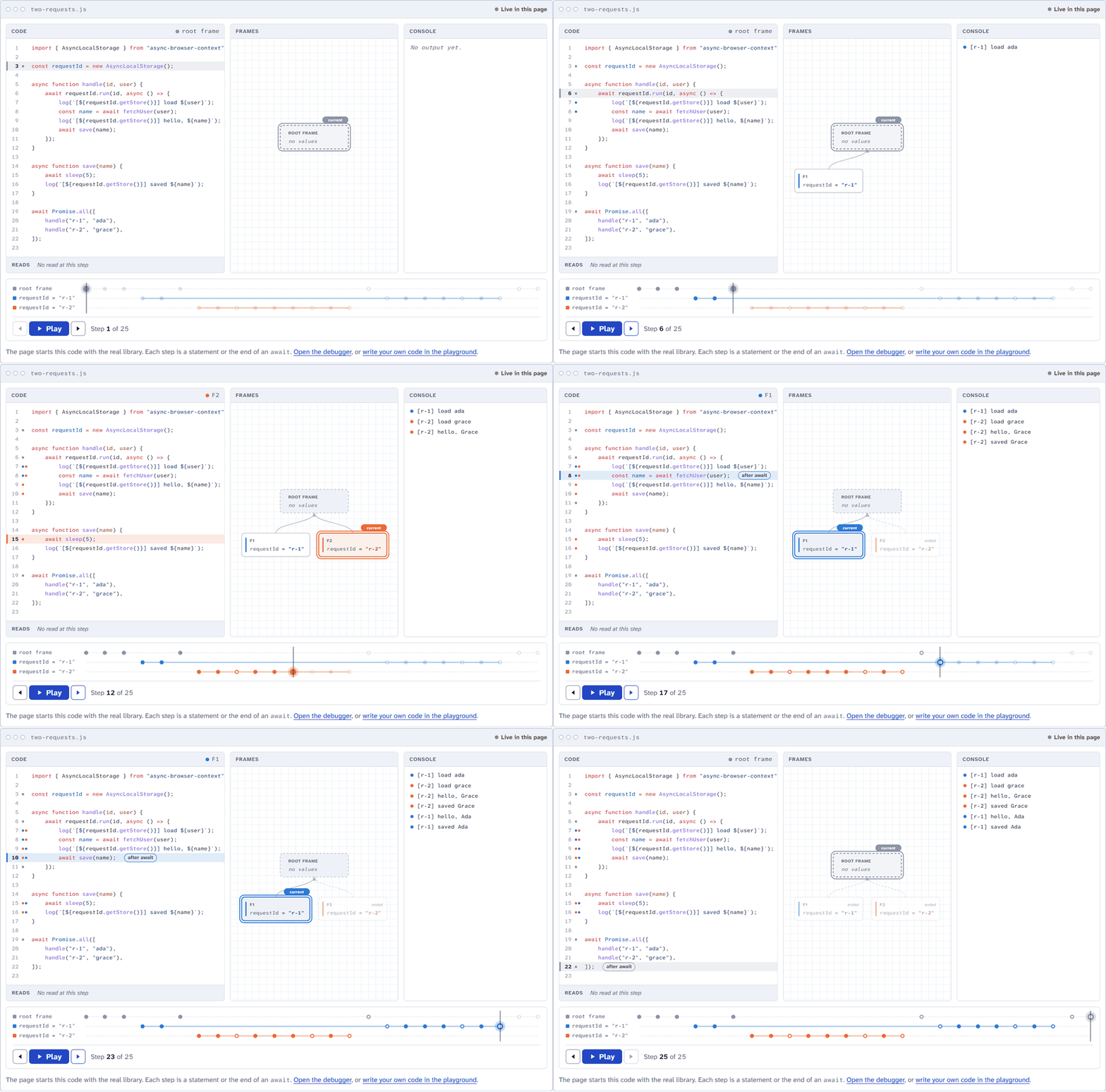
Browsers do not have AsyncLocalStorage. A native await does not use code that a library can change, so a library alone cannot keep a value through await. This library has two parts:
- A runtime. It keeps the current context. It patches
Promise.prototype.then, the timers, the event listeners, the observers and other callback APIs. Thus, each callback gets the context of the code that registered it. - A Babel preset and a Vite plugin. They change each async function into a generator that the runtime operates. Before each step of the function, the runtime sets the context of the function. After the step, the runtime sets the previous context again.
On Node.js, the package uses the native AsyncLocalStorage of node:async_hooks, and it installs no patch. On Node.js, the transform is necessary only for rule C5 of generators.
| Tool | Where it operates | Context after a native await |
API |
|---|---|---|---|
AsyncLocalStorage of Node.js |
Node.js and other server runtimes | Yes | AsyncLocalStorage |
TC39 AsyncContext proposal |
No browser has it at this time (Stage 2) | Yes, when browsers have it | AsyncContext.Variable, AsyncContext.Snapshot |
| zone.js | Browsers | No. A compiler must change async functions before zone.js can see them. | Zone |
async-browser-context |
Browsers and Node.js | Yes, through the Babel preset or the Vite plugin | AsyncLocalStorage and AsyncContext |
Thus, code that uses AsyncLocalStorage on the server can use the same API in the browser. The AsyncContext API of the library is the API of the proposal. When browsers have AsyncContext, a change to the native API is small: change the import.
npm install async-browser-contextThe build tools of the package need Node.js 22.18 or a later version of Node.js 22, or Node.js 24.11 or later. The runtime operates in the current versions of Chrome, Edge, Firefox and Safari.
CAUTION: Transform all the code that awaits in a context, also the code in
node_modules. In code that the transform does not change, the browser runtime cannot set the context afterawait. That code gets the root context:getStore()givesundefined, or thedefaultValueof the storage. It does not get the context of a different operation at any time.
-
Add the plugin to
vite.config.ts:import { defineConfig } from "vite"; import { asyncContext } from "async-browser-context/vite"; export default defineConfig({ plugins : [asyncContext()], });
-
Build or start the application as usual.
The plugin transforms the modules of the application and of its dependencies, also in the dev server. It also transforms the JavaScript of Vue, Svelte, Astro and MDX components, but not their styles. It operates after the other plugins, so it gets JavaScript after TypeScript and JSX are compiled. The plugin does not transform the modules of server-side rendering, because Node.js has the native AsyncLocalStorage.
| Option | Default | Function |
|---|---|---|
include |
All JavaScript and TypeScript modules, and the JavaScript of Vue, Svelte, Astro and MDX components | A regular expression or a function that selects the modules to transform. |
exclude |
None | A regular expression or a function that selects the modules not to transform. |
runtime |
async-browser-context/runtime |
The module that the transformed code imports. It must export the six names of async-browser-context/runtime. |
names |
true |
Set false to remove the names of the async functions for the callback hooks. The code is then smaller by 0.1 to 1.8 percent. |
ssr |
false |
Set true to also transform the modules of server-side rendering, for example for Vitest in Node.js. |
-
Add the preset to the Babel configuration. Put it last in the
presetslist, because Babel uses the presets in reverse order:{ "presets": ["@babel/preset-env", "async-browser-context/babel-preset"] } -
Make sure that Babel transforms the dependencies too. With webpack, do not exclude
node_modulesfrombabel-loader.
For TypeScript and JSX files, also add @babel/preset-typescript and @babel/preset-react. Babel cannot read these files without them. Put them before the preset of the library in the presets list.
The preset operates with Babel 7.22 and later, and with Babel 8. The transform of using and await using declarations needs Babel 7.23.9 or later. CI examines Babel 7.22, the newest Babel 7 and the newest Babel 8 with the packed package (pnpm test:babel).
The preset does not change the runtime of the library. A directive, "async-browser-context runtime", marks its native async functions. Terser and other minifiers can remove directives. Thus do not give the preset a copy of the runtime that a minifier changed, for example a dependency that bundles and minifies this library. Bundlers minify after the transform of each module, so the usual setups are correct.
A test in CI (pnpm test:bundlers) builds a page with each of these setups and examines it in Chromium. The build tools guide gives each configuration.
| Tool | Setup | Rules |
|---|---|---|
| webpack 5, Rspack 2 | babel-loader with the preset. Do not exclude node_modules. |
All |
| Rollup 4 | @rollup/plugin-babel with the preset |
All |
| esbuild | A small plugin that applies the preset | All |
| Next.js 16, Turbopack or webpack | babel.config.js with next/babel and the preset, and transpilePackages for the dependencies |
All |
| SWC, esbuild, Next.js without Babel | The target ES2016: the compiler changes async functions into generators | All except rule C5 |
With the target ES2016, the patch of then keeps the context through await. A generator body then gets the context of each next() call, and the callback hooks get no names.
The node export condition selects the Node.js entry, which uses the native AsyncLocalStorage. A transform is not necessary, except for rule C5. A generator keeps the context of its creation only in code that the preset transforms. Without the preset, a generator body gets the context of each next() call, as a native generator does.
The package gives two equivalent APIs.
AsyncLocalStorage, the class of Node.js:
import { AsyncLocalStorage } from "async-browser-context";

const storage = new AsyncLocalStorage<string>({ defaultValue : "none" });
storage.run("value", () => storage.getStore()); // "value"
storage.getStore(); // "none"
The class has getStore(), run(), exit(), enterWith(), disable(), the static bind() and snapshot(), and the name and defaultValue options of Node.js 24.
enterWith() operates as on Node.js. In the synchronous part of an async function, it also changes the store of the caller. Outside all run() calls, for example at the top level of a module, the store stays as a default store. The later code of the module and the callbacks that it registers get it. Use run() if possible.
AsyncContext.Variable and AsyncContext.Snapshot, the API of the TC39 proposal:
import { AsyncContext } from "async-browser-context";

const userId = new AsyncContext.Variable<string>({ name : "userId" });
const snapshot = userId.run("u-1", () => new AsyncContext.Snapshot());

button.addEventListener("click", AsyncContext.Snapshot.wrap(() => {
    console.log(userId.get());
}));
snapshot.run(() => userId.get()); // "u-1"
The package also exports Variable, Snapshot, and the other names AsyncVariable and AsyncSnapshot.
addCallbackHook adds a hook. The library starts its methods before and after each callback that it starts, in the context of that callback. Use it to measure callbacks, and to find the operation of a long task, also in Firefox and Safari:
import { addCallbackHook, AsyncLocalStorage } from "async-browser-context";

const operation = new AsyncLocalStorage<string>(); // Start each operation in operation.run()
const starts : number[] = [];
addCallbackHook({
    before() { starts.push(performance.now()); },
    after(callback, source) {
        const duration = performance.now() - (starts.pop() ?? 0);
        if (duration >= 50) report(operation.getStore(), callback.name, source, duration);
    },
});
source names the API, for example "setTimeout", "addEventListener:click" or "await". For a step after an await, callback.name is the name of the async function or of the async generator. A callback that a hook schedules does not start the hooks, so a hook cannot start itself without end. The guide Find the operation of a long task tells more.
| Import | Function |
|---|---|
async-browser-context |
The API. The node export condition selects the Node.js entry. Other environments get the browser entry. |
async-browser-context/browser |
The browser entry, also on Node.js. |
async-browser-context/runtime |
The runtime functions that the transformed code imports. |
async-browser-context/browser/runtime |
The browser runtime functions, also on Node.js. Use it as the runtime option together with async-browser-context/browser. |
async-browser-context/opentelemetry |
The OpenTelemetry context manager AsyncContextManager. It needs @opentelemetry/api. |
async-browser-context/vite |
The Vite plugin. |
async-browser-context/babel-preset |
The Babel preset. |
The web tracing of OpenTelemetry keeps the active span with a context manager. The ZoneContextManager of OpenTelemetry uses zone.js, and zone.js does not see a native await. AsyncContextManager uses AsyncLocalStorage of this library, so the active span stays correct after each await in transformed code.
import { WebTracerProvider } from "@opentelemetry/sdk-trace-web";
import { AsyncContextManager } from "async-browser-context/opentelemetry";

const provider = new WebTracerProvider();
provider.register({ contextManager : new AsyncContextManager() });
On Node.js, AsyncContextManager uses the native AsyncLocalStorage. Do not use it together with zone.js.
The tests of the rules are in test/rules/, one file for each rule. Each rule project in Node.js starts them, and Chromium, Firefox and WebKit start them too. The rule projects are the browser runtime with the preset, with SWC and with esbuild, and the Node.js runtime with and without the preset. The table after the rules gives the exceptions.
| Rule | The library keeps this rule |
|---|---|
| C1 | Outside a context, get() gives the default value. Between tasks, the current context is the root context. |
| C2 | While run(value, fn) starts fn, get() gives value. After fn, the previous context is current again. |
| C3 | An async function keeps the context of its call after each await, also in the same expression and after a rejection. |
| C4 | A then, catch or finally callback gets the context of the then, catch or finally call. |
| C5 | A generator body gets the context of the call that made the generator. After each step, the context of the caller is current again. |
| C6 | A timer callback gets the context of the call that scheduled it. |
| C7 | Code that the transform does not change cannot get the context of a different operation. At most, it gets no context after its own native await. |
| C8 | snapshot.run() and Snapshot.wrap() start functions in the recorded context. |
| C9 | Only code that has a Variable can read its values. The library puts no values on globalThis. |
| C10 | Two copies of the library on one page use one context store. |
| C11 | The library does not replace the Promise constructor. Promise subclasses operate as without the library. |
| C12 | The library does not keep promises or values in memory after the program has no reference to them. |
| C13 | An event listener gets the context of the code that dispatches the event. If that code has the root context, the listener gets the registration context. This is the context of the addEventListener() call or of the assignment to the on... property. An event that the browser dispatches, for example a click of the user, also gives the registration context. |
| Rule | Where the tests examine the rule |
|---|---|
| C5 | Only the projects with the preset examine the rule. The projects without the preset examine the other behavior: a generator body gets the context of each next() call. |
| C9 | test/rules/c09-c11-isolation.test.ts, only on the browser runtime. The Node.js runtime has no store of its own. |
| C10 | test/rules/c09-c11-isolation.test.ts, only on the browser runtime in Node.js. A browser cannot load a second copy of the same modules without a second bundle. |
| C12 | test/memory/memory.test.ts, in the project memory: the browser runtime in Node.js with --expose-gc. |
| C13 | test/browser/c13-events.test.ts, only in Chromium, Firefox and WebKit. |
CAUTION: Import
async-browser-contextbefore all other modules in the entry file of the application. The library patches global functions when it loads. Code that keeps a reference tosetTimeoutor to another patched function before the library loads does not get the context. A listener that code adds before the library loads, and adds again after, operates two times. The browser then has the listener and a wrapper of it.
| Group | APIs |
|---|---|
| Promises | Promise.prototype.then, thus also catch, finally and the combinators |
| Timers | setTimeout, setInterval, setImmediate, queueMicrotask, requestAnimationFrame, requestIdleCallback, scheduler.postTask, requestVideoFrameCallback, XRSession.requestAnimationFrame |
| Events | addEventListener, removeEventListener, all on... properties, MediaQueryList.addListener and removeListener |
| Observers | MutationObserver, ResizeObserver, IntersectionObserver, PerformanceObserver, ReportingObserver, PressureObserver, FinalizationRegistry |
| Streams | The methods of the underlying objects of ReadableStream, WritableStream and TransformStream |
| Callback APIs | navigator.locks.request, HTMLCanvasElement.toBlob, the map function of Array.fromAsync, geolocation, DataTransferItem.getAsString, the APIs of file system entries, decodeAudioData, MediaSession.setActionHandler, Notification.requestPermission, the callbacks of RTCPeerConnection, startViewTransition of Document and Element, NavigateEvent.intercept |
The patches keep the names, the lengths and the source text of the native functions. Function.prototype.toString gives the source text of the original function. The patched functions are methods, as the native functions: they have no prototype property and they are not constructors. They read the options of addEventListener() as the DOM does. For streams and option objects, the patches give the browser a Proxy of your object, so frozen objects, getters and private fields operate.
In transformed code, each step gets the context of its own operation. Code without the transform cannot get the context of a different operation (rule C7). At most, that code gets no context after its own native await. Where your code meets that code, one function of the library keeps the context:
| The other code | What to do | Tests |
|---|---|---|
| Gives a promise, and your code awaits it | Nothing. After the await, your code gets its context again. |
c07-boundaries, c07-untransformed |
Is async code that a compiler changed before the publish (__awaiter of TypeScript, _asyncToGenerator of Babel) |
Nothing. The helpers continue in then callbacks, and the patch of then keeps the context. |
c07-compiled-dependencies |
Starts your callback synchronously, or from a timer, an observer or a promise that it registers before its first await |
Nothing. The patched APIs keep the context. Event listeners follow rule C13. | c07-boundaries, c04-then, c06-timers, browser/patched-apis, browser/c13-events |
Starts your callback after its own native await |
AsyncLocalStorage.bind(callback) or AsyncContext.Snapshot.wrap(callback) |
c07-boundaries |
| Keeps your callback in a list and starts it later from other code | AsyncLocalStorage.bind(callback) when you give the callback |
c07-boundaries |
Reads the context itself after its own native await |
Give the values as arguments, or transform the code. | c07-untransformed: the read gets no value |
| Operates in a worker or an iframe | Send the values in the message, and use run() on the other side. |
No test |
untransformedLibrary.onDone(AsyncLocalStorage.bind((result) => {
    log(requestId.getStore(), result); // the context of the bind() use
}));
The Vite plugin transforms the dependencies in node_modules by default. Thus, these boundaries are usually only scripts from other servers, browser extensions and code from eval() or new Function(). The "Tests" column names the test files in test/rules/ and test/browser/, without .test.ts. The boundaries page of the website gives the details.
Do not use the library together with zone.js or with another library that patches Promise.prototype.then. The two libraries patch the same functions with different rules. For OpenTelemetry, use AsyncContextManager in place of the ZoneContextManager.
- Generator functions. A transformed generator function is an ordinary function that gives a bound generator.
fn.prototypeandinstanceof fndo not operate as for a native generator function.fn.constructorisFunction, notGeneratorFunction. Thus a library that examines a function to find a generator function, for examplecooris-generator-function, sees a plain function. The generator objects operate as native generator objects. - Stack traces. In transformed code, a stack trace shows the generator and the
coroutinefunction of the runtime. - Profilers. Between the browser and each callback of a patched API, stack traces and profilers show the wrapper
asyncBrowserContextWrapper. The Long Animation Frames API of Chromium shows this name in place of your function.addCallbackHook()gives the function and the context of each callback.
These results are from pnpm bench: the mean time of each scenario, on Node.js 25.2.1 and Windows 11. Each case operates in its own process. The values are the median of 5 rounds.
| Scenario | Plain JavaScript | Library | Factor |
|---|---|---|---|
| 10,000 awaits in one async function | 0.26 ms | 0.40 ms | 1.56 |
| 10,000 calls of an async function | 0.61 ms | 1.22 ms | 1.99 |
A chain of 10,000 then calls |
0.19 ms | 0.33 ms | 1.77 |
| 1,000 tasks with 10 awaits each | 0.39 ms | 0.68 ms | 1.75 |
| 1,000 request handlers in 1,000 contexts | 0.31 ms | 0.60 ms | 1.90 |
100,000 reads with get(), 5 contexts deep |
0.105 ms | 0.39 ms | 3.74 |
One read with get() takes approximately 4 ns. The documentation website shows the full results.
When the page loads, the library installs its patches in approximately 8 ms: the median of Chromium, Firefox and WebKit on the same computer.
In most cases, an await in transformed code takes more time than a native await. In Firefox, the patch of then adds approximately 0.8 µs to each await of a promise, also in code without the transform. The performance page of the website gives the time of each workload in Chromium, Firefox and WebKit (pnpm bench:browsers).
The runtime is 6.0 kB with gzip, and zone.js 0.16.3 is 11.8 kB. The transform adds 3 to 8.5 percent to packages with much async code, and nothing to React DOM. In an example application with React DOM, TanStack Query, supabase-js and ky, it adds 2.4 percent (pnpm bench:size).
| Command | Function |
|---|---|
pnpm test |
All test projects: unit tests, the rules on the browser runtime and on the Node.js runtime, memory tests, and the browser tests |
pnpm test:node |
The test projects in Node.js, without the memory tests |
pnpm test:browser |
The tests in Chromium, Firefox and WebKit |
pnpm smoke |
Packs the package, installs it in a new Vite application, and examines the application in Chromium |
pnpm test:babel |
Packs the package, transforms a program with the preset in Babel 7.22, the newest Babel 7 and Babel 8, and starts the output |
pnpm test:bundlers |
Packs the package, builds a page with webpack, Rspack, Rollup, esbuild and Next.js, and examines each page in Chromium |
pnpm mutation |
Mutation testing with Stryker |
pnpm bench |
The benchmarks |
pnpm bench:browsers |
The time of await and then in Chromium, Firefox and WebKit, without the library, with the Babel helper and with the library |
pnpm bench:size |
The size of the runtime, and the size that the transform adds to a set of npm packages |
pnpm lint:ste |
The STE linter of the documentation and the TSDoc comments |
pnpm test:ste-lint |
The tests of the STE linter (tools/ste-lint) |
Set BROWSERS=chromium,firefox,webkit to select the browsers. Playwright WebKit does not start on all Windows computers, so the default on Windows is Chromium and Firefox. docs/testing.md tells more.
The documentation follows ASD-STE100 Simplified Technical English. pnpm lint:ste examines it.
MIT